Paper timesheets get lost. Manual entries create payroll disputes. Field and remote employees forget to clock in. If any of this sounds familiar, you're running your workforce on a system that wasn't built for how businesses actually operate today.
This guide evaluates the six best mobile time clock apps of 2026 — tested across GPS accuracy, payroll integration reliability, team adoption, and total cost of ownership. Whether you manage a five-person trades crew or a 200-person retail operation, the right fit is in this list.
Who this guide is for: Small business owners, HR managers, operations leads, and field team supervisors who need to replace paper timesheets, reduce payroll errors, or manage a distributed workforce. Industries covered: construction, restaurants, retail, healthcare, and remote-first teams.
How We Evaluated the Apps
Every app in this guide was assessed against four real-world criteria, not feature checklists or vendor marketing materials. Here's what we measured and why each criterion matters for businesses making a real purchasing decision.
Here’s what we evaluated:
-
Mobile Time Capture & Accuracy: Does the app capture accurate clock-in and clock-out data under real working conditions — including poor connectivity, employee forgetfulness, and location spoofing attempts? Offline mode, GPS verification, and photo capture were all evaluated in the field.
-
Team Adoption & Usability: An app that managers love but employees ignore doesn't solve the underlying problem. We assessed how quickly employees learn to clock in correctly, how clearly the interface communicates job or location selection, and whether the app works consistently across Android and iOS without sync failures or missed punches.
-
Payroll & Systems Fit: Time data is only valuable if it flows cleanly to payroll. We evaluated the type of payroll connection offered (native sync, middleware, or CSV export), which platforms are supported, and whether job codes and overtime classifications transfer correctly — not just raw hours.
-
Compliance & Auditability: Under the Fair Labor Standards Act (FLSA), employers are required to maintain accurate records of hours worked for non-exempt employees. Overtime rules, break enforcement, and audit trail quality all factor into a business's compliance exposure. Each app was evaluated on how well it supports these requirements out of the box.
-
Multi-location controls
The Best Mobile Time Clock Apps of 2026

OnTheClock: Best for Small to mid-sized businesses
Available on: Web, iOS, Android
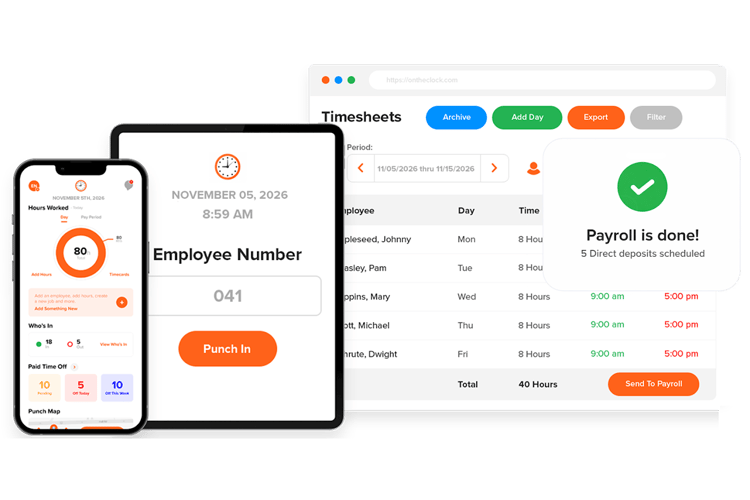
OnTheClock is a strong choice if you’re looking for a mobile time clock that balances simplicity with powerful features. Employees can punch in from their phone, computer, or a shared kiosk, and each entry can include GPS location data and even biometric verification, such as a fingerprint or photo capture. That means no more guessing where your staff was—or whether someone else clocked in for them.
Managers benefit from geofencing, which restricts clock-ins to approved locations, and from a drag-and-drop scheduling tool that makes building shifts painless. PTO tracking is built in, so vacation requests, sick leave, and accrual balances are all managed within the same system.
OnTheClock also shines when it’s time for payroll. The app automatically calculates overtime, double time, and break deductions based on the rules you set. You can export detailed timesheets or send hours directly to providers like QuickBooks, Gusto, or Paychex. Plus, with OnTheClock Payroll, every change is logged with an audit trail, so you always know who edited a punch, and why.
If you’re tired of chasing paper timecards or fixing avoidable payroll mistakes, OnTheClock delivers accuracy, control, and peace of mind, all in a mobile app your team will actually use.
Key Features
Integrations:
Pros
Cons
Pricing
-
Plans start at $5/month base fee + $4 per user/month

Deputy: Best for Retail Teams
Available on: Web, iOS, Android
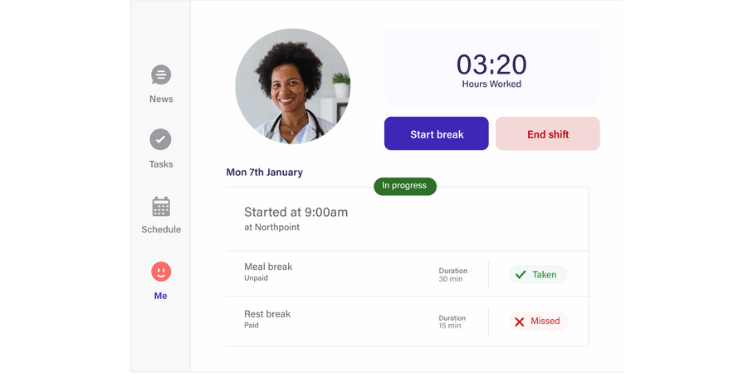
Deputy is tailored for retail teams where scheduling, shift coverage, and compliance are constant challenges. Employees can clock in from their phones, instantly see their schedules, swap or pick up shifts, and request leave without chasing down a manager. For supervisors, tools like auto-scheduling and labor forecasting help match staffing levels to customer demand, while built-in compliance rules prevent costly break or overtime violations. Integrations with POS and payroll systems tie sales and labor data together, giving managers clear insight and reducing manual admin work.
Key Features
Pros
Cons
Pricing
-
Free trial available
-
Plans start at $6 per user/month

Buddy Punch: Best for Healthcare Companies
Available on: Web, iOS, Android
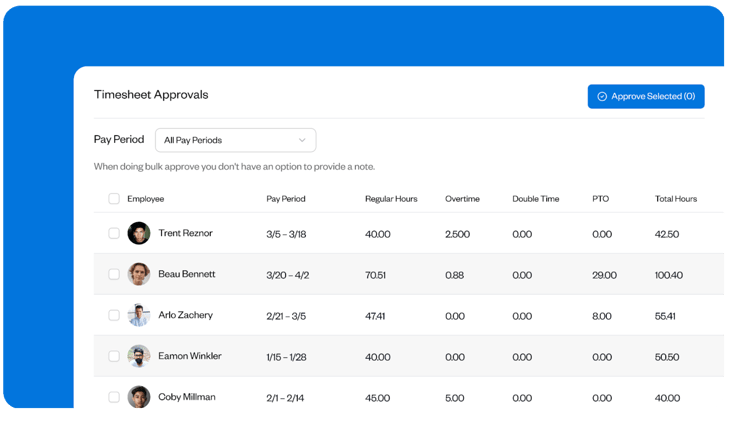
Buddy Punch has multiple features that help healthcare teams at medical practices, hospitals, and assisted living facilities keep their timesheets accurate. GPS on punch shows admins where employees were located when they clocked in and out, built-in PTO tracking adds taken PTO to timesheets automatically, and supervisors can be required to approve their team's timesheets before you run payroll.
Other features like photos on punch — which requires employees to take a selfie when clocking in and out — prevent time theft acts like buddy punching. A break tracking feature not only keeps you compliant with break laws but can also remove unpaid breaks from an employee's total hours automatically. And if mistakes are discovered on timesheets, admins can easily edit them, retaining an audit log of all changes.
Key Features
Pros
Cons
Pricing
-
Plans start at $4.49/user/month plus a $19 base fee

ExakTime: Best for Construction
Available on: Web, iOS, Android
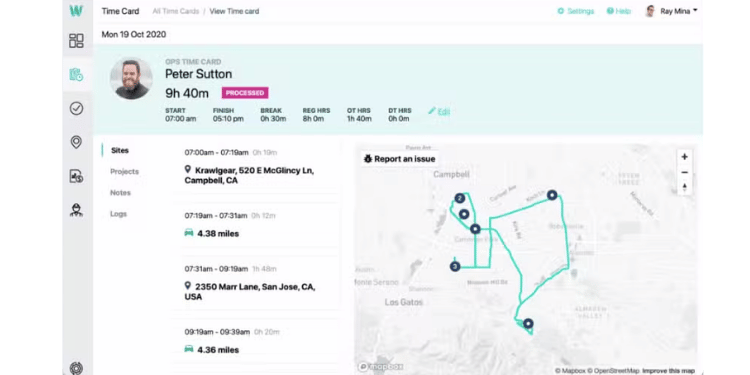
ExakTime is designed specifically for construction, where crews move between job sites and work outdoors in tough conditions. Employees can clock in with mobile devices, rugged jobsite clocks, or crew punches, while GPS, breadcrumb trails, and photo ID verification ensure accountability even in remote areas. Managers gain visibility into hours by job or cost code, track overtime, and stay compliant with wage and break rules. Payroll and ERP integrations connect site activity with the back office, making it easier to manage projects, costs, and compliance from a single system.
Key Features
Pros
Cons
Pricing
-
Plans start at $9 per user/month + base fee

7shifts: Best for Restaurants & Hospitality
Available on: Web, iOS, Android
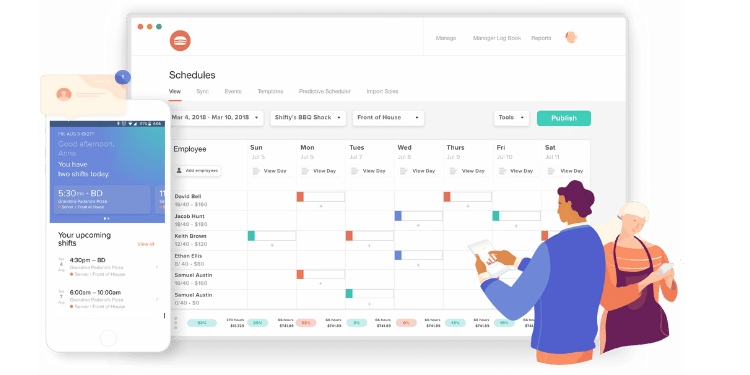
7shifts is built specifically for restaurants, where high turnover, split shifts, and tip management create constant challenges. Employees can clock in from mobile devices or POS tablets, instantly check their schedules, and swap shifts without disrupting managers. The app’s tip pooling and payout tools ensure fairness and accuracy for staff, while managers benefit from POS-linked sales forecasts that help align staffing with demand. Compliance alerts keep labor costs and scheduling within legal limits, and payroll syncs ensure accurate pay for complex restaurant operations
Key Features
Pros
Cons
Pricing
- A free plan for single locations is available
- Plans start at $39.99/location/month
.png?width=100&height=40&name=kronos-logo-best-mobile-apps-(100-x-40-px).png)
Kronos (UKG): Best for Enterprise & Multi-location Teams
Available on: Web, iOS, Android
-best-mobile-time-clock-apps-screenshot-1.png?width=750&height=375&name=Kronos-(UKG)-best-mobile-time-clock-apps-screenshot-1.png)
UKG (formerly Kronos) is built for enterprises managing thousands of employees across multiple sites. Its mobile app supports GPS clock-ins, self-service scheduling, and pay stub access, which help large workforces stay consistent across locations. For managers, labor forecasting, compliance automation, and real-time dashboards give visibility into staffing and costs company-wide. Payroll integration and compliance tools handle the added complexity of multi-location operations, reducing errors and legal risk at scale.
Key Features
Pros
Cons
Pricing
- Pricing is not available; a quote is required.

ClockShark: Best for Contractors & Trades
Available on: Web, iOS, Android
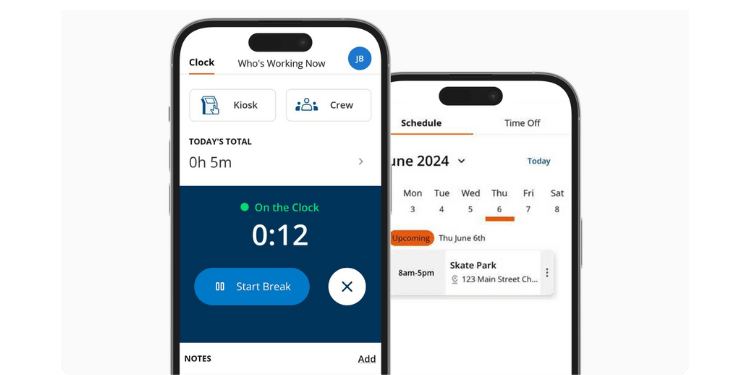
ClockShark focuses on contractors and field services. Employees clock in with GPS-stamped punches, even offline, which provides verified proof of when and where work happened—crucial for jobs spread across multiple sites. Spanish-language support helps diverse crews adopt the app faster, while job switching and notes let workers log exactly what tasks were completed, reducing confusion about scope and hours. Managers benefit from live dashboards and geofencing, which prevent offsite clock-ins and give real-time visibility into who is working and where. Job cost tracking ties labor hours directly to project budgets, helping contractors keep estimates accurate and avoid overruns. Payroll exports, PTO, and department controls simplify back-office work, ensuring that crews get paid correctly while owners spend less time fixing timesheets and more time focusing on keeping projects on schedule and profitable.
Key Features
Integrations:
Pros
Cons
Pricing
- 14-day free trial available
- Plans start at $40/month base fee + $9 per user/month
What Is a Mobile Time Clock App?
A mobile time clock app lets employees clock in and out directly from their smartphones, replacing paper timesheets and old punch clocks. Every punch is stored digitally, giving managers real-time visibility into hours worked.
How a Mobile Time Clock App Works
When an employee begins or ends a shift, they open the app and tap to clock in. The punch is saved to the cloud and synced across the system. Many apps add safeguards like GPS and geofencing to verify location, while offline mode stores punches locally until a signal is available. Together, these tools create accurate digital records that flow directly into timesheets, payroll, and scheduling.
Why Businesses Use Them
Businesses choose mobile time clock apps because they cut down on errors, save time, and build accountability. Paper-based tracking often causes payroll delays, missed hours, or disputes. With an app, hours are logged automatically, GPS confirms accuracy, and overtime or PTO rules are applied instantly. The outcome is fewer payroll mistakes, less stress for managers, and greater trust from employees that paychecks are accurate.
Who Benefits Most From Mobile Time Clock Apps
Any business that pays employees by the hour—or needs to document how and where work gets done—can benefit from a mobile time clock app. These tools do more than log punches; they allow you to:
-
Record hours precisely so employees are paid for actual time worked, not estimates on paper.
-
Manage labor costs by tracking overtime, reducing time theft, and keeping payroll aligned with budgets.
-
Stay compliant with labor laws and recordkeeping rules, protecting you during audits or disputes.
-
Streamline payroll by syncing with accounting or HR systems, saving hours of manual work.
Key Features Every Mobile Time Clock App Should Have
Choosing a mobile time clock app can feel overwhelming with so many options available. To make it easier, focus on the features that improve daily operations and protect your bottom line. The most important features to look for include:
-
Ease of Adoption for Employees: A time clock app only works if your team uses it. Look for simple clock-in/out options and an interface that feels natural, even for employees who aren’t tech-savvy.
-
GPS and Geofencing: Location-based features confirm employees are on-site when they clock in. For field crews, it prevents false punches; for retail and hospitality, it keeps attendance transparent.
-
Offline Clock-Ins: Not every job site has reliable internet. Offline support allows employees to log hours without a signal, and the app syncs data once they reconnect. This ensures no missing records.
-
PTO and Overtime Tracking: Automated tracking prevents payroll surprises and supports compliance with labor laws. It also builds trust with employees by showing that time off and overtime are recorded correctly.
-
Payroll and HR Integrations: Integrations cut out hours of manual work by sending time data straight to payroll or HR systems. That means fewer errors and faster processing on payday.
How to Choose the Right Mobile Time Clock App for Your Business
Here’s a clear, step-by-step way to pick the right tool without wasting time or money:
Step 1: Define the Outcome You Want
Before you compare apps, decide what problem you’re actually trying to solve. Are you losing hours to payroll errors? Struggling with unapproved overtime? Dealing with buddy punching? Write your main frustration in one sentence, then add a measurable goal—like reducing payroll prep from three hours to thirty minutes. This keeps you focused on solutions, not distractions.
Step 2: Map How Your Team Works Today
Think about how your employees actually clock in. Do they work from one location, move between job sites, or spend most of their time on the road? Are there split shifts, seasonal hires, or remote workers? By mapping your current setup, you’ll know what an app must handle before it even makes the shortlist.
Step 3: Separate Must-Haves From Nice-to-Haves
Not every feature matters equally. Must-haves are the tools you can’t run without, like simple clock-ins, GPS tracking, and PTO rules. Nice-to-haves—like job costing or kiosk modes—can make life easier but shouldn’t distract you from covering the basics. Getting this list straight ensures you don’t overpay for bells and whistles your team won’t use.
Step 4: Check Device Fit and Integrations
A great app isn’t great if it doesn’t work on the devices your team already uses. Confirm the app supports iOS, Android, or tablets in your workplace. Then check payroll and HR integrations. If the app syncs smoothly with your system, you’ll save hours of manual entry and cut down on costly errors.
Step 5: Confirm Compliance Needs
Every business has labor rules to follow, but some industries face stricter requirements than others. If you need audit trails, location proof, or automated overtime calculations, make sure the app can handle them. Choosing the wrong tool here could create bigger headaches down the line.
Step 6: Pilot With a Small Group
Before rolling out company-wide, test the app with a small group that includes both tech-savvy and less tech-savvy employees. Run it for one pay period and compare the results against your current process. This gives you proof of whether the app actually makes payroll easier or just adds new complications.
Step 7: Test in Real-World Conditions
Don’t just test in the office. Try clocking in from a job site with poor signal, verify that GPS geofencing triggers correctly, and check whether offline punches sync without errors. Real-world testing ensures the app works where your team actually spends their time.
Step 8: Measure Adoption and Accuracy
During the pilot, track how often employees can clock in without issues and whether the data matches expectations. Are there fewer edits? Fewer disputes? If your team resists using the app or punches don’t line up, it’s a red flag that the tool isn’t a good fit.
Step 9: Compare the Total Cost
Price tags can be misleading. Look at per-user fees, extra charges for GPS or job costing, and the setup time required. Balance those costs against the savings—like fewer payroll errors and faster processing. The cheapest app isn’t always the best value if it creates more work.
Step 10: Plan the Rollout
Once you’ve picked the right app, roll it out with a clear process. Create a simple guide for how to clock in, request PTO, and fix mistakes. Hold a short training session, then set a go-live date. A smooth rollout helps your team build confidence and reduces pushback.
Pro Tip: Before you make your final choice, hand your phone to the least tech-savvy person on your team. If they can clock in without asking for help, you’ve probably found the right app.
What Does a Mobile Time Clock App Cost?
The cost of a mobile time clock app varies by provider, team size, and feature set. Many apps charge per user per month, so costs rise as your staff increases. Some providers offer flat-rate plans, while others add fees for advanced features like GPS tracking or job costing.
The good news is that nearly every app offers a free trial or free tier. This gives you a chance to test the software with your team before committing. For example, you might run a two-week pilot with five employees to see how the app handles clock-ins, payroll syncing, and reporting. If it fits, you can upgrade to a paid plan knowing exactly what you’re getting.
When comparing costs, don’t just look at the subscription price. Factor in the hours saved on payroll, the reduced risk of compliance penalties, and the prevention of time theft. Often, the return outweighs the monthly fee. In short, the right app should feel less like an expense and more like an investment in smoother operations and lower labor costs.
Tips for Implementing a Mobile Time Clock App Successfully
The right app only helps if your team actually uses it. A good rollout makes the difference between employees embracing the tool and resisting it. Here’s how to set yourself up for success:
-
Start small with a pilot group: Choose a handful of employees to test the app first. This gives you a chance to work out issues, gather feedback, and show the rest of your team how it works in real life.
-
Train your team on the basics: A short training session goes a long way. Show employees exactly how to clock in, request PTO, and fix a mistake. When everyone knows the process, adoption is faster and smoother.
-
Communicate the benefits clearly: Employees are more likely to support the change if they understand how it helps them. Emphasize fairness, faster payroll, and fewer disputes over hours worked. When staff see the value, they’ll be more willing to use it.
-
Address resistance early: Some people will hesitate. Listen to concerns, answer questions, and provide extra help if needed. By showing that the app makes work easier for both managers and employees, you can turn resistance into buy-in.
Conclusion: Why Mobile Time Clock Apps Are Worth It
Tracking employee time doesn’t have to be stressful or complicated. A mobile time clock app provides accurate records, keeps payroll running smoothly, and controls labor costs—without the hassles of paper sheets or outdated punch systems. Whether you manage a small shop, a restaurant, a construction crew, or multiple sites, the right app adapts to your needs and makes daily operations easier.
Adoption is easier than you might think. With simple clock-in options, clear training, and a quick rollout, most teams adjust within days. The payoff is faster payroll, fewer disputes, and more confidence that everyone is being treated fairly.
Frequently asked questions
Are mobile time clock apps legal?
Yes. Mobile time clock apps are legal and widely used across industries to maintain accurate records as required by labor laws like the Fair Labor Standards Act (FLSA). However, employers must be transparent with their staff about what is being tracked and must comply with all state and local laws regarding employee privacy and monitoring.
Can employees clock in without internet?
In most cases, yes. Many apps include an offline mode that allows employees to record their punches even without a cellular or Wi-Fi connection. The app stores the timestamp data securely on the device and automatically syncs it with the server once an internet connection is restored.
Do mobile time clock apps prevent buddy punching?
They can. Apps use safeguards like GPS tracking, geofencing, photo verification, or biometric logins (facial recognition/fingerprint) to ensure the right person is clocking in from the correct location. These features significantly reduce time theft by making it nearly impossible for one employee to clock in for another.
Which apps offer free trials or free tiers?
Almost all major providers offer some kind of trial or free plan. Free trials usually provide full access to all features for a limited period (e.g., 14-30 days). Free tiers are free forever but may have limitations, such as a maximum number of users or basic features only. It's best to check the pricing page of each app for the most current offers.
What happens if someone forgets to clock in or out?
This is common, and good apps have built-in safeguards. Many apps can send automated reminders to employees' phones at the start or end of their shifts. Additionally, administrators and managers have the ability to manually add or edit time entries to correct any missed punches, ensuring timesheets are always accurate for payroll.
Can I track time by job, project, or cost code?
Yes. Many apps let employees tag their hours by job, project, or cost code as they work. This provides valuable data for job costing, helps in creating accurate invoices for clients, and gives you a clear understanding of where your labor costs are going. Employees can typically switch between different codes easily from their mobile device.