If you manage a team, you already know how chaotic scheduling can get. One person calls in sick, another forgets their shift, and before you know it, you’re rebuilding the whole week by hand. The stress adds up, missed shifts, overtime surprises, and frustrated employees who just want to know when they work.
That’s where employee scheduling apps come in. The right tool can cut scheduling time by up to 70%. It turns messy spreadsheets into clear, automated schedules your whole team can trust. You can drag and drop shifts, fill gaps in seconds, and send instant updates to employees’ phones. You can even track clock-ins by GPS—all from one place.
In this guide, I’ll share the best employee scheduling apps, what they do well, who they’re built for, and how features like auto-scheduling, shift swapping, PTO management, and labor cost forecasting can save you hours each week. Whether you run a restaurant, construction crew, or retail store, you’ll find an app here that makes scheduling faster, fairer, and far less stressful.
How We Evaluated the Apps
We scored each scheduling app based on what actually makes your job easier. If you manage an hourly team, you need a tool that helps you build schedules faster, keep shifts covered, and avoid payroll mistakes that turn into problems later.
To create this list, we focused on the features that support those goals. Each app was evaluated across ten categories that directly impact your day-to-day scheduling success, including:
- Drag-and-drop shift scheduler: You should be able to plan, move, or copy shifts with ease.
- Auto-scheduling: The best tools build optimized schedules automatically based on availability and skills.
- Shift templates & recurring schedules: Save your regular shift patterns to avoid rebuilding from scratch every week.
- Flexible shift swapping & open shifts: Employees can trade shifts or pick up open ones in the app, while managers stay in control.
- Time-off & absence management: Track PTO, sick days, and coverage gaps right inside the schedule.
- Compliance & labor law tools: Built-in safeguards prevent scheduling violations like missed breaks or excessive overtime.
- GPS time clock with geofencing: Verifies clock-ins and outs from job sites, reducing buddy punching.
- In-app chat & notifications: Keep your team updated in real time about schedule changes or reminders.
- Labor cost forecasting & overtime alerts: Shows how each shift impacts labor budgets before you publish.
- Payroll & integration readiness: Exports timesheets or syncs directly with payroll tools like QuickBooks, ADP, or Gusto.
The Best Scheduling Apps

OnTheClock: Best Employee Scheduling for Small Businesses
Available on: Web, iOS, Android
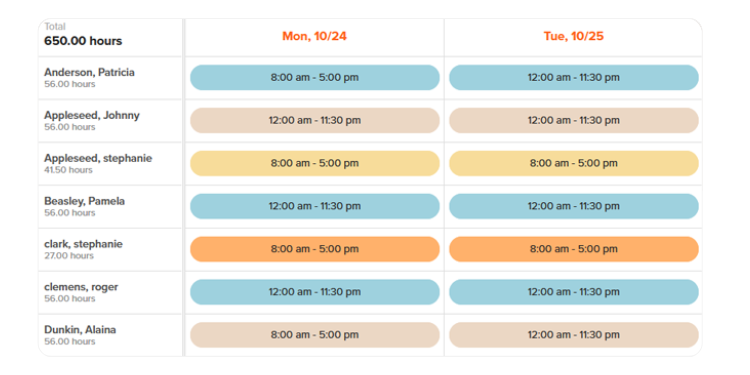
OnTheClock helps small businesses build accurate schedules fast while keeping labor costs visible and under control. Managers can drag and drop shifts, fill gaps in seconds, and use the built-in hours estimator to spot potential overtime before publishing.
Unlike enterprise-heavy tools, OnTheClock fits how small teams actually work. You can schedule by job, location, or department and share schedules through web, email, Excel, or PDF so everyone gets updates in the format they prefer.
What makes OnTheClock stand out is its balance of simplicity and flexibility. The interface feels intuitive from day one, with no training required, and gives managers enough control to handle daily scheduling confidently without unnecessary complexity. For small teams that value clarity, time savings, and reliable communication, OnTheClock keeps scheduling smooth and stress-free.
Key Features
Integrations:
Pros
Cons
Pricing
- 30-day free trial available
- Plans start at $5/month base fee + $4 per user/month

Homebase: Best for Professional Services
Available on: Web, iOS, Android
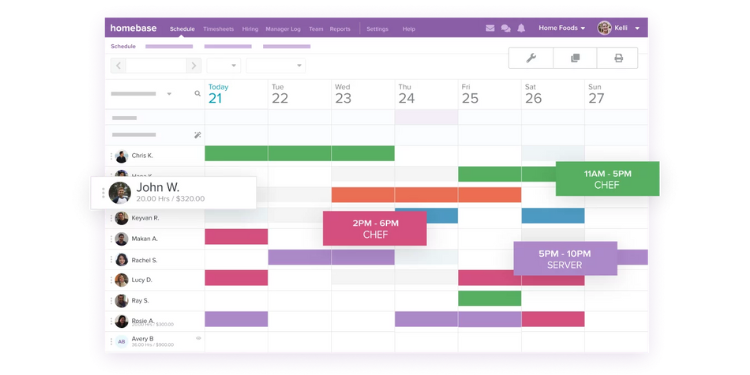
Homebase helps managers create fast, flexible schedules and gives employees self-service tools to handle their own shifts. Its clean drag-and-drop scheduler lets you build weekly or monthly schedules in minutes without digging through complex menus. Employees can submit availability, swap shifts in the mobile app, or pick up open shifts with one tap, cutting last-minute changes and scheduling stress.
The built-in reports show scheduled versus actual hours and labor costs, helping managers plan ahead and avoid overtime surprises. These insights are especially valuable for professional services like salons, clinics, agencies, and other appointment-based businesses where every shift affects client coverage and revenue.
Because Homebase balances ease of use with flexibility, it’s ideal for teams that want a system employees can actually use without training. Managers get visibility and control, while employees gain autonomy, making scheduling faster, clearer, and far less stressful.
Key Features
Pros
Cons
Pricing
- Free Plans for up to 10 Employees
- Plans start at $30 per location per month

ClockShark: Best for Field Services
Available on: Web, iOS, Android
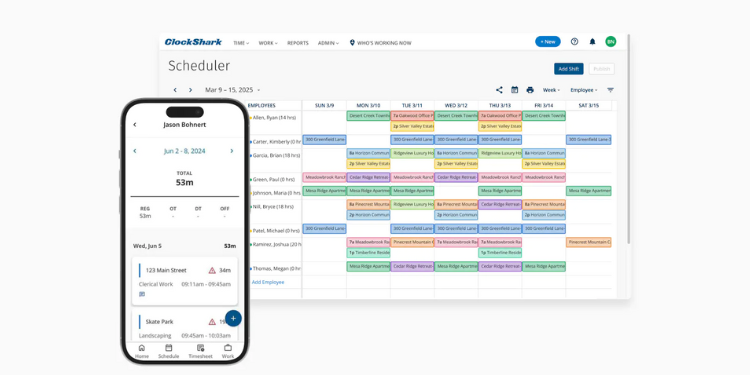
ClockShark delivers job-site scheduling and GPS time tracking in one platform, making it ideal for teams that move between multiple locations. Its drag-and-drop scheduler lets managers build and adjust shifts quickly, assign workers to specific jobs, and duplicate templates for recurring projects without starting from scratch.
What really sets ClockShark apart is its live location visibility. Managers can see who’s on the clock and exactly where they’re working through a real-time map. For example, if one crew finishes early at Site A, the manager can reassign them to Site B in seconds, all within the app.
The platform also strengthens accountability. Employees clock in and out directly from the job site, while geofencing ensures punches happen where they should. Optional photo capture at clock-in further reduces buddy punching and improves time accuracy.
For construction companies, contractors, and other field service operations, ClockShark combines clear scheduling with precise location tracking giving managers better control and crews less confusion.
Key Features
Pros
Cons
Pricing
- 14-day free trial available
- Plans start at $40 per month + $9 per user permonth

Connecteam: Best for Real-Time Team Coordination
Available on: Web, iOS, Android
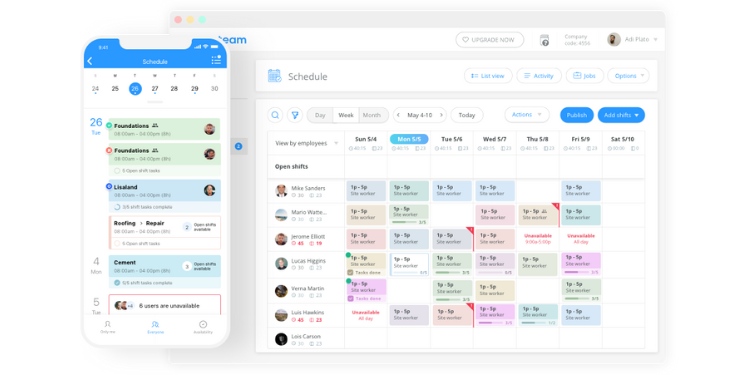
Connecteam combines scheduling and communication in one app, making real-time coordination simple and fast. Its mobile platform lets managers keep teams aligned without switching between tools.
The app includes built-in messaging, group chats, and announcements. That makes it easy to manage shift changes, daily updates, and urgent alerts in one place. Employees receive instant push notifications for new shifts or schedule edits, so no one misses critical updates. Managers can also automate alerts and reminders to keep everything running smoothly.
On the scheduling side, Connecteam covers the essentials: open shift claiming, time-off requests, recurring templates, and auto-scheduling based on availability and qualifications. Automation, advanced reporting, and deeper integrations are part of the higher-tier plans.
This blend of scheduling and communication makes Connecteam a strong fit for fast-moving teams that depend on real-time updates and clear coordination.
Key Features
Pros
Cons
Pricing
- 14-day free trial available
- Plans start at $ 29/mo for the first 30 users (per module)

7shifts: Best for Restaurants and Hospitality Teams
Available on: Web, iOS, Android
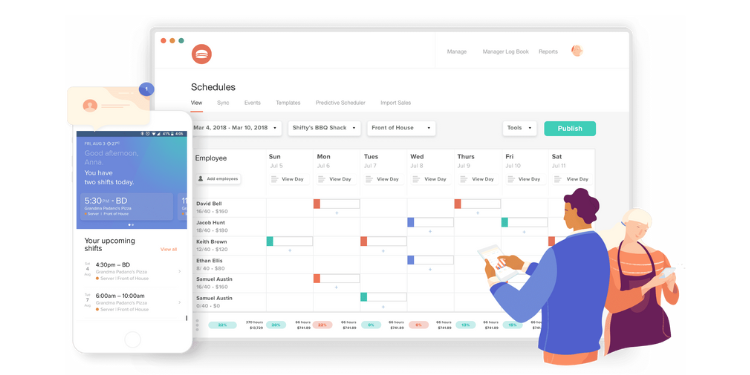
7shifts is built for restaurant and hospitality scheduling, where compliance, labor costs, and shift coverage make or break daily operations. It goes beyond basic planning by combining fast scheduling with smart compliance and forecasting tools that help managers stay ahead of issues.
Its drag-and-drop scheduler covers essentials like shift swapping, time-off requests, and team messaging. A built-in time clock with GPS geofencing ensures accurate punches and prevents buddy punching. Automatic alerts flag overtime risks or rest break violations before they become costly problems.
7shifts also includes demand forecasting that factors in data like weather and sales trends. This lets managers match staffing levels to real demand, not guesswork. For restaurants that handle tips, its built-in tip management system tracks, pools, and distributes tips, then syncs everything with payroll.
For restaurants and hospitality teams that need more than a calendar, 7shifts helps control costs, stay compliant, and keep every shift fully covered.
Key Features
Pros
Cons
Pricing
- Free Plan Up to 15 employees
- Plans start at $39.99 per month per location

Deputy: Best for Multi-Location Teams
Available on: Web, iOS, Android
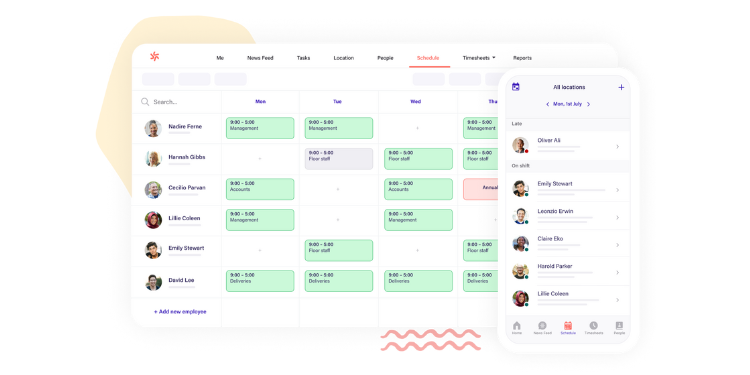
Deputy is built for AI auto-scheduling across multiple locations, helping managers keep large teams organized without drowning in admin work. Its smart scheduling engine balances employee availability, skills, and workload needs to build optimized schedules in seconds. Instead of spending hours assigning shifts manually, managers can let Deputy auto-assign, approve, or swap shifts based on preset rules and company policies.
Deputy integrates with major payroll, POS, and HR platforms like ADP, QuickBooks, and Gusto. This eliminates duplicate data entry and keeps every location compliant with local labor laws. Real-time reporting shows how labor costs align with sales volume or staffing levels, giving managers a clear view of performance across sites.
For growing businesses managing multiple locations, Deputy delivers the automation, visibility, and control needed to keep teams aligned and schedules accurate without adding extra administrative overhead.
Pros
Cons
Pricing
- 30-day free trial available
- Plans start at $5 per user per month

Akiflow: Best AI-Powered Planner & Time Blocking Calendar
Available on: Web, iOS, Android
Akiflow helps professionals and busy teams stay organized by combining task management, calendar planning, and smart scheduling into one unified workspace. Its intuitive interface pulls in tasks and events from email, calendars, and productivity apps, so you can see everything that matters in one place. Built-in time blocking and AI-assisted scheduling let you plan your day quickly and efficiently, allocating focus blocks around meetings and deadlines with drag-and-drop ease. Whether you’re juggling meetings, to-dos, or deadlines across multiple tools, Akiflow reduces app switching and helps you protect uninterrupted work time.
Key Features
Pros
Cons
Pricing
- 30-day free trial available
- Plans start at $5 per user per month
What are Scheduling Apps?
Scheduling apps are digital tools that help businesses create, manage, and share employee work schedules more efficiently. These apps centralize schedules, updates, and changes so managers plan faster and teams stay aligned. Instead of relying on spreadsheets or paper schedules, everything happens in one place, making it easier to plan shifts, handle last-minute changes, and keep everyone informed.
Who Needs Scheduling Apps?
Any team that juggles people, shifts, and frequent changes can benefit from a scheduling app. Here are the types of businesses that benefit most:
- Restaurants and Cafes: Coordinate front- and back-of-house staff and manage shift swaps.
- Retail Stores: Keep sales floors covered during peak hours without adding overtime costs.
- Construction and Field Services: Schedule crews by job site and verify attendance with GPS.
- Healthcare and Senior Care: Manage 24/7 coverage and stay compliant with labor laws.
- Hospitality and Events: Adjust schedules fast for bookings, banquets, or special events.
- Professional Services: Distribute workloads efficiently across projects and clients.
- Nonprofits and Community Groups: Organize volunteers and manage recurring events.
Why Businesses Rely on Scheduling Apps
For many businesses, scheduling apps have shifted from a “nice-to-have” tool to a daily operations essential. Manual scheduling often leads to messy spreadsheets, last-minute confusion, and wasted administrative hours. A scheduling app replaces that chaos with structure, speed, and clarity.
Here’s why teams depend on them:
- Save time on scheduling: Managers can build, adjust, and publish schedules in minutes instead of hours.
- Reduce errors and no-shows: Real-time updates prevent double bookings, missed shifts, and communication gaps.
- Streamline communication: Everyone gets the same schedule, alerts, and shift changes instantly.
- Control labor costs: Forecasting tools and overtime alerts help keep staffing levels aligned with demand.
- Support compliance: Built-in features track breaks, overtime, and labor rules to avoid costly violations.
- Empower employees: Staff can view schedules, request changes, and swap shifts without extra admin work.
In short, scheduling apps give businesses the visibility, control, and flexibility they need to keep operations running smoothly.
How Scheduling Apps Work
Scheduling apps work a lot like manual schedules but faster, smarter, and with fewer mistakes. Instead of scribbling names on a calendar or updating a spreadsheet, everything happens in one place.
Here’s a simple example: imagine you run a small coffee shop. Normally, you’d write out shifts for baristas each week, text them updates, and hope nothing changes. With a scheduling app, the process looks like this instead:
- The manager builds the schedule by dragging names into open shifts.
- Employees get an instant notification on their phones when the schedule is published.
- If someone can’t work, they can request a swap or pick up an open shift directly in the app.
- The manager can approve changes with one click, and the schedule updates in real time for everyone.
- When it’s time to clock in, employees use their phones so no more guessing who’s on shift.
In short, scheduling apps take the same steps you’d do manually and make them faster, clearer, and more reliable for both managers and employees.
Key Features Scheduling Apps Should Have
Not all scheduling apps are created equal. The best tools give managers the flexibility to build accurate schedules fast, keep teams informed, and prevent small issues from becoming staffing emergencies.
Here are the key features to look for:
- Drag-and-drop scheduling: Build and rearrange shifts quickly without starting from scratch every week.
- Auto-scheduling: Fill shifts automatically based on employee availability, skills, or demand.
- Shift templates: Reuse common shift patterns to save time and stay consistent.
- Shift swapping and open shifts: Let employees trade or claim shifts with manager approval to reduce last-minute call-offs.
- Time-off and availability management: See who’s available before assigning shifts.
- Labor compliance safeguards: Get alerts for overtime, missed breaks, or rest period violations.
- GPS time clock: Confirm employees are clocking in from the correct location.
- In-app communication: Send shift reminders, updates, or announcements directly through the app.
- Labor cost forecasting: See total hours and costs as you schedule to stay on budget.
- Payroll integrations: Export timesheets directly to payroll software to cut down on admin work.
These features turn a basic schedule into an automated system that saves time, reduces errors, and keeps your team in sync.
How to Choose the Scheduling Apps for Your Business
Choosing the right scheduling app doesn’t have to be complicated. You already know how your business runs. What you need is a tool that fits your workflow, not the other way around. Here’s a simple, manager-friendly process to follow:
Step 1: Define your must-haves
Start with the non-negotiables. Identify the features your team depends on, like a mobile time clock with GPS, drag-and-drop scheduling, PTO tracking, shift swaps, and payroll exports.
Step 2: Match the app to your daily workflow
Look at how you actually schedule and manage people. If your team is mobile, prioritize GPS and geofencing. If you manage multiple locations, look for location-based permissions, budget tracking, and centralized scheduling.
Step 3: Cover scheduling essentials
Pick a tool that handles the basics without extra effort. Prioritize auto-scheduling, shift templates, open shift claiming, conflict detection, bulk edits, and instant publishing via push, SMS, or email.
Step 4: Protect against compliance risks
Avoid costly labor violations. Choose a platform with built-in overtime alerts, rest-break tracking, audit trails, and rule enforcement.
Step 5: Check for integrations
Your scheduling tool should fit into your existing system, not create more work. Look for seamless payroll, POS, and HR integrations. If CSV export is the only option, expect extra manual steps.
Step 6: Test the mobile experience
Most employees use the app on their phones. Make sure it’s easy to clock in, swap shifts, view schedules, and get alerts. If the mobile app is clunky, adoption will lag.
Step 7: Understand pricing and add-ons
Look at how pricing scales with users, locations, and features. Watch for hidden add-ons like alerts, reports, or integrations that can increase costs.
Step 8: Run a quick pilot
Test the app with one team for two weeks. Track key KPIs like time-to-publish schedules and exceptions (no-shows, overtime, shift swaps) to measure its impact.
Step 9: Evaluate support and onboarding
Good software is useless without support. Look for fast live chat, clear training materials, and smooth setup. A strong support experience makes rollout easier.
Step 10: Compare, score, and commit
Narrow it down to your top two. Score them on ease of use, scheduling speed, compliance features, mobile experience, and cost. Pick the one that fits how your team actually works, not the one with the flashiest feature list.
Tips for Implementing Scheduling Apps Successfully
Choosing the right app is only half the job; how you roll it out determines whether your team actually uses it. A smooth implementation saves time, reduces pushback, and helps everyone adjust quickly. Think of this as setting your team up for success from day one.
Here are practical tips to make the transition easier:
- Start small: Launch the app with one team or location first. Work out the kinks before scaling it across the business.
- Train your team early: Give employees a quick walkthrough of how to check schedules, swap shifts, and request time off. Keep it simple.
- Set clear expectations: Make sure everyone knows how schedules will be shared, how changes are approved, and how to use the app going forward.
- Create a rollout plan: Define who owns each part of the process, for example:
- Scheduler: builds and publishes schedules
- Approver: manages swaps, time-off, and exceptions
- Payroll: syncs timesheets and ensures accuracy
- Communicate the “why”: Show your team how the app will make their lives easier, fewer missed messages, clearer schedules, and faster approvals.
- Use templates and automation from day one: Start with shift templates, auto-scheduling, and notifications to save time immediately.
- Check KPIs after Week 1 and Week 4: Track scheduling time, number of missed shifts, and swap requests to see how well the rollout is working.
- Keep improving: Once everyone’s comfortable, explore advanced features like forecasting, integrations, or compliance tools to get more value out of the app.
A thoughtful rollout builds trust and momentum. When your team sees immediate benefits, like fewer scheduling headaches and clearer communication, they’re much more likely to adopt the tool fully.
Conclusion: Turning Scheduling Chaos Into Clarity and Control
If you’ve ever rebuilt a week’s schedule from scratch because someone called in sick, you know how much time and energy manual scheduling wastes. The good news is: the right scheduling app can eliminate most of that chaos.
Each of the tools in this guide solves a specific scheduling pain. Some focus on simplicity for small businesses, others on mobility, compliance, or multi-location coordination. But they all share one thing in common: they help you schedule faster, communicate better, and keep your team aligned.
By choosing an app that fits the way your team actually works and rolling it out thoughtfully, you can cut hours of manual work, reduce no-shows and overtime surprises, and give employees more clarity and control over their schedules.
Whether you’re running a restaurant, a field crew, or a professional service team, modern scheduling tools give you what spreadsheets never could: speed, accuracy, and peace of mind. It’s time you get back to focusing on leading your team, not chasing the schedule.
