
Overview
Welcome to your Year-End Preparation Guide—everything you need to close out the year smoothly and accurately.
I cannot stress this enough: you must review the items below now to avoid costly adjustments and amended fees for your company—please take action immediately.
Check Your Employer Data
Verify the employer and employee information used for your quarterly tax reports and W‑2s.
How to find this in OnTheClock:
- Go to Payroll > Documents > Tax.
- If you’ve been with us for more than a quarter, open the Recap report and check the column labeled EIN.
If any account numbers are missing or marked “Applied For,” please enter them in OnTheClock as soon as possible. If you haven’t applied for an EIN yet, do so immediately. Missing account numbers can cause failed tax filings and rejected W‑2s. Employees cannot file their taxes correctly without your agency tax IDs, which can result in costly corrections, penalties, and interest.
If you’re unsure how to update this information, contact our support team for help.
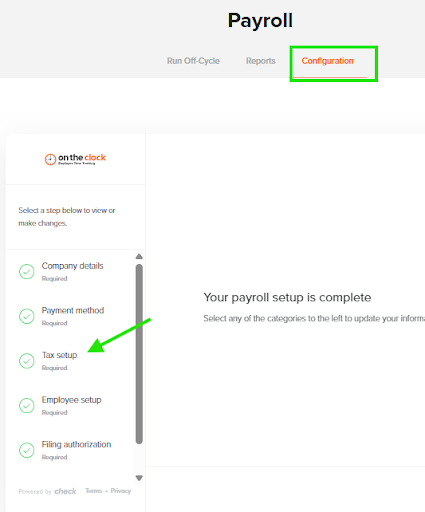
Pro Tip: You can also review and update your tax setup by going to Payroll > Configuration > Tax.
Check Your Employee Data
Verify that employee names and addresses are formatted correctly.
How to find this in OnTheClock:
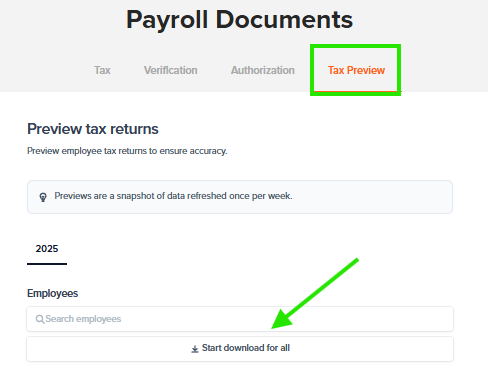
- Go to Payroll > Documents > Tax Preview.
- Run the W‑2 Preview reports to review employee names and addresses.
- You can also check for any missing tax accounts, as mentioned above.
Note: These are preview reports only, not the final W‑2s. Do not distribute them to employees—they are for your review only.
Pro Tip: Have Employees Review Their Own Information
Require all employees to log in to OnTheClock to review and update their own information. This helps ensure accuracy and can save you time. Employees have the ability to:
- Verify their personal information, including correct names and addresses.
- Confirm they’ve opted to receive electronic W‑2s, which can speed up delivery and reduce mailing costs. Super Time Saver! (Why can’t we just opt all employees in? It’s against the law—employees must choose to receive their W‑2s/1099s electronically themselves.)
Note: Nicknames or shortened names must be corrected. For example, “Buddy” might actually be “Robert.” The IRS may impose a penalty for each W‑2 with a missing or incorrect Social Security number or employee name.
How employees can update their information:
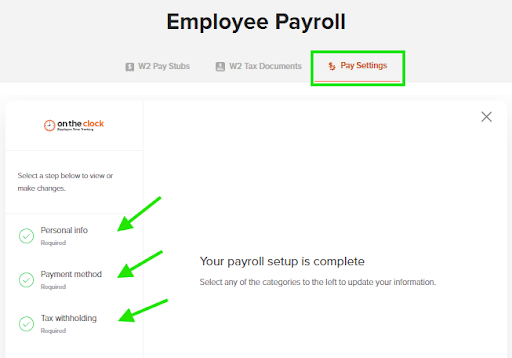
- Log in to OnTheClock
- Go to Payroll Settings
- Review each area and update as needed
This simple step can save you time, reduce costs, and minimize employee questions.
Check Wage, Tax, and Benefits Data
Ask your bookkeeper or accountant NOW if any of the following items apply to you or your employees. Withhold any applicable fringe benefits from their next paycheck.These may include:
- Owner (greater than 2% ownership) medical expenses
- Group-term life insurance in excess of $50,000
- Third-party sick pay (is a W‑2 being issued by the third party?)
- Personal use of company vehicle
- Non-qualified moving expense reimbursements
- Company-provided transportation or parking
- Employer-paid education not related to the employee’s job
- Non-accountable business expense reimbursements or allowances
- Unrecorded Bonuses
- Non-cash payments
Pro Tip: Run a Payroll Journal from Payroll > Reports, for the full year (Start: 1/1/2025, End: 12/31/2025) to verify that all wages have been entered. If we migrated your wages from a prior provider, we loaded all wages managed in your old system.
Sample Email to Accountant/Bookkeeper:
Subject: Year-End Payroll Verification
Hi [Accountant/Bookkeeper Name],
I’m reviewing year-end payroll and need to ensure that all wage, tax, and benefits information is accurate for myself and my employees. Could you please confirm if any of the following items apply to 2025?
- Owner (greater than 2% ownership) medical expenses
- Group-term life insurance in excess of $50,000
- Third-party sick pay (is a W-2 being issued by the third party?)
- Personal use of company vehicle
- Non-qualified moving expense reimbursements
- Company-provided transportation or parking
- Employer-paid education not related to the employee’s job
- Non-accountable business expense reimbursements or allowances
- Bonuses
- Non-cash payments
Please let me know as soon as possible so we can make any necessary adjustments before year-end.
Thanks,
[Your Name]
How to Record These Items in OnTheClock:
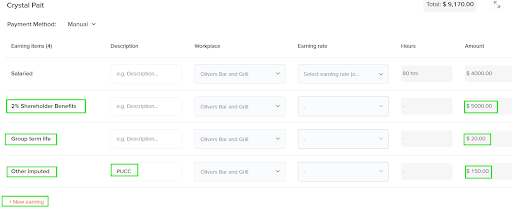
- On a live payroll, on your employee, add the appropriate earning codes in your open payroll batch.
- Special codes exist for Group Term Life and 2% Shareholder Benefits—these ensure the information is attached to the correct W‑2 fields and appropriately taxed.
- Most other items should be entered under “Other Imputed” and type in a description for your records
- Schedule Special Bonus Payrolls: Make sure any special bonus payrolls for the current year are scheduled. Pay attention to the calendar, as upcoming holidays may affect banking days. Submitting regular payrolls and bonuses on time ensures they are processed within the current year.
Examples: Year-end performance bonuses, holiday bonuses, retroactive pay adjustments. - Employee W‑4 Updates: Remind employees to complete a new Form W‑4 if their personal or tax situation has changed.
- Manual Checks: Confirm that all manual checks written during the year have been recorded in the system. If a check was issued to an employee but not entered, make sure to enter it in the next payroll or create an off-cycle payroll to record it properly and pay the associated taxes.
- Voided or Reversed Checks: Verify that all voided or reversed paychecks are accurately accounted for. For example, if a manual check was recorded but later found to be unnecessary or incorrect, ensure it was properly voided in the system.
Check for your employer’s new state unemployment insurance (SUI) tax rate. These notices are typically mailed from each state in November.
If you received your SUI rate letter, please send a copy to support@ontheclock.com so we can update it for you.
Verify Terminated Employees’ AddressesEnsure that all terminated employees have the most recent address on file.
- You can log in to OnTheClock as an inactive employee and update their address if needed.
Important: Terminated employees will no longer have access to the online portal to view their W‑2 or 1099 forms, so it’s essential their mailing address is correct.
Cancel Your Previous Payroll Provider- Important: If you have switched payroll providers, make sure your previous provider is fully canceled.
- They may not realize they should stop processing year-end filings and W‑2s, which could result in duplicate filings and costly penalties.
- Notify your old provider in writing that they are no longer authorized to file any annual returns, W‑2s, or payroll tax forms after you stopped processing payroll with them.
- Ensuring this is completed protects your business from errors, duplicate filings, and unnecessary IRS penalties.
Pro Tip: Double-check cancellation confirmation and keep documentation for your records.
Year-Beginning FAQ: Tax and Other Year Start Questions- When should I update employee benefits?
Before your first payroll, complete any benefit updates that may have occurred during open enrollment. You can do this now to avoid the year-end rush. Make sure to end-date old benefits and start-date new benefits to avoid doubling them on the first payroll—it happens more often than you think! - Do you have your new unemployment rates?
As mentioned earlier, please forward all new state unemployment rate notices to support@ontheclock.com so we can update your account. - Did active employees opt in for electronic W‑2s/1099s?
This is a huge time saver. Instruct all active employees to opt in before 12/31/2025. - If they do not opt in, W‑2s/1099s will be mailed, and delivery will depend on the postal service. Electronic W2s are posted a week before Jan 31st.
- Alternatively, you will receive a master copy of the W‑2s/1099s and can provide copies to employees as needed.
- Why can’t we just opt all employees in? It’s against the law—employees must choose to receive their W‑2s/1099s electronically themselves.
- Where will terminated employees’ W‑2s/1099s be mailed?
To the address on their profile. Important: Terminated employees will not have access to the online portal for electronic W‑2s/1099s—they will be mailed directly. - Where will employer copies be posted?
Employer copies are available with your quarterly reports: Payroll > Documents > Tax. - Where will year-end returns be posted?
All year-end returns can be found here: Payroll > Documents > Tax. - Why are my employer taxes so much higher than they were in December?
All caps reset on January 1. Federal unemployment and state unemployment wage bases reset at the start of the year. Once your employees meet these wage bases, the taxes stop until the next year. - My employee says their taxes are different than they were in December—why?
All tax tables are refreshed on January 1. Federal and some state tax tables may be updated, resulting in different withholdings. If an employee has questions, they can log in and update their W‑4 under the Taxes tab. - 9. Why doesn’t Box 1 on my W‑2 match Boxes 3 and 5?
Check your benefit deductions—they must have been deducted pre-tax. Retirement and other pre-tax deductions will alter the taxable wages reported in Boxes 1, 3, 5, and possibly 16 and 18. It also will not match the Annual Gross as pre-tax deductions reduce the taxable wages. It is supposed to be this way.
Tax updates you need to know about:
What Employers Need to Know:
- Employee Tax Credits: Under OBBBA, employees may claim a 2025 tax credit for qualified tips and overtime.
- No Special W‑2 Box: Tips and overtime do not appear in a dedicated box this year. Employees will need totals from employers to claim the credit.
Employer Action Required:
-
- Provide employees with a year-end summary of tips and overtime.
- In OnTheClock, run a full-year Payroll Summary (1/1–12/31/2025) and share totals with employees.
- Ensure all reported tips and overtime are accurate and complete to avoid errors on employee tax filings.
- Qualified Income Only: Only report qualified tips and overtime for the credit. Regular wages and unqualified pay are not eligible.
- Accuracy Protects Everyone: Proper reporting ensures employees can claim their maximum credit and reduces the need for corrections or amended forms.
What Recent Guidance Confirms About the OBBBA (for Employers)
Current IRS and industry guidance indicates that:
- Employees may claim new federal tax deductions for 2025–2028 for
- Qualified tips (up to $25,000 per year)
- Qualified overtime pay (up to $12,500, or $25,000 if married filing jointly).
- These are above-the-line deductions, meaning employees can claim them even if they take the standard deduction.
- Forms like the W-2 do not have special boxes for these amounts for tax year 2025.
Because of this, the IRS allows employers to give employees the needed information through a separate written statement. - 2025 has a transition/penalty-relief period, so employers will not be penalized for not reporting these amounts separately—as long as normal payroll reporting rules are followed.
What the IRS says: LINK
FYI for California Employers – FUTA Credit Reduction
What’s Happening?
California is on the official FUTA Credit Reduction list for 2025. This means the state has an outstanding federal unemployment loan balance, which results in reduced FUTA credit for employers.
What This Means for You
Because of this reduction, employers must pay an additional FUTA amount for wages paid in 2025. All payroll providers are required to calculate and submit this extra tax as part of year-end filings.
What We Will Do
To keep you compliant and avoid any penalties:
- We will calculate the required FUTA Credit Reduction amount for your business.
- We will draft the additional tax before year-end so it can be filed properly on your FUTA return (Form 940).
- No action is needed from you unless you have questions or anticipate changes to your 2025 payroll totals.
Why This Draft Is Required
The FUTA Credit Reduction is federally mandated. All employers with California wages must pay the additional amount, and the IRS requires payroll providers to collect it before year-end.
FYI: 4th Quarter & Year-End Balancing
We are about to begin 4th quarter and year-end balancing.
- You may notice small “net zero” payroll batches in your account. These are normal.
- These batches are used to round up or down cents for certain taxes to ensure accuracy.
- Their purpose is to ensure that your 4th quarter returns and annual filings are precise.
Do Not Be Alarmed: These small payroll batches are a normal part of the year-end process.
Congratulations – You Made It to the End!
We sincerely thank you for your dedication and for doing your part to ensure a smooth and successful year-end. Your attention to these steps helps protect your business, your employees, and ensures accurate filings.