Skip to content

Employee Time Tracking for Bookkeepers

Stop Chasing Hours Start Owning Them.

See every punch, approve every shift, and run payroll without the chaos.

No credit card needed. Set your system up in 5 minutes or less!

bookkeeper-time-tracking-image

More than 18k companies use OnTheClock for Time Tracking, Scheduling, and Payroll

Track every hour worked. Know where it happened, and be payroll-ready in minutes.

employee-location-tracking-mobile-app

Catch Every Hour, No Surprises

Stop worrying about errors that cost money and trust your records.

  • Know every punch is real: You see exactly when and where your team clocked in.

  • Rules handle themselves: Overtime and break laws are followed automatically, so you’re not stuck policing every shift.

  • Payroll is ready fast: You send clean, accurate totals in minutes and stop dreading the end-of-week crunch.

Start Tracking Time Today →

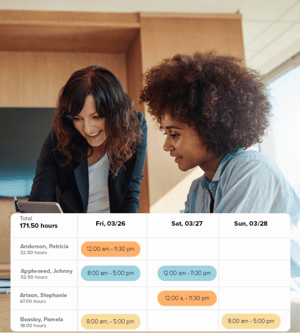
Keep Schedules Tight Without the Headaches

You shouldn’t have to drop everything when someone calls off. With the right tools, you fix the problem fast, and move on.

  • See who’s missing in real time: Stop the guessing game. If someone’s late or a no-show, you’ll know right away.

  • Create schedules in minutes: You don’t have time to rebuild every week from scratch. Set the plan once, tweak as needed, and move on.

  • Shift changes in seconds: Drag, drop, and notify in seconds—no chasing people, no last-minute panic.

Try Our Scheduling Tools →

employee-scheduling-dashboard-with-shifts
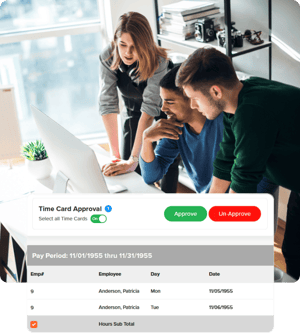
team_time_card_approval_hr

Cut the Work The Slows you Down

Your time shouldn’t be spent copying data between tools or fixing simple errors by hand. Let the system do the boring part.

  • Approve hours in one place: No more chasing paper or screenshots—review, adjust, and approve in a single screen.

  • Keep a full audit trail: See exactly who made changes, when they happened, and what was approved—no more digging for answers.

  • Export totals instantly: You get clean totals you can trust, without hours spent fixing spreadsheets.

Discover Payroll with OnTheClock →

How Bookkeepers Track Employee Time with OnTheClock

1
Create an account.
2
Invite your team.
3
Employees log their hours.
4
Pay your staff.

What Our Customers Are Saying

5-stars

"After trying expensive alternatives, we found OnTheClock. Thank you for making functions so simple, clear, and user-friendly!!!! I love that I can control the information gathered from the admin account so our employees don’t have to worry about being tracked. Just simple punch in/out, PTO, and manager tracking of hours. I love that there is a payroll option as well. And, I especially love that users can edit their punch-ins if they forget to clock in or out! So simple! Thank you!!!!."

JulieBusiness Owner

Everything You Need In One Place

Take control of hours, costs, and schedules in minutes.