Skip to content
Integrates with RUN Powered by ADP®

Time Tracking for ADP that Actually Shows You Where Your Employees Are 

If you're running payroll through ADP RUN, you've already solved the hard part. What OnTheClock adds is the time tracking layer ADP doesn't include by default: GPS clock-ins, geofencing, mobile punch-ins from any device, and PTO tracking — all feeding accurate hours into ADP when you're ready to run payroll.

  • Free for 30 days
  • No credit card required
  • No demo needed
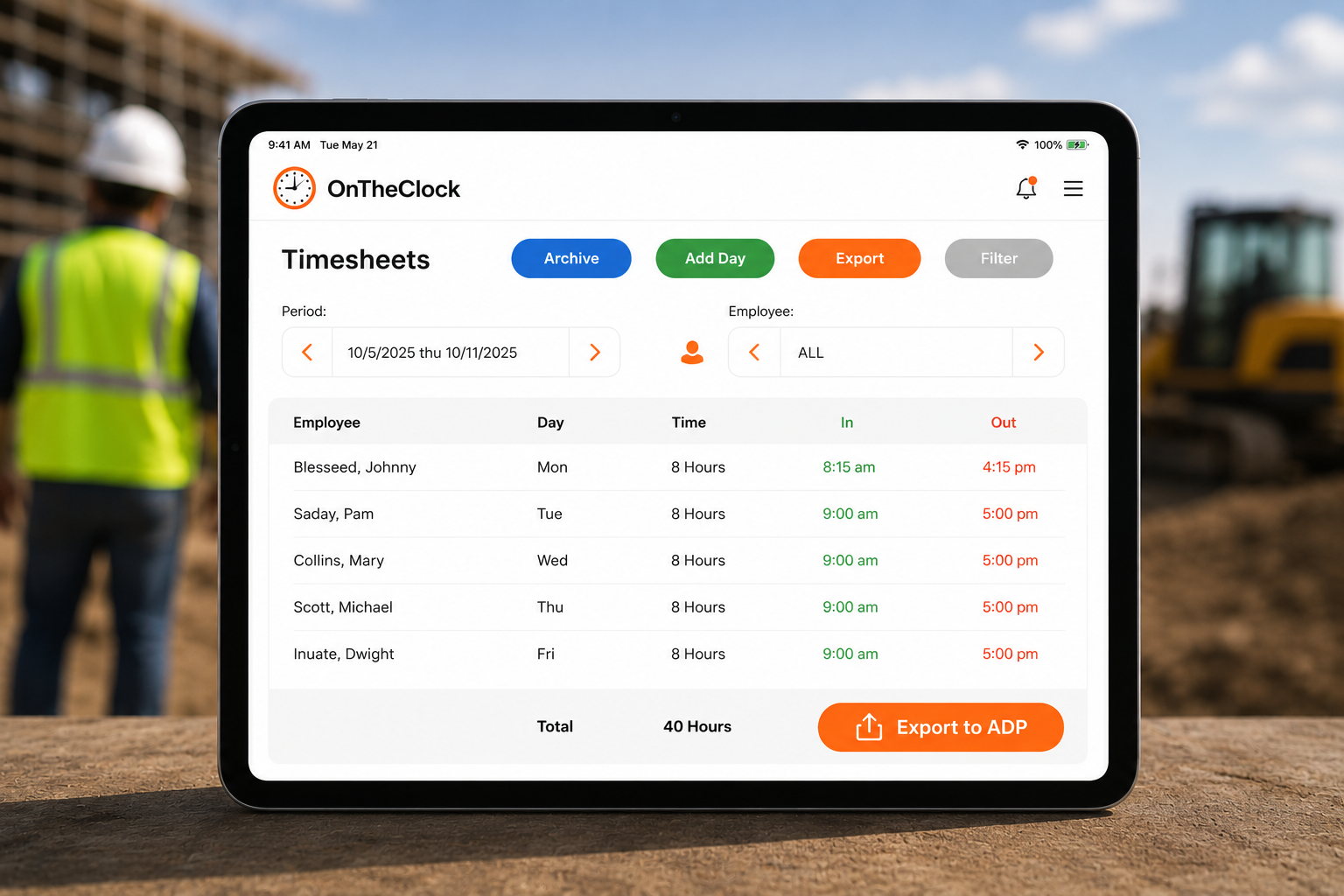
ontheclock-adp-timesheet-export-ipad

Two Tools. One Payroll Workflow.

OnTheClock handles time tracking: clock-ins and clock-outs, GPS location, PTO accruals, overtime calculations, and audit trails. ADP RUN handles payroll: paychecks, tax filing, compliance, and HR. Connect the two, and employees' actual hours go straight to ADP — no spreadsheets,  manual entry, or guesswork on payday.

Priced right for growing businesses.

OnTheClock’s software is more affordable than our leading competitors. New customers can get 30 days for $0.

# Of Employees $ Per Employee
1 - 99 $4.00/Employee + $5.00 Base Fee
100+ Contact Us

How to Set Up the OnTheClock + ADP Integration

There are two ways to connect, depending on where you're starting from.
Already use OnTheClock?

Connect from settings

 Go to your account's payroll provider settings and select ADP RUN from the integration list. Follow the prompts to connect. Setup takes just a few minutes 
Already use ADP RUN?

Add via ADP Marketplace

 Add OnTheClock directly through the ADP Marketplace. Search for OnTheClock, connect your account, and your employees can start clocking in the same day. 
New to both?

Start a free trial

 Start a free OnTheClock trial, set up your team, and connect ADP RUN from your payroll settings when you're ready. No demo required. 

Once connected, here's the day-to-day workflow:

1

Clock in

Employees clock in and out using the mobile app, web browser, or a shared kiosk.
2

Track automatically

OnTheClock tracks their hours, PTO, and overtime as they work.
3

Review & approve

At the end of each pay period, review and approve timecards in OnTheClock.
4

Export to ADP

Send the data to ADP RUN. Payroll runs from there.

What OnTheClock Adds to ADP Payroll

ADP RUN handles payroll well. What it doesn't include by default is a GPS-enabled time clock built for hourly and field-based teams. That's where OnTheClock comes in.

GPS clock-ins and geofencing

Employees clock in from their phones. OnTheClock records their location at punch-in and can restrict clock-ins to a defined job site radius. If someone clocks in from home instead of the job site, you'll know.

Mobile time clock for any device

Your team can clock in from the OnTheClock mobile app, a shared tablet kiosk, or a web browser. Setup takes a few minutes, and employees figure it out themselves — no training required.

PTO tracking and accrual management

OnTheClock tracks paid time off alongside regular hours, so PTO is already accounted for when you export to ADP. No separate spreadsheet, no manual calculation at pay period end.

Overtime and break calculations

OnTheClock calculates overtime and break requirements automatically based on the rules you set. Hours that go to ADP are already verified — not raw data you have to review line by line.

Two Ways to Connect OnTheClock to ADP

Existing OnTheClock customer

If you're an existing OnTheClock customer, connect ADP from your payroll provider settings — takes a few clicks.

Coming from ADP

If you're coming from ADP, you can find and add OnTheClock through the ADP Marketplace.
Either way, your team can be clocked in and connected to ADP before end of day.

What Customers Say About the ADP Integration

OnTheClock has a 4.7-star rating across 717+ reviews on GetApp. Here's what customers running payroll through ADP say:
★★★★★
""Exporting hours to ADP used to mean a spreadsheet and a prayer. Now I approve timecards and the data is in RUN in a couple clicks. Payday is boring again — exactly what I wanted.""

Marcus D.
Operations Manager, HVAC
★★★★★
""The GPS clock-in solved our biggest headache. Crews punch in from the job site, hours flow into ADP, and I'm not chasing anyone down for accurate timesheets.""

Lori T.
HR Administrator, Construction
★★★★★
""Setup was genuinely under ten minutes. We connected through the payroll settings and ran our first ADP payroll from OnTheClock hours that same week.""

Priya S.
Office Manager, Field Services

Common Questions About the ADP Integration

Here's what most businesses ask before connecting OnTheClock to ADP RUN. If something isn't covered here, our support team is available through our live chat — typical response time is under five minutes.
Yes. OnTheClock integrates directly with RUN Powered by ADP. Once connected, you can export employee hours from OnTheClock to ADP at the end of each pay period.
Yes. OnTheClock is available through the ADP Marketplace. If you're an existing ADP RUN customer, you can add OnTheClock directly from there.
OnTheClock exports employee hours — including regular time, overtime, and PTO — to ADP RUN for payroll processing. GPS data and job costing information are available in OnTheClock but are not transferred to ADP as part of the export.
The direct integration is built for RUN Powered by ADP, which is ADP's payroll platform for small businesses. If you're on a different ADP product, contact our support team to discuss your options.
Most customers are up and running the same day. Creating your OnTheClock account takes a few minutes. Connecting to ADP is done through your payroll settings and typically takes under 10 minutes.
OnTheClock's U.S.-based support team is available by live chat, phone, and email. Most issues are resolved in three to four minutes. You can also reach us at (888) 753-5999.
Get Started Today

Ready to Connect Your Time Tracking to ADP?

OnTheClock is a time tracking platform built for small businesses with hourly and field-based teams. More than 18,000 businesses use OnTheClock to track employee hours, manage PTO, and send accurate data to their payroll provider, including ADP RUN.


Try it free for 30 days. No credit card is required at sign-up. No demo needed.

$5/month + $4 per employee
All features are included
No credit card required