How much does OnTheClock Payroll cost?
OnTheClock Payroll costs $40 per month plus $6 per worker, whether they're a W-2 employee or 1099 contractor. A one-time $250 migration fee covers importing your historical payroll data and auditing it for accuracy. No hidden fees, long-term contracts, or surprise payroll charges.
How does OnTheClock Payroll Work?
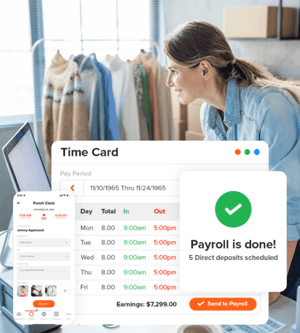
OnTheClock Payroll automates the payroll process by importing employee hours tracked directly through OnTheClock’s time tracking system. Users can review, approve, and process payroll with just a few clicks, making it simple to manage payroll for your team.
How do I get started with OnTheClock Payroll?
To get started, sign up for an account on our website. Once you’ve set up an account and input your payment information, OnTheClock payroll may be accessed through the Payroll icon. For those new to the software, visit OnTheClock Payroll directly for more information at https://www.ontheclock.com/payroll.aspx. If you’re already utilizing a paid OnTheClock account, simply login to your account and click the payroll icon.
Can I use OnTheClock Payroll without the time clock?
No. OnTheClock Payroll is built on top of the OnTheClock time clock, so employee hours flow straight into payroll instead of being imported from somewhere else. That's what removes the double entry and mismatched totals most payroll providers leave you to sort out. If you're currently tracking hours in another system, moving that tracking into OnTheClock is part of setup.
What makes OnTheClock a reliable choice for payroll?
OnTheClock Payroll was built through a partnership with Check, a payroll institution trusted by 15,000-plus employers and 180,000-plus employees nationwide. Check has processed more than 300,000 payrolls and securely moved $4 billion in payroll funds, ensuring the reliability and accuracy you’d expect from an industry leader. By partnering with Check, OnTheClock Payroll is built on years of refined expertise, minimizing risk for your business.
How does OnTheClock handle compliance and regulatory changes?
OnTheClock Payroll was built through a partnership with Check. Check’s dedicated compliance team monitors real-time updates to labor laws, tax codes, and reporting requirements. This expertise is embedded into OnTheClock’s platform, automating withholdings, filings, and audits. Check has processed more than 300,000 payrolls and helped resolve complex compliance challenges for businesses across numerous industries. This ensures you, as an OnTheClock user, remain ahead of any and all regulatory shifts.
How can OnTheClock Payroll help my company save money?
With OnTheClock Payroll, businesses avoid the process associated with hiring external payroll providers, which can result in significant time and cost savings, especially for small to mid-sized businesses.
Will OnTheClock’s award-winning support team be available to assist with payroll concerns?
Yes. OnTheClock’s support team will be available to help customers with any questions or concerns they may have.
Is employee data secure with OnTheClock Payroll?
Absolutely. OnTheClock takes data security seriously and implements robust security measures to protect all employees’ personal information and payroll data, including encryption and secure access protocols.
Is there a cost for account setup and migrating pay history from previous payroll solutions?
We will handle your whole payroll migration. Our expert team makes this process a breeze! We do require a one-time fee for setup and migration of $250. Our team will transfer over all payroll history, including past tax information and employees.
How do deductions, like retirement, insurance, etc., work?
Both pre- and post-tax benefits are supported. These include medical, vision, dental, and disability insurance payments as well as various retirement funds, including 401(k), 403(b), Roth 401(k), etc. The program also supports flexible spending accounts (FSAs) and health savings accounts (HSAs) for both medical and dependent care.
Does OnTheClock Payroll calculate taxes?
Yes. The program will automatically set up and calculate local, state, and federal withholdings. If and when tax changes occur, the software will automatically update accordingly.
Is it difficult to switch from my current provider?
No. OnTheClock Payroll’s migration service will import all the necessary information. Following the migration process, employees will need to customize their deductions and payment preferences, but, outside of that, switching to OnTheClock Payroll is fairly seamless.
How long does payroll take to complete?
A typical payroll process takes four business days to complete. Accelerated approval (two days) and next-day direct deposit will not be available upon launch.
How can I add Payroll to my plan?
Adding payroll is easy! Simply log in as an OnTheClock Admin, click on the "Payroll" icon at the top of the page, and then click the "Enroll" button. OnTheClock will walk you through the steps to get your team set up.
How can OnTheClock payroll enhance confidentiality?
Managing payroll internally reduces the number of parties who have access to sensitive employee information, decreasing the risk of data breaches.
Can OnTheClock payroll facilitate better communication?
Internal payroll enables direct communication between the payroll team and other departments, ensuring timely and accurate updates to employees' statuses, benefits, or deductions.
Does OnTheClock payroll offer organizations more flexibility?
When payroll is managed in-house, managers can make corrections and alterations quickly and easily. This flexibility ensures that payroll can be adapted rapidly to any and all changing business needs.
Can OnTheClock Payroll be customized?
Yes. OnTheClock payroll can be extensively customized to meet each business's specific needs, covering reporting requirements, deduction types, tailored benefits, and more.
Can I pay both employees and contractors with OnTheClock Payroll?
Yes! OnTheClock makes it simple to run payroll for both W-2 employees and 1099 contractors in one platform. You can track time for each, pay them via direct deposit, and auto-generate their year-end forms (W-2s and 1099s) without extra fees.
Do contractors need to track time in OnTheClock?
It’s up to you. If you pay contractors hourly, you can track their time just like employees. If you pay them per project or flat rate, you can skip time tracking and simply run payroll.
Are 1099s included in the monthly price?
Absolutely. There are no hidden fees. Your monthly base fee and per-worker fee cover both W-2 employees and 1099 contractors, including year-end form generation.
How does OnTheClock Payroll handle W-2 employees vs. 1099 contractors?
Whether you have employees, contractors, or a mix of both, OnTheClock Payroll keeps everything in one place.
W-2 Employees
- Automatic tax withholding
- Year-end W-2 forms are auto-generated
- PTO tracking and scheduling are included
- Benefits, garnishments, and deductions are processed automatically
- Employees may be paid via direct deposit
1099 Contractors
- No tax withholding (contractors handle their own)
- Year-end 1099 forms are auto-generated
- Optional time tracking is built in
- Simple, accurate payments occur with no hidden fees
- Employees may be paid via direct deposit
Is small business payroll software affordable?
Yes. Small business payroll software is often more affordable than business owners expect. When you factor in the time saved, payroll tax filings, direct deposits, year-end tax forms, and reduced payroll errors, many businesses find payroll software pays for itself.
How do I switch payroll providers without disrupting my team?
OnTheClock's migration team handles the transfer of your historical employee, company, and payroll data. Our implementation specialists work with you throughout the transition to help ensure payroll continues running smoothly.
What's the best time to switch payroll providers?
The end of a calendar year or the beginning of a new quarter is usually the easiest time to switch payroll providers, since it helps avoid splitting historical payroll data across multiple systems. However, businesses can switch payroll providers at any time of the year with the proper migration support.
Does OnTheClock Payroll handle payroll tax compliance?
Yes. OnTheClock Payroll automatically calculates and files federal, state, and local payroll taxes. Quarterly filings, W-2s, and 1099s are included, helping small businesses stay compliant without the administrative burden.
How long does payroll take to process?
Most businesses can run payroll in just a few clicks once employee hours have been approved. With OnTheClock Payroll, because employee time tracking and payroll live in the same platform, there's no need to re-enter hours or manually import time sheets.
Can I pay hourly employees and contractors through OnTheClock Payroll?
Yes. OnTheClock Payroll supports payroll for hourly employees, salaried employees, and 1099 contractors from one platform. Whether you're paying employees by direct deposit or managing contractor payments, everything is handled in one place.
What does small business payroll software include?
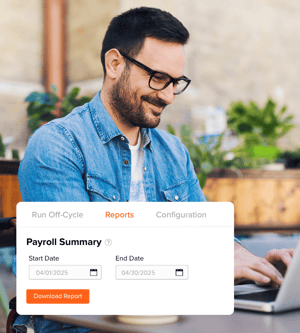
OnTheClock Payroll includes payroll tax filings, direct deposit, employee self-service tools, W-2s, 1099s, payroll reporting, and integrated employee time tracking. It's designed to simplify payroll for small businesses by bringing time tracking and payroll together into a single platform.
Does OnTheClock Payroll support my state?
OnTheClock Payroll supports payroll tax filings in all 50 U.S. states. Contact our team to confirm availability and learn more about state-specific payroll requirements for your business.
What are the benefits of using payroll software for a small business?
Payroll software helps small businesses save time, reduce payroll errors, automate tax filings, and improve the employee experience. By automating repetitive tasks and keeping payroll and time tracking connected, business owners can spend less time processing payroll and more time growing their businesses.
What should I look for in payroll management software?
The biggest factor for most small businesses is whether the payroll management software connects to how you already track employee hours. Software that requires exporting timecards from one system and importing them into another reintroduces the errors it was meant to prevent. It's also worth checking whether payroll tax filings, W-2s, and 1099s are included rather than billed separately, and whether support is reachable when something goes wrong mid-run.