Skip to content

Employee Time Tracking for Administrative Assistants

Finally Time Tracking That Doesn't Eat Your Day.

Keep schedules, PTO, and payroll accurate, without chasing missed punches, redoing reports, or chasing people.

No credit card needed. Set your system up in 5 minutes or less!

administrative-assistant-time-tracking-image

More than 18k companies use OnTheClock for Time Tracking, Scheduling, and Payroll

Track every hour, shift, and PTO without chasing people.

administrative-assistant-payroll-success

Payroll That's Always Right the First Time

Don’t waste hours fixing payroll. With OnTheClock, every paycheck is accurate, every time, without late-night corrections.

  • Automatic calculations: Eliminate payroll-day panic with error-free hours, overtime, and PTO totals you can trust instantly.

  • Real-time updates: See changes the moment they happen, so mistakes don’t snowball into paycheck problems.

  • Direct payroll export: Send final hours straight to payroll, no double entry, no re-checking, no Friday stress.

Get Started Today →

Take Back Control of Your Timecards

Stop getting blamed for mistakes you didn’t make. Every change is tracked, and every decision is backed with proof.

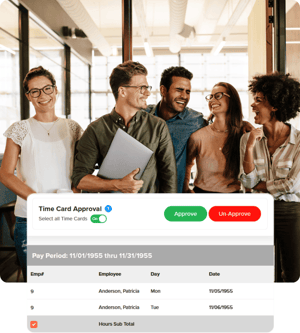
  • Manager approvals built in: Get sign-off before hours hit payroll, removing guesswork and finger-pointing.

  • Audit trail for every edit: Show exactly who made changes and when, so responsibility is always clear.

  • Timecard locking after approval: Prevent last-minute changes so payroll stays accurate and your work stays protected.

Start Tracking Time for Free →

imecard-approval-team-collaboration
gps-punch-location-admin

Stay in Control, Start to Finish

There are too many shifts, rules, and risks to catch everything yourself. OnTheClock keeps you protected, even when you're busy.

  • Punch reminders sent automatically: Employees get a nudge to clock in or out—so you’re not hunting them down mid-shift.

  • GPS and geofencing controls: Ensure clock-ins happen on site, eliminating buddy punching and location disputes.

  • Easy manual edits with notes: Fix errors fast and add context, so corrections are clear and no one questions your changes.

Free Trial of OnTheClock →

How Administrative Assistants Track Employee Time with OnTheClock

1
Create an account.
2
Invite your team.
3
Employees log their hours.
4
Pay your staff.

What Our Customers Are Saying

5-stars

"After trying expensive alternatives, we found OnTheClock. Thank you for making functions so simple, clear, and user-friendly!!!! I love that I can control the information gathered from the admin account so our employees don’t have to worry about being tracked. Just simple punch in/out, PTO, and manager tracking of hours. I love that there is a payroll option as well. And, I especially love that users can edit their punch-ins if they forget to clock in or out! So simple! Thank you!!!!."


JulieBusiness Owner

Everything You Need In One Place

Take control of hours, costs, and schedules in minutes.