Online Time Tracking that Connects Directly to QuickBooks
If you're running payroll through QuickBooks, you already know the pain: manually entering hours, double-checking totals, hoping nothing got missed. OnTheClock pulls your employees' actual clock-in and clock-out times directly into QuickBooks, so on payroll day, the data is already there.
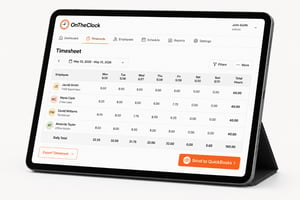
QuickBooks Time raised its prices for 2026. OnTheClock delivers the same time tracking, scheduling, and QuickBooks Online sync at less than half the cost — and we'll cover 50% of your bill for six months if you switch before July 1.
See how much you'd save →What You Get When OnTheClock Connects to QuickBooks
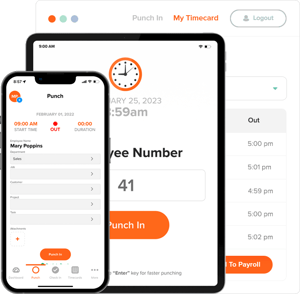
Your employees clock in and out on their phones, a shared tablet, or a web browser. OnTheClock tracks their hours (including overtime and PTO) and sends that data to QuickBooks when you're ready to run payroll. No manual entry or chasing employees for their totals.
OnTheClock also offers GPS tracking features that support employee scheduling and audit trail reporting. If you ever need to look back at a specific pay period to confirm overtime, for example, you can quickly find out where field employees punched in.
How the QuickBooks Integration Works
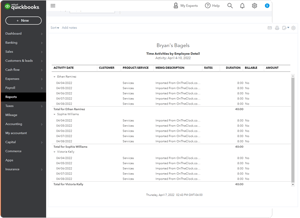
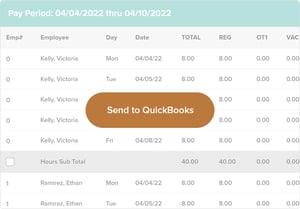
Once employees' timecards are in for the pay period, you review them in OnTheClock, make any adjustments, and click "Send to QuickBooks." That's the whole process. Hours move over to QuickBooks efficiently, so you can run payroll without re-entering anything.
OnTheClock works with both QuickBooks Online and QuickBooks Desktop. See the FAQ section below for specifics on what data transfers with each version.
Fewer Errors. Less Time on Payroll.
Manual time entry is where payroll mistakes happen. An employee misremembers their hours. Someone's overtime doesn't get caught. You spend Friday correcting what should already be right.
When OnTheClock sends hours to QuickBooks, you're working with actual punch data rather than what someone entered. For most teams, that means payroll goes from a four-hour process to one that takes 20 minutes.
How to Send Employee Time to QuickBooks: Step by Step
Sending employee time to QuickBooks takes four steps and can be completed in less than a minute. No manual entry, export files, or reconciliation.
- Employees clock in and out throughout the week.
- When the pay period closes, review and adjust timecards in OnTheClock.
- Select the pay period you want to export.
- Click "Send to QuickBooks."
QuickBooks receives the hours automatically, and you're ready to run payroll. See how it works
Works with QuickBooks Online and QuickBooks Desktop
Whether you're on the cloud version or still running the desktop version, OnTheClock works with both. The export process is the same — the specifics of what data transfers differ slightly by version. See the FAQ below for a full breakdown.
Common Questions About Integrating QuickBooks with OnTheClock
Here's what most businesses ask before connecting OnTheClock to QuickBooks. If something isn't covered here, our support team is available by live chat. Typical response time is under a minute.
QuickBooks Online
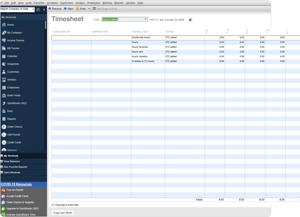
OnTheClock maps your employees' total hours to QuickBooks Online. Overtime and PTO information must be separated manually in QuickBooks Online. Job and project costing data from OnTheClock won't map over, and salaried employee information won't transfer either.
Yes, you can track contractor hours in OnTheClock. However, those hours don't transfer to QuickBooks Online — we only send hours over for employees listed in QuickBooks.
Not currently. We don't integrate with the accountant version of Intuit Online Payroll.
Quickbooks Desktop
The QuickBooks Desktop importer sends time to default payroll items: hourly, overtime (x1.5), double-time, triple-time, hourly vacation, hourly holiday, hourly sick, and hourly personal.
No, timecard columns in OnTheClock need to stay at their default names. If you rename them, the importer won't recognize the CSV file, and the import will fail.
QuickBooks Desktop does support contractor hours with OnTheClock.
OnTheClock is compatible with Enterprise, Pro, Wholesale, and Accountant versions from 2016 to the current. Time tracking capabilities must be enabled in your QuickBooks Desktop account before importing.
OnTheClock's support team is U.S.-based and available by live chat, phone, and email. Most issues are resolved in three to four minutes. If the QuickBooks integration throws an error you don't recognize, you won't spend an afternoon in a help center; you'll have an answer in minutes.
-
Live chat available during business hours
-
U.S.-based support team — no overseas routing
-
Phone: (888) 753-5999
Questions? Someone picks up.
OnTheClock's support team is U.S.-based and available by live chat, phone, and email. Most issues are resolved in three to four minutes. If the QuickBooks integration throws an error you don't recognize, you won't spend an afternoon in a help center; you'll have an answer in minutes.
-
Live chat available during business hours
-
U.S.-based support team — no overseas routing
-
Phone: (888) 753-5999

Ready to stop entering payroll hours by hand?
OnTheClock is a time tracking platform built for small businesses that run payroll through QuickBooks. More than 16,000 businesses — across construction, health care, retail, and home services — use OnTheClock to get accurate hours into QuickBooks without manual entry.