Military Time Converter & Chart (24 Hour Time)
Not sure what “0800 hours” means? Our simple military time converter is here to help. With OnTheClock’s military time calculator, you can effortlessly convert to and from the 24-hour clock, helping you stay punctual and organized.
Last Update: 09/2026Military / 24 Hour Time Calculator
How To Use a Time Conversion Chart
If you don't have our calculator handy, a military time chart works just as well. The chart is split into two halves: the left half covers the AM hours (midnight to 11:00 AM) and the right half covers the PM hours (noon to 11:00 PM). In each half, military time is on the left and the matching standard time is right next to it.
To convert military time to standard time, find the military time in the chart and read the time next to it. For example, 15:00 sits next to 3:00 PM.
To convert standard time to military time, do the reverse. Find the standard time and read the military time to its left. For example, 7:00 AM sits next to 07:00, and 7:00 PM sits next to 19:00.
The chart lists whole hours only. For times with minutes, look up the hour and keep the minutes the same: 2:30 PM becomes 14:30, and 21:45 becomes 9:45 PM.
You can download the full chart to keep handy by clicking the button below.
Military Time Chart
Find any time in the military time chart below. Military (24-hour) time is on the left and the matching standard (12-hour) time is on the right.
| Military Time | Regular Time (AM) | Military Time | Regular Time (PM) |
|---|---|---|---|
| 00:00 | 12:00 AM | 12:00 | 12:00 PM |
| 01:00 | 1:00 AM | 13:00 | 1:00 PM |
| 02:00 | 2:00 AM | 14:00 | 2:00 PM |
| 03:00 | 3:00 AM | 15:00 | 3:00 PM |
| 04:00 | 4:00 AM | 16:00 | 4:00 PM |
| 05:00 | 5:00 AM | 17:00 | 5:00 PM |
| 06:00 | 6:00 AM | 18:00 | 6:00 PM |
| 07:00 | 7:00 AM | 19:00 | 7:00 PM |
| 08:00 | 8:00 AM | 20:00 | 8:00 PM |
| 09:00 | 9:00 AM | 21:00 | 9:00 PM |
| 10:00 | 10:00 AM | 22:00 | 10:00 PM |
| 11:00 | 11:00 AM | 23:00 | 11:00 PM |
Convert Military Time to Standard Time Instantly
Simply enter the time format (12-hour or 24-hour) you want to convert into the appropriate box, and the equivalent will automatically calculate for you.
The easiest way to convert time is with our military time converter above.
If you're converting military time to regular time, enter the time in the 24-hour format (e.g., 14:00 hours) and click “calculate.” Our calculator will then provide you with the conversion result quickly and accurately.
What Is Military Time?
Military time (also called 24-hour time or army time) runs the clock from 0000 at midnight straight through to 2359 at the end of the day, with no AM or PM labels. It's the standard format used in healthcare, aviation, emergency services, and the armed forces, anywhere that ambiguity about time can cause real problems. If you've ever stared at "1730" and drawn a blank, you're not alone. Use the converter above to instantly translate between military and standard time in either direction, or scroll down for a manual conversion guide, a printable chart, and answers to the most common questions.
What Time Is It in Military Time Right Now?
Current time in military time: --:--
Shown in your local time zone.
Here's a video we made explaining Military Time
How To Do Manual Time Conversions
How To Manually Convert Military Time (24-Hour) to 12-Hour Standard Time
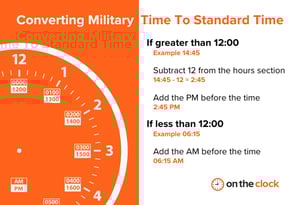
Converting military time to regular time can seem complicated, but it's actually quite simple. To convert military time to regular time, you just need to subtract 12 from any time that's greater than 12:00 PM.
For example, let's say you want to convert 16:30 hours (military time) to regular time. Since 16 is greater than 12, you need to subtract 12 from 16, which gives you 4. So, 16:30 hours becomes 4:30 PM in regular time.
In most cases, if the military time is less than or equal to 12:00 PM, then you can simply add "AM" to the end of the time. For example, 8:30 hours (military time) is equal to 8:30 AM in regular time. The exception is 12:00 AM, which is displayed as 00:00 in the 24-hour time format
How To Manually Convert a 12-Hour Format to Military Time
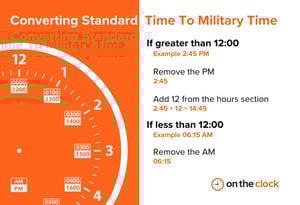
Converting regular time to military time is also a simple process. If the time is in the AM, you should remove the “AM” portion and add a leading zero to any single-digit hours (e.g., 08:00 for 8:00 AM). Again, the exception is 12:00 AM, which is displayed as 00:00 in military time.
If the time is in the PM, instead of subtracting 12 hours from the hour portion of the time, you should add 12 to the hour portion of the time. For instance, if you want to convert 2:30 pm to military time, you should add 12 to the hour portion, resulting in 14:30 hours.
Frequently Asked Questions
What is Military Time and how does it work?
Military time, is a timekeeping system that runs on a continuous 24-hour clock from 0000 (midnight) to 2359 (one minute before the next midnight). Instead of cycling through 1–12 twice with AM and PM labels, each hour of the day gets its own unique number: 0800 for 8 in the morning, 1400 for 2 in the afternoon, and so on. The first two digits always represent the hour; the last two represent the minutes. Because every time is expressed as a four-digit number, there's no ambiguity about whether a given time is morning or evening.
How do I read and understand military time?
Military time uses a 24-hour format (rather than a 12-hour format). Like the 12-hour format, the first two digits represent the hour, and the last two represent minutes. With military time, the day starts with “0000” (zero-hundred hours, or midnight). Anything between 0100-11:59 is AM time; anything after 1200 is PM time.
What are the advantages of using military time?
The biggest advantage is clarity: there's no risk of confusing 6:00 AM with 6:00 PM when the clock reads 0600 versus 1800. This matters enormously in high-stakes environments like hospitals, air traffic control, and emergency dispatch, where an AM/PM mix-up can have serious consequences. Military time also simplifies scheduling across time zones and makes it easier to calculate how much time has elapsed between two events. It's the international standard for a reason: it removes a whole class of human error.
How do I calculate time intervals in military time?
For intervals within the same day, simply subtract the start time from the end time. If a shift starts at 0730 and ends at 1545, the difference is 1545 − 0730 = 815, which equals 8 hours and 15 minutes. For intervals that cross midnight, subtract the start time from 2400 to get time remaining in the day, then add the end time. For example, a shift from 2200 to 0600 is (2400 − 2200) + 0600 = 200 + 600 = 800, or 8 hours.
What are some common mistakes when using military time?
The most frequent error is dropping the leading zero, writing 800 instead of 0800, which makes it ambiguous and non-standard. Another common mistake is applying AM/PM labels to military time, which defeats the purpose entirely (1400 PM is redundant; 1400 already means 2:00 in the afternoon). People also sometimes forget that 1200 is noon, not midnight. Midnight is 0000. When in doubt, use the converter above rather than converting in your head.
Is military time the same as 24-hour time?
They use the same underlying system: both run from 0000 to 2359 with no AM/PM designation. The practical difference is in notation and pronunciation. Military time is written without a colon (1700) and spoken with conventions like "seventeen hundred hours," while the civilian 24-hour standard typically includes a colon (17:00) and doesn't require the word "hours." In everyday conversation the terms are used interchangeably, but in formal military or government contexts the no-colon format and spoken conventions are expected.What is 0000 in military time?
0000, pronounced "zero hundred hours," is midnight and the first moment of a new day. It's the military standard for the start of any calendar day. You may occasionally see 2400 used to indicate the very end of a day (also midnight), but 0000 is the more common and widely accepted convention. For reference, noon is 1200 and the last minute of the day is 2359.How do you say military time out loud?
Military time is read as a four-digit number in two pairs, followed by the word "hours." Times with even hundreds are spoken as "[number] hundred hours": 0700 is "zero seven hundred hours," 1300 is "thirteen hundred hours," 2000 is "twenty hundred hours." When minutes are involved, you say both pairs: 1545 is "fifteen forty-five hours," 0830 is "zero eight thirty hours." The word "hours" is often dropped in casual use but is standard in formal military communication.How do I convert military time without a calculator?
For times between 0000 and 1159, military time is identical to standard AM time. Just add a colon and "AM" (0930 = 9:30 AM). For times between 1300 and 2359, subtract 12 from the hour and add "PM" (1700 − 12 = 5:00 PM). The two edge cases to memorize: 1200 is noon (12:00 PM) and 0000 is midnight (12:00 AM). For quick mental math, think of 1200 as your pivot point. Everything above it, subtract 12 and add PM.What industries use military time besides the military?
Healthcare is one of the most critical adopters. Hospitals and pharmacies use military time on charts, medication schedules, and surgical logs to eliminate dangerous AM/PM errors. Aviation uses 24-hour time globally for flight plans, departure times, and air traffic control communications. Emergency services including police, fire, and EMS log all dispatch and incident times in military format. Transportation, shipping, and logistics rely on it to coordinate across time zones without confusion. Many government agencies, public utilities, and international organizations also use it as their default for the same core reason: it's unambiguous.How to Eliminate Time-Conversion Hassles with OnTheClock
Converting time between military and standard formats can be a hassle, especially if you're dealing with large amounts of data or need to convert times frequently. If that's your situation, then OnTheClock's time-tracking software can make the process much easier.
OnTheClock simplifies the time-conversion process by eliminating the need to convert times manually. Our time clock has the ability to display time in either a 12-hour or 24-hour format — one of our many customizable features designed to meet your needs. Your first 30 days of OnTheClock are free — get started today.
Helpful resources at your fingertips
Convert minutes to decimal hours and vice versa.
View calculatorCalculate the duration between two times instantly.
View converterAutomatically calculate the total hours for payroll.
View calculatorOver 15,000 companies track time effortlessly with OnTheClock









Written By
Herb Woerpel
Herb Woerpel is a writer and content strategist at OnTheClock with 17+ years of experience in journalism and business communications. He specializes in workforce management, employee time tracking, and payroll compliance — translating complex labor regulations and HR processes into clear, practical guidance for small business owners and managers.
Before joining OnTheClock, Herb served as Senior Editor of ACHR News and Editor in Chief of Engineered Systems Magazine, two of the most respected trade publications in the mechanical contracting and HVAC industry. Leading editorial operations at both outlets gave him a deep understanding of how field-based, hourly, and contractor workforces actually operate, which directly informs how he writes about time tracking and payroll.
At OnTheClock, Herb works alongside HR professionals, payroll administrators, and business owners daily, giving him firsthand insight into the compliance challenges and operational realities that small businesses navigate every week.