If your business still uses manual time sheets or an old punch clock, switching to digital time tracking can feel like a significant upgrade. Many small businesses start with Time Clock Wizard because it offers a free plan and simple tools that replace paper time records.
But if you are searching for a Time Clock Wizard alternative, something is likely not working the way you expected.
Your field crew may complain that the mobile app drains their phone batteries before lunch. You may get frustrated by slow-loading screens or “No Internet Connection” errors when you are trying to finish payroll on a Friday afternoon. Or your business may be growing, and you have discovered that important tools, such as GPS tracking or PTO management, require an expensive upgrade.
In this article, I'll review the best Time Clock Wizard alternatives in 2026. You will see what each platform does well, where it struggles, and which option may work best for your team.
What Most Teams Actually Want from a Time Clock Wizard Alternative
When most people start looking for a Time Clock Wizard alternative, they're not just looking for a cheaper tool; they're looking for reliable mobile performance that doesn't drain device batteries. They want software that caches data offline so remote crews can actually clock in. They're looking for more control, better visibility, and fewer payroll surprises.
Quick Picks: Which Time Clock Wizard Alternative Best Fits Your Team
-
OnTheClock: Best Time Clock Wizard Alternative for Small Businesses
-
Buddy Punch: Best Time Clock Wizard Alternative for Strict Accountability
-
Homebase: Best Time Clock Wizard Alternative for Retail and Restaurants
-
Clockify: Best Time Clock Wizard Alternative for Zero-Budget Teams
-
When I Work: Best Time Clock Wizard Alternative for Complex Scheduling
-
Connecteam: Best Time Clock Wizard Alternative for Deskless Workforces
How We Evaluated These Time Clock Wizard Alternatives
To evaluate these Time Clock Wizard alternatives, I focused on what matters most on real job sites and in busy retail environments. I reviewed reliability, payroll accuracy, ease of use, and the level of control managers have when reviewing hours.
Here is what was measured:
-
Mobile-First Reliability
-
Pricing
-
GPS and Geofencing
-
Offline Capability
-
Payroll Sync
-
Support
The Best Time Clock Wizard Alternatives
Below, I review several strong alternatives based on real operational needs. For each platform, I'll explain the type of business it works best for, where it performs well, and where it may not be the right fit for your team.

OnTheClock: Best Time Clock Wizard Alternative for Small Businesses
Available on: Web, iOS, Android
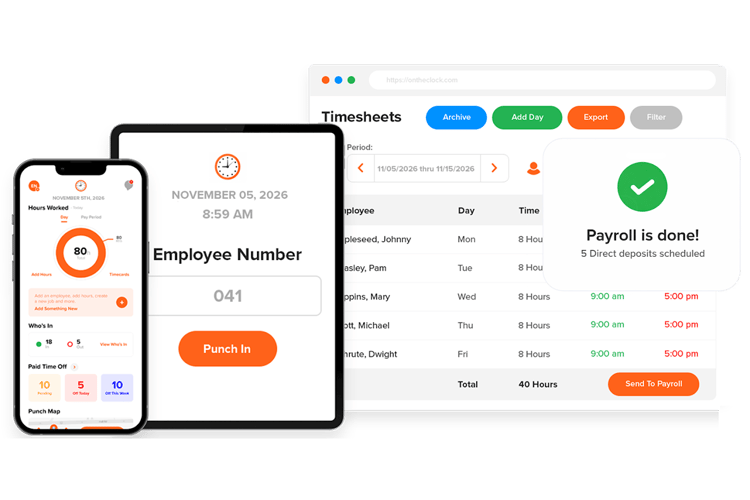
OnTheClock is designed for small and mid-sized businesses that need reliable time tracking without extra software layers. Most construction and service teams do not need complicated enterprise systems; they need a tool that works every day, especially during payroll week.
In my experience, small business owners usually care about three things: accurate hours, clean payroll exports, and simplicity. OnTheClock focuses on those basics and keeps everything in one affordable plan. You do not have to unlock core features through multiple pricing tiers.
For example, a small landscaping company with 15 field workers does not need advanced workforce analytics. The owner needs to know who showed up, where each person clocked in, and how many hours each person worked on each job. OnTheClock keeps that information clear and easy to manage.
What Makes it Different from Time Clock Wizard?
At first glance, both platforms appear similar. Each one allows employees to clock in from a mobile device, track locations with GPS, and manage time for field teams. The difference becomes clear once you start using them every day and see how each system affects your budget.
Time Clock Wizard uses a tiered pricing structure. Important tools, such as PTO tracking and detailed payroll reporting, are available only in its Pro and Enterprise plans. This setup can work for businesses that need a basic time tracker and have almost no budget; however, as teams grow, many companies find they must upgrade to more expensive plans just to handle routine tasks.
OnTheClock takes a simpler approach. The setup process stays straightforward and is easy to follow. Instead of separating key tools across numerous plans, the platform includes features, like GPS tracking, PTO management, and payroll integrations, in one affordable plan. Users also receive direct assistance from a real support team, so if a payroll issue comes up on a Friday afternoon, someone is there to help.
Key Features
Integrations:
Pros
Cons
Pricing
-
Plans start at $5/month base fee + $4 per user/month

Buddy Punch: Best Time Clock Wizard Alternative for Strict Accountability
Available on: Web, iOS, Android
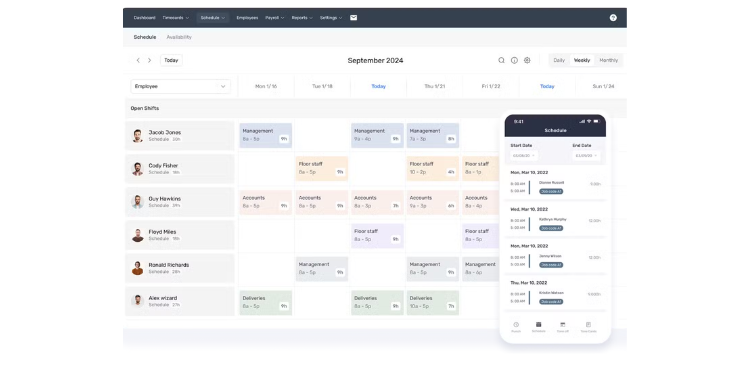
Buddy Punch, like Time Clock Wizard, includes mobile time tracking and scheduling tools. The main difference is that Buddy Punch focuses more on employee accountability and identity verification.
This focus helps businesses address buddy punching. Buddy punching occurs when an employee clocks in for another who is late or absent. It also helps managers who supervise teams working at different job sites. Buddy Punch gives managers stronger control over the clock-in process.
You can require employees to take a photo with a webcam when they clock in. The system can also use facial recognition to confirm a worker's identity. Another option is geofencing, which restricts clock-ins to a specific job site. If an employee is outside the approved location, the system will not allow the punch.
Buddy Punch may cost a little more for very small teams, because it includes a monthly base fee. However, many businesses recover that cost by saving time on payroll and administration. The system sends verified time data directly to major payroll providers, which reduces manual work and payroll errors.
Key Features
Pros
Cons
Pricing
-
A 14-day free trial is available
-
Plans start at +$19 base fee per month + $5.49 per user per month

Homebase: Best Time Clock Wizard Alternative for Retail and Restaurants
Available on: Web, iOS, Android
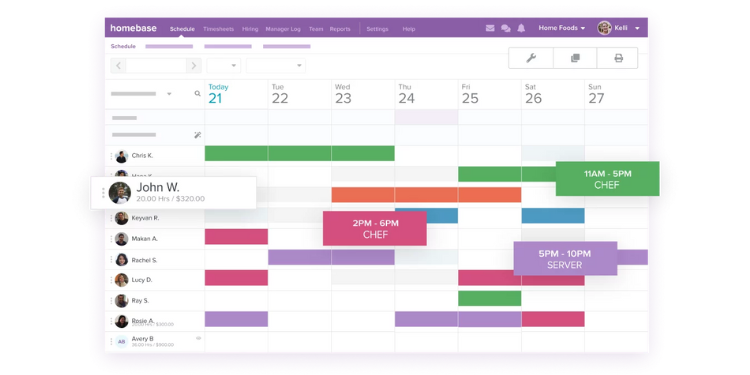
Homebase focuses on businesses that deal with fast-moving schedules and high employee turnover, such as retail stores and quick-service restaurants. While Time Clock Wizard provides general scheduling tools, Homebase connects directly to point-of-sale (POS) systems. This connection lets managers compare scheduled labor costs with live sales data as the day unfolds.
For example, a coffee shop manager may juggle part-time student employees, last-minute shift changes, and tight labor budgets. Seeing labor costs next to current sales helps that manager decide whether to add or cut shifts during slow periods. Homebase helps reduce the daily back-and-forth that often comes with scheduling. Employees receive shift reminders on their phones, and they can request shift swaps through the app. A manager only needs to review and approve the change.
Homebase also uses a different pricing approach. Instead of charging for each employee, the platform charges a flat monthly fee per location. This model works well for businesses that hire many part-time or seasonal workers.
Key Features
Pros
Cons
Pricing
- Free plan available
-
Plans start at $ 30 per month per location

Clockify: Best Time Clock Wizard Alternative for Zero-Budget Teams
Available on: Web, iOS, Android
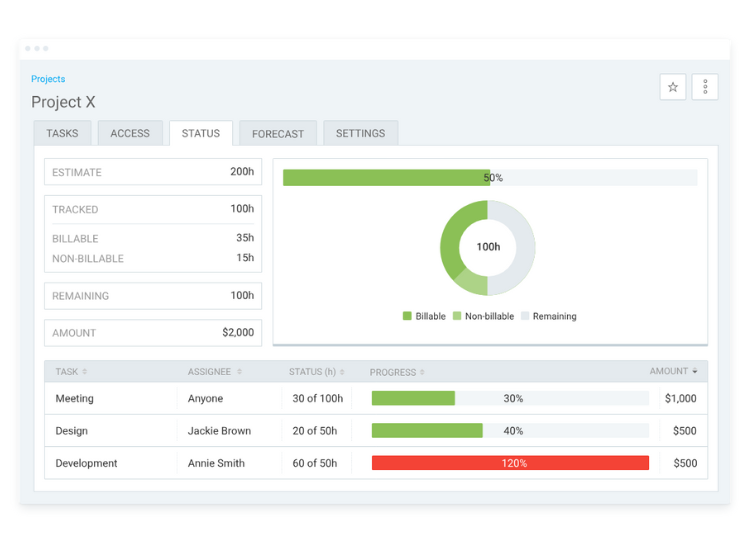
Clockify serves a very different user base than traditional shift scheduling software. The platform is built for digital agencies, remote freelancers, and professional service teams that need to track billable hours for client projects without paying for expensive tools.
While Time Clock Wizard limits many features in its free plan to push users to upgrade, Clockify offers a true free plan that includes unlimited users and projects. This makes it appealing for small teams that want simple, reliable time tracking without adding another monthly cost.
For example, a small marketing agency may want to know exactly how many hours the team spent designing a client’s website. Clockify makes this easy. Users can start a timer with a stopwatch, enter hours manually in a time sheet, or use a desktop auto-tracker that records which applications are running in the background.
Clockify does not focus on shift scheduling or hardware kiosks, which are important for businesses, like restaurants or construction companies. Instead, the platform focuses on project-based time tracking. For many professional teams, that project-focused structure combined with a generous free plan makes Clockify a practical upgrade for tracking billable work.
Key Features
Pros
Cons
Pricing
-
Free plan available
- Plans start at $6.99 per month per user

When I Work: Best Time Clock Wizard Alternative for Complex Scheduling
Available on: Web, iOS, Android
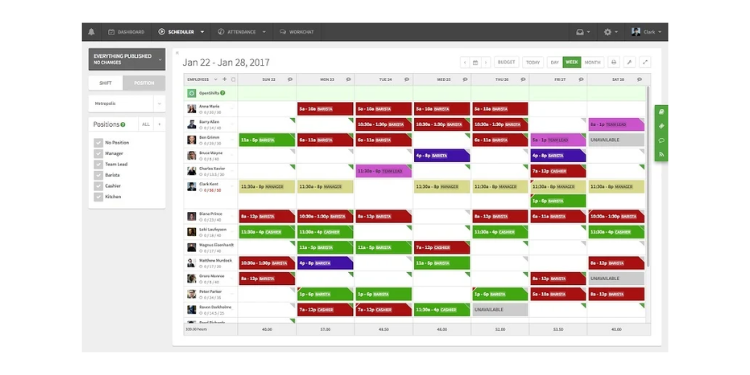
When I Work focuses on solving one of the biggest problems managers face: complicated employee scheduling. While Time Clock Wizard lets you create a schedule manually, When I Work goes a step further by automating the process. The system uses an algorithm that considers employee availability, required skills, and your labor budget to build a schedule in minutes.
For businesses like health care clinics, call centers, or large retail stores, this type of automation can save managers several hours of administrative work each week. Instead of adjusting shifts one by one, managers can quickly generate a working schedule and make small edits if needed.
The platform also includes a feature called OpenShift. Managers can post open shifts to a digital board, where qualified employees receive notifications. Staff members can claim the shift on a first-come, first-served basis. This simple system removes the need for managers to spend time calling employees to fill gaps in the schedule.
When I Work connects this scheduling system with a mobile time clock that includes GPS verification. Employees can clock in from their phones, and the system confirms they are scheduled and physically at the job site when they start their shifts.
Key Features
Pros
Cons
Pricing
-
Plans start at $ $2.50 per user per month

Connecteam: Best Time Clock Wizard Alternative for Deskless Workforces
Available on: Web, iOS, Android
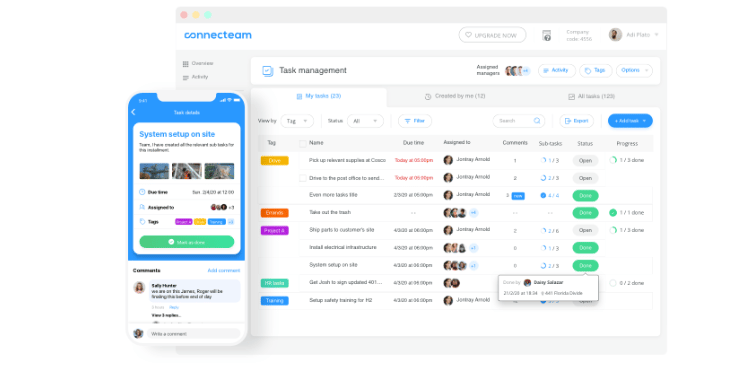
Connecteam goes beyond simple time tracking. The platform acts as a central system for companies that manage large teams working in different locations. Many businesses currently use separate tools for each task, such as Time Clock Wizard for hours, WhatsApp for messaging, and paper forms for safety records. Connecteam brings those activities into one place.
For a regional cleaning company or a mid-sized logistics team, the platform combines daily operations inside a single mobile app. The Operations Hub helps managers dispatch jobs and track employee time with GPS. The Communications Hub allows teams to send secure messages and company announcements. The HR Hub lets businesses deliver safety training and other courses directly to employees’ phones.
Managers can also attach digital checklists to specific shifts. For example, a field technician may need to upload a photo of a completed job before the system allows them to clock out. This process helps confirm that work is finished before a shift ends.
Connecteam also offers a “Small Business Plan.” This plan gives teams of up to 10 users free lifetime access to all three hubs, making the platform accessible to smaller companies that are still growing.
Key Features
Pros
Cons
Pricing
-
Free for up to 10 users
-
Starts at $29/month up to 30 users
A Side-by-Side Comparison of Time Clock Wizard Alternatives
Why Choose OnTheClock?
See how OnTheClock stacks up against other Time Clock Wizard alternatives.
| Tool | Best For | Pricing (Approx.) | Key Strengths | Top Integrations |
|---|---|---|---|---|
| OnTheClock | Small Businesses | $4 /employee (avg) | Simple dashboard, GPS geofencing, no feature gating | ADP, QuickBooks, Gusto, Square |
| Buddy Punch | Strict Accountability | $4.49 /user + $19 base | Facial recognition, webcam photos, robust approvals | QuickBooks, Paychex, ADP, Gusto |
| Homebase | Retail & Restaurants | $30 /location (Essentials) | POS integrations, auto-scheduling, location pricing | Square, Clover, Toast, QuickBooks |
| Clockify | Zero-Budget Teams | Free (Basic is $3.99 /user) | Unlimited free users, billable rates, project tracking | Asana, Trello, Jira, QuickBooks |
| When I Work | Complex Scheduling | $2.50 /user | Auto-scheduling, OpenShifts, team messaging | Rippling, Gusto, ADP, Square |
| Connecteam | Deskless Workforces | $29 /month (up to 30 users) | Digital checklists, all-in-one HR, unified communications | QuickBooks, Gusto, Paychex |
Comparison data based on 2026 market research and subject to change by respective providers.
What’s the Best Option for You?
The best option isn't the tool with the longest list of features; it's the one that solves the problem that frustrates you every day.
Start with a simple question: What problem are you actually trying to solve?
Many managers choose software based on features they might use someday. That often leads to systems that feel heavy, take weeks to learn, and frustrate crews who have to use them. A better approach is to focus on the problem slowing you down right now.
Ask yourself what is causing the most friction in your day.
-
Are field workers complaining that your current app drains their phone batteries?
-
Do you spend every Friday fixing time sheet errors because punches failed to sync?
-
Do you juggle three different apps to schedule shifts, track hours, and message your team?
-
Do you need stronger accountability so employees cannot clock in for each other?
Your answer should guide your decision. The right Time Clock Wizard alternative removes friction from your most common problem. When that friction disappears, payroll runs smoother, job costing becomes clearer, and managers spend less time fixing errors and more time running the business.
Frequently Asked Questions About Time Clock Wizard Alternatives
What is the best Time Clock Wizard alternative?
The best alternative depends on your main priority. For small to mid-sized businesses that want a simple setup, flat pricing, and clean payroll integration without hidden feature gates, OnTheClock is often a strong fit. For companies that manage complex rotating shifts, When I Work or Homebase may be a better option. The right choice depends entirely on your biggest operational pain point.
Which Time Clock Wizard alternative is best for preventing buddy punching?
Alternatives that offer biometric authentication, webcam photo verification, or kiosk-based facial recognition provide the strongest protection against buddy punching. Platforms like Buddy Punch excel in this area by requiring visual or biometric confirmation, along with strict GPS data, for every punch sequence.
Why do companies switch away from Time Clock Wizard?
Companies frequently migrate away from Time Clock Wizard due to unexpected scaling costs, feature gating (where essential tools like PTO are locked behind premium tiers), and severe mobile application inefficiencies. Field workers consistently report that the mobile app causes massive battery drain and struggles with connectivity, prompting organizations to seek more reliable alternatives.
How long does it take to switch from Time Clock Wizard to another platform?
Most small to mid-sized teams can switch time tracking platforms in a few days to two weeks. The timeline depends heavily on your total employee count, the complexity of your existing payroll integrations, and whether historical data must be migrated. Platforms with intuitive onboarding processes can often be deployed to the workforce within 48 hours.
Will my employees resist switching from Time Clock Wizard?
Employees usually resist change only when the new system feels more complicated or damages their mobile devices. If the replacement platform offers a lightweight, battery-optimized mobile application and simplifies the daily clock-in process, most crews adapt quickly and often appreciate the software upgrade.
Do Time Clock Wizard alternatives integrate with payroll tools like QuickBooks or ADP?
Yes. Many alternatives integrate directly with major payroll tools, such as QuickBooks, ADP, Sage, and Gusto. It is always recommended to confirm the depth of the integration, specifically whether it syncs overtime calculations, PTO accruals, and job codes, to ensure all manual data entry is eliminated.
