
Jump to section
Try OnTheClock Free
Save time and make payroll effortless with our easy-to-use, affordable employee time tracking app.
Try It FreeWhen it comes to basic workforce management, Buddy Punch covers the essentials fairly well. It lets employees clock in and out, tracks hours, and replaces paper timecards. For many teams, that’s a practical and helpful place to start.
Over time, though, some teams may begin to notice small friction points. Occasional clock-in issues, setup limitations, or extra steps in everyday workflows can pull managers into troubleshooting rather than keeping them focused on payroll or scheduling.
Buddy Punch is a solid product. It helps many teams move away from paper systems and manage time more efficiently. But, as needs change or workflows become more complex, some teams may start exploring alternatives that offer more flexibility, deeper features, or a smoother day-to-day experience.
What Most Teams Actually Want from a Buddy Punch Alternative
When teams start looking for a Buddy Punch alternative, they’re usually not chasing fancy features. They’re trying to remove friction from everyday work and make time tracking feel boring again in a good way.
Most teams are really looking for a tool that does five simple things well:
-
Simple pricing without feature gating
-
Reliable mobile clock-ins
-
Built-in GPS tracking
-
Clean payroll exports
-
Real support without upgrades
In short, most teams aren’t looking for a “better” time clock. They’re looking for one that creates less work, fewer surprises, and fewer late nights fixing payroll.
Quick Picks: Which Buddy Punch Alternative Fits Your Team
If you just want the short answer, here’s how the top Buddy Punch alternatives break down. These picks are based on pricing, feature access, ease of use, integrations, and how each tool supports common time tracking, payroll, and scheduling workflows.
-
OnTheClock — Best Overall: Simple pricing, built-in GPS, clean payroll exports, and real support on all plans.
-
Clockify — Best Free Option: A strong free plan for basic time tracking, but limited for scheduling and payroll.
-
Hubstaff — Best for Remote Teams: Deep monitoring tools and GPS tracking, though it can feel intrusive and pricey.
-
When I Work — Best for Scheduling: Great shift scheduling and messaging, but weaker timecard and reporting features.
-
Homebase — Best for Hourly Retail: Easy for small retail teams to get started, but costs rise fast as you grow.
How We Evaluated These Buddy Punch Alternatives
To make the comparison consistent and useful, we compared each tool across the same core areas:
-
Setup time and learning curve: How fast a team can get up and running without training sessions or long onboarding.
-
Mobile app reliability: Whether clock-ins work smoothly on phones without freezes, crashes, or failed punches.
-
GPS accuracy and geofencing: How well location tracking works in real-world conditions, not just on paper.
-
Scheduling and shift controls: How easy it is to build schedules, reassign shifts, and handle last-minute changes.
-
Payroll integrations: How cleanly hours export into tools like QuickBooks, Gusto, ADP, or Paychex.
-
Pricing transparency: Whether pricing is simple and predictable, without surprise add-ons.
-
Feature access across plans: Whether core features are included or locked behind higher tiers.
-
Support quality and availability: How easy it is to reach real help when something breaks, or payroll is due.
The Best Buddy Punch Alternatives
There are plenty of time tracking tools out there, but not all of them meet the same needs or expectations. The options below represent a range of solid alternatives to Buddy Punch, whether you’re focused on pricing, features, team size, or specific workflows. Each one is worth considering depending on how you track time and manage work today.

OnTheClock: Best Overall Buddy Punch Alternative
Available on: Web, iOS, Android
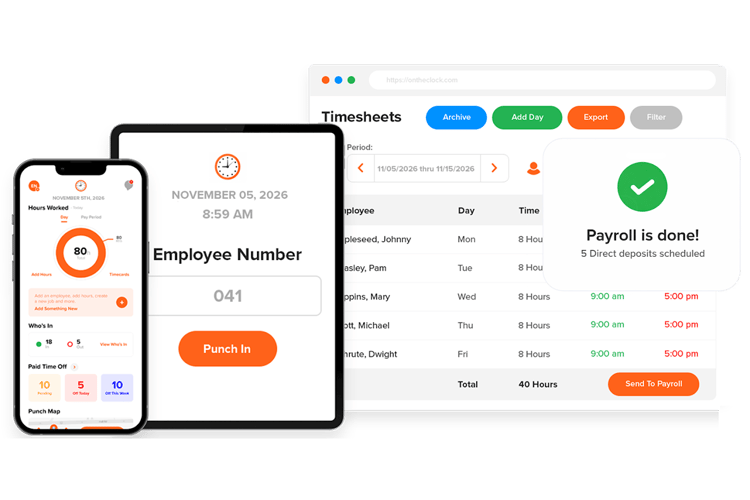
OnTheClock is a time tracking and scheduling tool built for small and mid-sized teams that want a simple, dependable way to track hours and run payroll without added complexity. It’s commonly used by businesses with hourly employees, including construction crews, retail teams, healthcare clinics, restaurants, and field service companies.
The platform combines mobile clock-ins, GPS tracking, scheduling, PTO tracking, and payroll-ready timecards in one place. Instead of focusing on advanced monitoring or niche features, OnTheClock is designed around everyday workflows—getting people clocked in on time, keeping hours accurate, and making payroll easier to run at the end of the week.
Teams often choose OnTheClock when they want something more straightforward than spreadsheets or paper timecards, but less complicated than enterprise workforce software. It’s built for managers who want time tracking to “just work” without needing long setup, training, or constant admin fixes.
What Makes It Different from Buddy Punch
Buddy Punch and OnTheClock offer many of the same core features, like mobile clock-ins, GPS tracking, scheduling, and timecards. The difference is less about what they do and more about how those features are packaged and supported.
One key difference is feature access. OnTheClock does not lock core tools behind higher plans. Teams get access to things like GPS tracking, scheduling, reporting, and timecard controls on all plans, without needing to upgrade.
Pricing is also simpler. OnTheClock uses a base fee plus a per-employee price. There are no surprise add-ons for essentials like GPS or payroll-ready timecards. That makes monthly costs easier to predict.
Support works differently, too. OnTheClock offers live, U.S.-based support on all plans. Teams don’t have to upgrade just to talk to someone when payroll is due, or something isn’t working.
In short, teams often choose OnTheClock not because Buddy Punch is missing features, but because they want fewer pricing tiers, fewer locked tools, and easier access to real support.
Key Features
Integrations:
Pros
Cons
Pricing
- 30-day free trial available
- Plans start at $5/month base fee + $4 per user/month
Thinking about switching from Buddy Punch?
Try OnTheClock free for 30 days and see how smooth time tracking and payroll can be.
Try Free
Clockify: Best Free Buddy Punch Alternative
Available on: Web, iOS, Android
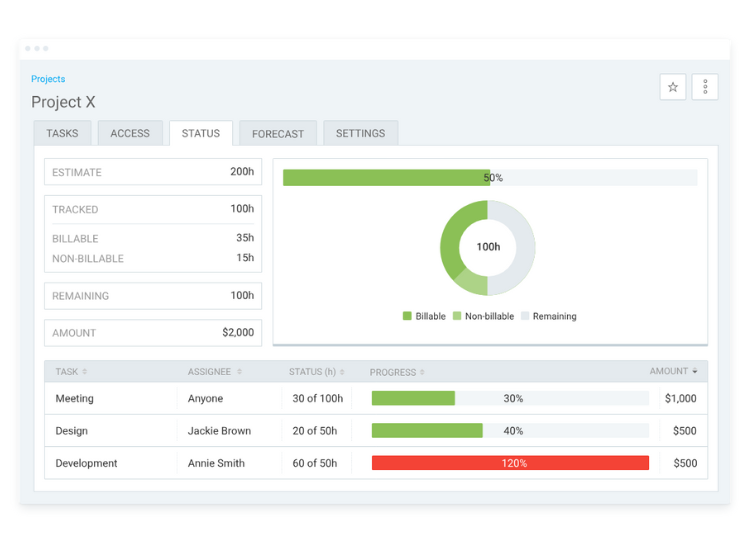
Clockify is a popular time tracking tool known for its generous free plan and simple interface. It’s often used by freelancers and small teams that want basic time tracking without paying upfront.
Compared to OnTheClock and Buddy Punch, Clockify is more focused on general time tracking than workforce management. It offers project tracking, reports, and browser extensions, but it does not include built-in payroll features. That means teams still need to export hours and run payroll in a separate system.
While the free plan covers basic needs, accessing more advanced features requires upgrading to a paid tier, which can increase costs as your team grows.
Key Features
Pros
Cons
Pricing
- Free plan forever for up to 5 users
- Plans start at $3.99 per user per month when billed annually.

Hubstaff: Best Buddy Punch Alternative for Remote Teams
Available on: Web, iOS, Android
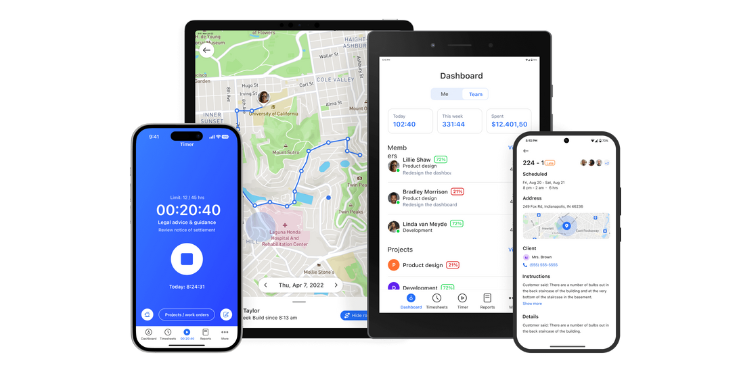
Hubstaff is a time tracking tool designed for remote and distributed teams. It focuses heavily on visibility and accountability, offering features like activity tracking, GPS location tracking, and optional screenshots during work hours.
Compared to Buddy Punch and OnTheClock, Hubstaff leans more toward monitoring than scheduling or payroll workflows. Teams can track time, see activity levels, and review location data, but payroll and scheduling typically require additional setup or integrations.
Hubstaff works best for teams that want deeper insight into how and where time is spent, especially in fully remote environments. For teams that prefer a lighter-touch approach or simpler payroll workflows, it can feel more complex than necessary.
Key Features
Pros
Cons
Pricing
- 14-day free trial available
- Plans start at $4.99 per user per month when billed annually.

When I Work: Best Buddy Punch Alternative for Scheduling-First Teams
Available on: Web, iOS, Android
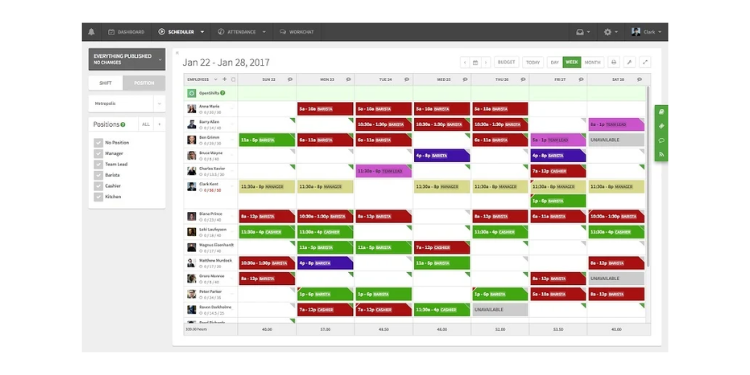
When I Work makes sense if scheduling is your biggest headache. If you’re constantly building shifts, dealing with availability changes, or filling last-minute gaps, this tool puts scheduling front and center.
You can create schedules quickly, let employees swap shifts, and send updates without long back-and-forth messages. Built-in messaging helps keep everyone on the same page, especially in fast-moving environments, like retail, restaurants, or service teams.
Time tracking is available, but it’s not the main focus. Compared to Buddy Punch or OnTheClock, When I Work works best when you care more about getting the schedule right than managing detailed timecards or payroll workflows. If your priority is knowing who’s working, when, and where to plug coverage gaps, it’s a practical option.
Key Features
Pros
Cons
Pricing
- 14-day free trial available
- Scheduling plans start at $2.50 per user per month; Time & Attendance costs extra.

Homebase: Best Buddy Punch Alternative for Hourly Retail Teams
Available on: Web, iOS, Android
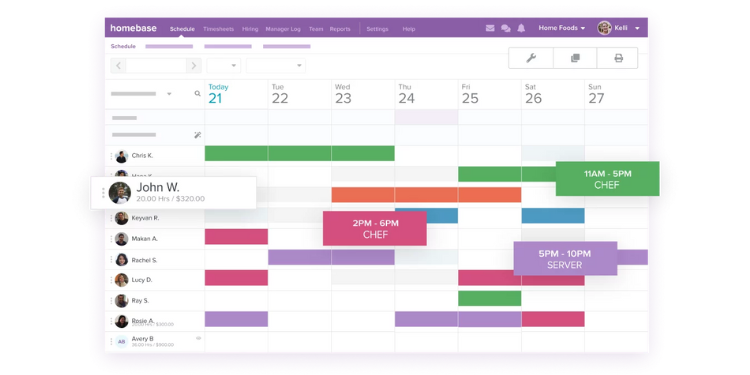
Homebase is built for hourly teams that need a simple way to handle scheduling, time clocks, and basic team communication in one place. It’s especially common in retail, restaurants, and small service businesses where shifts change often, and managers need quick visibility into who’s working.
The free plan makes it easy for small teams to get started with scheduling and clock-ins without committing to a paid plan right away. As teams grow, Homebase adds options for time tracking, labor controls, and payroll-related features through paid tiers.
Homebase works best for hourly retail teams that want an all-in-one starting point, but costs can increase as more features or locations are added.
Key Features
Pros
Cons
Pricing
- Free plan available for one location and up to 10 employees
- Paid plans start at $30 per location per month
A Side-by-Side Comparison of Buddy Punch Alternatives
Why Choose OnTheClock?
See how we stack up against the competition.
| Tool | Pricing & Feature Access | GPS + Mobile | Scheduling + Payroll | Support |
|---|---|---|---|---|
| OnTheClock | $5 base + $4/employee All core features included |
Strong GPS + reliable mobile clock-ins | Scheduling + payroll-ready exports | Live U.S.-based support on all plans |
| Clockify | Free plan; paid tiers for advanced tools | Good mobile; GPS not the focus | Limited scheduling; no built-in payroll | Mostly self-serve support |
| Hubstaff | Starts at $4.99/user/month annually; tier-based | Strong GPS + monitoring tools | Time tracking first; payroll via integrations | Support varies by plan |
| When I Work | Scheduling from $2.50/user/month; time tracking costs extra | Good mobile; GPS available | Scheduling is the main strength | Positive onboarding feedback |
| Homebase | Free plan; paid plans add features | Good mobile clock-ins | Strong scheduling; payroll features vary | Good for small teams, mixed as you scale |
Comparison data is approximate and subject to change by respective providers.
What’s the Best Option for You?
Buddy Punch is a solid tool for basic time tracking. For many teams, it does exactly what it promises. But, if you’re starting to feel friction, whether that’s pricing tiers, limited reporting, scheduling gaps, or extra steps during payroll, it may be time to switch to a platform that fits your workflow better.
Here’s the simplest way to select the right solution:
- Choose OnTheClock if you want an all-in-one system with simple pricing, GPS tracking, scheduling, payroll-ready timecards, and real support on every plan.
- Choose Clockify if you want a strong free option for basic time tracking and don’t need payroll or scheduling tools built in.
- Choose Hubstaff if you manage remote employees and want deeper monitoring and productivity tracking.
- Choose When I Work if scheduling is your biggest priority and you want an easy way to manage shifts and availability.
- Choose Homebase if you run an hourly retail or restaurant team and want a scheduling-first platform with a free plan to start.
If you’re unsure, I suggest testing two options for one full pay period. That gives you a real look at clock-ins, approvals, reporting, and payroll exports without guessing.
If you want a clean, reliable upgrade from Buddy Punch with fewer pricing surprises, OnTheClock is a strong place to start.
Frequently Asked Questions About Buddy Punch Alternatives
Is Buddy Punch still worth it?
Buddy Punch remains a reliable choice for basic time tracking, mobile clock-ins, and straightforward scheduling. It is particularly effective for teams transitioning from paper timesheets to digital logs. However, some features require higher-tier plans or add-ons. Geofencing, for example, requires Pro or Advanced, while Real-Time GPS costs extra on Starter and Pro and is included with Advanced. Teams that need these features may want to compare the total cost with alternatives that include more functionality in their standard pricing.
Does Buddy Punch track GPS by default?
Yes. Buddy Punch offers Basic GPS on all plans, which records an employee’s location when they clock in or out. Real-Time GPS can track an employee’s location throughout a shift and is available as a paid add-on for Starter and Pro or included with the Advanced plan. Geofencing is available on Pro and Advanced.
What is the cheapest Buddy Punch alternative?
The cheapest option depends on your team size and feature needs. Clockify offers a free plan for teams of up to five users who need basic time tracking. For paid options, When I Work scheduling plans start around $2.50 per user per month (time and attendance costs extra), and OnTheClock costs $4 per employee per month plus a $5 base fee, with all core features included. Many businesses find these alternatives cheaper than Buddy Punch because they may not charge the $19/month base fee required by Buddy Punch's standard plans.
Which app has the best mobile time clock?
For 2026, OnTheClock and Connecteam are frequently cited as top mobile performers due to their intuitive interfaces and stable GPS reliability. Homebase is also a favorite for local retail and restaurant teams. If you need advanced biometric features, Jibble offers high-rated facial recognition on mobile, while Clockify remains the go-to for simple, timer-based mobile tracking.
Do any Buddy Punch alternatives include payroll?
Yes. OnTheClock offers a fully integrated payroll service ($40/month base + $6/employee). Homebase also offers payroll as a paid add-on, while other alternatives may connect with third-party payroll providers.
How long does it take to switch time tracking software?
Setup time varies by platform, team size, pay rules, integrations, and the amount of historical data being migrated. Simple setups may be completed quickly, while more complex migrations can require additional onboarding time. If you are migrating historical data or complex pay rules, the process may take one to three business days. Most modern platforms provide CSV import tools and dedicated onboarding support to ensure your next payroll cycle isn't interrupted during the transition.
