Key Takeaways
- ✔ When I Work is best for businesses needing simple shift scheduling, but lacks built-in time tracking, in-house payroll integration, and responsive support.
- ✔ Costs can rise quickly due to paid add-ons for features like time tracking, kiosks, and PTO management.
- ✔ Setup and onboarding are fast and user-friendly, making it easy for teams to get started with scheduling.
- ✔ Customer support is inconsistent and limited, especially for users on lower-tier plans or mobile.
- ✔ It’s a good starting point for small, shift-based teams, but not a scalable solution for growing companies.
When I Work is an online workforce management solution designed to help businesses schedule employees, track attendance, and communicate with their teams. The web- or mobile-based platform focuses heavily on shift scheduling and team communication, making it especially popular with hourly, shift-based workplaces that need a simple way to manage availability, swap shifts, and reduce scheduling conflicts.
Verdict: Is When I Work Worth It?
Score: 6.5/10
When I Work is a scheduling-first workforce platform that covers the basics of managing hourly teams: building schedules, tracking attendance (with a paid add-on), and giving managers visibility into who’s working and when. It’s easy to get started, the interface is generally intuitive, and the core workflow — setting up employees, creating shifts, and sharing schedules — feels simple and functional without a steep learning curve.
The platform is best suited for businesses where shift coverage matters most, such as retail, hospitality, education, and other schedule-driven environments. Onboarding is quick, adding employees is straightforward (including bulk upload options), and the mobile app gives employees an accessible way to view schedules, request time off, and stay connected on the go.
However, When I Work starts to feel limited as soon as you expect it to function like a complete, all-in-one workforce system. Time tracking isn’t included in base plans; and important tools, like PTO settings and advanced controls, can be easy to miss because they’re buried in menus or require manual setup. Payroll is also integration-dependent, meaning it relies on third-party providers and isn’t a built-in experience. Customer support can be difficult to access and inconsistent, especially for lower-tier users or anyone relying primarily on the mobile app.
Overall, When I Work is a solid option for teams with predictable workflows that want a scheduling-focused platform and don’t mind paying extra for time tracking. But for growing businesses that want a unified system with time tracking included, easier feature access, payroll options that feel truly integrated, and consistent support, it may feel more like a starting point than a long-term solution.
The following comprehensive review scores When I Work from every angle and explains exactly how I landed at this rating.
How Much Does When I Work Cost?
Score: 5/10
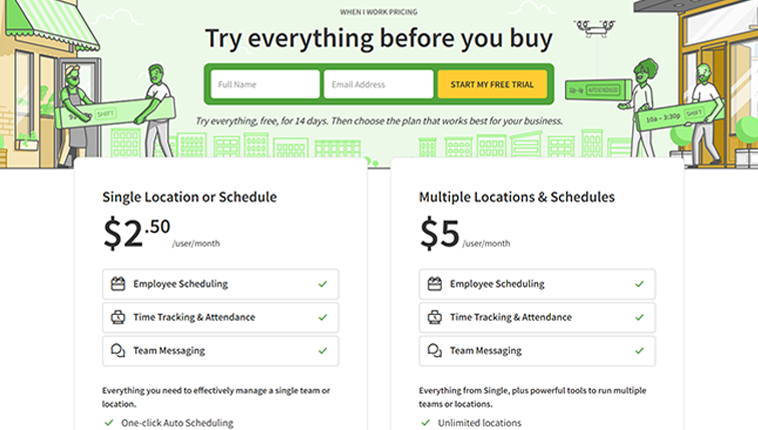
When I Work offers three pricing tiers: Essentials, Pro, and Premium. The cost for the Essentials plan is $2.50 per user per month; the Pro plan is $5 per user per month; and the Premium plan is $8 per user per month. For a 10-user team, that’s $25/month (Essentials), $50/month (Pro), or $80/month (Premium) before adding time tracking.
Time tracking and attendance are not included in these plans, but may be purchased for an additional $1.50 per person per month for the Essentials plan and $2 per user per month for the Pro and Premium plans. This increases the cost for a 10-person company to $40 for the Essentials plan, $70 for the Pro plan, and $100 for the Premium plan.
When I Work offers a 14-day trial; however, it does not offer a free plan for businesses of any size.
How Do You Get Started on a Web Browser?
I started by visiting the When I Work website (www.wheniwork.com) to create an account. There, I was greeted by a headline that touts the ability to “build, share, and track a work schedule in minutes.” The homepage also boasts relationships with a number of reputable brands, including Culver's, Gilroy Gardens, Walgreens, etc.
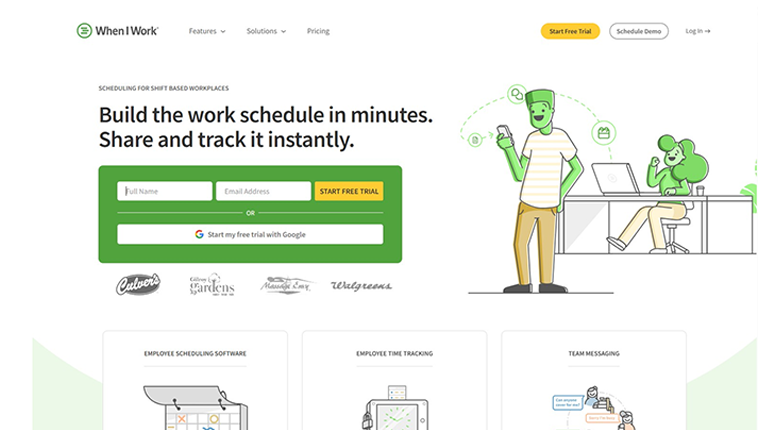
I was able to start my free trial simply by entering my full name and an email address. An option to proceed with an existing Google account was also offered. I learned on the next screen that my trial is 14 days long, and I was able to start my trial without entering a credit card number. The software’s light green and white appearance was pleasant and easy on the eyes, and I was up and running in just a few minutes.
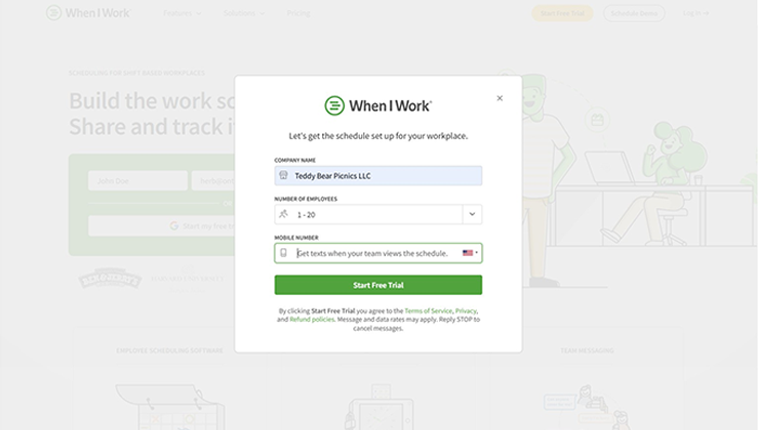
The next step focused on setting up my workplace schedule. I was prompted to enter my company name, the number of employees I intended to schedule, and my cell phone number on the next screen.
Then I was asked to enter my business name, company size, mobile number, and more.
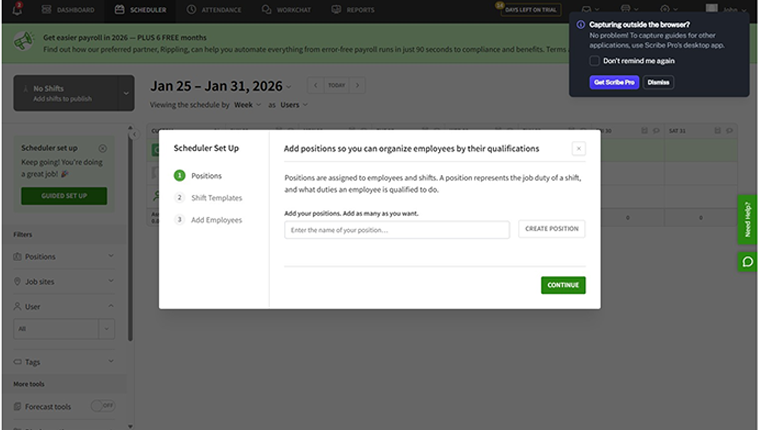
The next screen encouraged me to complete my schedule. The software’s scheduler tool offered me three options: Import a setup, proceed with assistance, or do it on my own. I chose the “Help me get started” prompt. The next step encouraged me to add positions, such as supervisor, manager, employee, etc.
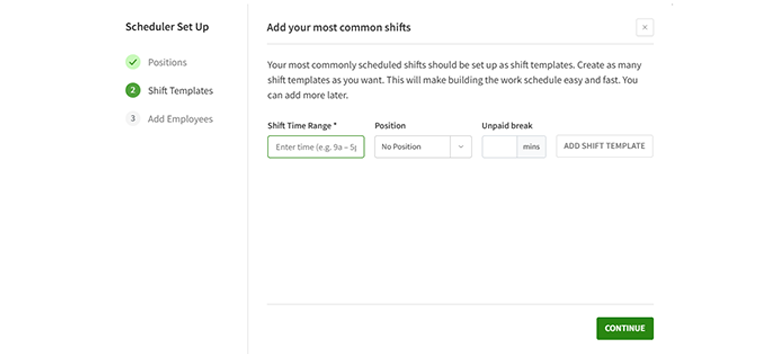
Then, I was asked to add my most common shifts, including the time range, position, and any unpaid breaks.
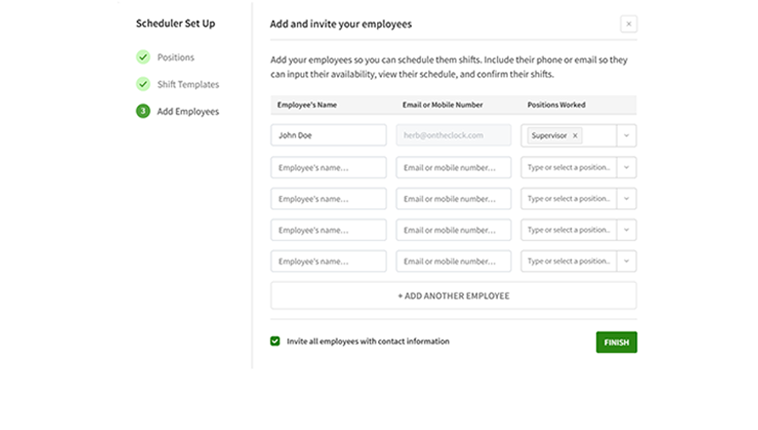
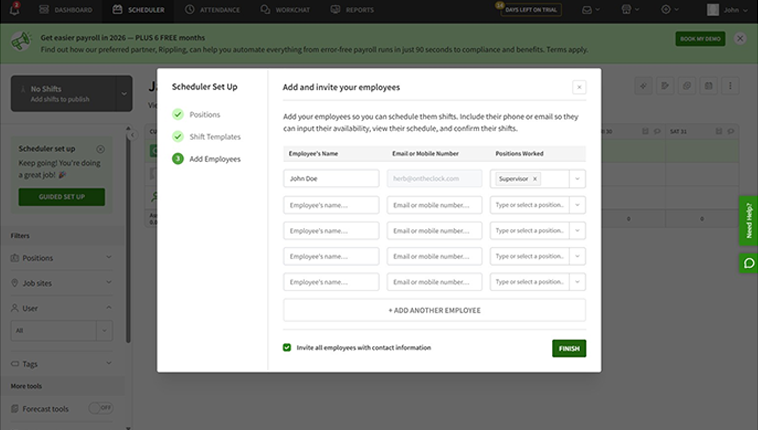
I was then asked to invite employees to the solution. To do so, I simply needed to input their names, email addresses, and positions.
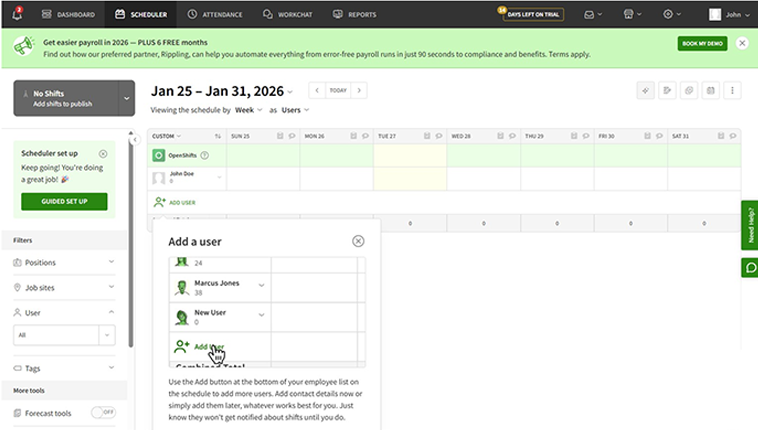
A tutorial pop-up demonstrated how to add employees to the schedule. This guide informed me that any additional details could also be added later. This tip was helpful, providing insight and a path to assistance if needed.
How Do I Get Started on the Mobile App?
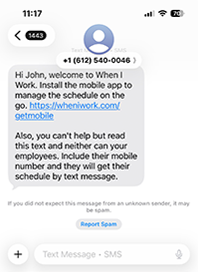
Upon signing up for an account via a web browser, I received a text message that welcomed me to When I Work and encouraged me to install the mobile app.
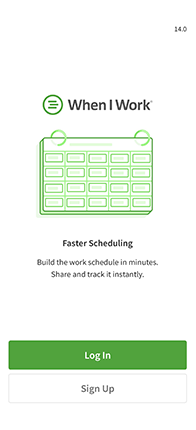
Downloading the mobile app was easy. It took only a few seconds. Once it had loaded, I was prompted to log in or sign up, and the background screen touted “Faster Scheduling.” There wasn’t an option to log in with my Apple/Google ID or any other option in the mobile app.
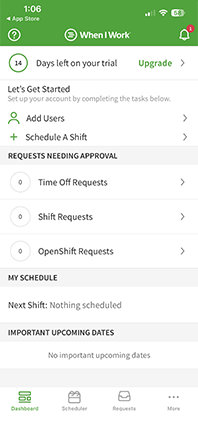
I then landed on the app’s dashboard. The interface retained the software’s trademark green and white appearance; however, the experience was much busier and a tad more difficult to navigate.
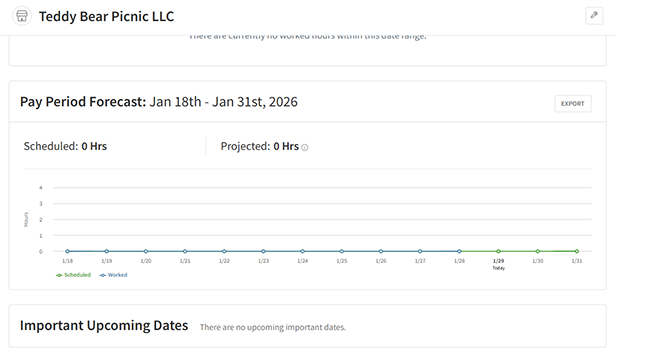
On the dashboard screen, I was encouraged to complete my account setup by adding users and scheduling a shift. Any pending time off, shift, and OpenShift requests were shown, along with schedules and important upcoming dates.
Along the bottom of the app were four shortcuts: Dashboard, Scheduler, Requests, and More.
How Do You Add Employees?
Score: 9/10
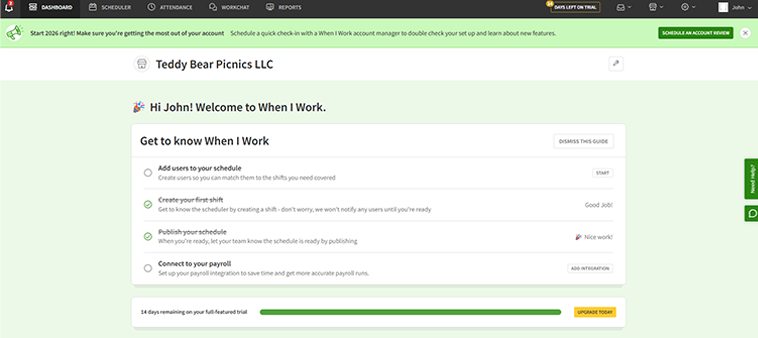
To add employees during the trial period, an admin has to navigate to the Dashboard and click the “Add Users to Your Schedule” tab.
From there, use the Add button at the bottom of the employee list on the schedule.
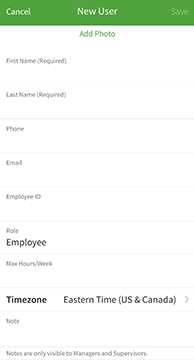
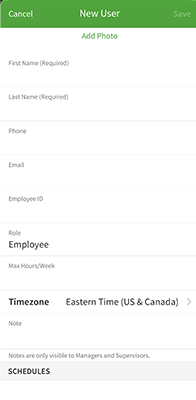
On the mobile app, the “Add Users” prompt is listed near the top of the screen. When tapped, it opened up a portal that allowed me to input the employee’s vital information, including tabs to add schedules, positions, and tags.
How Does Scheduling Work?
Score: 8/10
Scheduling is When I Work’s shining star. The software’s scheduling feature is comprehensive, offering companies numerous ways to configure and track employees’ work schedules.
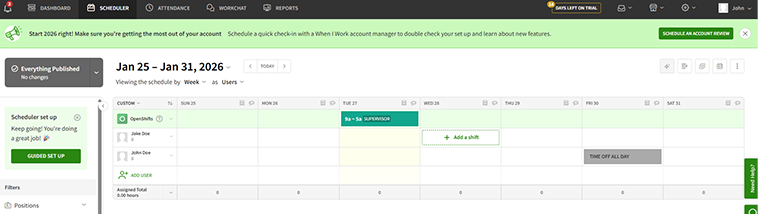
To create a schedule, I clicked the Scheduler tab, then selected a day for the employee whose schedule I aimed to set up. From there, a widget appeared that allowed me to fill in the details, including start and end times, location, job, a custom pay rate, and whether the schedule should repeat. I was also prompted to enter any notes I deemed pertinent.
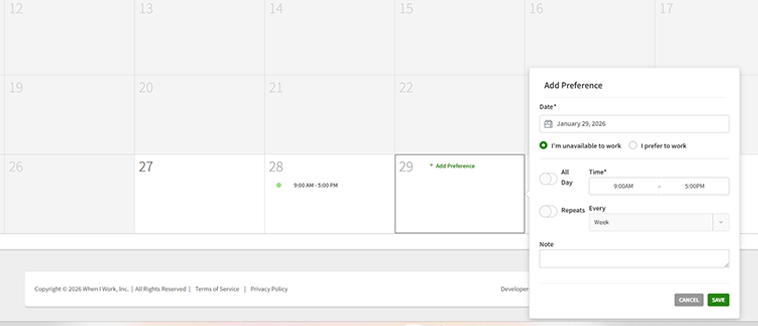
Within the schedule interface, employees may toggle on their availability as well as include notes directly within each day.
As an admin, I was able to create employee shifts/schedules at will. The interface allowed me to assign a specific color, position, time, break, and more. Additional information includes tags, task lists, shift notes, and more.
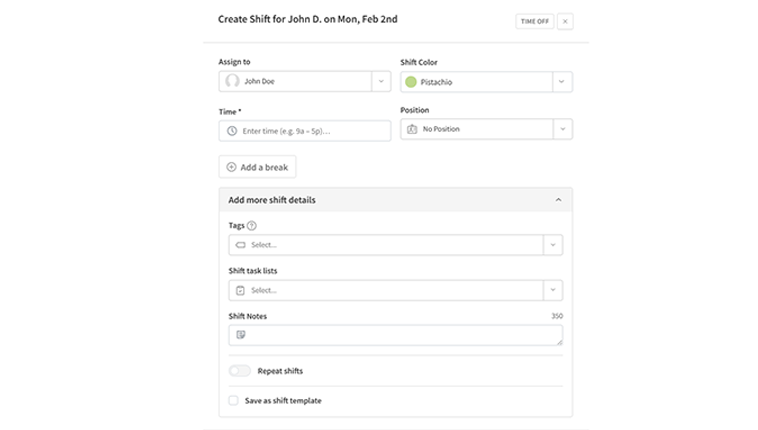
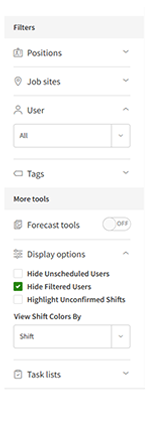
The schedule can be filtered by position, job site, user, etc. Additionally, when toggled on, forecast tools allow a company to track its sales budget, labor percentage target, and assigned labor. Users may be hidden if they’re unscheduled, and unconfirmed shifts may also be highlighted. Finally, shifts can be highlighted in different colors, each representing a different position, value, or shift. Another nice touch: I received an email every time a shift was created.
Finally, employees may choose to view their own schedules or the entire team’s. Shifts can be assigned to employees based on multiple elements (tags, availability, positions, etc.) and layers, such as limiting max hours, prioritizing weekend shifts, and allowing multiple shifts per day. These options are quite remarkable. In fact, this level of customization was among the best I’ve experienced with any time-tracking app.
How Do Timecards Work?
Score: N/A
When I Work’s timecards are not included in the base trial offering; thus, I was unable to review them.
This limitation reinforces how time tracking is treated as an add-on rather than a core feature within the platform.
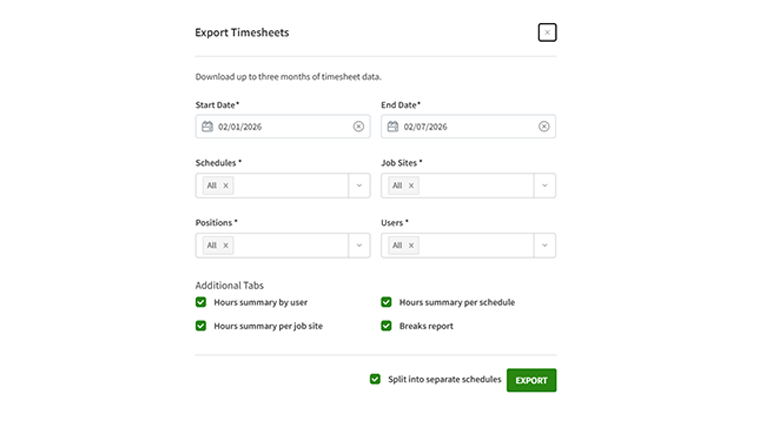
I did notice in the reports section that an export option is available.
What Kind of Customer Support Does When I Work Offer?
Score: 3.5/10
Support is a very important part of any time tracking company. It’s crucially important to have a real person available if/when problems arise.
Unfortunately, When I Work’s support is difficult to locate. I found it in the very bottom-right corner of the dashboard, under the Need Help? text.
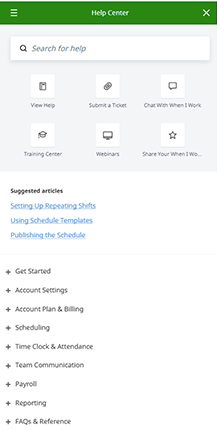
Clicking that text loaded a help page loaded with how-to videos, help articles, and more. At the very bottom, I was prompted to submit a ticket if I still had a problem.
Ticket hours were 7 a.m. to 9 p.m. CT. Live chat hours were noted from 7 a.m. to 7 p.m.; however, I didn’t see a prompt for a live chat anywhere within the help section.
On the dashboard, I encountered a green quote bubble along the right side of the screen. I clicked that and was greeted by an Answer Bot. I requested a human representative and waited approximately 1 minute for a response. Emily greeted me and was unable to answer my pricing question.
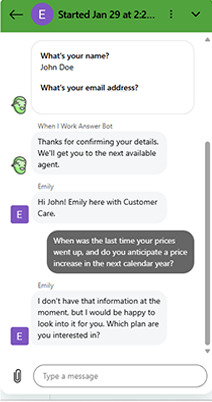
Clicking the “Need Help” tab along the right side of the screen populated a list of help resources in alphabetical order. Additionally, a search bar offered me the ability to seek a solution. From this screen, I could also submit a ticket, chat, view webinars, and more.
I did experience some bizarre hiccups in this area as well. For some reason, my trial account was abruptly cancelled.
The day my account was deactivated, I received a sales call from the company. When asked if I was interested in upgrading from trial to paid, I shared that I had only signed up to test and review the site on behalf of a competitor. Very shortly thereafter, my account had been terminated. I called the sales rep back and asked why my account was cancelled, but he was unable to identify a specific reason. Additionally, he said he’d call me back and never did. I also submitted a ticket regarding the account, and after several days, I still have not received a definitive answer.
While this may not be a universal experience, it did raise concerns about support transparency and account management.
Finally, there is no telephone number for support, and help on the go is not an option, either, as there is no easy way to access support from the mobile app.
How Does In-App Chat Work?
Score: 8.5/10
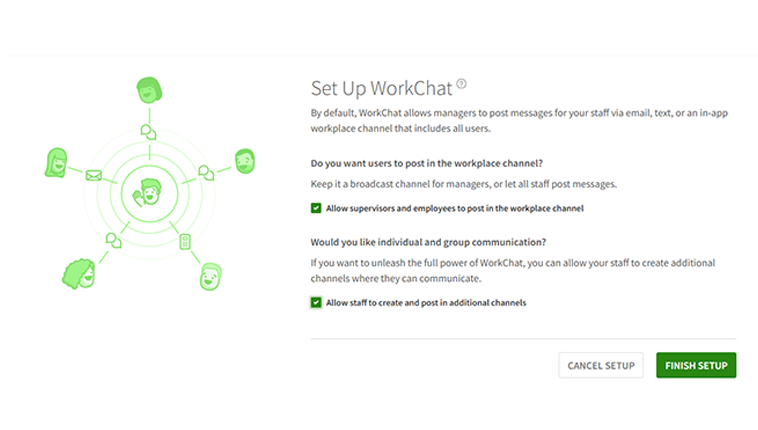
When I Work’s chat function is called WorkChat. It’s touted as the ability to bring all communication under one private, secure roof.
The setup process allowed me to decide whether to limit who could post in the workplace channel and if they should be able to communicate in groups.
That said, some users report missed notifications or message glitches, so reliability may vary depending on device and settings.
How Do You Manage Time Off?
Score: 6/10
When I Work’s time off tool can be accessed by clicking the settings icon and then Time Off Settings.
Within, there are many customizable features, including approval requirements, the number of days' notice required before taking a day off, the types of PTO I’d like to implement, and more. Additionally, accrual rates can be set up here.
Once set up, the PTO interface may be accessed by clicking the drawer (or envelope – I’m honestly unsure which it is) in the top right corner of the web screen.
Inside the PTO interface, admins may alter the selected employee’s PTO attributes by clicking the highlighted word “Edit.” From there, all values, including Code, Frequency, Beginning Balance, Hours Awarded, Reset timeline, etc., may be altered.
PTO can be toggled to be included in overtime calculations (or not), and the option to use it or lose it may also be triggered on this screen. Finally, employees’ reset dates can be toggled to reflect the fiscal year, hire date, or anniversary date.
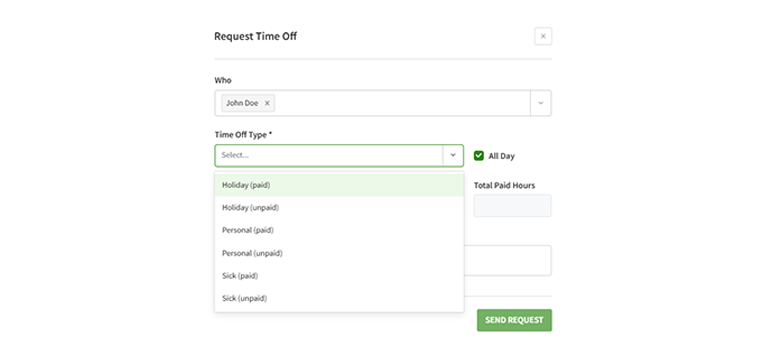
I tested it, and, once everything was set up, the PTO function ran rather smoothly. The ability to quickly and easily set up the system was definitely a plus; however, the inability to assign PTO in bulk (more than one employee at a time) was a minus.
How Does Payroll Integration Work?
Score: 4/10
While When I Work doesn’t have its own payroll program, it does partner with Rippling. Through this partnership, users can efficiently sync employee time sheets, onboard new hires, and more. The View Requirements tab led me to a massive help page designed to simplify setup.
A six-month free Rippling promotion was currently available on the When I Work website. However, there was no mention of the monthly cost to run Rippling payroll after the promotion expires.
When I Work integrates with numerous third-party payroll providers, including Run Powered by ADP, ADP, Gusto, Paychex, QuickBooks, and others.
What Add-Ons Does When I Work Offer?
As previously mentioned, time tracking and attendance are considered add-on services. They may be purchased for an additional $1.50 per person per month for the Essentials plan and $2 per user per month for the Pro and Premium plans.
If users want to run punches through a kiosk station, that costs extra as well. Additionally, reporting, role permissions, and labor sharing were offered as “customizable options,” but no price was listed.
How Does When I Work Handle Follow-Ups and Outreach?
After signing up for When I Work, I received eight emails in my first 10 days, including a welcome message, a focus on features, case studies, how-to examples, and more.
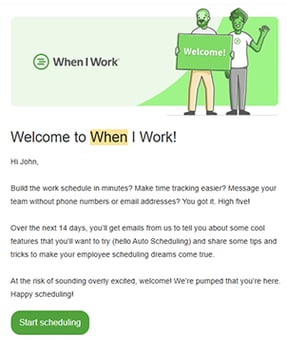
After signing up for When I Work, I received eight emails in my first 10 days
Overall, When I Work’s onboarding emails were task-driven and aimed to be helpful. They prioritized keeping me on task and provided clear steps for activating the account and using it as I see fit.
While eight emails in 10 days are plentiful, the outreach proved helpful and straightforward, though it was largely focused on setup mechanics rather than broader use cases or long-term value.
What Are the Pros and Cons of Using When I Work?
When I Work is a capable workforce management platform for businesses with predictable schedules and straightforward needs. Its strengths lie in scheduling, ease of use, and onboarding, but limitations in payroll, feature accessibility, and support make it less ideal for growing companies seeking a fully integrated, all-in-one workforce solution.
Pros
- Strong Scheduling Capabilities – Scheduling is When I Work’s biggest strength. The platform offers drag-and-drop scheduling, repeat shifts, position- and location-based assignments, availability tracking, and visual forecasting tools. For shift-driven teams, this level of control is impressive and easy to use.
- Simple Employee Clock-Ins (Once Enabled) – Once time tracking is added and activated, clock-ins are straightforward across web and mobile. Employees can easily punch in and out, review hours worked, and view assigned schedules without much training.
- Easy Employee Onboarding – Admins can add employees via email invitations, manual entry, or bulk uploads. The process is quick and flexible, making it easy to bring teams on board with minimal friction.
- Clean, Beginner-Friendly Interface – The interface is clean and approachable, particularly on the web. Employees can quickly find schedules, requests, and timecards without navigating overly complex menus, reducing onboarding time.
- Flexible PTO Configuration (After Setup) – Once enabled and configured, PTO tracking is fairly flexible. Admins can manage accrual rates, rollover rules, reset dates, and whether PTO counts toward overtime calculations. After setup, the tool functions smoothly.
- Helpful, Task-Driven Onboarding Emails – Post-signup email outreach is consistent and focused on helping users complete setup steps. These messages are practical and encourage early adoption of core features, especially scheduling.
Cons
- Time Tracking Is a Paid Add-On – Unlike many competitors, time tracking and attendance are not included in When I Work’s base plans. This adds an extra cost per employee and can be surprising for businesses that expect time tracking to be standard.
- Payroll Is Integration-Dependent – When I Work does not offer built-in payroll. Payroll functionality relies on third-party integrations, like Rippling, and pricing details beyond promotional periods are not clearly disclosed. As a result, payroll feels bolted-on rather than fully integrated.
- Key Features Are Hidden or Disabled by Default – Important tools, including PTO, time tracking, and certain settings, are buried in menus or disabled until manually enabled by admins. This makes features easy to overlook and adds unnecessary setup friction.
- Inconsistent Customer Support Access – Support is difficult to locate and uneven across plans. Live chat availability is unclear, there is no phone support, and mobile users have limited access to help. Response times and follow-through can also be inconsistent.
- Mobile Interface Feels Crowded – While functional, the mobile app relies heavily on vertical scrolling and condensed menus. This can make it harder to quickly locate specific information compared to more streamlined mobile-first platforms.
- Limited Scalability for Growing Businesses – As workforce needs expand, requiring integrated payroll, advanced reporting, or consistent live support is essential. When I Work becomes less cost-effective and more fragmented compared to all-in-one workforce management systems.
- Pricing Can Add Up for Small Teams – Once scheduling plans, time tracking add-ons, and payroll integrations are factored in, costs rise quickly. For small teams, this can make When I Work more expensive than competitors that include these features upfront.
What Do Real Users Say About When I Work?
While the solution is commonly praised for its user-friendly interface, some users report that the app sometimes fails to register punches, leading to discrepancies such as being clocked in for too long or missing punches.
For example, the most relevant review on G2, where When I Work has a 4.4-star average rating out of 361 ratings, comes from Maggy F. On Jan. 13, 2026, she writes, “What I like best about When I Work is how user-friendly and efficient it is for managing schedules and communication. It makes it easy for staff to view shifts, request time off, and swap shifts, which reduces confusion and saves time. The clear layout and real-time updates help keep everyone on the same page, allowing us to focus more on our work and less on scheduling logistics.”
She also adds, “What I dislike about When I Work is that it can feel limited when schedules change frequently or when more detailed notes are needed for specific shifts. Some features, like advanced reporting or customization, are not as intuitive and can take extra time to navigate. At times, notifications can also be overwhelming or easy to miss, which can cause small communication gaps if staff aren’t checking the app regularly.”
On Apple, where When I Work has a 4.8-star rating on 51,436 reviews. awesome wrote, on Jan. 18, 2024, “The app has been nice for scheduling purposes; however, I have had major issue with the ‘workchat’ section. First off, I sometimes don’t get a notification that a text has been sent in the group chat. This has happened on many occasions, and it hinders my ability to pick up extra shifts or cover shifts. Secondly, I am having major issues with once I send a message, it disappears on my end. I don’t know why this happens, and it’s simply frustrating.”
On Capterra, When I Work has a 4.5-star rating on 1,251 ratings. Tomoya K. wrote, on Jan. 9, 2026, “My overall experience with When I Work was positive. It allowed me to see my work schedule with ease. There was nothing I didn’t like about the app. It was easy to use and gave a lot of information, including whom I was working with on any particular day.”
How Does When I Work Compare to OnTheClock?
|
Feature |
When I Work |
OnTheClock |
|
Mobile-Friendly Design |
Mobile app is reliable for schedules and basic actions, but key tools like time tracking, PTO, and advanced settings must be manually enabled and can be difficult to locate |
Fully featured mobile app with real-time access to timecards, schedules, PTO, and payroll-related data |
|
Desktop Clock-Ins |
Supported through a web browser once time tracking is added |
Fully supported on desktop and laptop devices |
|
Time Tracking |
Not included in base plans; requires a paid add-on per employee |
Included as a core feature |
|
Payroll Functionality |
No native payroll; relies on third-party integrations such as Rippling, with pricing and long-term costs not clearly disclosed |
Integrated payroll available as an add-on with seamless connections to QuickBooks, Gusto, ADP, Paychex, and more |
|
User Roles Without Extra Charges |
Tiered pricing; access to advanced features, permissions, and support depends on plan level |
No extra charges for admins, managers, or view-only users — full functionality for all subscribers |
|
Customer Support |
Support is difficult to locate and inconsistent; no phone support and limited mobile access |
Live, U.S.-based support via phone, chat, and email for all customers |
|
Time Clock Kiosk |
Available as a paid add-on using shared devices with PINs or QR codes |
Dedicated kiosk mode for shared devices with full admin controls |
|
API Access |
Limited and generally restricted to higher-tier plans |
Open API access without forcing upgrades |
|
Pricing Transparency |
Tiered pricing with base fees, add-ons for time tracking and kiosk use, and limited clarity around payroll costs |
Flat base fee plus low per-employee cost with no gated essentials or surprise fees |
What’s the Final Verdict on When I Work?
When I Work is a solid scheduling-first platform for businesses with predictable shifts and straightforward workforce needs. It’s easy to set up, intuitive for employees, and particularly strong at building, sharing, and managing schedules. For retail, hospitality, education, and other shift-based teams that primarily need scheduling and basic visibility into who’s working, it can be an effective and low-friction solution.
However, its limitations become more apparent as business needs grow. Time tracking is not included by default, key features like PTO and advanced settings require manual configuration, and payroll depends entirely on third-party integrations with limited pricing transparency. Customer support can also be difficult to access and inconsistent, especially for lower-tier users or those relying on the mobile app. Together, these gaps make the platform feel more fragmented over time.
For organizations with modest requirements, When I Work can serve as a functional starting point. But for growing businesses that want a more unified, scalable workforce system—one that brings time tracking, scheduling, PTO, and payroll together without gating essentials—OnTheClock offers a more complete long-term solution. Try OnTheClock free at www.ontheclock.com and see the difference for yourself — no credit card required.
