Skip to content

Hours and Minutes to Decimal Hours Calculator & Conversion Chart

Convert hours and minutes to decimal hours with our simple online calculator.

Hours Calculator

Decimal Hours
Hours Minutes
 

Convert Time to a Decimal Format Instantly

Decimal hours are a common way to calculate total time worked. They’re best for determining an hourly salary or the total time spent on a project. If you need to convert decimal hours to hours and minutes, you can use our calculator to speed up your time sheet process. 

How to Simplify Time Conversion with OnTheClock

Converting from hours and minutes to decimals can be a hassle, especially when dealing with large amounts of data or when you need to convert times frequently. If that's your situation, then OnTheClock's time-tracking software can make the process much easier.

OnTheClock simplifies time conversion by eliminating the need to manually convert times. Our time clock has the ability to display time worked in decimals or hours and minutes — one of our many customizable features designed to meet the needs of small businesses.

Our software also integrates with payroll providers, like Quickbooks, Gusto, ADP, and more. This will save you even more time by calculating gross and net pay as well as PTO, overtime, holidays, and more. These highly accurate time sheets will help you streamline your payroll process while staying compliant with labor regulations and company policies.

Your first 30 days of OnTheClock are free — Get Started Today!

Watch How to Convert Hours and Minutes to Decimal Hours

Everything Is Included, Yes Everything!

Decimal Hours Chart

Here’s a handy reference to convert decimals to and from hours and minutes. To use this decimal conversion chart, locate your starting number in the “Minutes” or “Decimal” column. Then, match it with the decimal hour or minutes in the column next to it.

For example, if you want to convert 45 minutes into decimals, locate “45” in the table (under the “Minutes” column) and then follow the row to the corresponding decimal (in the “Decimals” column). In this case, 45 minutes is equal to 0.75 decimal hours.

In addition, you can also use the table to convert from decimals back into minutes and hours by simply finding the decimal number in the “Decimal” column and then following it across to the left.

Minutes Decimal Minutes Decimal Minutes Decimal
1 .01 21 .35 41 .68
2 .03 22 .37 42 .70
3 .05 23 .38 43 .72
4 .07 24 .40 44 .73
5 .08 25 .42 45 .75
6 .10 26 .43 46 .77
7 .12 27 .45 47 .78
8 .13 28 .47 48 .50
9 .15 29 .48 49 .82
10 .17 30 .50 50 .83
11 .18 31 .52 51 .85
12 .20 32 .53 52 .87
13 .22 33 .55 53 .88
14 .23 34 .57 54 .90
15 .25 35 .58 55 .92
16 .27 36 .60 56 .93
17 .28 37 .62 57 .95
18 .30 38 .63 58 .97
19 .32 39 .65 59 .98
20 .33 40 .67 60 1.0

Manual Conversion

Prefer to do the math manually? Here’s how to do the math behind a decimal time conversion

Manually Converting Hours and Minutes to Decimal Time

Step 1: Divide the minutes by 60 to convert them into decimal form.

Example: If you have 30 minutes, divide 30 by 60: 30/60 = 0.5

Step 2: Add the decimal form of the minutes to the hours.

Example: If you have 2 hours and 30 minutes, add 2 (hours) and 0.5 (decimal form of minutes): 2 + 0.5 = 2.5

Step 3: The result obtained in Step 2 represents the time duration in decimal format. The whole number part before the decimal represents the hours, and the decimal part represents the fraction of an hour (in this case, the minutes).

So, 2 hours and 30 minutes is equivalent to 2.5 hours in decimal form.
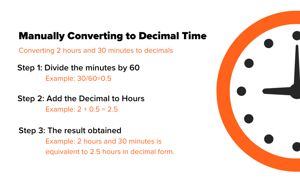
Manually Converting to Decimal Time
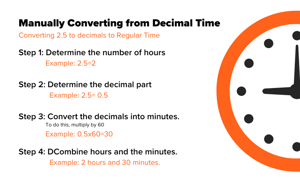
Manually Converting from Decimal Time

Manually Converting from Decimal Time

Step 1: Determine the whole number of hours.

Example: If you have 2.5 hours, the whole number of hours is 2.

Step 2: Determine the decimal part as a fraction of an hour.

Example: In 2.5 hours, the decimal part is 0.5, which represents 0.5 of an hour.

Step 3: Convert the decimal part into minutes. To do this, multiply by 60.

Example: 0.5 multiplied by 60 = 30 minutes.

Step 4: Combine the whole number of hours and the minutes. Example: 2 hours and 30 minutes.

So, 2.5 hours is equivalent to 2 hours and 30 minutes.

Frequently Asked Questions

How can I calculate total working hours in decimal format?

There are a few ways to calculate total working hours in a decimal format:

  • Use a decimal hours calculator
  • Use a decimal hours conversion chart
  • Manually convert minutes to decimals by dividing by 60
  • Use time clock software to automatically calculate

Automatically converting to decimal format with time clock software is the easiest, since there is no additional work required.

How can I use a decimal hours calculator to calculate payroll?

To calculate payroll with a decimal hours calculator, simply enter the total time worked into the calculator to generate a number with a decimal. Then, multiply the decimal hour by the employee's hourly wage rate. The result will be the gross pay.

So, for example, say you’re calculating the paycheck for someone who worked 78 hours and 45 minutes during a 2-week pay period. The hours worked would be 78.75 hours in decimal format. If the hourly pay rate is $18 an hour, you’d multiply 78.75 by $18. This will produce their gross pay for the given period, which is $1,417.50.

From there, you’ll need to manually calculate deductions and withholdings based on your local regulations and company policies. Using a time clock solution that integrates with payroll software will automatically calculate this for you, creating accurate payroll in just a few clicks.

What are the benefits of using decimal hours instead of hours and minutes?

For payroll, it’s much easier to calculate a pay rate with decimal hours than hours and minutes. Additionally, decimal hours are much more precise.

Helpful Resources at Your Fingertips

More than 15,000 companies track time effortlessly with OnTheClock

Make time tracking simple with OnTheClock