Skip to content

EMPLOYEE TIME TRACKING FOR SMALL BUSINESS

Know What Every Hour Is Costing You


Accurate employee time tracking that automatically turns hours worked into job costs, labor costs, and payroll. It's time tracking for small business teams who need job costing without the overhead of a complex accounting system.


No credit card needed. Setup takes five minutes or less!
time-tracking-job-costing-ontheclock

Trusted By 18,000 Companies and 150,000 Employees

From Clock-In to Job Cost to Payroll, No Spreadsheet Required

Accurate hours are the foundation of a profitable job. OnTheClock's employee time tracking app makes sure every hour also carries a job, client, and labor cost.

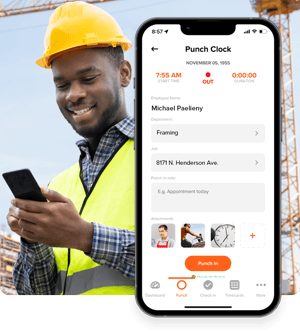
Employees select a client and/or job and clock in from their phones, a browser, or a shared tablet, so job cost data is collected automatically as employees work. The same approved hours that run your payroll also show you which jobs came in over estimate and what to bill — without anyone rebuilding the numbers in a spreadsheet.

geofencing-online-time-clock

Track Employee Hours Wherever Work Happens

Whether your team works in the office, on job sites, or in the field, OnTheClock makes it easy to track employee hours from anywhere.

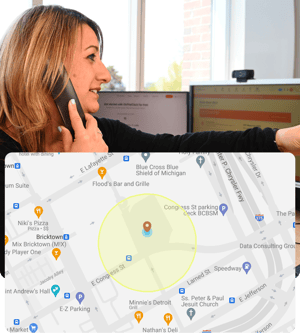
  • Employees clock in from their phones, a browser, or a shared kiosk — with GPS time tracking confirming they're actually on-site.
  • Geofencing restricts clock-ins to the job site itself, so hours match where work actually happened.
  • Running crews across job sites? Multi-location time tracking keeps every site's hours organized under one dashboard instead of juggling separate logs.
  • See who's clocked in right now at a glance, without calling around to find out.

Every Hour Is Automatically Tied to a Job

Most employee time tracking software tells you who worked and for how long. OnTheClock goes further, tying every clocked hour to a job, a client, or a cost code, so you know what a project actually costs while it's still in progress, not three weeks after it's done.

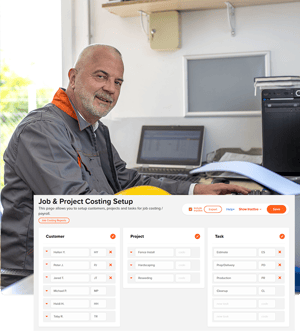
  • Employees select the job when they clock in, so project cost data is tracked automatically throughout the day.
  • Switch between jobs mid-shift without losing accuracy — every minute still lands on the right cost code.
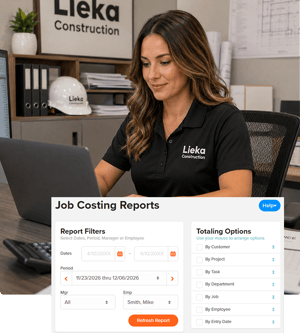
  • See labor costs by job in real time, so you catch a project running over budget while there's still time to do something about it.
job-and-project-costing-employee-time-tracking-ontheclock
time-tracking-job-costing-report-ontheclock

Fewer Mistakes, Less Cleanup

Employee time tracking software shouldn't create more work for managers. OnTheClock makes it easy to fix mistakes, review employee hours, and catch overtime before payroll becomes a problem.

  • Fix a missed punch or an incorrect clock-in in seconds, with a full log of who changed what.
  • Add notes to any time entry. This is useful for flagging a late arrival, a job site delay, or anything payroll should know about.
  • Automatic overtime alerts flag extra hours as they happen, not after the pay period closes.

Payroll- and PTO-Ready, Every Pay Period

Once hours are approved, time tracking for payroll shouldn't mean re-entering anything.

  • Export payroll-ready reports directly to QuickBooks, Gusto, or ADP, or run payroll in-house with OnTheClock Payroll.
  • PTO requests and approvals flow through the same system, so vacation, sick time, and holidays show up on the same time sheet as hours worked.
  • Spot patterns in employee attendance tracking, such as late arrivals, early departures, or no-shows, before they turn into a bigger staffing problem.


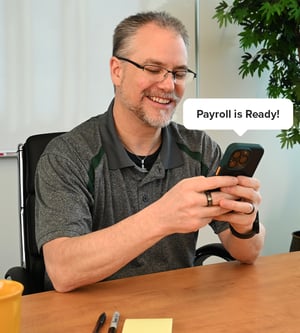
payroll-is-ready

How to Start Tracking Time with OnTheClock

Create an Account
Invite your team
Employees log their hours
File your Payroll

Take Control of Your Team’s Time Tracking

What Our Customers Are Saying

5-stars

"What I like best about OnTheClock is how easy it is to use for both employees and managers. Clocking in and out is quick, tracking hours is accurate, and the interface is simple to navigate. It helps streamline payroll and time tracking, saving time while reducing errors."

Michael M.

Everything You Need in One Place

FAQ

What is employee time tracking?

Employee time tracking is the process of recording when employees start and stop work so businesses can accurately calculate hours, manage labor costs, and prepare payroll. 

What is employee time tracking software?

Employee time tracking software records when employees start and stop work, automatically calculates their hours, and turns that information into accurate time sheets, payroll-ready reports, and labor cost data. It replaces paper timecards and spreadsheets with a faster, more accurate way to track employee hours, manage payroll, and understand where labor dollars are being spent.


How much does time tracking software cost?

OnTheClock is $4 per employee per month plus a $5 monthly base fee. So a 12-employee team runs $53/month. OnTheClock's time tracking starts as part of a plan built for small business budgets, with no separate per-feature add-ons for basics, like GPS or overtime tracking. Visit our pricing page for the latest plans and features.


Can employees track time on their phone or in an app with OnTheClock?

Yes. Employees can clock in and out from their phones using the OnTheClock time tracking app. GPS time tracking records the location of each clock-in, and geofencing can restrict employees to clocking in only when they're at an approved job site. Managers can review employee hours and approve time from anywhere.
 

Can time tracking software track job or project costs, not just hours?

Yes. OnTheClock lets employees select a job or cost code when they clock in, so labor costs build automatically by project instead of requiring a separate spreadsheet to calculate afterward.


Is OnTheClock's time tracking suitable for remote or multi-location teams?

Yes. Employees can clock in from any device, and managers get one dashboard covering every location instead of separate logs per site. 

Does OnTheClock track employee activity or take screenshots, like some time tracking tools do?

No. OnTheClock tracks time, location, and job costs — not keystrokes or screenshots. It's built for hourly and field teams whose work isn't measured by what's on a screen or those that rely on desk-based activity monitoring. 

Can managers check or approve hours from anywhere?

Yes. Approve, edit, or review time entries from any device. There is no need to be at a specific computer or wait until end of week to catch a mistake. 

Does time tracking software calculate overtime automatically?

Yes. Regular hours and overtime are calculated automatically as employees clock in and out, and alerts flag overtime as it happens rather than after the pay period closes. 

How long does it take to set up time tracking for my team?

About five minutes to create an account and invite your team. Most businesses are tracking time on the same day they sign up. 

Can time tracking data go straight into payroll?

Yes. Approved hours export directly to QuickBooks, Gusto, or ADP, or run through OnTheClock Payroll directly. There’s no need to re-enter time sheets by hand.