
Overview
Employees can seamlessly track their tips, bonuses, and commissions in their OnTheClock account.
Setup
Add Permission to Track Bonuses, Tips, and Commissions
Step 1: Log in as the administrator or manager.
Step 2: Click “My Team.”
Step 3: Select an employee.
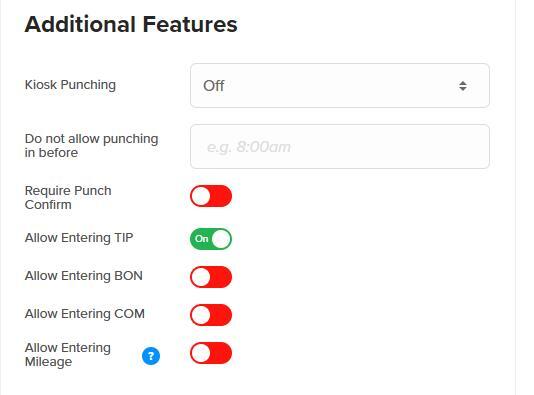
Step 4: Click "General" and go to “Additional Features.”
Step 5: Turn the applicable item to green if the employee needs to be able to enter at punch out.
Step 6: Click “Save Settings.”
What to Expect
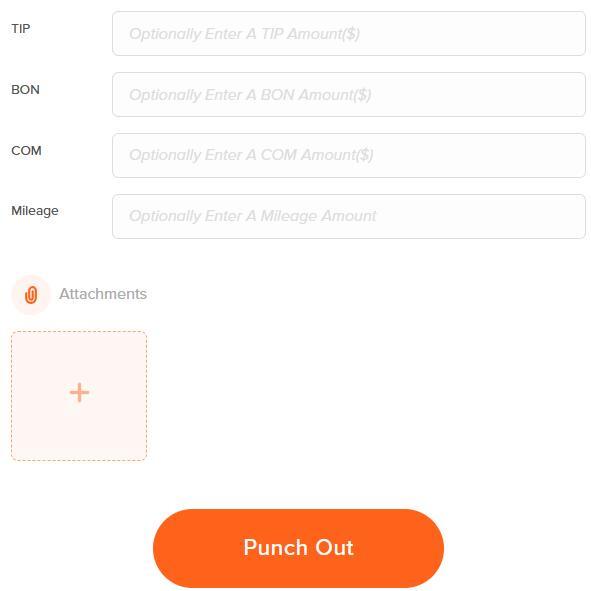
Employees can add a dollar amount at the time of punch out to their time card.
Q&A
Q: Who can enter in tips, bonuses, and commission values?
A: Admins and managers can add these values to timecards as long as the timecard columns are enabled. Employees can enter this information only if the permission is set on their profile to allow it.
Q: Can I rename these fields to better suit my business?
A: These fields can be relabeled in advanced settings under time clock settings as an admin.