
Tracking Payroll Setup Progress
Under company status you will be able to view two types of statuses.
- Onboarding Status
- Implementation Status
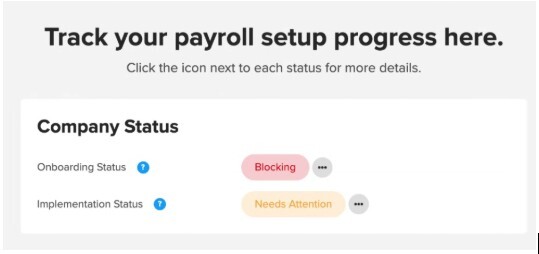
If you see a block in your status, this means important documentation is missing and is blocking your ability to process payroll.
If you see a warning in your status, this means there are documents that are not collected, but are not blocking your ability to process payroll. At some point, these documents will need to be added.
Once all information is collected, you will see a complete status.
Resolving Employee Blocks
If you are seeing a  status in the employee list under payroll status, these are the items that may be missing:
- Missing an Assigned Workplace: A primary workplace must be assigned to the employee, you should have completed this in the enrollment process.
- Missing Configured Withholdings: The employee will complete this inside their payroll icon in there own portal.
- Missing Employee Details: In order to proceed with the ability to process payroll the employee will need to have their start date of employment, dob (date of birth), and residence.
Check out employee on-boarding for more guidance on employee set up.
Resolving Company Blocks
In order to move forward to process payroll, you will need to resolve the block status. You may be encountering a block status because you are missing the following critical items:
- Missing Bank Account: Create your bank account, Verify bank account, and submit authorization.
- Missing Setup parameters: All appropriate taxes setup for your specific jurisdiction.
- Missing Filing Authorization
If you're seeing a block status under implementation status, the following items may be needed:
- Signatory: Make sure you have designated a signatory.
- Missing Company Info
- Missing Filing Form 8655: This needs to be files with the IRS.