
Overview
Having this feature enabled will make it so an employee cannot access the clock in and out button at all when logging in with their username and password.
Setup
On a web browser:
Step 1: Log in as an administrator or manager.
Step 2: Click “My Team” in the top menu, then select “Team Directory” from the dropdown.
Step 3: Open the profile of the team member you want to modify.
Step 4: In the profile, go to the “General” tab.
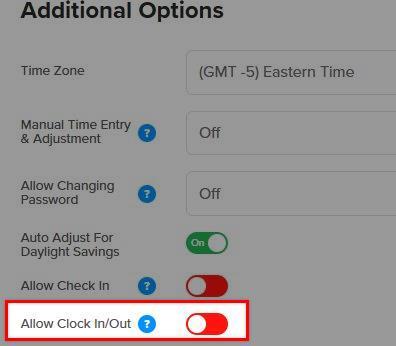
Step 5: Under “Additional Options,” find the “Allow Clock In/Out” option.
Step 6: Toggle the switch to the green position to enable “Allow Clock In/Out.”
Step 7: Click “Save.”
What to Expect
Once the feature is turned on, your employee will no longer be able to create a clock in or out for the day. They will only be able to view time cards, submit PTO requests, and view their schedules.