
Payroll administrators can download pay stubs and pay statements for one or more employees and one or more pay periods. The export is delivered as a compressed (.zip) file and sent to the administrator's email address when processing is complete.
Before You Begin
To download pay stubs, you must:
- Be enrolled in OnTheClock Payroll
- Be logged in as an Administrator
- Have access to payroll reports
What Is Included
The Pay Stub Export allows you to:
- Download pay stubs for multiple employees at the same time
- Download one or multiple pay periods in a single export
- Download all selected payroll documents in a single export
- Download both employee and contractor pay statements
Download Pay Stubs
Step 1: Open the Pay Stubs Report
- Sign in to OnTheClock as an Administrator.
- Select Reports from the main navigation menu.

- Select Pay Stubs.

Step 2: Select Employees
- Choose the employees or contractors you want to include.
- Select the checkbox beside each person you want included in the export.

Step 3: Select Pay Periods
- Select one or more pay periods.
- Verify your employee and pay period selections.
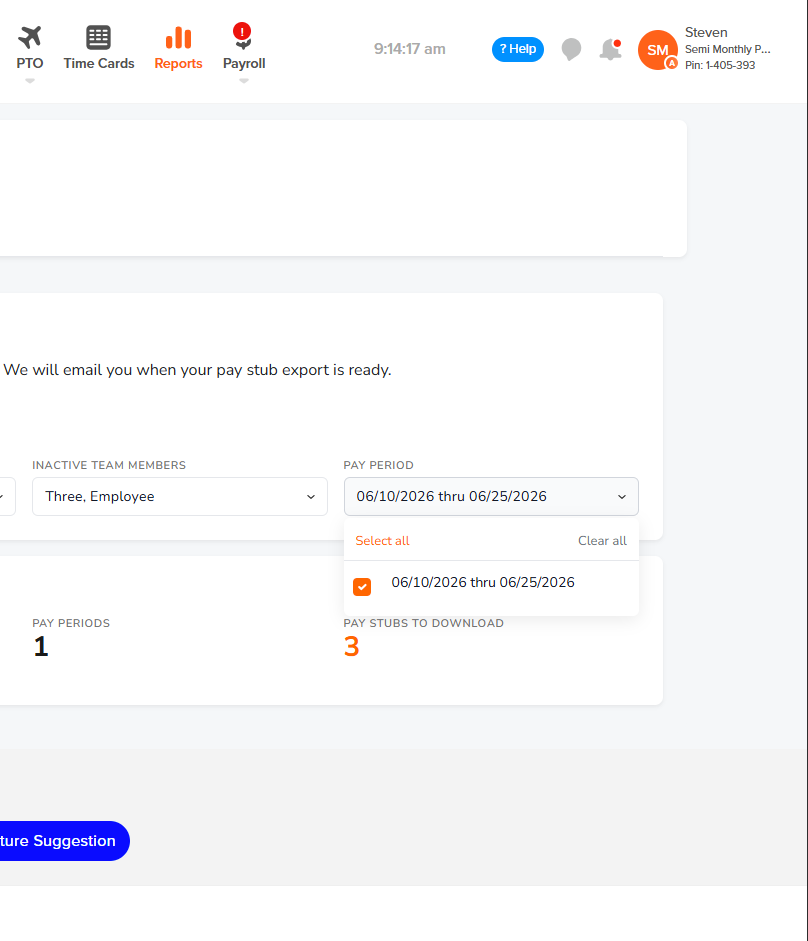
Step 4: Start the Export
- Click Download Pay Stubs (.zip).

Step 5: Wait for Processing
After submitting the export, you will receive the message:
Export started. You will receive an email when it is ready.
The export is generated in the background and may take several minutes depending on the number of employees and pay periods selected.

Access Your Export
When processing is complete, you'll receive a notification that your export is ready.
Download the exported file and open it to access the selected pay stubs or pay statements.
Troubleshooting
I did not receive the export email
If you do not receive the email:
- Check your Spam or Junk folder.
- Verify that you can receive emails from OnTheClock.
- Allow additional processing time for larger exports.
- Try running the export again.
The export contains fewer pay stubs than expected
Verify that:
- The correct employees were selected.
- The correct pay periods were selected.
- The employees were paid during the selected pay periods.
Frequently Asked Questions
Who can download pay stubs?
Only administrators with access to payroll reports can generate pay stub exports.
Can I download pay stubs for multiple employees?
Yes. Select multiple employees before starting the export.
Can I download multiple pay periods at once?
Yes. You can select one or more pay periods in the same export request.
What file format will I receive?
The export is delivered as a compressed (.zip) file containing individual pay stubs or pay statements.
Can I download contractor pay statements?
Yes. Contractor pay statements can be included in the export when applicable.
How long does the export take?
Export processing times vary based on the amount of data included in the request. Larger exports may take longer to complete.