
Overview
This report gives you a simplified summary of hours and pay for a selected time period.
It pulls directly from time cards and groups totals so you can quickly review payroll without digging into individual entries.
Where to Find It
- Login as an admin or manager
- Go to Reports
- Select Payroll Summary
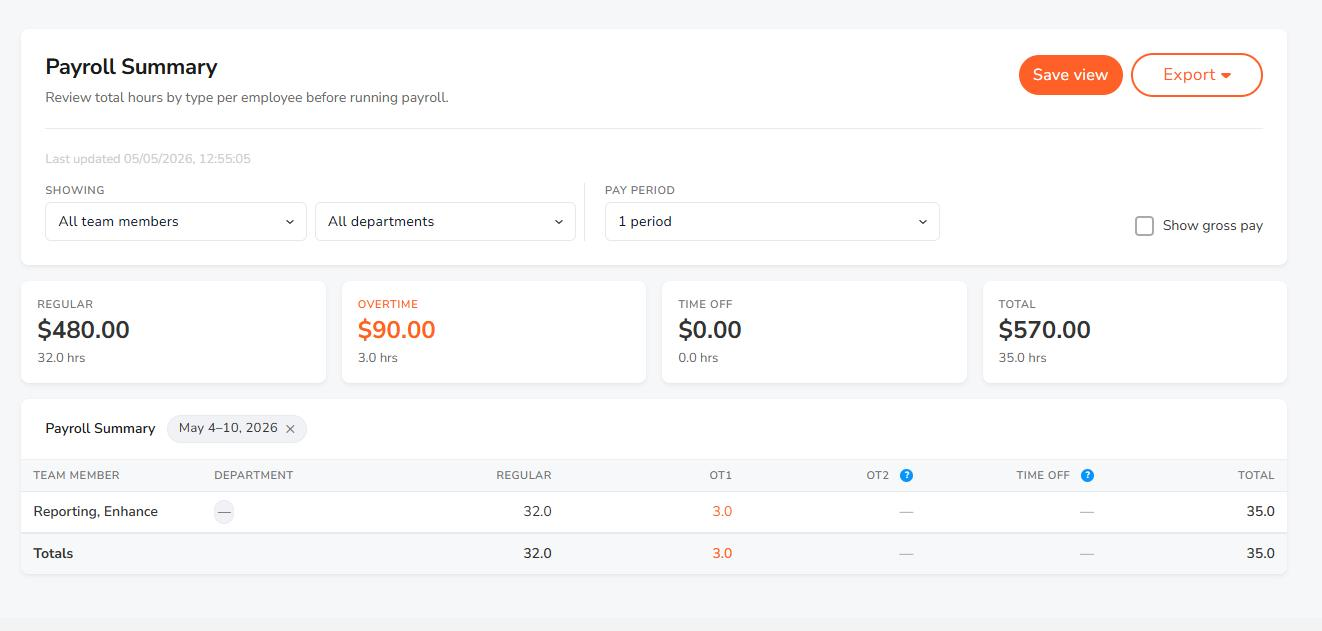
How to Run the Report
- Click Reports
- Select Payroll Summary
- Choose a date range or pay period
- (Optional) Apply filters
- Review totals
- Save your view or export the report
What This Report Shows
- Regular hours
- Overtime (OT1)
- Overtime 2 (OT2)
- Time off hours
- Gross wages (if enabled)
Example: An employee worked 72 regular hours, 8 overtime hours, and used 8 hours of PTO in a pay period. These totals are reflected directly from their time card entries.
Permissions
- Admins:
- Can see all employees
- Can view gross wage totals
- Managers:
- Can only see assigned employees
- Can view gross wages only if permission is enabled
Save and Export
- Save your report view to reuse later
- Export totals for payroll processing or reporting
What to Expect
- Totals are based entirely on time card data
- Overtime reflects your configured rules (if applied)
- Manual entries are included in totals
- Results are grouped for quick payroll review
Use this report when you need a quick snapshot of total hours and pay before running payroll.