
Overview
This report helps you quickly see whether employees worked their scheduled shifts.
It compares:
- Scheduled time (shift or fixed schedules)
- Actual time (recorded time cards)
Any differences are shown as variance.
Where to Find It
- Login as an admin or manager
- Go to Reports
- Select Schedule vs Actual
How to Run the Report
- Click Reports
- Select Schedule vs Actual
- Choose a date range or pay period
- (Optional) Apply filters
- Review results
- Save your view for later or export the report
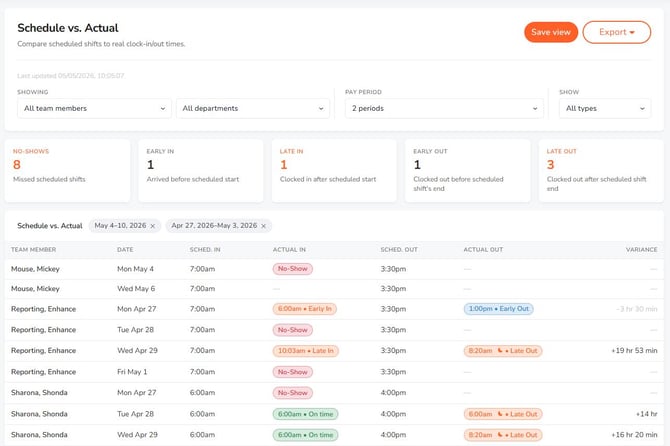
What This Report Shows
- Scheduled start and end times
- Actual clock-in and clock-out times
- Variance between scheduled and worked time
- No Show (scheduled but no time recorded)
- Not Scheduled (worked without a shift)
Example
- Scheduled: 9:00 AM – 5:00 PM
- Actual: 9:12 AM – 4:50 PM
- Result: Late in / Early out
- Variance: +12 minutes late, -10 minutes early
This means the employee clocked in late and left early compared to their scheduled shift.
Example (Not Scheduled)
- Scheduled: —
- Actual: 10:00 AM – 2:00 PM
- Result: Not Scheduled
This means time was recorded, but no shift existed.
Key Indicators
- Late / Early: Did not match scheduled times
- No Show: Scheduled but no time is recorded
- Not Scheduled: No schedule exists for that date
Quick View
When you first view the schedule you will be filtered to show:
- No Shows
- Late arrivals
Save and Export
- Save your report view to reuse later
- Export data for payroll or review
What to Expect
- Compares scheduled time to actual time worked
- Actual time is based on recorded time entries
- Supports both shift schedules and fixed schedules
- Highlights differences as variance
- Breaks are not included
- Overnight shifts are supported
Access
- Admins: Full access
- Managers: Assigned employees only
This report makes it easy to spot schedule mismatches and attendance issues at a glance.