Key Takeaways
- ✔ Easy to use and ideal for basic time tracking: Buddy Punch offers a clean interface, quick setup, and strong scheduling features that work well for small businesses with predictable workflows.
- ✔ Limited features without upgrades: Essential tools, like advanced GPS, detailed reporting, and customer support, are gated behind higher-priced tiers or add-ons.
- ✔ Mobile app feels overly simple: While mobile punching is reliable, the app lacks depth unless admins enable more advanced functions from the web version.
- ✔ Customer support depends on pricing tier: Dedicated support is only available to users on the most expensive plan, limiting assistance for others.
- ✔ OnTheClock offers better value and flexibility: Compared to Buddy Punch, OnTheClock includes more features in its base plan, with full support and seamless integrations at a lower cost.
Buddy Punch is a web-based time tracking and workforce management tool designed for businesses to record employee hours, manage schedules, and simplify payroll. It’s primarily geared toward small to medium-sized companies.
Verdict: Is Buddy Punch Worth It?
Score: 7/10
Buddy Punch is a clean, straightforward time tracking platform that does exactly what it claims: track hours, manage schedules, and help small to mid-sized businesses keep tabs on employee time. It’s web-based, easy to learn, and offers solid scheduling and timecard functionality without overwhelming users.
The platform is clearly built with traditional service businesses in mind — retail, hospitality, health care, education, and similar industries where shift scheduling and punch accuracy matter most. From a usability standpoint, Buddy Punch delivers a smooth onboarding experience, reliable mobile punching, and simple administrative controls.
That said, Buddy Punch begins to show its limits as operational needs grow. Many essential features, such as advanced GPS tracking, reporting, payroll support, and even customer service, are locked behind higher-priced tiers or sold as add-ons. While the software works well at a basic level, the cost can climb quickly, and support access becomes restricted unless you opt into the most expensive plan.
Overall, Buddy Punch is a competent time tracking solution for businesses with straightforward needs and predictable workflows. But, for companies looking for flexibility, transparency, and long-term scalability, it may feel more like a partial solution than a complete workforce management platform.
The following comprehensive review will score Buddy Punch from every angle and explain exactly how we landed at this rating.
Pricing
Score: 5/10
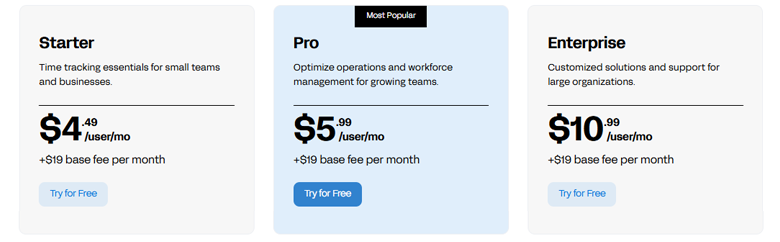
Buddy Punch plans are available in three tiered options. Each begins with a monthly base fee of $19 plus a per-user cost ranging from $4.49 to $10.99. Each tier offers increasing capabilities, including basic time tracking, scheduling, advanced GPS features, and enterprise-level support & integrations.
The pricing is fairly steep when compared to other options, such as OnTheClock. The base fee of $19, without any employees added, doesn’t make it an easy choice. The per-employee pricing is not too bad, but it is also tiered and doesn’t include customer support until the highest tier.
Getting Started on a Web Browser
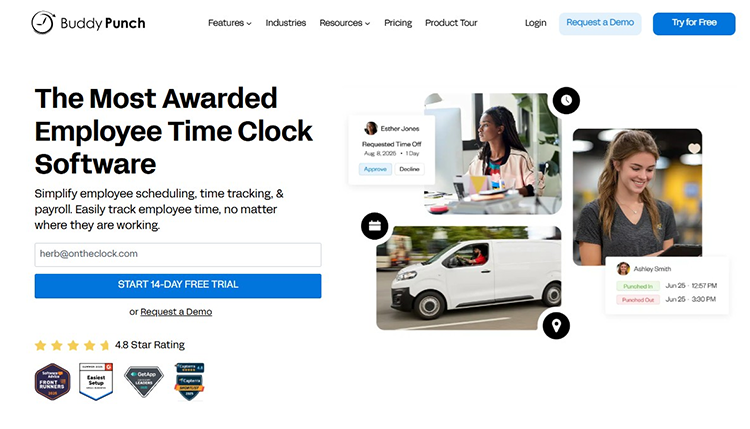
My journey began with a visit to the Buddy Punch website (buddypunch.com) to create an account. There, I was greeted with the claim that Buddy Punch is “The Most Awarded Employee Time Clock Software.” Multiple badges from various websites tout a 4.8-star rating.
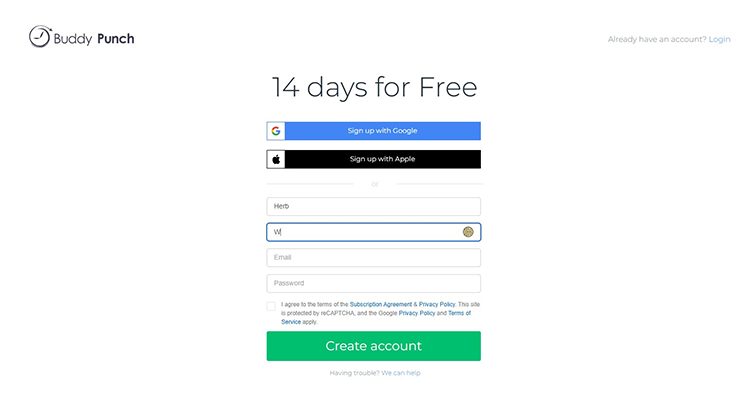
I was offered a 14-day free trial upon activation and navigated a login screen that allowed me to sign in using a Google/Apple account or my email address.
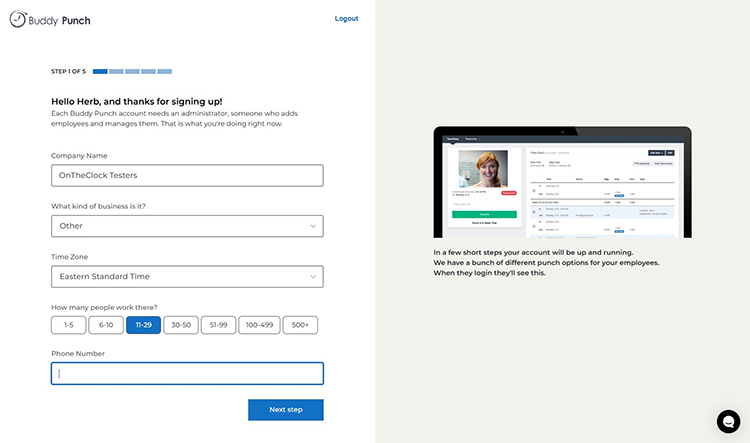
Upon starting a new account, I was prompted to enter my company name, identify my business type from a drop-down menu, input my time zone, and toggle the number of individuals my company employs.
Then, I selected my pay frequency, the start of my pay period, how I heard about the solution, and my current job role.
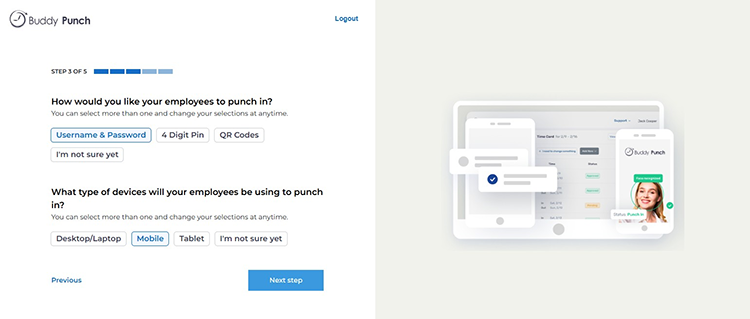
I then proceeded to identify my preferred employee punch-in method (username & password, four-digit pin, QR Code, etc.) and the type of devices my employees will be using (desktop/laptop, mobile, tablet, etc.). Overall, the process was smooth and simple.
Getting Started on a Mobile App as an Employee
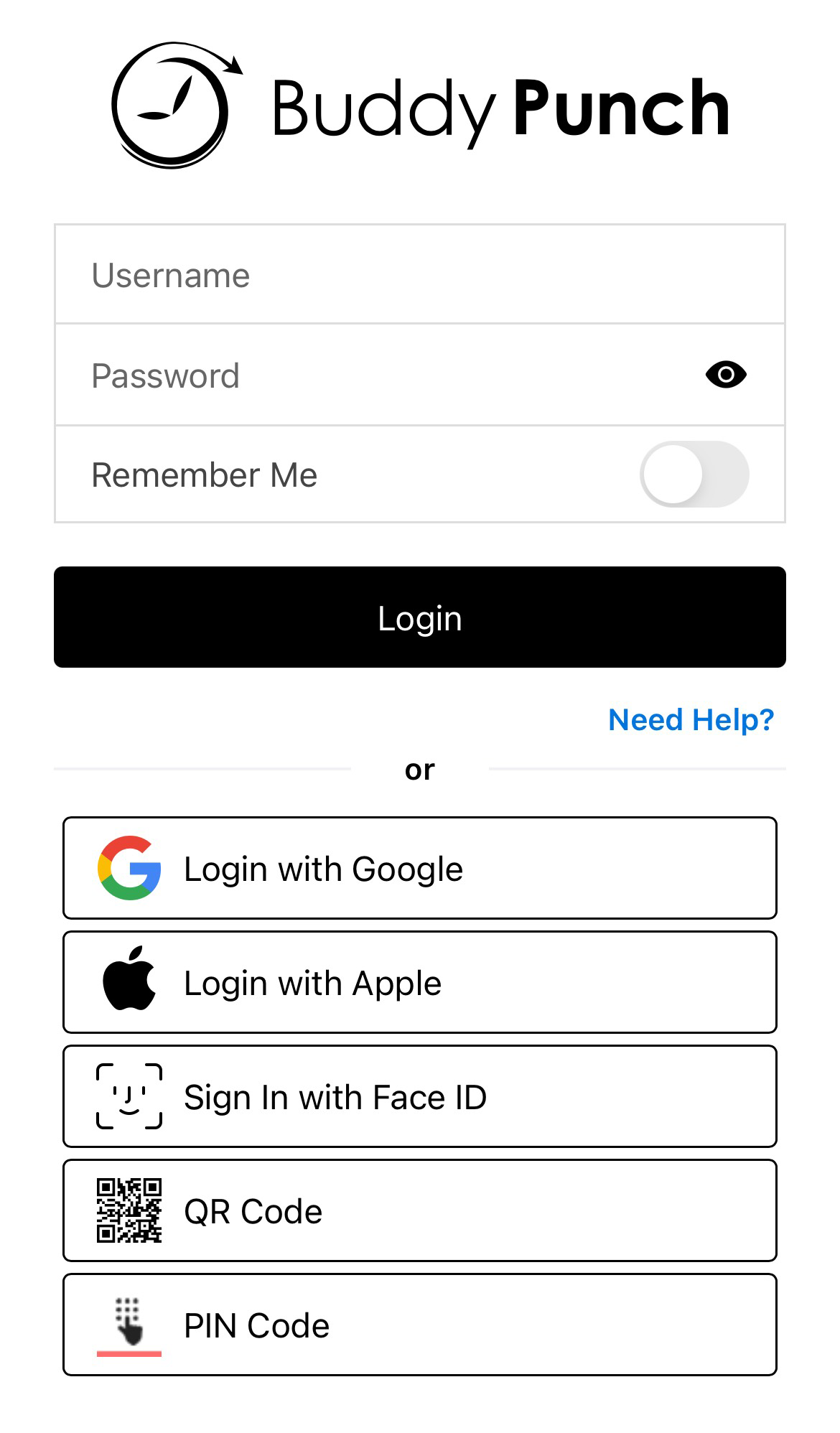
Downloading the mobile app took mere seconds, and the login screen offered generous options, including the ability to log in from Google or Apple, sign in with Face ID, scan a QR code, or use a pin code. The prompt may be transposed into Spanish by simply toggling to the appropriate flag, which was yet another nice feature.
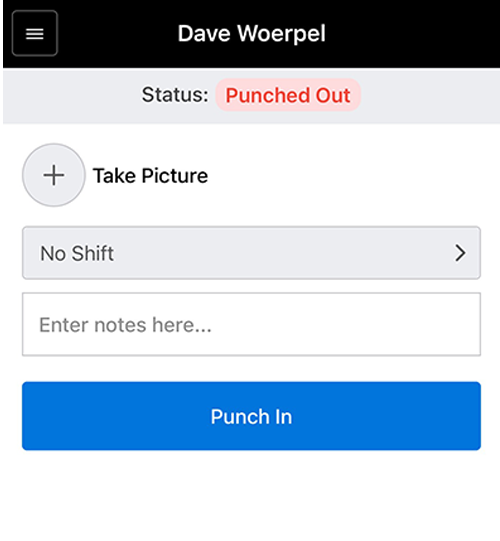
Once I had logged in, I was prompted to punch in by tapping an easily identifiable, long red bar that covered most of the screen.
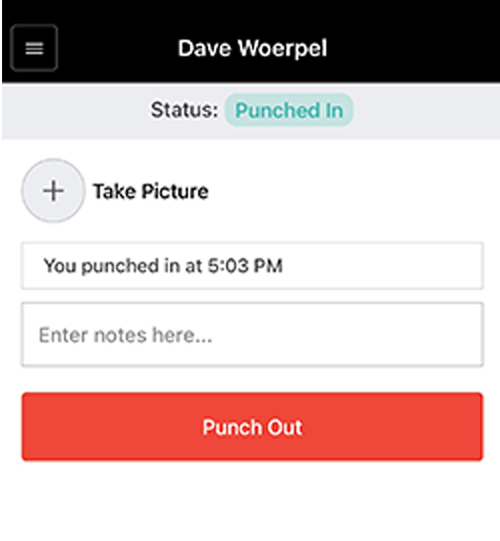
Once I punched in, my time was confirmed and frozen for me to see at any time. A circle with a plus sign allowed me to "take a picture." The ability to visually document my punch location (or anything else I’d like. to note) was a nice touch. A text box prompted me to include a note with my punch.
The bottom of the screen offered me shortcuts to schedule and timecard icons. Clicking the schedule icon allowed me to preview my week's schedule (assuming one has been created), and the timecards icon displays punches by day. The dates of the current pay period are clearly listed in the top-left corner.
A hamburger menu in the top left offered shortcuts to the timecards, schedule, settings, and notifications. A user may also easily log out from this menu.
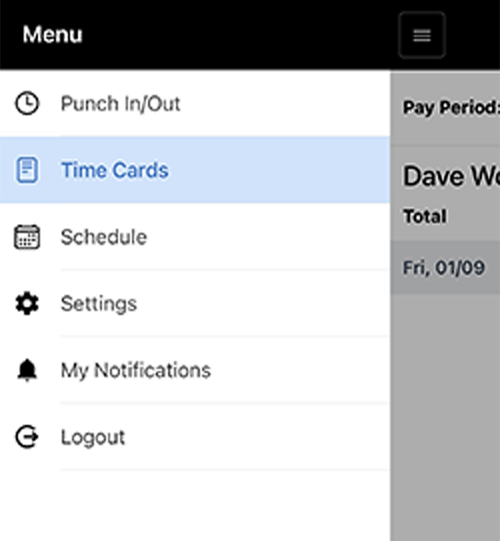
That’s it. No geofencing, PTO, GPS tracking, etc., until those options are toggled on by the admin. The interface is simple – almost too simple compared to alternative options.
Getting Started on the Mobile App as an Admin
Immediately after logging in, a dashboard displayed which of my employees were in, and the times and days they punched in.
Clickable tags allow me to see who’s out and today’s schedule as well.
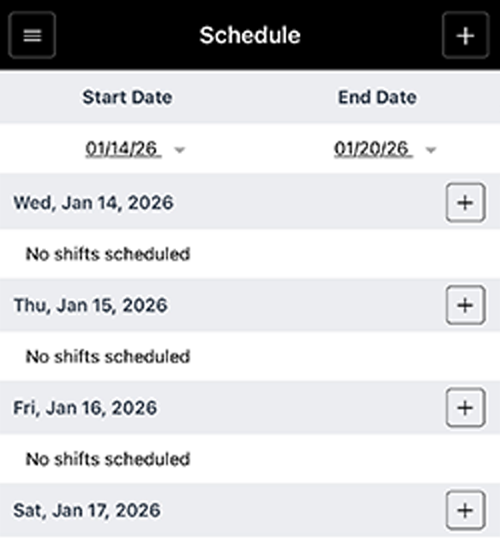
The same three icons (punch, schedule, timecards) populated the bottom of the screen. Time off was added once it was set up. The admin hamburger menu granted me a look at pending punch approvals, shifts by day, and any notifications. A user could also log out from this screen.
The biggest difference between the admins and the employees lies in the settings tab. Admins have control over locations, department codes, positions, geofences, language, and more.
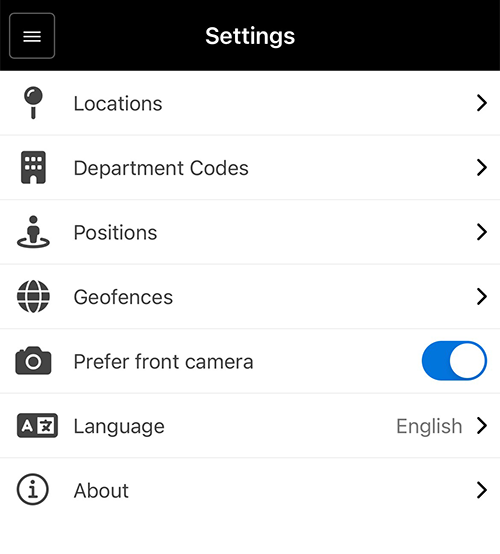
Overall, the app was simple to navigate. Its black-and-white approach was sort of blah, and the lack of options limited the software's usability, especially for employees.
Adding Employees
Score: 9/10
Next, I added employees by inputting their first and last names, email addresses, usernames, and passwords. After adding the employees, I was asked which features I was most interested in (punch time clock, scheduling, time off, job codes, GPS, alerts, etc.).
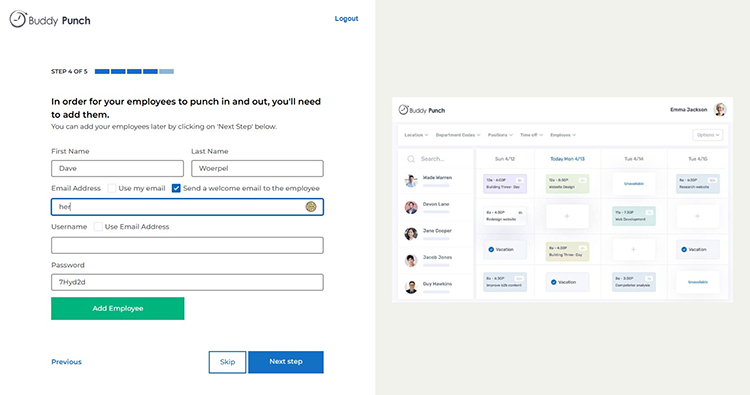
Once that was done, a short video tutorial on time tracking and scheduling appeared.
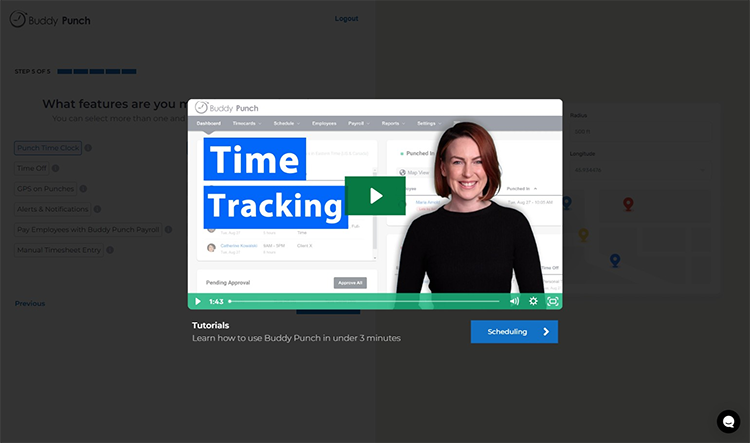
Overall, the experience was fairly quick and easy. I particularly enjoyed the tutorial videos at the end, which provided a helpful overview of the time tracking features and a personal, human-led interaction with the software.
Clocking In
Score: 9/10
Clocking in is simple. As previously mentioned, the clock-in button is prominently featured in an elongated box near the bottom of the introductory screen on the mobile app. Once the clock-in button is tapped, it changes from blue to red. The same button now becomes a punch-out button, allowing users to easily clock out using the same process.
Once clocked in, an employee can add a note simply by tapping and typing in the appropriate thread.
Scheduling
Score: 9/10
After completing the sign-up process, I decided to create a schedule for my employees. This is where Buddy Punch shines. Making shifts was straightforward. I simply clicked on a date and added the punch times.
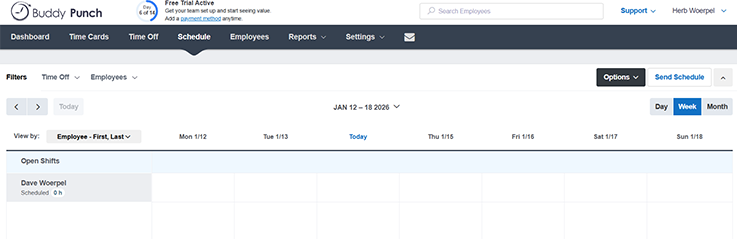
I also had the option to set these shifts as recurring throughout the week. Once the schedule was in place, I could publish it to all employees or select a specific group.
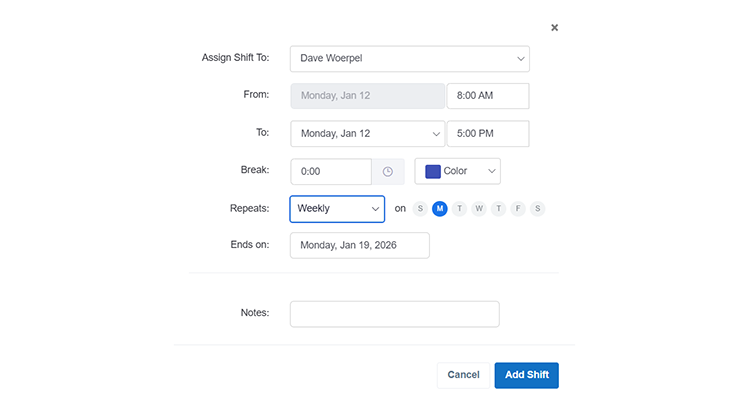
Additionally, if my schedule remained the same, I could easily copy the template to the following week. There was also a feature that allowed me to add open shifts for employees to pick up.
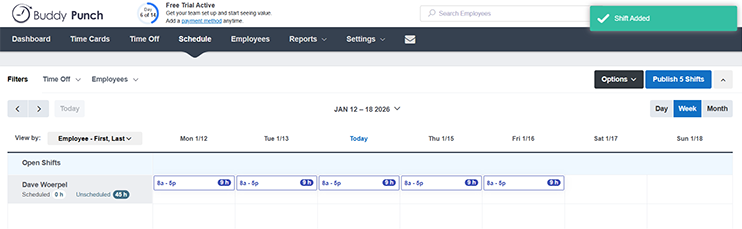
Overall, the scheduling process was simple yet comprehensive, offering useful features, such as template creation, open shifts, and selective publishing to employees.
Timecards
Score: 8/10
Buddy Punch’s timecards were easy to use and very straightforward as well. There were no bells and whistles or complicated menus to navigate. The timecard view was clean and easy to read. Editing timecards was also very easy and user-friendly. Managers can add, edit, or delete time entries if someone forgot to punch in/out or if adjustments are needed. You can also add durations for specific dates and assign job codes if your organization uses them.
Timecards can be approved, rejected, or reset for correction and locked to prevent further edits by employees. Employees see a “Submit for Approval” button when a timecard is ready. Once submitted, the timecard’s status becomes “Pending Approval.”
Customer Support
Score: 5/10
Support is a very important part of any time tracking company. Having a real person to talk with when I have a question about the system is crucial. The support during the trial was excellent; they provided clear instructions on how to operate the system and tried to assign me an onboarding agent to help me complete my account setup. Unfortunately, after the trial period ended, a customer must upgrade to the highest-tier plan for “Dedicated Support,” suggesting I may not receive the same level of support without ponying up additional money.
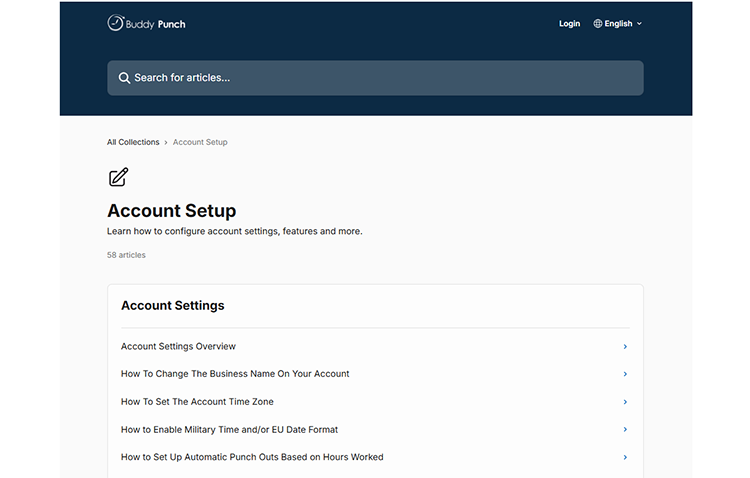
On the web, clicking Support took me to a help center that allowed me to search for answers to a wide variety of questions.
As I only had a 14-day trial, I was unable to test the level of support provided for the lower tier of service, but limiting support based on price is not promising.
Chat
Score: 0/10
Buddy Punch does not currently support a chat feature.
Time Off
Score: 8/10
Time off may be set up by admins on a web browser. Inside the Time Off tab, admins can toggle time off on/off, choose whether to allow employees to view their time off calendar, and allow employee time off accruals.
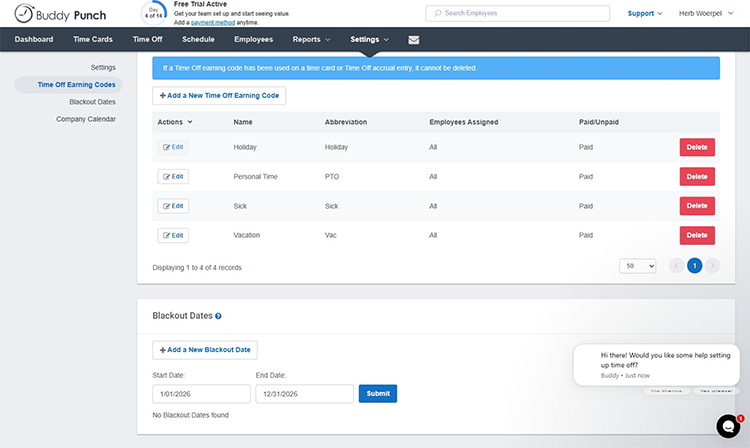
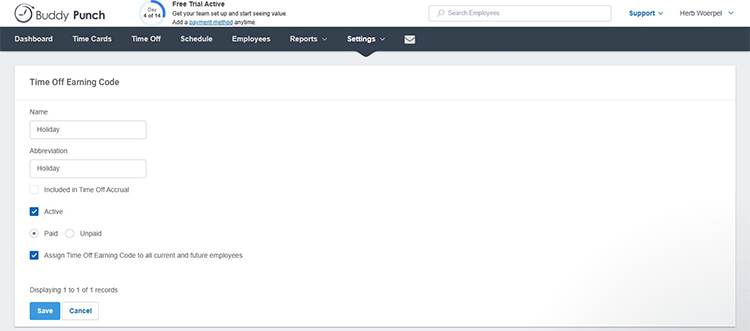
Buddy Punch offers four types of time off: holiday, personal time, sick, and vacation. Each type may be edited, allowing users to change the name, abbreviation, whether to include time off in accruals, which employee is eligible for each category, whether an employee has been assigned time off, and whether the time off is paid or unpaid.
Accrual rules can easily be set up for individual employees or the entire team, and blackout dates can be assigned as well. A company calendar option shows time off across the entire business.
Time off must be set up in the web platform and is not supported on the app.
Payroll
Score: 8.5/10
Accessing the payroll option within the settings tab, I loaded a landing page that prompted me on Buddy Punch’s payroll feature. The page touted a setup that only takes 10 minutes, promising a consolidation that will reduce costs and save time.
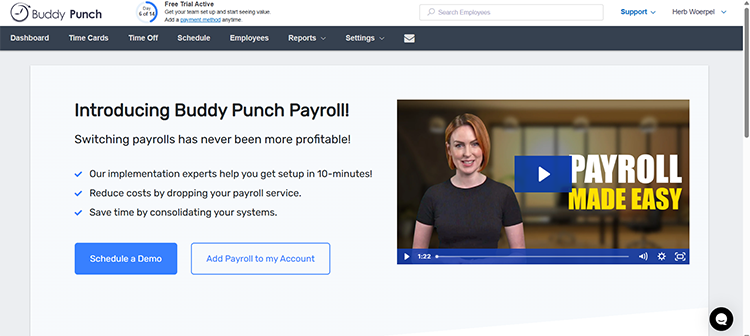
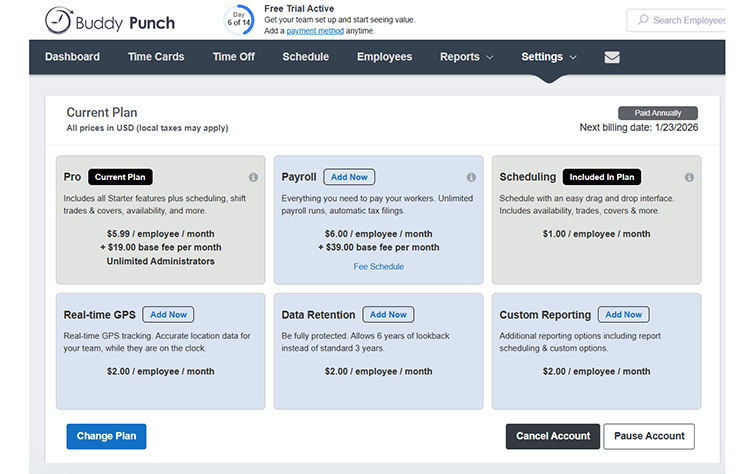
Users are encouraged to schedule a demo or immediately add payroll to the account. When I clicked the add it now option, I was greeted with a pricing page that identified the cost as $39 per month (base fee) and $6 per employee per month.
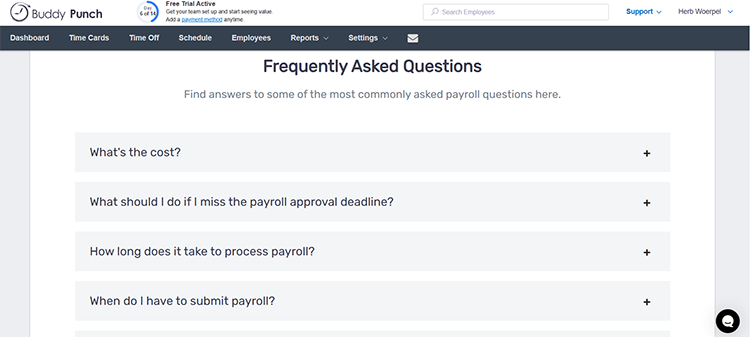
A list of frequently asked questions covers the cost, how long it takes, when employees are paid, etc.
Buddy Punch limits users to a base tier of services. Additional services are offered at an additional fee, such as $2 per employee per month for real-time GPS, $2 per employee per month for data retention, and $2 per employee per month for custom reporting.
After signing up for Buddy Punch, the company's email outreach focused heavily on prompting immediate setup and employee activity.
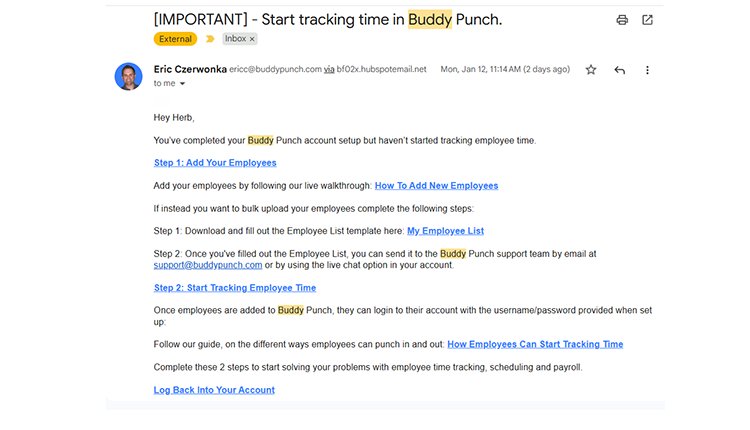
I received nine emails within my first week. One, for example, was largely instructional, notifying me that my account setup is complete but that employee time tracking has not yet begun. It walked me through the next steps, starting with adding employees either individually or via a bulk upload template. The email included links to live walkthroughs and help articles and encouraged me to reach out to support or start a live chat if assistance is needed. The message clearly outlines a step-by-step path to getting employees to punch in and out.
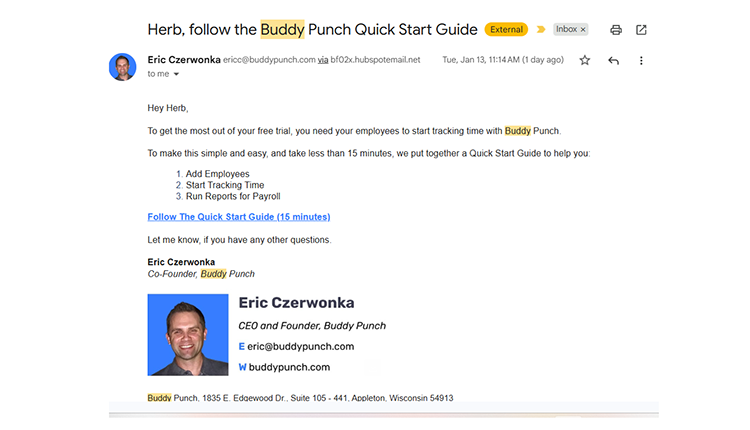
A second email reinforced this same goal with a simpler, more condensed approach. It emphasized the importance of getting employees actively tracking time during the free trial and introduced a “15-minute Quick Start Guide.” This guide highlighted three core actions: adding employees, starting time tracking, and running reports for payroll. The email is short, direct, and signed by a cofounder, which adds a personal touch without being aggressive.
Overall, Buddy Punch’s onboarding emails are task-driven and utilitarian. They prioritize speed to activation, provide clear instructional resources, and repeatedly guide users toward the same outcome: adding employees and beginning time tracking as quickly as possible. While there were quite a few emails, the outreach is helpful and straightforward, though largely focused on setup mechanics rather than broader use cases or long-term value.
Buddy Punch Pros
- Easy to Learn and Quick to Set Up: The onboarding process is straightforward, with guided setup steps and short tutorial videos that make it easy to get started.
- Clean, User-Friendly Interface: Both the web platform and mobile app are simple to navigate, with minimal clutter and intuitive menus.
- Flexible Punch-In Options: Employees can clock in using usernames and passwords, PINs, QR codes, Face ID, Google, or Apple logins.
- Reliable Mobile Time Tracking: The mobile app offers fast punch-ins, punch confirmations, punch notes, and optional photo attachments.
- Strong Scheduling Features: Scheduling is one of Buddy Punch’s strongest areas, with recurring shifts, schedule templates, open shifts, and selective publishing.
- Straightforward Timecards: Timecards are easy to read and edit, with simple approval workflows and the ability to lock timecards after submission.
- Customizable Time-Off Policies: Admins can create multiple time-off types, set accrual rules, assign blackout dates, and view a company-wide time-off calendar.
- Admin Control Over Locations and Roles: Admins can manage locations, department codes, positions, geofences, and language settings from the admin dashboard.
- Available Payroll Add-On: Buddy Punch offers an integrated payroll option for businesses that want time tracking and payroll in one system.
- Free 14-day trial: Users can fully test the platform before committing.
Buddy Punch Cons
- Pricing Can Get Expensive Quickly: A $19 monthly base fee applies before adding any employees, and per-user pricing increases by tier.
- Key Features Locked Behind Higher Tiers or Add-Ons: Advanced GPS tracking, custom reporting, extended data retention, and higher-level support all cost extra.
- Customer Support Limited By Plan: Dedicated support is only available on the highest-tier plan, which may limit access for lower-tier customers.
- No Built-In Chat Feature: Buddy Punch does not currently offer an internal chat or messaging tool.
- Time-Off Management Not Available on Mobile: Time-off settings and management must be handled on the web platform and are not supported in the mobile app.
- Payroll Costs Add Up: Payroll requires an additional $39 monthly base fee plus $6 per employee, increasing overall costs.
- Mobile App Feels Overly Basic: While easy to use, the black-and-white design and limited customization make the app feel somewhat restrictive.
- Limited Scalability for Growing Teams: As operational needs expand, tiered pricing and paid add-ons may make Buddy Punch feel less flexible long-term.
User Feedback and Testimonials
Buddy Punch generally received positive reviews on all review sites. It’s praised for its user-friendly interface, helpful scheduling/alerts, GPS tracking, and suitability for field/remote teams, but some users reported issues with the app not always registering punches, which caused discrepancies, like being clocked in for too long or missing punches.
For example, the most relevant review on Capterra, where Buddy Puncy has a 4.8-star average rating, comes from Mark B on Sept. 22, 2025, in which he says, “It allows me to have a more accurate payroll with time breaks and exact punch-in/punch-out times.”
On Google Play, where Buddy Punch has a 4.5-star rating, D Bos wrote, on Dec. 22, 2025, “Impressed with this app. We had been using another time tracking app at my company, but we'll be switching to Buddy Punch. BP's geofencing, GPS location, and time edit approvals work really well. They also have smart features like IP locking and punch schedule limiting. Both the app and website are intuitive and easy to use.”
On Apple, Buddy Punch has a 4.9-star rating out of 5 stars. A few critical reviews do exist, including one from South Florida Catering, which was published on Jan. 15, 2024: “We have a business with about 75 employees that we pull from based on the size of our events. Having to inactivate them all and then reactivate every month led to errors and holdups when employees would clock in. The software would be better if it only charged for employees who actively punch in during a month, while letting us leave all of our employees active in the system. Also, we had a pattern with some employees with darker skin having problems with facial recognition. So, that was a bit embarrassing and led to the final decision to put everyone back on punch cards.”
Buddy Punch vs. OnTheClock
|
Feature |
Buddy Punch |
OnTheClock |
|
Mobile-Friendly Design |
Mobile app is fast and reliable, but fairly basic with limited customization and functionality (no PTO, geofencing, etc., until activated) |
Fully featured mobile app with real-time access to timecards, schedules, PTO, and payroll-related data |
|
Desktop Clock-Ins |
Supported via web browser |
Fully supported on desktop and laptop devices |
|
Payroll Integrations |
Payroll is available as a paid add-on; integrations and support vary by tier |
Payroll is available as a paid add-on; it seamlessly integrates with QuickBooks, Gusto, ADP, Paychex, and more |
|
User Roles Without Extra Charges |
Tiered pricing; access to advanced features and support depends on plan level |
No extra charges for admins, managers, or view-only users. All subscribers gain full functionality of the software. |
|
Support |
Dedicated support is only available on the highest-tier plan |
Live, U.S.-based support via phone, chat, and email for all customers |
|
Time Clock Kiosk |
Supports shared devices with PINs and QR codes |
Dedicated kiosk mode for shared devices with full admin controls |
|
API Access |
Limited and typically restricted to higher-tier plans |
Open API access is available without forcing upgrades |
|
Pricing Transparency |
Tiered pricing with base fees, add-ons, and feature restrictions |
Flat base fee plus low per-employee cost; no surprise fees or gated essentials |
Final Thoughts
Buddy Punch is a solid option if your primary goal is simple time tracking with dependable scheduling tools. It’s intuitive, easy to adopt, and performs well for teams that don’t require advanced automation or deep integrations. For smaller organizations with minimal reporting needs and a stable workforce, it can get the job done.
However, as soon as you need more — real-time PTO visibility for employees, robust payroll automation, flexible reporting, or consistent access to live support — the cracks start to show. Tiered pricing, paid add-ons, and gated customer service make Buddy Punch more expensive and less predictable as your team grows.
OnTheClock is built for businesses that want time tracking to work with them, not against their growth. It combines time tracking, scheduling, PTO, and payroll into one unified system without forcing you into higher tiers just to unlock essentials. Managers and employees get full functionality from both desktop and mobile devices, eliminating the friction of platform restrictions.
Automation is where OnTheClock truly stands apart. From overtime calculations and payroll processing to real-time alerts for missed punches or scheduling conflicts, the platform reduces manual work and helps prevent costly errors. Employees always know where they stand when it comes to seeing schedules, PTO balances, and timecards in real time, cutting down on confusion and back-and-forth.
Customer support is another major differentiator. While Buddy Punch limits hands-on support to premium plans, OnTheClock offers live, U.S.-based support via phone, chat, and email without requiring an “enterprise” upgrade. When questions come up, help is readily available.
Finally, pricing stays refreshingly simple. One flat base fee, a low per-employee cost, and no surprise charges for admins, reporting, or support. With seamless integrations (including QuickBooks, Gusto, ADP, Paychex, and more), full-service payroll, and a platform designed to scale, OnTheClock is built to grow alongside your business — not slow it down.
Want to see how OnTheClock compares for your team? Try it free and explore the difference for yourself—no credit card required.
