Skip to content

Time Tracking Software for Nonprofits

Stop Chasing Timesheets. Track Every Hour Your Staff Works.

Staff clock in from any phone or tablet, and every hour lands on one accurate timecard.
No credit card required
Cancel anytime
5-minute setup
ontheclock-non-profit
18,000+
Companies rely on OnTheClock Everyday
160,000+
Employees Punching in Daily
★★★★★
4.8
Capterra
★★★★★
4.5
G2

Why time tracking is different for nonprofit organizations


It’s Friday, and payroll is due. Your 14 employees work at an office, a food pantry, and an overnight shelter. Two split their time between programs funded by a state grant. Their hours are scattered across paper timesheets, a spreadsheet, and a group text.

Adding up the hours is only part of the job. You also need to know how much time those two employees spent on each program. Right now, you have to piece that together by hand.

With OnTheClock, staff can choose a program when they clock in from a phone or shared tablet. You can review hours by program, get overtime alerts, and send approved hours to payroll.

ontheclock-non-profit-punch-in

What OnTheClock does for nonprofits

Hours Tracked by Program

Set up each program or grant as a job, and staff select it when they clock in. You can run a report to see how many hours were recorded for each one, without piecing the answer together from paper timesheets.

Clock in from any device

Staff can clock in from a phone, desktop, or shared tablet kiosk with a PIN. Their punches appear on their timecards, so you can review everyone’s hours in one place before running payroll.

Punch controls for every site

Set geofencing, IP, or Wi-Fi restrictions for your office, pantry, and shelter. These controls help ensure staff clock in from an approved location, even when your team works across several sites.

Overtime alerts

Automatic alerts let you know when an employee is approaching your overtime limit. That gives you time to adjust coverage before extra hours put pressure on a budget you’ve already planned.

PTO tracking

Set your PTO accrual rules, and OnTheClock keeps employee balances up to date. Staff can check their balance and request time off in the app, saving you from updating a separate spreadsheet.

Approvals with an audit trail

Review and approve timecards in one place before hours go to payroll. When the audit trail is enabled, you can see who edited a timecard and when, giving you a record to check later. 
BEFORE & AFTER

Sound familiar? 

Here’s the real cost of running a shop without OnTheClock.

Without OnTheClock
With OnTheClock
✕ A staff member splits her time between a state grant and the general fund, but her timesheet shows only a weekly total.
✓ Staff select the program when they clock in. A job costing report shows the hours recorded for each program.
✕ Hours from the office, pantry, and shelter arrive on three different sheets just as payroll is due.
✓ Punches from all three sites appear in one place, so you can review the hours before payroll.
✕ Someone signs the pantry’s paper sheet for coworkers who haven’t arrived. You have no punch records to check.
✓ Location restrictions help you check that punches came from an approved site.
✕ An uncovered shelter shift pushes one employee to 46 hours. You find the overtime when you prepare payroll.
✓ An overtime alert gives you a chance to adjust coverage before the employee reaches your set limit.
✕ You update PTO balances in a spreadsheet at night, then answer staff emails asking how much time they have left.
✓ PTO balances update under your accrual rules. Staff can check their balance and request time off in the app.
✕ A board member asks how much staff time went to the youth program last quarter. Someone spends a day piecing it together from paper.
✓ Run a job costing report for the quarter. Approved timecards and an enabled audit trail give you records to review alongside it.
How it work
How it works
01
Add your staff and set up your programs

Create your OnTheClock account, add your staff, and set up a job for each program or grant. There's nothing to install. Staff get a login by text or email and download the app.

add-team-member-screenshot (1)
02
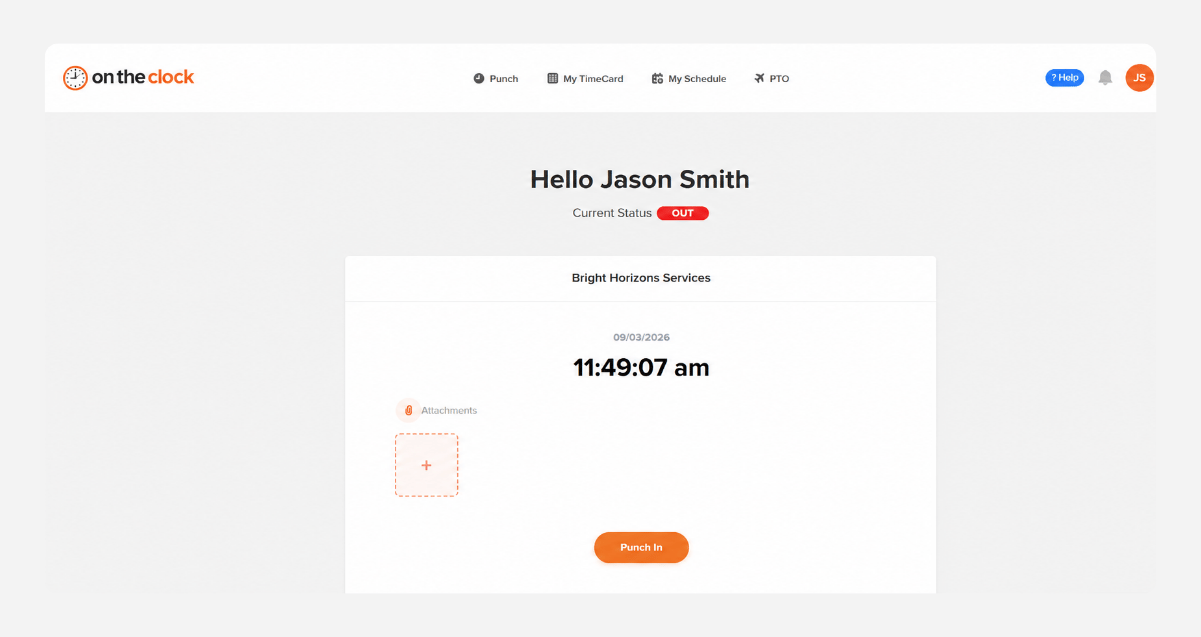
Staff clock in to the right program

Each staff member clocks in from their phone, a desktop, or the shared tablet at your site and picks the program they're working on. Location controls confirm they're where they should be.
punch-in-screenshot
03
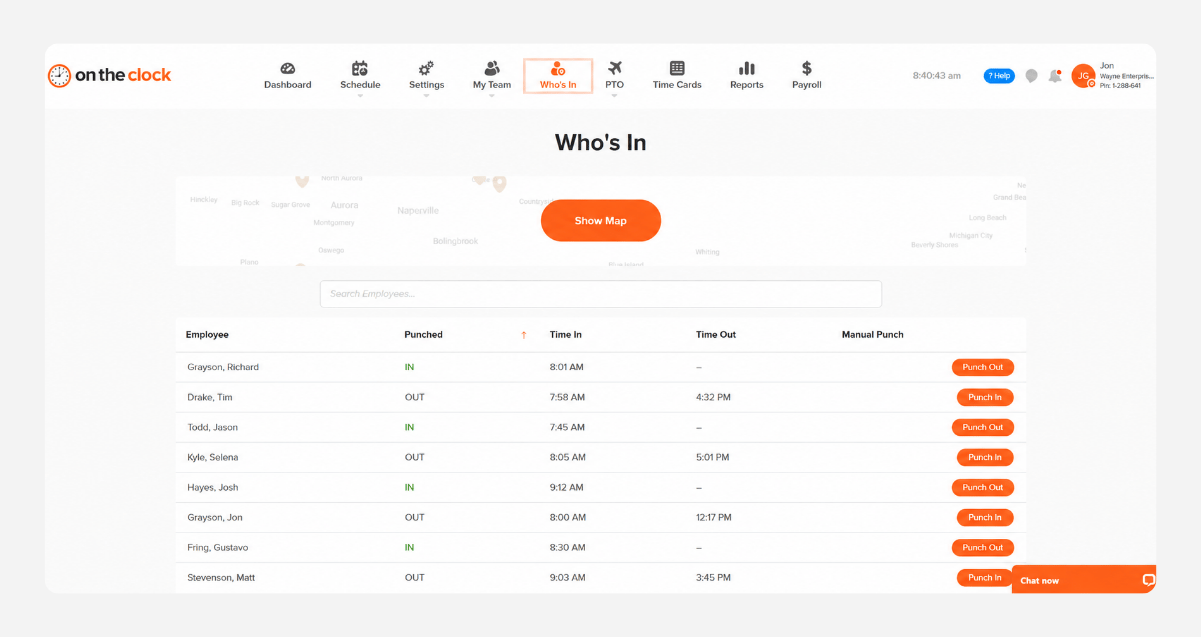
Watch hours by program and site in real time

The Who's In dashboard shows who's working and where they clocked in. Overtime alerts and schedule-versus-actual reports flag no-shows, late arrivals, and long weeks while you can still fix them.
who-is-in-screenshot
04
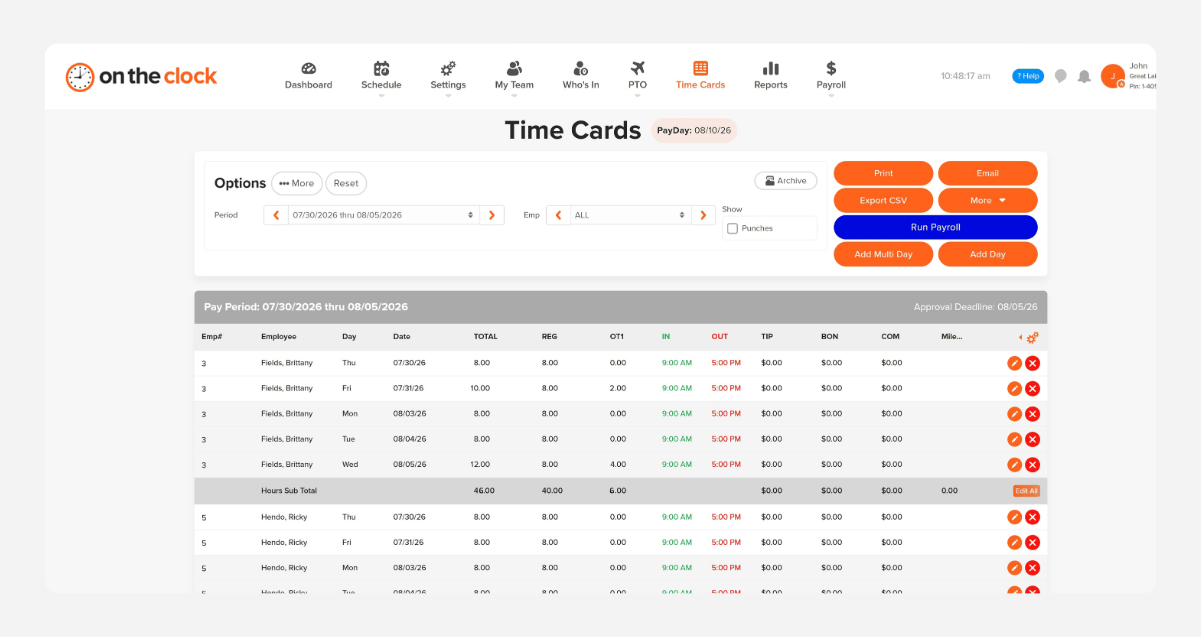
Approve hours and send them to payroll

At the end of the pay period, review hours by employee or program, approve them in one place, and export to payroll. QuickBooks, Gusto, ADP, Paychex, and Square are supported.
payroll-export-screenshot-1

Know where every funded hour goes, every pay period.

OnTheClock is free for the first 30 days. No credit card is required, and you can set up your account in 5 minutes from your phone.

How OnTheClock compares


Feature OnTheClock Harvest Clockify

Best for

Nonprofits with hourly staff

Teams that bill clients by the hour

Project and volunteer time tracking

GPS time tracking

✓ Included 

✗ Not available 

✓ Pro plan only ($9.99/user)

Geofencing

✓ Included

✗ Not available

✓ Pro plan only

Tablet kiosk clock-in

✓ Kiosk with PIN

✗ Not available

✓ Included

Hours by program

✓ Job costing

✓ Projects and tasks

✓ Projects

Payroll integrations

✓ Included

✗ Not available

✓ Standard plan

PTO tracking

✓ Included

✗ Not available

✓ Standard plan

Scheduling

✓ Included

✗ Separate product

✓ Pro plan only

Pricing (per user/mo)

$4/user + $5 base

$9–$14/seat (annual)

Free–$14.99/user

Free trial

30 days, no credit card

30 days

Free plan (limited)

OnTheClock is best for small nonprofits that need hours tracked by program, clock-ins from any site, and payroll integration at a transparent price with real U.S.-based support.

Trusted by nonprofitsof all sizes

★★★★★
"I looked at quite a few time card systems - including ones that were more expensive. OnTheClock was the best bang for the buck. I love how employees have it on their phone for easy punch in and punch out. Add tasks to know what people are working on and attribute time to it. If someone forgets to punch in or out, it is easy to fix and have hours recalculate. This is an excellent tool for keeping track of employee and contractor hours."

MR
Merance
★★★★★
"We only have a couple of contract employees, but this saves me a lot of time in figuring checks. A+"

KF
Kathy Fortner
★★★★★
"OnTheClock is a great tool for any small business or independent contractor to manage time spent on projects. I highly recommend it - especially to any independent contractors out there!"

JN
James Nichols
Transparent pricing

Simple pricing. No feature tiers. No surprises.

OnTheClock charges $4 per active employee per month plus a $5 base fee. That's it. Every feature, including GPS tracking, geofencing, scheduling, PTO management, audit trails, and payroll exports, is included from day one.
$0 /mo
0 active employees

Need payroll, too?

OnTheClock Payroll runs $40/month plus $6 per employee, with direct deposit, automated tax calculations, and the same dashboard your crew already uses for time tracking.

There are no feature upgrades. No plan switching. No "GPS is a Pro feature" surprises.
Start your free 30-day trial
No credit card required at sign-up.
Get Started Today

Your staff is ready. Setup takes 5 minutes.

No credit card, contracts, or IT is required. Just more time for the mission and fewer hours spent on timesheets.

Common Questions

Questions from electrical contractors

A 12-person nonprofit pays $53/month ($4 per active employee per month plus the $5 base fee). There are no feature tiers or setup fees. Job tracking, GPS, scheduling, PTO, and payroll exports are all included from day one.
Yes. Set up each program or grant as a job, and staff choose one when they clock in. Job costing reports show hours and labor cost by program, by employee, or both, for any pay period.
It gives you the records that reporting depends on. Federal rules require personnel charges to reflect actual work, not budget estimates. OnTheClock records actual hours by program, with approvals and an edit log. It doesn't split one paycheck across grants, so pair it with your accounting system.
Yes. Turn any tablet into a kiosk, and staff clock in with their own PIN. It works well at a pantry, shelter, or front desk, and staff can also use their own phones or a desktop.
Only if you want it to. GPS punch recording logs location at clock-in and clock-out. GPS breadcrumb trails are a separate feature for field staff, and you decide whether to turn it on.
Yes. OnTheClock tracks hours for salaried and hourly employees on the same account, plus 1099 contractors. Many nonprofits track salaried staff too, since grant-funded time needs a record of actual hours.
OnTheClock is built for paid staff, so it's the wrong tool for large volunteer programs. One rule to know: Paid employees can't volunteer to do the same work they're paid for, so those hours belong on their timecard.
No contract. You can cancel anytime from your account settings. Every account starts with a free, 30-day trial, so you can test it with real staff first.
Get Started Today

Spend less time on timesheets

OnTheClock is affordable time tracking and payroll software built for nonprofits with hourly and grant-funded staff.