Skip to content

Employee Leave tracker

Efficiently Track Employee Leave with OnTheClock

OnTheClock’s PTO management tool allows businesses to administer employees’ comings and goings effectively and efficiently.

No credit card needed. Set your system up in 5 minutes or less!

Work_schedule_maker_hero

More than 15k companies use OnTheClock for Time Tracking, Scheduling, and Payroll

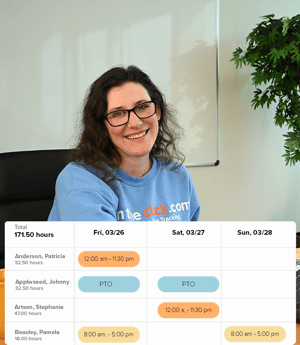
Simplify absence management and effortlessly track employee leave with OnTheClock.

Leave_tracker_Image_Three_2

Stay Organized Anytime, Anywhere!

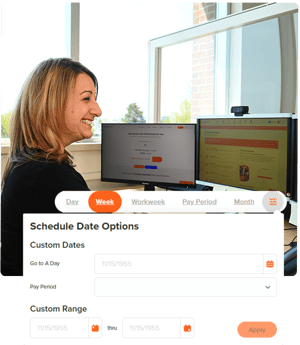
Generate reports on PTO usage, trends, and balances across the organization

  • Plan time off without directly contacting the HR department.

  • Request, edit, or review time off at any time.

  • Make informed decisions that maintain productivity and ensure a smooth workflow.

PTO Tailored to Your Business

Customize accrual policies to automatically calculate PTO based on your company's rules.

  • Easily configure accrual rates based on employee tenure, hours worked, or any additional custom criteria.

  • Automatic updates allow employees to view current PTO balances at any time, minimizing manual adjustments and preventing errors.

  • Time off accruals can be tailored to meet local and federal PTO regulations.

Leave_tracker_Image_One
schedule_view_hero

Take Control of Your PTO with Smart Reporting

Generate reports on PTO usage, trends, and balances across the organization.

  • Forecast staffing needs and identify patterns in time-off usage

  • Filter and customize reports by department, team, or specific timeframes.

  • Keep track of individual PTO balances easily.

Real-Time PTO Insights for Your Team

OnTheClock’s PTO management tool provides employees with instant, real-time access to their PTO balances, granting visibility to used, pending, and accrued time off.

  • Gain clear, 24/7 access into accrued and/or spent sick time, personal time, vacation time, and holiday.

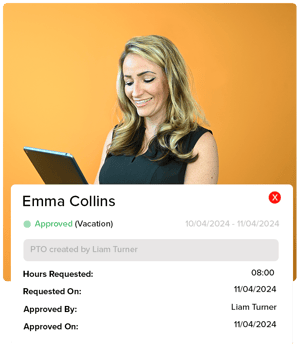
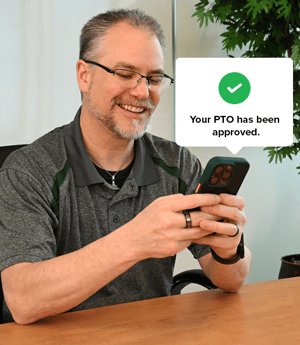
  • Set up alerts when a PTO request is made, approved, or denied.

  • Clear visibility allows team members to plan for coverage and optimize staffing levels.

Leave_tracker_Image_Two

How to Manage PTO in OnTheClock

1
Create an account.
2
Invite your team.
3
Click the PTO icon
4
Manage PTO Requests

Take Control of Your Team’s PTO with Real-Time Tracking

What Our Customers Are Saying

5-stars

"OnTheClock is easy for my staff to use and simple for me to maintain employees/PTO. Their customer service is great, too! I would definitely recommend this to any small business. Being a Michigan-based company is wonderful as well!"

BPL

Everything You Need In One Place

PTO FAQ

How does OnTheClock’s leave tracker tool work?

OnTheClock’s PTO management tool helps companies automate and streamline PTO tracking, ensuring accurate, up-to-date records for both employers and employees. Employees can view PTO balances in real-time, while managers can approve or review PTO requests with just a few clicks.

How can employees check their PTO balance?

Employees can view their PTO balances anytime by logging into the OnTheClock platform on their desktops or mobile apps. The dashboard shows available PTO, any time off used, and upcoming approved days off.

How can an employee request time off through OnTheClock?

To request PTO, log in to OnTheClock, go to the PTO section, and submit a new request. Your request will be sent to your manager for approval, and you’ll be notified of any updates.

How can an employee see the status of his or her PTO request?

The status of each PTO request can be viewed directly within the platform. Pending, approved, and denied statuses are all visible in each employee’s PTO request history.

What types of PTO may be requested through OnTheClock?

OnTheClock supports requests in four categories: sick time, personal time, vacation, and holiday. These categories can be customized or combined into one category.

How does PTO accrue on OnTheClock?

The platform allows managers to customize PTO accrual rules to match company policies. Accruals can be based on hours worked, pay periods, or anniversary dates, ensuring PTO is calculated accurately according to your specific rules.

How can a manager customize his or her PTO accrual policy in OnTheClock

Visit the PTO settings and configure the accrual rules via the OnTheClock admin dashboard. Accruals can be customized based on hourly, daily, or annual schedules to match the company’s PTO policy. They will then calculate automatically for each employee

Can managers generate team and individual PTO reports

Yes, OnTheClock offers detailed PTO reporting that allows managers to view PTO balances, usage, and trends across the organization. You can filter reports by team, time frame, or individual employee.