Skip to content

Time Sheet Software

Record Time Quickly and Efficiently

Automated time sheets simplify the time tracking and payroll processes

No credit card needed. Set your system up in 5 minutes or less!

time-sheet-software-header

More than 15k companies use OnTheClock for Time Tracking, Scheduling, and Payroll

Simplify Your Payroll with Digital Time Sheets

timesheets-workforce-management-practices

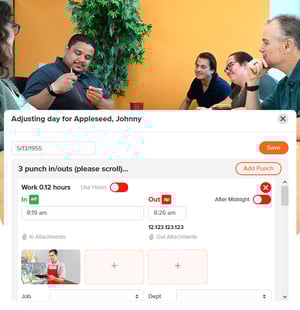
Correct Time Sheets in Seconds

If an employee makes an error on a time sheet, correct it in seconds.

  • Digital records can be reviewed and fixed instantaneously.

  • Cloud software offers accessibility and endless storage.

  • Eliminate manual calculations and fact-checking.

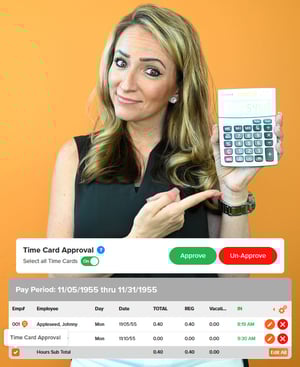
Review and Approve Time Data Quickly and Efficiently

A digital interface ensures time sheets are always accurate.

  • Punches are recorded and stored in a central platform.

  • Reports allow managers to review and analyze attendance trends.

  • Data is updated in real-time as employees log hours

timesheets-manually-tracking-time
Integrate-with-Your-Payroll-Provider

Integrate with Your Payroll Provider

Easily export your time sheets into your payroll provider’s software.

  • Seamless payroll integration promotes a cohesive workflow.

  • Payroll integration saves time, money, and energy.

  • Eliminate manual data-entry errors.

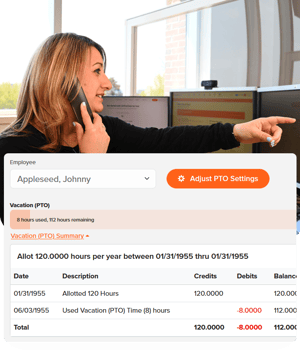
Simplify the PTO Process

Efficiently manage employee PTO requests 24/7.

  • View all upcoming absences on a calendar view.

  • Check remaining PTO balances for your entire team on one screen.

Simplify-the-PTO-Process

How to create a time sheet in OnTheClock

1
Sign up to get started.
2
Ask your team to join
3
Get Everyone's Work Hours
4
Make Your Time sheet Automatically

Experience the benefits of accurate, and efficient time tracking with OnTheClock.

What Our Customers Are Saying

5-stars

"This app is great. It's easy to use and navigate and has made calculating hours and payroll so much easier."

By MDI

Everything You Need In One Place

FAQ

What is the difference between a time sheet and a timecard?
Typically, a timecard is recognized as a timestamped document designed only to record an employee’s start and stop times. A time sheet allows employees to record additional data, such as the purpose of the shift, client information, etc.
What is the difference between a time sheet and time sheet software?
A time sheet is typically presented on paper or via a spreadsheet while time sheet software are digital tools designed to automate the process of tracking and managing employee hours.
How can time sheet software boost my company’s productivity?
Time sheet software offers many benefits. It can discourage multitasking, improve focus, encourage prioritization, boost organization, increase accountability, and more.
Can time sheet software serve as a legal document?
Yes, a time sheet may be considered a legal document and can be used to justify compensation, hours worked, benefits, etc.
Is my time sheet software data confidential?
Hours worked are covered under the Public Relations Law and are generally considered financial records. If a time sheet includes personal information, such as performance reviews or social security numbers, they are considered confidential.
Is time sheet software secure?
Security varies by provider. OnTheClock uses specific security measures, such as Secure SocketsLayer (SSL) protocol, which encrypts information at 256-bit strength.