Skip to content

Employee Vacation tracker

Take the Guesswork Out of Vacation Tracking

No more manual calculations — update vacation schedules automatically.

No credit card needed. Set your system up in 5 minutes or less!

Leave_tracker_Image_Hero

More than 15k companies use OnTheClock for Time Tracking, Scheduling, and Payroll

Get accurate, stress-free PTO tracking with OnTheClock.

Leave_tracker_Image_Two

Quick and Efficient Requests

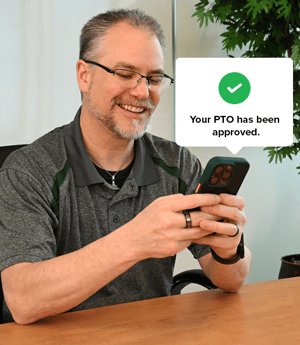
With OnTheClock’s time-off tracker, employees can request vacation and managers can approve it in just a few clicks.

  • Time off can be requested and approved instantly from anywhere.

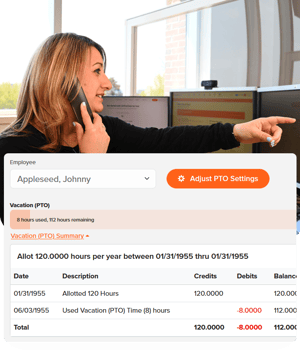
  • PTO balances update automatically upon approval or denial.

  • Receive instant notifications if and when a request is approved or denied.

Customize Your PTO Policies

Tailor your time-off policies to precisely align with your business’s unique needs.

  • Set custom accrual rates allowing employees to earn PTO on an hourly, weekly, or monthly basis.

  • Define rollover rules to specify if and how unused time carries over.

  • Create distinct leave categories for vacation days, sick leave, and unpaid time off.

Leave_tracker_Image_Three_2
Simplify-the-PTO-Process

Empower Your Team with Transparent, Hassle-Free PTO

Say goodbye to endless back-and-forth emails and manual tracking!

  • PTO balances and accrual details can be viewed 24/7 from any device.

  • Employees are updated instantly when a request gains a response.

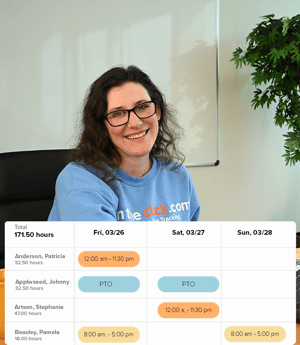
  • Employees can request time off, view PTO history, or see scheduled absences at their convenience.

Enhanced Compliance and Recordkeeping

OnTheClock’s vacation tracker provides a clear and accurate record of all time-off activities, helping companies stay compliant and up to date.

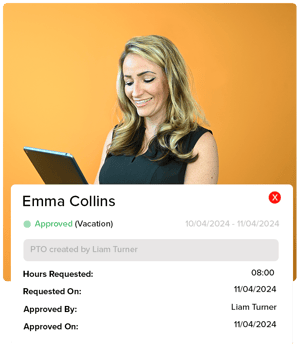
  • Every request, approval, and adjustment is documented.

  • Discover which manager approved or denied each request and when.

  • In the case of an audit, detailed time-off records can be easily accessed, organized, and presented.

Leave_tracker_Image_One

How to Manage PTO in OnTheClock

1
Create an account.
2
Invite your team.
3
Click the PTO icon
4
Manage PTO Requests

Efficient PTO Tracking Awaits – Explore OnTheClock’s Vacation Tracker!

What Our Customers Are Saying

5-stars

"The account setup was straightforward and simple for our employees to download and start using. Our employees having the ability now to leave notes when punching their time, the ability to correct their own missed punches, being able to view how much PTO they have and the ease of requesting it make OnTheClock the best time tracker I have used in all my years of doing payroll."

Mandy R

Everything You Need In One Place

PTO FAQ

How does the vacation tracker handle different PTO policies?

OnTheClock’s vacation tracker is also a holiday tracker, sick time tracker, and personal time tracker. The software allows you to set custom policies for accrual rates, rollover rules, and specific leave types, so you can tailor PTO to match your company’s unique needs.

Can employees view their own PTO balances and request time off directly?

Yes, employees can check their current PTO balances, view past requests, and submit new time-off requests directly within the platform, making the process transparent and straightforward.

Does the vacation tracker support multiple types of leave, like vacation, sick days, and personal time?

Absolutely! OnTheClock’s vacation tracker is flexible and supports various leave types, allowing companies to categorize and manage all time-off requests, whether they’re for vacation, sick days, or other types of leave.

How will I be notified when an employee requests time off?

When an employee submits a time-off request, you’ll receive an instant notification. These notifications can be customized to be received via text, email, or directly through the software. Managers can review and approve (or decline) the request with a single click, keeping the process efficient and streamlined.

Is it possible to track PTO balances for remote or multilocation teams?

Yes, OnTheClock’s vacation tracker is cloud-based, meaning it’s accessible from any device with an internet connection, making it easy to track PTO balances across remote or multilocation teams.