Skip to content

Time Tracking Software for Health Care

Less time on time sheets. More time with patients.

Every punch, break, and overtime hour lands in one place — so payroll takes minutes and your team stays with patients.
No credit card required
Cancel anytime
5-minute setup
ontheclock-healthcare-mobile-clock-in
16,000+
Companies rely on OnTheClock Everyday
160,000+
Employees Punching in Daily
★★★★★
4.8
Capterra
★★★★★
4.5
G2

When Time Records Are Wrong, Payroll Becomes Guesswork


It’s Monday, payroll is due at 10 a.m., and you’re rebuilding last week from memory. One MA stayed late. Someone worked through lunch. The sign-in sheet says everyone left at 5 p.m. Yet, you know that’s not true.

The problem is the system. Paper sign-ins and automatic lunch deductions show what should have happened, not what actually did. So you guess, round up, or risk someone getting a short check.

OnTheClock gives you real punches, real break records, and overtime alerts before payroll day. Staff clock in at the front desk, missed breaks stay paid, and Monday becomes review and approve, not detective work.
 

ontheclock-quickbooks-timesheet-export-ipad-1
DESIGNED FOR REAL Healthcare Offices

Catch Late Arrivals, Overtime, and Payroll Issues Before They Cost You

PIN punches at the front desk

Stop wondering who is actually clocked in. Staff enter a PIN on the check-in kiosk and get to work. You can limit punches to your office Wi-Fi, so nobody clocks in before they walk through the door.

Breaks without the guesswork

 Lunch breaks should not turn into another thing you have to track down. Staff punch out when they leave and back in when they return. If someone works through lunch, there is no break punch, so those hours stay paid. 

Catch overtime before payroll

 A few extra minutes here and there can turn into an overtime surprise by Friday. Get an alert when someone is getting close to 40 hours, so you still have time to adjust the schedule and control labor costs. 

Know where dollars are going

 See how much time and money are going to the front desk, clinical staff, billing, or other departments. When you are thinking about hiring another MA or opening on Saturdays, you can make the decision with real numbers instead of guessing. 

Time off without the mess

 No more digging through texts, sticky notes, and old emails to remember who asked for Friday off. Staff request time off from their phones, balances update automatically, and everyone works from the same calendar. 

Payroll in one click

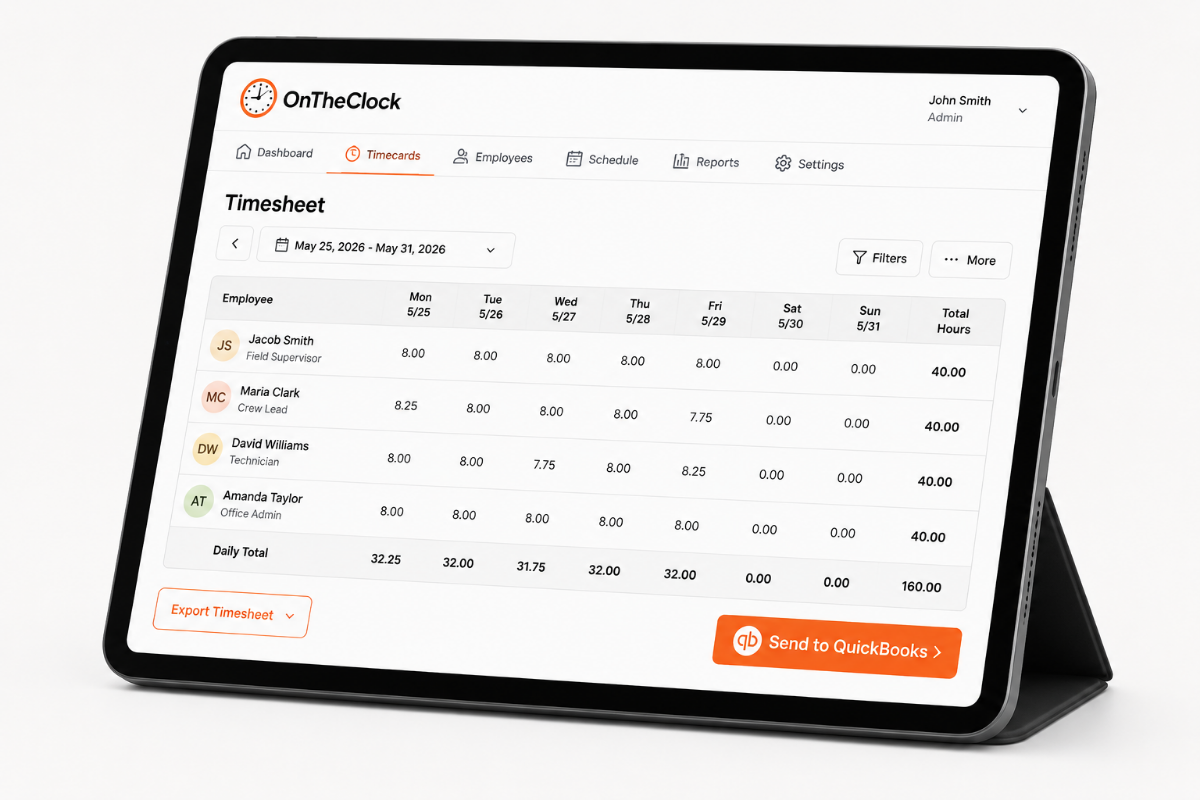
 You should not spend your day fixing timecards and entering hours into payroll. Approve the week and send hours to QuickBooks, Gusto, ADP, or Paychex. What used to take part of your morning can take just a few minutes. 
BEFORE & AFTER

Sound familiar? 

Here’s the real cost of running a shop without OnTheClock.

Without OnTheClock
With OnTheClock
Payroll is due Monday at 10 a.m., and you're rebuilding 14 people's hours from a paper sheet and your memory.
Every punch is already in the system. You open one screen, look at the handful that need attention, and approve.
An MA covers a walk-in through lunch. The system takes the 30 minutes anyway, and she doesn't say anything about it.
Break punches come from your staff, not from an assumption. No break punch means the time stays on the card and gets paid.
Someone clocks in from the parking lot at 7:52 a.m. and walks through the door at 8:05 a.m. On paper, both look the same.
Punches only count on the office Wi-Fi, so the clock starts when they're actually here.
You find out about overtime while you're running payroll, when there's nothing to do about it.
An alert reaches you as someone gets close to 40 hours, with enough of the week left to move coverage.
Time-off requests come by text, sticky note, and hallway conversation. Two people end up booked off the same Friday.
Requests go through the app, balances update on their own, and the whole team looks at one calendar.
You retype approved hours into QuickBooks and hope you didn't flip two digits on somebody's week.
Approved hours export in one click. Nothing gets retyped.
How it works
01
Set up your team and your tablet

Add your staff, enter pay rates, and choose who’s hourly or salaried. Then open the kiosk on a tablet you already have at the front desk and give each employee a PIN.


Most practices can get everything ready in under an hour, so setup doesn’t turn into another project hanging over your head.

add-team-member-screenshot (1)
02
Staff punch in when they arrive

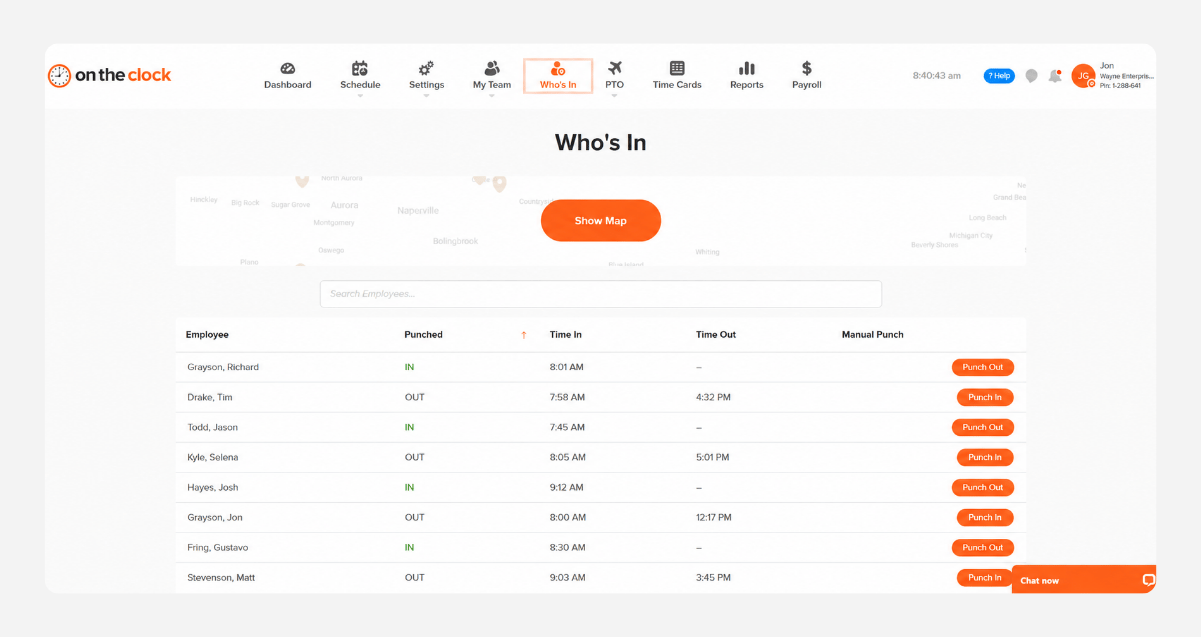
Employees tap their PIN when they walk in. Clinical staff moving between rooms can clock in from their phones instead.


Lunch is just as simple. They clock out when they leave and back in when they return. No guessing later. No trying to remember who took 30 minutes and who took an hour.
who-is-in-screenshot
03
Watch the week before it's over

See who’s working, who’s at lunch, and how many hours each employee has worked right from your dashboard.


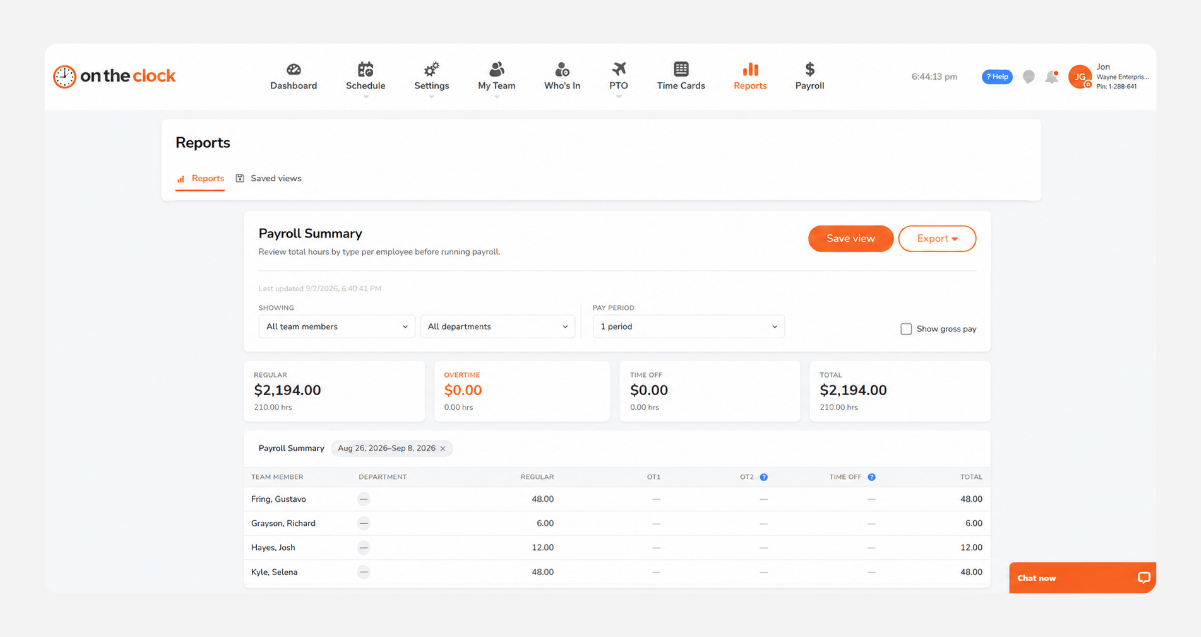
If someone is getting close to overtime, you can catch it on Wednesday instead of discovering it after the week is already over. That gives you time to adjust the schedule before the extra hours hit payroll.
report-screenshot
04
Approve once and send to payroll

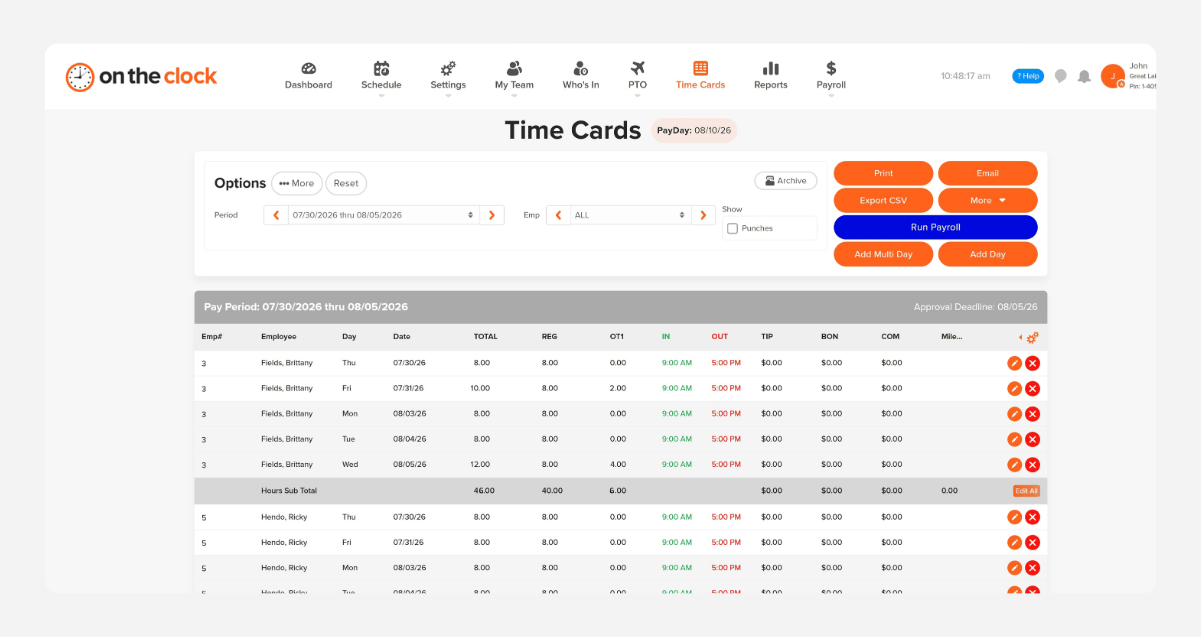
Review the timecards, fix the few punches that need attention, and approve the week.


Then send the hours to QuickBooks, Gusto, ADP, or Paychex in one click. You can review regular hours, overtime, and gross pay before anything goes through.
payroll-export-screenshot-1

How OnTheClock compares

A feature-by-feature look at OnTheClock, Connecteam, and Hubstaff for cleaning businesses.

Feature OnTheClock Connecteam Hubstaff
 Starting price (10 staff)   $45/month   Free up to 10 users   $70/month 
 Kiosk with PIN at the front desk   ✓ Included   ✓ Advanced plan ($59/mo)   ✗  Not available 
 Break and overtime rules   ✓ Included   ✓ Included   ✓ (Team plan, $120/mo) 
 PTO tracking and accruals   ✓ Included   ✓ Included   ✓ (Team plan, $120/mo) 
 Built-in payroll   ✓ (OnTheClock Payroll)   ✗  Not available    ✗  Not available 
 U.S.-based phone support   ✓ Phone, chat, email, text   ✗  Not available  ✗  Not available
 OnTheClock is built for small practices that want clean punches, real break records, and payroll in one place — at one price, with a person on the phone when something breaks. 
FROM REAL PRACTICES

Trusted by Practice Managers Who Got Their Mondays Back

★★★★★
"I have been using OnTheClock since I opened my practice in early 2013, and it has worked flawlessly for me. Payroll reporting has never been easier — and I know I'm not even using the site to its full potential. Customer service has been great as well. Also, the ability to clock in from anywhere is very important, so just another reason why OnTheClock has been perfect for me and my practice.""

Dr.J
Dr. Jason
★★★★★
"Amazing and exactly what I was looking for!
This thing is awesome and simple to use. Finally a program that makes sense and is easy for the small businesses out there. Keep it up!"

Dr.S
Dr. Seth
★★★★★
"Excellent. Easy to use.
So many great features. Love that I can see from what location employees have clocked in/out. Very easy to edit mistakes like when an employee forgets to clock in/out. Options for tailoring to your specific business are virtually unlimited. I’ve been using it for the past 3+ years with no regrets."

Dr.B
Dr.B
Transparent pricing

Simple pricing. No feature tiers. No surprises.

You're billed for active employees, not everyone in your system. Per-diem staff, fill-ins, and anyone who didn't punch that month don't count toward your bill
$0 /mo
0 active employees

Need payroll, too?

OnTheClock Payroll runs $40/month plus $6 per employee, with direct deposit, automated tax calculations, and the same dashboard your crew already uses for time tracking.

There are no feature upgrades. No plan switching. No "GPS is a Pro feature" surprises.
Start your free 30-day trial
No credit card required at sign-up.
Get Started Today

Your front desk is ready. Setup takes an afternoon.

No credit card, no contracts, no IT. Just an honest record of who worked when — and a Monday that doesn't start with a paper sign-in sheet.

Common Questions

Questions from health care professionals

$61 a month — $4 per active employee plus a $5 base fee. That includes the front desk kiosk, break and overtime rules, PTO accruals, and payroll export. You only pay for people who actually punch that month, so per-diem and fill-in staff do not cost you when they are not working. 

No. OnTheClock tracks employee names, hours, and punch times. It does not connect to your EHR or practice management system and never touches patient records. If your compliance officer has questions, support can clearly explain what OnTheClock does and does not store. 

Yes. Assign staff to front desk, clinical, or billing, and your reports show hours by group. That makes it easier to see where your payroll dollars are going before you hire another MA, add Saturday hours, or make another staffing decision. 

Nothing gets deducted unless you set it that way. If your staff punches for breaks, the timecard reflects what actually happened. No break punch means the time stays on the card. You can also set automatic breaks if that works better for your practice. 

Mark each person as salaried or hourly when you add them. Salaried providers can still punch for attendance without affecting overtime math. Everyone appears on the same timecard screen, so you can review and approve the whole practice without jumping between systems. 

Only if you allow it. You can restrict punches to your office Wi-Fi or to approved devices, helping ensure the clock starts when someone is actually at the practice. You set the rules, so you are not left wondering where someone clocked in. 

Yes. You can get an alert when someone approaches 40 hours, giving you time to adjust the schedule before overtime becomes a surprise. The payroll summary also shows regular hours, overtime, and gross pay before you send anything. 

No contract. Cancel from your account settings whenever you want. You are free to leave if OnTheClock no longer makes sense for your practice. Most customers stay because it saves them time and stress, not because they are locked in.