A Mobile Time Clock You Can Actually Trust
OnTheClock is a mobile time clock app that lets employees clock in and out from their phones, tablets, or computers. Whether your team works in the office, in the field, or remotely, this employee clock in app makes tracking time simple with GPS verification, real-time visibility, and accurate hours ready for payroll.
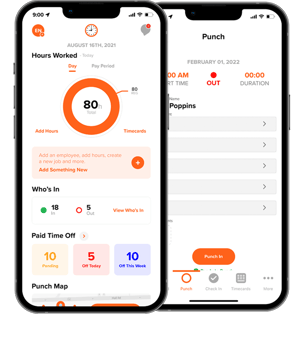
Get the easy-to-use time clock adopted by 16,000 companies and 160,000 employees

"We needed a simple solution that allowed employees to clock in and out on mobile devices. Other solutions are convoluted with features that we did not need nor did we want to pay for. OnTheClock delivers a simple system that requires no training. Thank you, OnTheClock!"
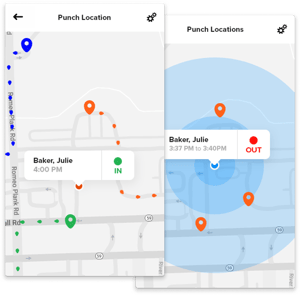
Mobile Time Clock with GPS
Help prevent time theft with built-in GPS verification and geofencing. Know employees are at approved job sites before they clock in. As a time clock app with GPS, OnTheClock confirms an employee's location the moment they clock in, not after the fact.
- Restrict clock-ins to approved job sites with geofencing
- See exactly where each employee clocked in, not just when
- A GPS time clock app that works the same whether you manage one location or several
Clock In From Any Device
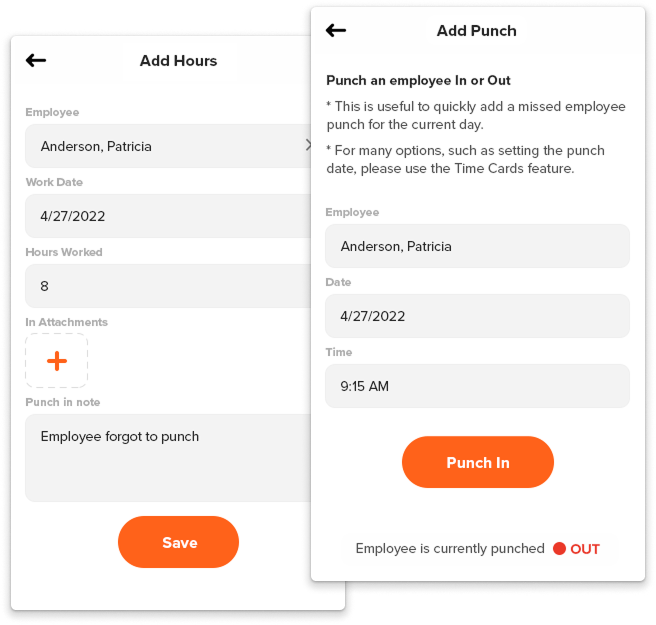
Let your team clock in however they prefer, on any mobile device or desktop, or via supervisor-approved group punches. As a clock in app built for flexibility, OnTheClock doesn't force every employee through the same device.
- Employees clock in from their own phones — no shared hardware is required
- Supervisors can punch in a group at once for job sites or shifts starting together
- Switch between desktop and mobile without losing any data
Instant Workforce Visibility
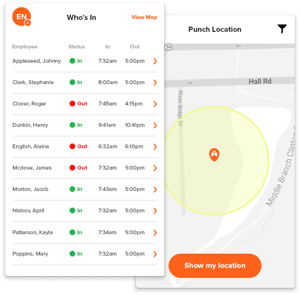
See who's clocked in, when, and where, all in real time. Check from your desk or from your phone in the parking lot — the view's the same either way.
- See who's clocked in right now from any device, without walking the floor or calling around to check
- Works across multiple locations at once, so you're not juggling separate views per job site or store
- Catch a shift-change gap before it happens — see who's covering the next shift before the current one clocks out
Switch Between Jobs Without Missing a Minute
Employees can switch between jobs or tasks without clocking out, while you automatically track hours for accurate job costing.
- Switch between jobs or tasks with one tap — no need to clock out and back in every time work changes
- Every minute still lands on the right job code automatically, so labor costs stay accurate without anyone doing the math by hand
- Built for crews moving between multiple job sites or tasks in a single shift, not just one job start to finish

One Time Clock. Every Job Site.
OnTheClock is a clock in and clock out app built for how people actually work, not tied to one job site or one device. Unlike a traditional punch clock app, there's no expensive hardware to install or paper timecards to manage, just accurate employee hours from wherever your team clocks in.
Designed to Be Simple
Getting started with OnTheClock is easy. Our step-by-step onboarding gets your team set up in minutes.
Maximize your minutes with OnTheClock Payroll, our in-house payroll system. OnTheClock Payroll automates the payroll process by importing employee hours tracked directly through OnTheClock. Users can review, approve, and process payroll with just a few clicks.
OnTheClock is optimized for minimal battery usage — so you’ll never need to worry about your team’s phones powering down in the middle of a shift.
OnTheClock Mobile Time Clock - Frequently Asked Questions
A mobile time clock app lets employees clock in and out from their own phones instead of a shared time clock machine or paper time sheet. OnTheClock's app also tracks location, calculates overtime, and syncs hours directly to payroll.
A clock in clock out app lets employees record their start and end times from a phone instead of a shared time clock machine or paper time sheet. OnTheClock's version also tracks location, calculates overtime, and syncs hours directly to payroll — so the same tap that clocks someone in also keeps their time sheet accurate.
Yes. Employees clock in and out from their own iOS or Android device, and managers can review, edit, or approve those hours from anywhere.
Yes. GPS and geofencing confirm employees are actually at an approved location when they clock in, helping prevent buddy punching and time theft.
Yes. Supervisors can punch in a group of employees at the same time. This is useful for shifts or job sites where a whole team starts together.
Yes. OnTheClock's mobile time clock app is available for both iOS and Android devices, allowing employees to clock in and out, switch jobs, view hours, and request PTO from their smartphones. Managers can also review timecards, approve hours, and monitor employee activity from virtually anywhere.