Skip to content

Time Tracking Software for Retail

Stop fixing hours on payroll night. Know who really worked the floor.

Associates clock in with a PIN or fingerprint at the counter, so every hour is real.
No credit card required
Cancel anytime
5-minute setup
ontheclock-retail
16,000+
Companies rely on OnTheClock Everyday
160,000+
Employees Punching in Daily
★★★★★
4.8
Capterra
★★★★★
4.5
G2

Why time tracking is different for retail stores


It's 9:50 on a Saturday, and the doors open at 10. You have 12 part-time associates and one shared tablet by the register. One of them just clocked in for a friend who's still 20 minutes away.

The bigger problem is a time clock that can't verify who actually punched in. Without the right controls, buddy punching slips through, and overtime can pile up before you catch it.

OnTheClock helps prevent that with PIN and fingerprint punches, flexible scheduling, and overtime alerts. Associates clock in at the counter or on their phones, while you see who's working in real time. Once hours are approved, they flow straight into OnTheClock Payroll.
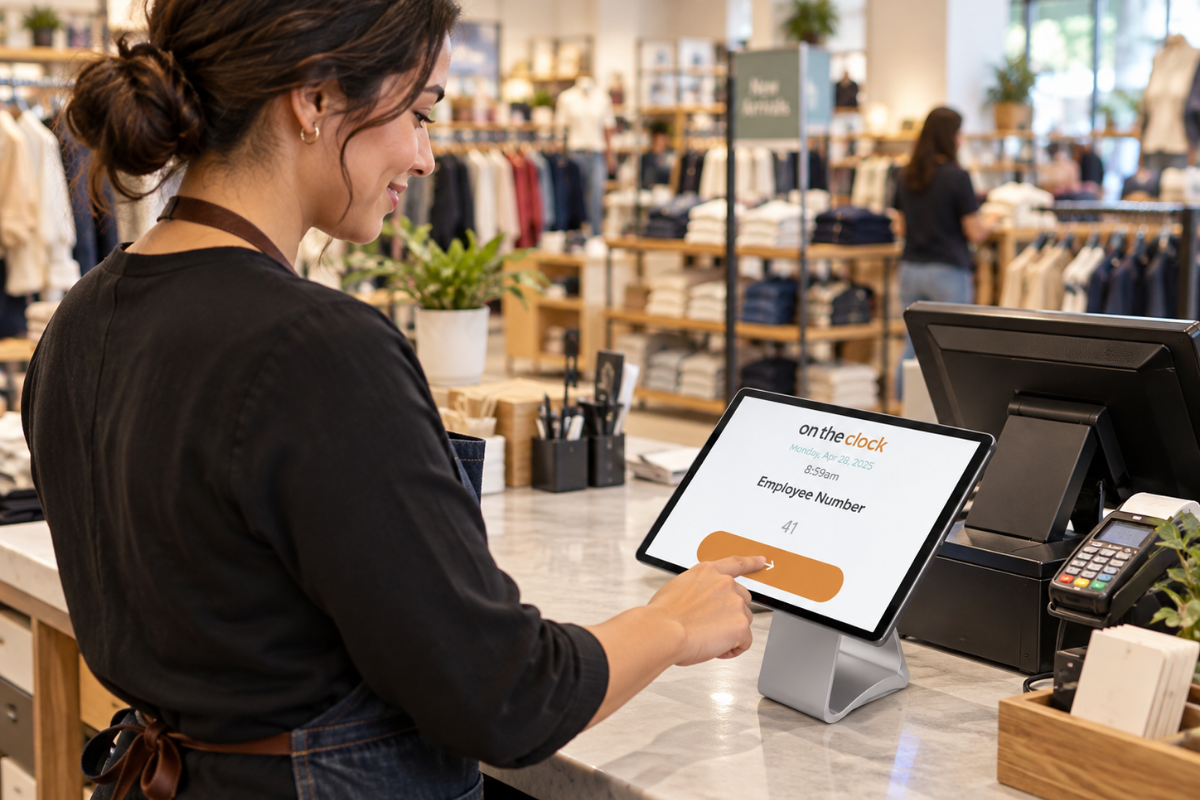
ontheclock-retail-employee-punch-in

What OnTheClock does for retail stores

PIN and fingerprint punches

PIN and fingerprint punches
Turn the counter tablet into a kiosk where each associate clocks in with a PIN or fingerprint. Buddy punching becomes nearly impossible to pull off.

No early clock-ins

Block punches that come in before a shift's scheduled start. Associates can't pad the morning by clocking in early and waiting for the doors to open.

Reminders for missed punches

Alerts and reminders nudge associates to clock in and out, even during a Saturday rush. Fewer missed punches means fewer timecards to fix on Monday.

Overtime aler

Get notified before an associate crosses 40 hours, so you can shift coverage. December overtime stops showing up as a surprise on payday.

Schedules you can change in seconds

Drag and drop shifts when someone calls out, and staff get notified right away. The Schedule vs. Actual report flags no-shows and late arrivals.

Every store on one screen

The Who's In dashboard shows who's working at each location right now. Approved hours from every store export to payroll in one click.

Before and after

Without OnTheClock
With OnTheClock
✕ One associate taps in for a friend at 9:50 a.m. The friend walks in at 10:15, and you pay for all of it.
✓ Each associate punches in with their own PIN or fingerprint, so the hours belong to whoever is actually there.
✕ Associates clock in at 9:40 and wait for the doors to open at 10. That's 20 minutes a day, every day.
✓ Early punches are blocked until the scheduled start time, so paid time starts when the shift does.
✕ A Saturday line keeps an associate on the register, and she forgets to clock out. Monday starts with a guess.
✓ Reminders catch missed punches the same day, and any fix shows up in the timecard audit log.
✕ Two part-timers hit 43 hours during the week before Christmas. Nobody notices until the paychecks go out.
✓ Overtime alerts reach you before anyone crosses 40 hours, while you can still adjust the schedule.
✕ Someone calls out Friday morning, and you text eight people one by one to find coverage.
✓ Move the shift in the drag-and-drop schedule, and your staff get the update on their phones.
✕ Payroll night means adding up punches from two stores by hand, after you've already closed both.
✓ Hours from both stores land on one timecard report, ready to approve and export in one click.
How it works
01
Add your staff and set up your stor

Create your OnTheClock account, add your associates, and set up each store as a location. Turn the counter tablet into a kiosk. There's nothing to install, and staff can also use the mobile app.

add-team-member-screenshot (1)
02
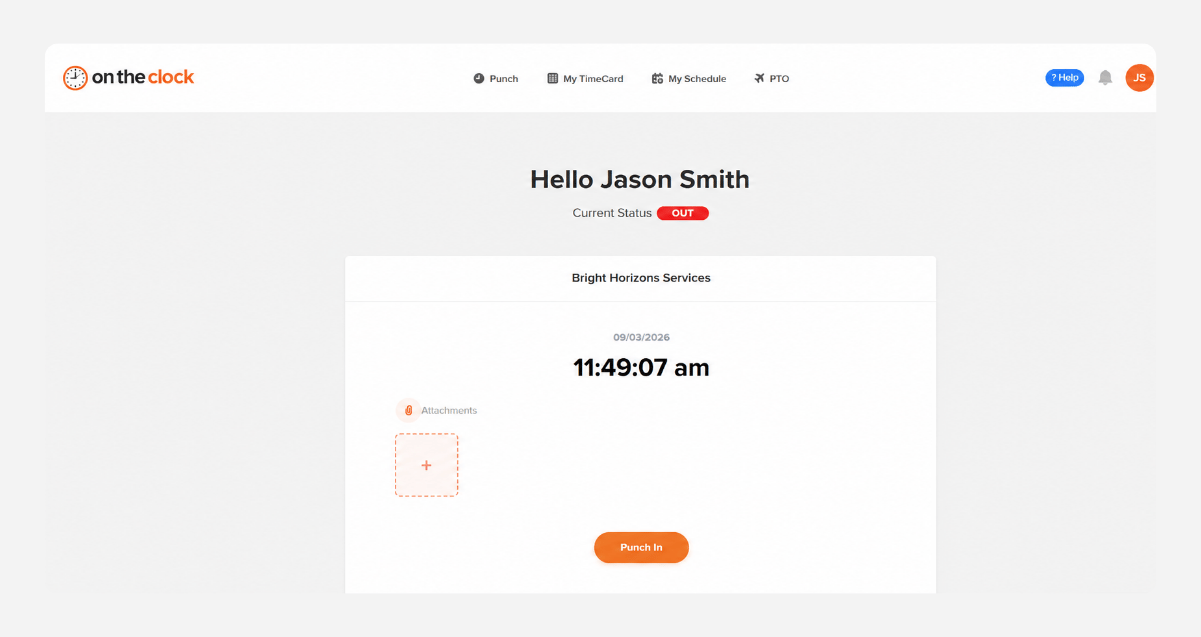
Associates clock in at the counter
Each associate punches in with a PIN or fingerprint on the kiosk, or from the mobile app. Early punches are blocked, and Wi-Fi or device restrictions keep clock-ins inside the store.
punch-in-screenshot
03
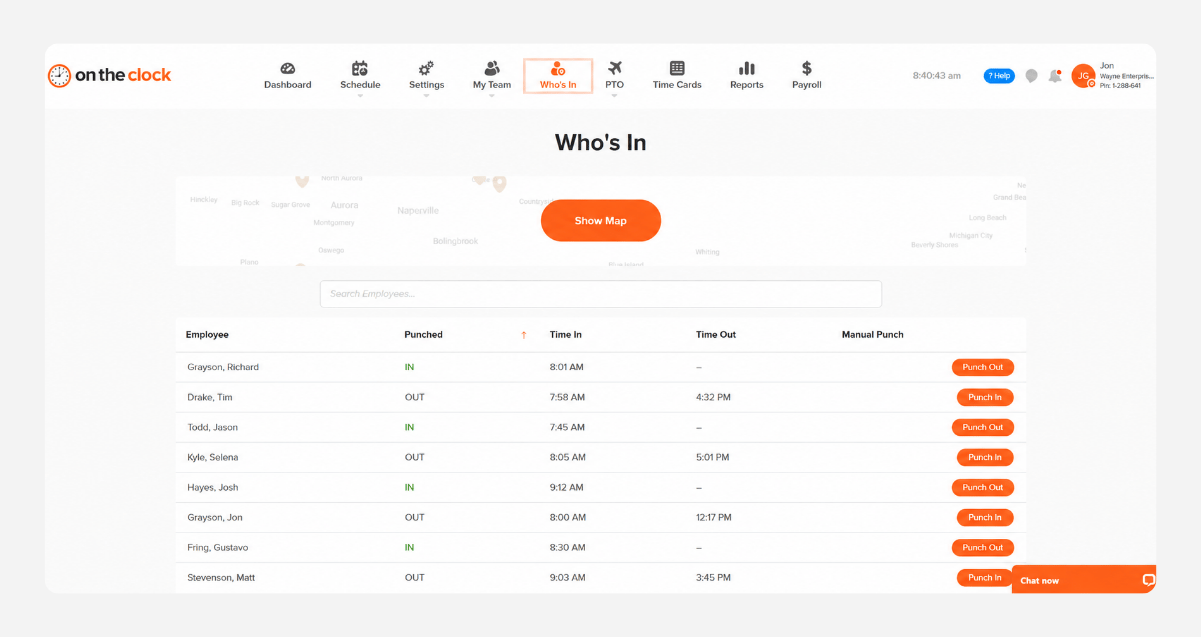
See who's on the floor in real time
The Who's In dashboard shows who's working at each store. Overtime alerts and the Schedule vs. Actual report flag long weeks, no-shows, and late arrivals while you can still fix them.
who-is-in-screenshot
04
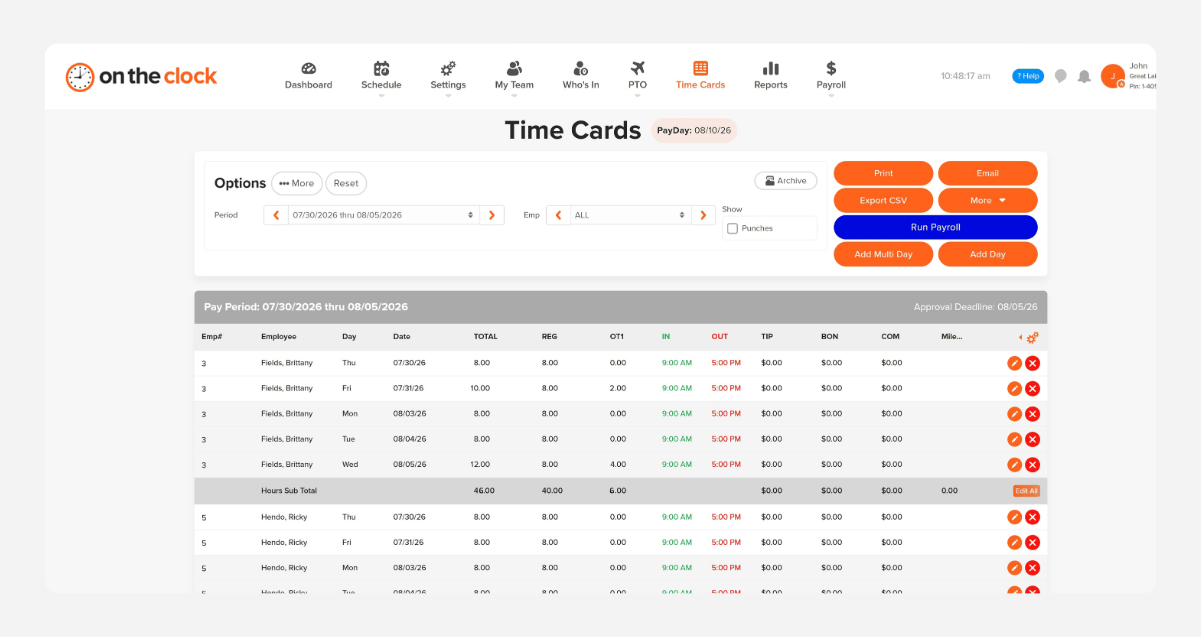
Approve hours and send them to payroll
At the end of the pay period, review hours by associate or store, approve them in one place, and export to payroll. QuickBooks, Gusto, ADP, Paychex, and Square Payroll are supported.
payroll-export-screenshot-1
How OnTheClock compares
A feature-by-feature look at OnTheClock, Homebase, and Clockify for retail stores.
Feature OnTheClock Homebase Clockify
Best for Small stores with part-time staff Single-location shops Project and billable-hour tracking
Pricing model Per active employee Per location Per seat, tiered
Price for a 12-person store

$53/mo

$30/mo Essentials $60–$180/mo
Free trial 30 days, no credit card 14 days Free plan (up to 5 users)
Tablet kiosk with PIN ✓ Included ✓ Included ✓ Basic plan+
Fingerprint punching ✗ Not available ✗ Not available ✓  QuickBooks, Gusto, Paychex
Block early clock-ins ✓ Included ✓ Included ✗ Not available
GPS and geofencing ✓ Included ✓ Paid plans only ✓ Pro plan only
Scheduling ✓ Included ✓ Included ✓ Pro plan only
Overtime alerts ✓ Included ✓ Paid plans ✓ Pro plan only
OnTheClock is best for small retail stores that need honest punches at a shared counter, schedules, and payroll at a transparent price with real U.S.-based support.
From real retail stores

Store owners who stopped fixing hours after closing

★★★★★
"I looked at quite a few time card systems - including ones that were more expensive. OnTheClock was the best bang for the buck. I love how employees have it on their phone for easy punch in and punch out. Add tasks to know what people are working on and attribute time to it. If someone forgets to punch in or out, it is easy to fix and have hours recalculate. This is an excellent tool for keeping track of employee and contractor hours."

MR
Merance
★★★★★
"We only have a couple of contract employees, but this saves me a lot of time in figuring checks. A+"

KF
Kathy Fortner
★★★★★
"OnTheClock is a great tool for any small business or independent contractor to manage time spent on projects. I highly recommend it - especially to any independent contractors out there!"

JN
James Nichols
Transparent pricing

Simple pricing. No feature tiers. No surprises.

OnTheClock charges $4 per active employee per month plus a $5 base fee. That's it. Every feature, including GPS tracking, geofencing, scheduling, PTO management, audit trails, and payroll exports, is included from day one.
$0 /mo
0 active employees

Need payroll, too?

Need payroll too? OnTheClock Payroll runs $40/month plus $6 per employee with direct deposit, automated tax calculations, and the same dashboard your crew already uses for time tracking.

There are no feature upgrades. No plan switching. No "GPS is a Pro feature" surprises.
Start your free 30-day trial
No credit card required at sign-up.
Get Started Today

Your staff is ready. Setup takes 5 minutes.

No credit card, contracts, or IT is required. Just honest hours from open to close, every day of the week.

Common Questions

Questions from retail store managers

A 12-person store pays $53/month ($4 per active employee per month plus the $5 base fee). You only pay for active employees, so seasonal hires you deactivate in January stop costing you. Every feature is included.
It ties each punch to one person. Associates clock in on the counter kiosk with their own PIN or a fingerprint, and device and Wi-Fi restrictions block punches from anywhere else. Buddy punching becomes nearly impossible.
No. OnTheClock doesn't clock staff in through your register. Staff punch in on a tablet kiosk, a desktop, or the mobile app, and hours export to Square Payroll, QuickBooks, Gusto, ADP, or Paychex.
Yes. Set up each store as a location and build schedules with drag and drop. Staff see their shifts in the mobile app, and the Who's In dashboard shows who's working at each store right now.
Only if you want it to. GPS punch recording logs location at clock-in and clock-out. GPS breadcrumb trails are a separate feature, and you decide whether to turn it on. In a store, Wi-Fi or device restrictions often do the job instead.
Probably not, but check your city. Most predictive scheduling laws cover large retailers, often with hundreds of employees or dozens of locations. A few, like Berkeley and New York City, reach smaller stores. OnTheClock doesn't enforce these rules for you.
OnTheClock tracks tips, bonuses, and commissions alongside hours, and it handles automatic breaks and punch rounding. Part-time, seasonal, and salaried staff all fit on the same account.
No contract. You can cancel anytime from your account settings. Every account starts with a free, 30-day trial, so you can test it through a real weekend rush first.
Get Started Today

Close the store, not the timecards

OnTheClock is affordable time tracking, scheduling, and payroll software built for retail stores with part-time and seasonal staff.