

Jump to section
Try OnTheClock Free
Save time and make payroll effortless with our easy-to-use, affordable employee time tracking app.
Try It FreeIf you've ever had a gut feeling that someone on your team clocked in from their car, you're not alone. Time theft quietly inflates payroll costs and rarely leaves a paper trail. For small business owners managing field workers or remote employees, it's one of the most expensive problems to have and the hardest to prove without the right tools.
A GPS time clock changes that equation. It stamps every clock-in with a real-world location, so you know exactly where your employees were when they started their shifts. For most businesses that deploy one, the results show up in the first pay period.
That said, GPS is a tool, not a complete solution. The businesses that get the most out of it treat it as one layer of a broader accountability system. Here's what you need to know.
Key Takeaways
- ✔GPS time clocks verify locations at clock-in, eliminating off-site punching and buddy punching, the two most common forms of time theft for field-based businesses
- ✔Buddy punching drops sharply. GPS ties every clock-in to a specific device and a real-world location, not just a PIN or password
- ✔GPS has real limits. It won't catch early departures or idle time on the job; those require policy and manager oversight
- ✔GPS-stamped records strengthen your legal position. Documented location data is far harder to dispute than a handwritten time sheet
- ✔Policy is what makes the technology enforceable. Written notice, defined geofences, and clear consequences complete the picture
- ✔State laws on GPS consent vary. Check your state's requirements before deploying location tracking
What Is a GPS Time Clock?
A GPS time clock is a time tracking tool that records an employee's location at the exact moment they clock in or out. Instead of accepting a clock-in from anywhere, it captures a GPS coordinate tied to that specific punch, giving managers verifiable proof of where each employee was at the start and end of every shift.
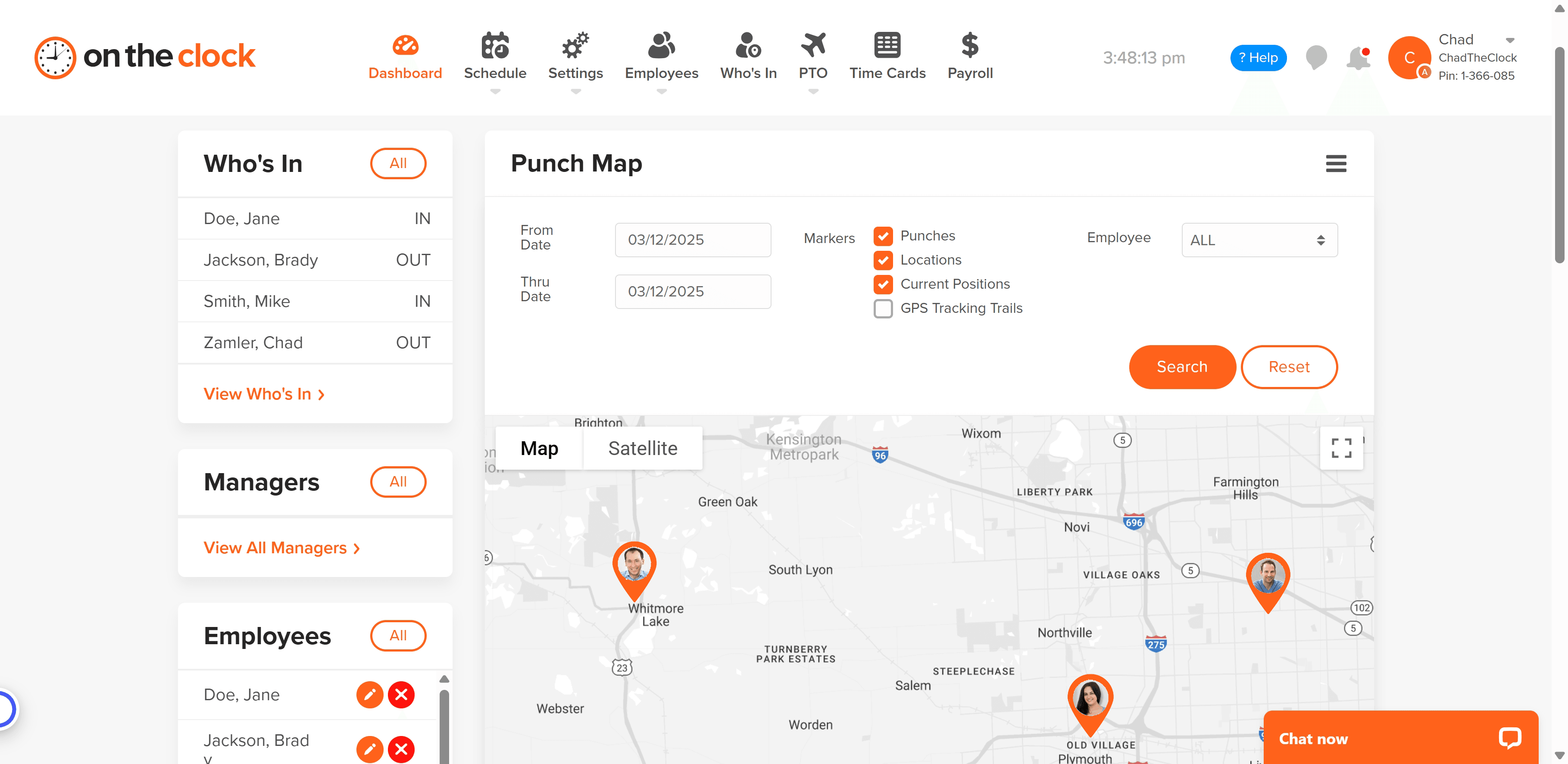
Most GPS time clocks today run through a smartphone app. When an employee clocks in, the app logs that individual's coordinates and timestamps the punch. Managers can view that data on a live map or pull it into timecards and payroll reports.
Many apps also offer geofencing, which creates a virtual boundary around a job site or office. When geofencing is active, employees can only clock in from within that defined radius. Attempts from outside are automatically blocked.
One clarification worth making early: Most business-grade GPS time clocks log locations only at the moment of a punch; they are not tracking employees continuously throughout the day. That distinction matters for employee trust, and it matters for legal compliance in several states.
What Types of Time Theft Does a GPS Time Clock Actually Stop?
GPS eliminates the two most common and costly forms of time theft for field and remote businesses: off-site punching and buddy punching.
Off-site punching
Off-site punching occurs when an employee clocks in from home, a car, or any location other than the job site. Without GPS, that punch looks identical to a legitimate one. With GPS, the location mismatch is visible immediately.
Buddy punching
Buddy punching occurs when an employee clocks in for a coworker who hasn't arrived yet. GPS-based time clocks make buddy punching nearly impossible because every clock-in is tied to a specific device at a specific physical location.
For businesses managing crews across multiple sites, these two forms of timecard fraud account for the majority of payroll losses. Eliminating them often produces a measurable drop in labor costs within the first few pay periods. Our Buddy Punch vs. OnTheClock breakdown covers how the two platforms compare specifically on this issue.
What Can't GPS Time Clocks Catch?
GPS confirms where an employee was when they clocked in; however, it does not tell you what they did afterward.
Early departures, extended breaks, and idle time on the job are invisible to a location-only system. An employee who clocks in legitimately at the job site and then leaves two hours early will show a clean timecard with no red flags.
This is where policy and manager oversight close the gap. GPS handles the "were they where they said they were?" question. Accountability structures handle the "did they actually do the work?" question. The two work together, not in place of each other.
At its core, GPS eliminates the fraud that's easiest to commit and hardest to catch. What remains is a smaller, more manageable problem; supervision and clear expectations can handle it from there.
Does GPS Time Tracking Hold Up When There's a Dispute?
Yes. GPS-stamped timecards create a documented record that is far harder to dispute than a handwritten time sheet or an honor-system log.
The FLSA requires employers to maintain accurate records of hours worked. GPS-enabled time tracking produces exactly that: A timestamped, location-verified record for every punch. If a wage dispute lands before a labor board, that data carries significantly more weight than self-reported hours or paper records.
GPS time tracking is not uniformly regulated across every state. Some states require written employee consent before location tracking begins, while others have stricter notification rules. Before you deploy any GPS time clock system, review the requirements that apply to you in our GPS tracking laws by state guide.
What Should Your GPS Clock-In Policy Include?
A GPS time clock without a written policy is just software. The policy is what gives you the authority to act on what the technology shows you.
At a minimum, your GPS clock-in policy should cover:
- Written notice to employees before GPS tracking begins; required in many states and good practice everywhere else
- Defined geofence boundaries for each job site, so employees know exactly where they're expected to clock in from
- Consequences for location spoofing or repeated out-of-bounds attempts, stated clearly in writing
- State-specific consent language tailored to your state; review GPS tracking requirements before drafting this section
Don't start tracking without one. This template covers consent, data use, and employee expectations — just fill in the blanks.
A written policy transforms GPS from a monitoring tool into an enforceable standard. Employees who understand the rules in advance have no legitimate grounds for dispute when those rules are applied.
Ready to cut time theft at the source?

How Do You Choose the Right GPS Time Clock App?
Look for an app that logs GPS at clock-in only (not continuously), gives managers a real-time map view of active employees, and lets you configure geofence boundaries per job site.
The right GPS time clock app should also integrate directly with your payroll system. If hours have to be manually exported and re-entered after every pay period, the accuracy gains from GPS tracking get absorbed by administrative work on the back end.
For small businesses, ease of setup matters as much as the feature list. A GPS time clock should be deployable in an afternoon, not a week-long implementation. The right mobile time clock is one your team can download and start using on day one with minimal training.
OnTheClock includes GPS tracking built into the same app your team already uses to clock in. You can set geofence boundaries by job site, view a live map of who's clocked in and where, and pull location-verified timecards directly into payroll. More than 160,000 individuals use OnTheClock to accurately track employee time.
The Bottom Line
GPS time clocks are among the most effective tools a small business can deploy to combat time theft. They eliminate the fraud that's hardest to catch: off-site punching and buddy punching. And they create a verified paper trail that holds up when it counts.
The technology does the heavy lifting. A clear written policy makes it stick.
OnTheClock's GPS time tracking is built into the same platform your team already uses to clock in every day, with no extra apps or steps. Try OnTheClock free. More than 160,000 individuals use OnTheClock to accurately track time. Start your free trial. No credit card required.
Frequently Asked Questions
Is GPS time tracking legal?
Yes, in most states it's legal, though requirements vary. Some states require written employee consent before GPS tracking can begin, and others mandate advance notification. Review the GPS tracking laws that apply in your state before deploying any location-based time clock.
Can employees tell when their GPS is being logged?
Employees should always be informed before GPS tracking begins, both because it's good practice and because several states require it. Most GPS time clock apps log location only at clock-in and -out, not continuously throughout the shift. That should be documented clearly in your written policy.
What is geofencing in a time clock app?
Geofencing creates a virtual boundary around a specific location, like a job site or office. When active, employees can only clock in from within that radius. Attempts from outside the boundary are automatically blocked, eliminating off-site punching without manual review.
Does OnTheClock have GPS time tracking?
Yes. OnTheClock's GPS time clock logs location at every clock-in and clock-out. Managers can view a live map of active employees, set geofence boundaries by job site, and review location-verified timecards when running payroll.
How accurate is GPS for employee time tracking?
GPS on modern smartphones is typically accurate within 10 to 16 feet under open sky. Accuracy can vary in dense urban areas or indoors. Most business-grade GPS time clocks account for this with configurable geofence radii, typically set between 100 and 300 feet, to avoid false rejections at legitimate locations.
