Skip to content

EMPLOYEE TIME CLOCK SOFTWARE

Simple Online Time Clock Software Built for Small Business


Employee time clock software doesn't have to be complicated. OnTheClock is a simple, accurate time clock that's easy for employees to use and easy for managers to trust.


No credit card needed. Setup takes five minutes or less!
track-hours-online-time-clock

Trusted By 18,000 Companies and 150,000 Employees

Stop Staying Late — Let OnTheClock Handle it!

OnTheClock's time clock software helps small businesses track employee hours, approve time sheets, and prepare payroll in just a few clicks. No paper timecards, manual calculations, or chasing down employee hours.
manual-tracking-online-time-clock

One Time Clock App, Any Device, Anywhere Your Team Works

No two businesses track employee time the same way, and that's exactly why OnTheClock is built to be flexible.

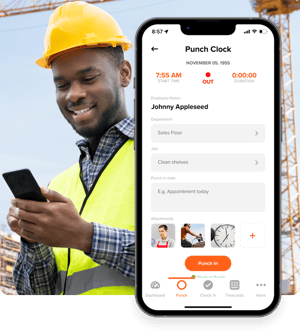
Whether your employees are working in the office, on a job site, or from home, OnTheClock makes it easy to clock in and clock out from virtually any device.

  • Allow employees to clock in from their iPhone or Android devices using our mobile time clock app.
  • Access your online employee time clock from any web browser; no software to install.
  • Set up a shared kiosk mode for employees who clock in from a shared tablet or computer using a pin or their employee number.

Whether you run a construction company, nonprofit, restaurant, remote team, or nearly any other type of small business, OnTheClock’s employee time clock software adapts to the way your business operates, not the other way around.


Know Where Your Employees Clock In and Clock Out

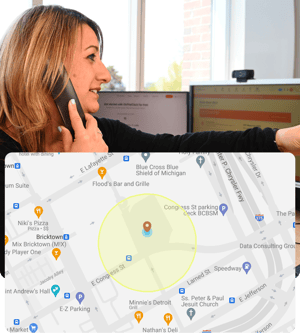
When employees clock in remotely or work across multiple job sites, it can be difficult to know where hours are actually being worked. OnTheClock’s GPS time clock and geofencing tools give you the visibility and accountability you need to run your business with confidence.

Our GPS time clock uses GPS tracking and geofencing technology to help ensure employees are clocking in from approved locations. It's one of the most effective ways to prevent buddy punching and reduce time theft before it becomes a payroll problem.

  • See where employees clocked in, not just when
  • Restrict clock-ins to approved job sites or Wi-Fi networks
  • Manage employees across multiple locations from a single dashboard

Whether you manage one office or several job sites, OnTheClock's employee clock-in/clock-out system and multi-location time clock tools make it easy to track employee hours wherever work happens. You'll never have to wonder whether employees were actually on-site when they clocked in.


geofencing-online-time-clock
accurate-records-online-time-clock

From Clock-In to Payroll Without Re-Entering a Thing

Payroll shouldn't require double-checking employee hours or entering the same information twice.

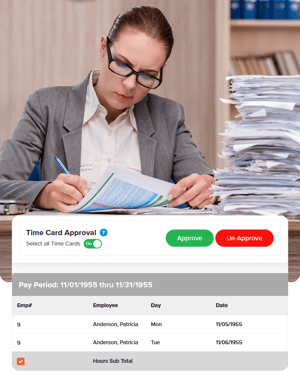
OnTheClock combines its employee punch clock and payroll software into one seamless process. Simply approve employee time sheets and send hours directly to OnTheClock Payroll or export them to QuickBooks, Gusto, or ADP in just a few clicks.

Because your time clock for payroll stays connected, employee hours remain accurate from clock-in to payday, eliminating duplicate data entry and reducing payroll errors every pay period.

Built-in reporting gives you visibility into overtime, labor costs, and hours worked by employee, job, or location, helping you make smarter scheduling and payroll decisions before payday arrives.



Get Time Back Every Pay Period

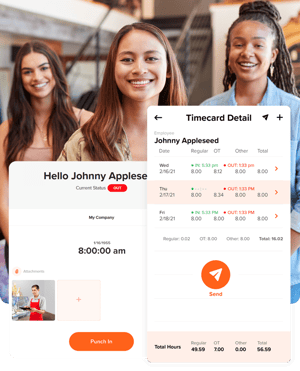
Manually tracking employee hours doesn't just increase the risk of payroll mistakes; it steals valuable time from your day. Calculating timecards, correcting errors, and chasing down missing punches quickly add up, occupying valuable time you could spend growing your business.

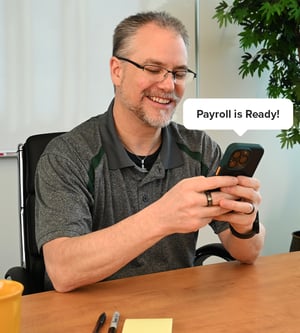
With OnTheClock's online time clock, employee hours are automatically tracked and ready for payroll, giving you more time to focus on running your business.

"We spend less than 15 minutes a week figuring and writing paychecks instead of chasing lost time sheets... This is the kind of solution small businesses need." — Jeff, OnTheClock customer


payroll-is-ready

How to Start Tracking Time with OnTheClock

Create an Account
Invite your team
Employees log their hours
File your Payroll

Take Control of Your Team’s Time Tracking

What Our Customers Are Saying

5-stars

We made the switch from manual punch cards to OnTheClock a year ago. It is a great tool and has many features that we love, including employee surveys, personal messages, and job coding. The initial setup was simple, even with 85-plus employees. The support staff is also very helpful. I highly recommend OnTheClock for your time tracking needs.

Jessi

Everything You Need in One Place

FAQ

What is the best time clock app for small business?

The best time clock app for small business is the one your employees will actually use, which usually means it works on the devices they already carry. OnTheClock runs on iPhone and Android, in any web browser, and in kiosk mode on a shared tablet, so an office team, a field crew, and a remote employee can all clock in the same way. Punches are verified with GPS and geofencing, and approved hours move straight into payroll. 

Is OnTheClock' employee clock in clock out app a good fit for small businesses?

Yes. OnTheClock is small business time clock software designed to help growing teams save time and simplify payroll. Setup takes about five minutes, no IT department is required, and pricing is affordable at $5 per month (base fee) and $4 per user per month. 

How do employees clock in and clock out with OnTheClock?

Employees can clock in and clock out from the mobile app on iPhone or Android, from any web browser, or from a shared tablet in kiosk mode using a PIN or their employee number. You choose which methods to enable, and you can require GPS verification or fingerprint clock-in so punches are tied to the right person in the right place. 

What is geofencing on an employee time clock?

Geofencing sets a virtual boundary around a job site or office. Employees can only clock in or out once they're inside that boundary, supporting time theft prevention. 

Do I need a separate clock in and out system for each location?

No. OnTheClock manages every job site, office, and remote employee from a single dashboard. You can set different approved locations or Wi-Fi networks for each site, and all hours flow into the same time sheets and payroll run regardless of where they were worked. 

How does OnTheClock help with buddy punching prevention?

 Geofencing, GPS verification, and fingerprint clock-in all work together so the person clocking in has to actually be on-site and be who they say they are. 

Does OnTheClock offer a biometric employee time clock?

 Yes. Alongside GPS and geofencing, OnTheClock offers fingerprint clock-in, so only the employee themselves can punch in or out. 

Can I try OnTheClock for free?

OnTheClock offers a 30-day free trial, no credit card required, so you can try the full time clock and payroll software before committing to a plan.

What are the legal requirements for tracking employee hours in the U.S?

 Employers are generally required to keep accurate records of employee hours worked. Specific requirements, including overtime rules, breaks, and record retention periods, can vary by state and industry. OnTheClock automatically tracks and stores employee time records to help simplify compliance and payroll reporting. 

How long does it take to set up OnTheClock?

 Most businesses can get started in about five minutes. Simply add your employees, choose how they will clock in, and you're ready to begin tracking employee hours. 

Does OnTheClock offer real customer support?

Yes. Every plan includes access to live, U.S.-based support: real people via phone, chat, or email, not bots or long hold times, ready to help you get set up and stay running.