
%20(1).webp)

Jump to section
Switching Payroll? We'll Do the Heavy Lifting
Hands-on implementation support to move your payroll data, set up your account, and guide your first payroll run.
Request a DemoHave you ever run payroll, glanced at your bank balance a few days later, and thought, "Wait, is that right?"
That instinct is worth listening to. Payroll reconciliation is the process of double-checking that your payroll records match the hours worked, taxes, deductions, and payments that actually occurred, before a small discrepancy turns into a bigger problem at tax time.
It's not glamorous. It's also one of those habits that saves you from finding a mistake nine months later instead of three days later.
Here's what payroll reconciliation actually involves, what to check, and how to do it in OnTheClock.
What Is Payroll Reconciliation?
Payroll reconciliation means comparing your payroll records against the information behind them, including approved hours, gross pay, taxes and deductions, net pay, and the money actually paid out.
Think of it as a regular gut check, not a one-time audit. Most businesses reconcile every pay period, though some also do a deeper review monthly or quarterly. Ideally, reconciliation occurs shortly after each payroll run, while the timecards, pay changes, and approvals behind it are still fresh. The sooner you catch something off, the easier it is to fix. (If you're looking for the steps on actually fixing something once you've found it, check out this article on payroll corrections.)
What to Check During Reconciliation
A thorough reconciliation usually covers:
- Hours and pay match approved timecards: Confirm the hours used to calculate a paycheck match what was actually approved, not just what was originally clocked.
- Gross pay reflects everything it should: Regular hours, overtime, bonuses, and commissions should all be accounted for.
- Deductions and taxes look right: Withholding amounts should reflect current elections and up-to-date rates.
- Net pay matches what actually went out: The amount deposited or paid should match what your payroll records say was owed.
- Year-to-date totals are tracking correctly: A single pay period looking right doesn't guarantee the running total is right. Spot-checking YTD figures periodically catches small errors before they compound.
How to Reconcile Payroll in OnTheClock
OnTheClock's payroll reports give you different levels of the same picture. The Payroll Summary gives you the big-picture totals, the Payroll Journal lets you dig into employee-level details, and the Tax Liabilities Report gives you a separate look at payroll taxes. Together, they make it easier to work from the overall numbers down to individual discrepancies.
-
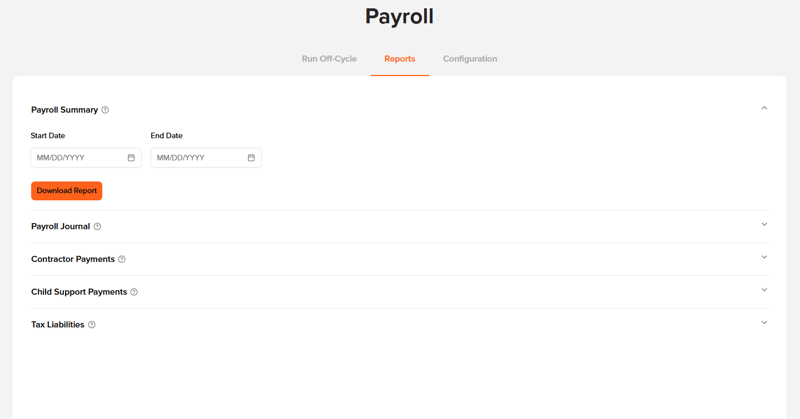
Pull the Payroll Summary Report: Go to Payroll, then Reports, then Payroll Summary. This report totals earnings, deductions, taxes, and net pay by employee for the period you select. It's your starting point for spotting anything that looks off at a glance.
- Compare against approved timecards: Head to Timecards for the same pay period and confirm the hours reflected in the Payroll Summary match what was actually approved. If the hours in your Payroll Summary don't match the approved timecards for the period, that's a discrepancy worth investigating before moving on.
- Pull the Payroll Journal Report for the detailed breakdown: Go to Payroll, then Reports, then Payroll Journal. This gives you a more detailed payroll breakdown: earnings broken out by regular and overtime, itemized deductions, taxes withheld per employee, and net pay. This is usually the report your bookkeeper or accountant will want, since it's built for exactly this kind of review.
- Check the Tax Liabilities Report: Go to Payroll, then Reports, then Tax Liabilities. Review the federal, state, and local tax liabilities associated with the pay period and look for anything that seems inconsistent with the payroll you just processed. An unexpected amount or significant change from previous payrolls is worth investigating before moving on.
- Compare payroll funding with your bank activity: Review your company's bank account and compare payroll-related withdrawals for the period with your payroll records. Make sure the amounts being withdrawn align with what was processed for employee pay, taxes, and any applicable payroll fees. If something doesn't line up, investigate the difference while the payroll is still fresh rather than carrying an unexplained discrepancy into the next pay period.
- If everything matches, you're done. If it doesn't, reconciliation has done its job: You've found the discrepancy while it's still fresh. From there, identify the source of the difference and follow the appropriate payroll correction process before the error carries into another pay period.
A Few Things Worth Knowing
- QuickBooks Online can make accounting easier. If you use QuickBooks Online, go to Payroll, then Configuration, then Accounting Setup to connect your account. Connecting OnTheClock with QuickBooks Online can reduce the amount of payroll information you have to manually transfer into your accounting system. QuickBooks Desktop and QuickBooks Self-Employed aren't currently supported.
- If your accountant requires a specific journal entry format or pre-processing journal that isn't included in the current reporting, contact OnTheClock support to see what options are available.
- OnTheClock automatically performs a quarterly tax-balancing process behind the scenes. As a result, you may occasionally see a small "net zero" balance on a payroll. This is part of OnTheClock's tax-balancing process and is separate from the pay-period reconciliation covered here.
Why Is Payroll Reconciliation Important?
Payroll reconciliation helps you catch errors early, keep your payroll and accounting records aligned, and avoid carrying small discrepancies from one pay period to the next.
Nobody reconciles payroll for fun. You do it so that when tax season or year-end rolls around, you're not untangling a year's worth of small discrepancies all at once.
A few minutes of comparing reports each pay period is a lot less painful than discovering in Q4 that something's been slightly off since March.
Simplify Payroll with OnTheClock
If you're not paying employees with OnTheClock Payroll yet, our 2026 year-end offer can help make the switch easier.
Start your OnTheClock Payroll enrollment before Dec. 31, 2026, and you'll receive:
- Four Months of Free Payroll: Your first four months of OnTheClock Payroll are free, beginning with the month of your first payroll run.
- Free Time Tracking for Salaried Employees: We'll waive the monthly time tracking fee for each salaried employee on your OnTheClock Payroll account.
- Hands-On Payroll Implementation: There is a one-time $250 implementation fee that covers hands-on help from our payroll implementation team to set up your account and prepare for your first payroll run.
Claim Your Year-End Offer
Enrollment must begin before Dec. 31, 2026, to qualify for this year-end offer.
Frequently Asked Questions About Payroll Reconciliation
What is payroll reconciliation?
Payroll reconciliation is the process of comparing your payroll records against what actually happened, including hours worked, earnings, taxes and deductions, and money paid out. The goal is to catch discrepancies before they carry into another pay period or create problems at tax time.
How often should I reconcile payroll?
Most businesses should reconcile payroll after every pay period, while the timecards, pay changes, and approvals behind the payroll are still fresh. A deeper monthly or quarterly review can provide an additional checkpoint.
Why is payroll reconciliation important?
Regular payroll reconciliation helps catch errors early, keeps payroll and accounting records aligned, and prevents small discrepancies from compounding over time. It can also make month-end, quarter-end, and year-end payroll reviews much easier.
What reports does OnTheClock provide for payroll reconciliation?
OnTheClock's Payroll Summary Report, Payroll Journal Report, and Tax Liabilities Report provide different levels of detail. Together, they let you review overall payroll totals, employee-level earnings and deductions, taxes, and net pay.
Does OnTheClock connect to my accounting software?
Yes. OnTheClock integrates directly with QuickBooks Online, helping reduce the amount of payroll information you need to manually transfer into your accounting system. QuickBooks Desktop and QuickBooks Self-Employed aren't currently supported.
What should I do if I find a payroll discrepancy?
Start by identifying where the difference came from, such as incorrect hours, earnings, deductions, taxes, or payment information. Once you've found the cause, use the appropriate payroll correction or adjustment process to fix it before the error affects future pay periods or tax filings.
Does OnTheClock handle quarterly tax reconciliation for me?
OnTheClock automatically performs a quarterly tax-balancing process. This happens separately from the pay-period-level reconciliation you perform when reviewing your payroll records.
What is the difference between payroll reconciliation and payroll correction?
Payroll reconciliation is how you identify discrepancies in your payroll records. Payroll correction is what you do to fix them. Put simply, reconciliation finds the problem; correction fixes it.
%20(1).webp?width=290&name=Untitled%20(400%20x%20476%20px)%20(1).webp)