

Jump to section
Try OnTheClock Free
Save time and make payroll effortless with our easy-to-use, affordable employee time tracking app.
Try It FreeKey Takeaways
- Employee time tracking records when employees work and assigns hours to jobs, locations, or tasks to support payroll, attendance, and labor cost management.
- Automated time tracking software reduces manual calculations, flags overtime before it occurs, routes time sheets for approval, and exports hours directly to payroll systems.
- Accurate time records help small businesses reduce time sheet errors, understand project costs, improve workforce planning, and identify unplanned overtime.
- The proper time tracking method depends on where employees work; how much detail the business needs; and whether paper, spreadsheets, punch clocks, or digital tools provide the best balance of simplicity and visibility.
- Successful time tracking requires clear policies, employee communication, simple workflows, and regular record reviews because software alone does not guarantee accurate records or legal compliance.
Employee time tracking is the practice of recording when hourly employees start and stop work. The process focuses on converting those punches into the hours you pay. For a small business, an accurate record can be the difference between running payroll in one sitting and spending up to 10 hours chasing down incorrect timecards and spreadsheets.
To minimize the time spent chasing employee time records, small business owners begin seeking a time clock. However, most struggle to separate the features they think they want from those that they need.
Some small business owners start tracking time on paper or a spreadsheet, where hours are recorded but frequently entered or calculated incorrectly. Others start with a system built for a company several times their size, where the features that make sense at 200 employees just get in the way at 12.
Both want the same thing: something simple enough that a crew can use it without training and fast enough that it doesn't add a step to anyone's day. Unfortunately, most guides are vague, recommending software with excessive feature counts instead of focusing on what small businesses actually need.
What is time tracking?
Time tracking is the process of recording when employees work and how they spend their time. A time tracking record may include clock-in and -out times, breaks, job locations, projects, tasks, and travel between work sites.
Set up job and location tracking on day one, even if you’re not sure you need it. Reports get useful once they have months of history behind them, and any data you don’t capture now is gone for good.
Small businesses use these records to calculate payroll, confirm attendance, measure labor costs, and identify where overtime is building up.
How does employee time tracking work?
Employee time tracking records when an employee starts and stops working and assigns those hours to specific jobs, locations, or tasks.
For example, an employee punches in at the shop at 7:45 a.m., arrives at a client's house at 8:20, finishes at 11:30, reaches a second job at 11:55, and punches out at 3:15 p.m. The record shows more than the employee's total hours; it also shows that one hour of paid time was spent traveling between locations.
The business can decide whether to assign that travel time to a customer, include it in future estimates, or treat it as an overhead expense.
What does time tracking software do?
Time tracking software automates the work someone would otherwise have to do manually before payday. It:
- Captures each punch as it happens from a phone, shared kiosk, or browser.
- Totals hours continuously, so Thursday's numbers are available on Thursday.
- Flags overtime as it accrues, while there is still time to adjust the schedule.
- Routes timecards for approval without chasing paper.
- Exports to payroll in the format your provider already reads.
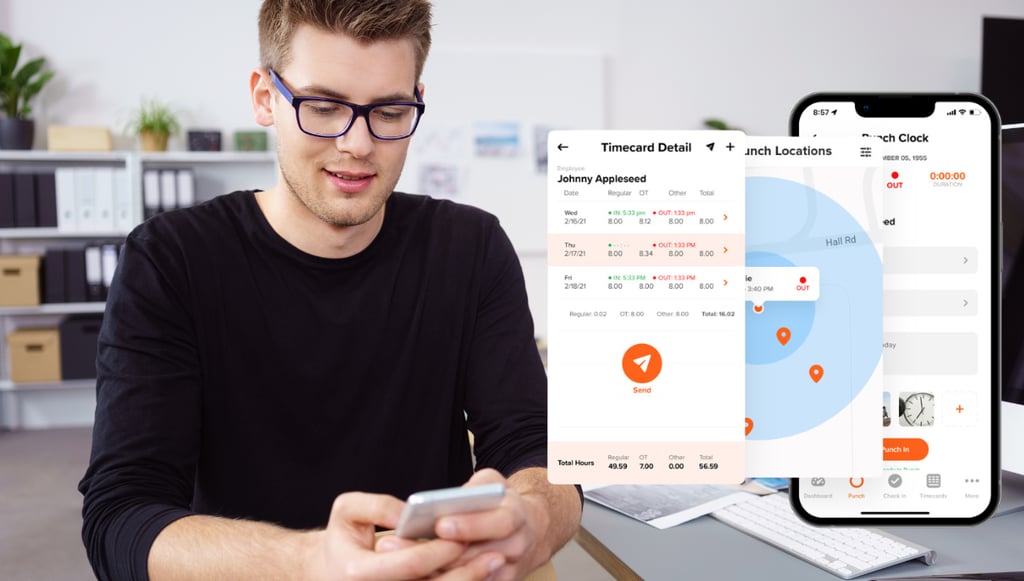
Ask how the system handles a missed punch before you look at anything else. Missed punches happen on every team, and fixing one should take seconds, not a support ticket.
Two things change when the recording is automated: The numbers are more reliable because nobody has to transcribe and total them by hand. They also exist right away, not after the pay period is over.
That second benefit is what owners often underestimate. At the end of the week, a completed timecard tells you what happened, but every decision it could have informed has already been made. A running total tells you on Tuesday that someone is on track to cross 40 hours by Thursday, while Thursday's schedule is still yours to change.
Why is time tracking important for small businesses?
Time tracking is important for small businesses because it enables accurate payroll calculations, understanding labor costs, identifying overtime early, and tracking how employee hours are distributed across jobs and locations. However, if you are a covered employer with nonexempt employees, you are also required by law to keep accurate time records.
Under the Fair Labor Standards Act, covered employers must keep accurate records for nonexempt employees, including:
- Hours worked each day and workweek
- The time and day the workweek begins
- Pay rates
- Regular and overtime earnings
- Wage additions or deductions
- Total wages paid
- The pay period and payment date
Payroll records must generally be retained for at least three years, while timecards, work schedules, and other records used to calculate wages must be retained for at least two years. These records allow employers and the Department of Labor to verify that employees received the correct minimum wage and overtime pay.
Compliance is only the starting point. Accurate time records can also help you understand project costs, improve productivity, reduce time theft, and plan your workforce more effectively.
How does time tracking benefit small businesses?
Reduces time sheet errors
Digital punch capture eliminates two errors caused by manual handling of time records: transcription mistakes and calculation errors. Nobody has to read handwriting, retype a number, or total a column. In a 2018 QuickBooks Time survey of 731 business owners, 44% said time sheet errors were their biggest time tracking struggle, with some encountering them daily or weekly.
The same survey identified the origin of many of those errors. Only 8% of owners blamed a confusing or unreliable system. The other 92% believed user error, or how the system was used, was the more likely cause. That includes forgotten punches, time assigned to the wrong job, and records submitted without being reviewed.
Software reduces those errors by simplifying how employees record and submit their time. A simple system reduces the training burden and the number of steps where errors can occur, though clear instructions and consistent review remain necessary.
Better understand project costs
For a labor-heavy service business, manpower is one of the highest controllable costs; however, it's the one least likely to leave a receipt. You know what you billed for a job. Payroll tells you what the entire week costs. Neither tells you how to identify the job cost on an individual basis.
Time tracking closes that gap by assigning hours to a job, client, or location rather than lumping them into a single weekly total.
Consider a technician who works two jobs in one day: 3 hours and 10 minutes at the first house, 3 hours and 20 minutes at the second, and one hour traveling between them. Payroll sees 7 hours and 30 minutes. At a loaded labor rate of $28 per hour, totaling $210 in labor.
However, the first house was quoted for two hours. The additional 1 hour and 10 minutes put the job about $33 over its labor estimate before any travel time was allocated. Repeat that mistake 40 times a month, and the unplanned labor exceeds $1,300.
You cannot control a cost you cannot see. Once every hour, you can select a job name and choose to reprice the work, improve the estimate, tighten the route, or change how the job is staffed.
Improves productivity
Effective time tracking shows where working hours actually go, so you can spot inefficiencies and bottlenecks. It does not make anyone work quicker. In conversations with our customers, we've discovered that much of the productivity a small business loses comes from how labor is allocated.
Once hours are separated by job, location, and task, scheduling problems become easier to see. You may find crews arriving before a site opens, jobs staffed with the wrong number of people, or unnecessary travel between locations. The fixes are specific: Adjust the start time, assign the right crew size, or change the route.
Time tracking also reduces administrative work by replacing handwritten records, limiting manual data entry, and making missed punches easier to identify. For a small business owner, that means more time for quoting work, serving customers, and bringing in the next job.
Reduce time theft
Time tracking software helps employers minimize paying for time that was not worked, especially through buddy punching. Buddy punching happens when one employee clocks in or out for another. A paper timecard or shared PIN records that a punch occurred, but it does not confirm who made it.
Different verification tools close different gaps. A photo helps verify who made the punch, while GPS or a geofence helps verify where it occurred. Individual logins and device controls also make punches more difficult to share. Together, these tools give managers a record to review rather than relying solely on memory or trust.
Not every payroll discrepancy is an example of intentional time theft. An employee may forget to clock out, reconstruct a shift several days later, or enter the scheduled start and break times instead of the actual ones. Digital records make it easier to identify and correct those discrepancies before payroll.
The American Payroll Association (APA) estimates that inaccurate manual tracking and time theft cost U.S. businesses up to $550 billion every year. For a single business, these minor discrepancies quietly eat up between 2%-8% of their gross payroll.
Improves workforce planning
Workforce planning gets easier when schedules are based on what actually happened instead of what you remember happening. Months of time data reveal which days regularly run long, which jobs consistently need a second person, and whether recurring overtime points to a scheduling problem or a staffing shortage.
Those patterns help you decide whether to adjust shifts, change crew assignments, hire another employee, or prepare for predictable busy periods.
For example, a landscaping company may find that its crews consistently work overtime on Thursdays and Fridays during the spring. The records may show that early-week schedules are too light, certain properties need larger crews, or seasonal demand has outgrown the current staff. The owner can then redistribute jobs, adjust crew sizes, or hire seasonal help before overtime becomes routine.
Reduces unplanned overtime
Overtime may be necessary, but unplanned overtime becomes expensive when it happens regularly. Under federal law, covered, nonexempt employees must receive at least 1.5 times their regular rate for hours worked in excess of 40 in a workweek. That higher rate increases labor costs and can reduce the margin on the work being completed.
Set the overtime alert below 40 hours, not at it. An alert at 36 hours reaches you while there’s still a schedule to change. An alert at 40 arrives after the overtime already started.
Time tracking software shows managers how many hours employees have worked before overtime begins. That visibility allows them to adjust schedules, redistribute work, or approve additional hours when necessary.
A paper timecard cannot provide that warning. The weekly total does not exist until someone collects the card and adds up the hours. By then, the overtime has already been worked, and the premium is owed.
What are the drawbacks of time tracking?
Eroding employee trust
A time clock introduced to a crew that has never punched in can feel like an accusation, even when that is not the owner's intent. The concern comes partly from the broader category. Some time tracking products also monitor screens, log keystrokes, capture screenshots, and score employee activity.
Employees may reasonably wonder which type of system has just been introduced.
A poor rollout makes that concern worse. In the aforementioned QuickBooks Time survey, only 25% said they provided employees with in-depth training on their time tracking system, while 14% said they provided none.
When people do not understand why a system was introduced, they fill in the explanation themselves. Employees may assume management believes they are wasting time or recording hours dishonestly, even when the actual goal is simply to improve payroll accuracy and job costing.
Micromanagement
Some time tracking systems include features that allow managers to monitor far more than hours worked. Screenshots, keystroke logs, activity scores, and continuous location tracking can encourage managers to oversee minor details that have little effect on payroll, scheduling, or job costs. Excessive monitoring can eventually become counterproductive.
A 2022 Harvard Business Review article reported that monitored workers were more likely to take unapproved breaks, disregard instructions, damage or take workplace property, and deliberately work slowly.
The researchers connected that behavior to a reduced sense of personal responsibility. When employees feel a system is responsible for enforcing every rule, they may feel less personally accountable for their own decisions.
Run one payroll on a free trial before you decide
More than 16,000 businesses track time, schedule shifts, and run payroll on OnTheClock. No credit card is required at sign-up; your first 30 days are free.
Is time tracking worth it?
Time tracking is worth it for most small businesses with hourly employees. It shows what labor actually costs by job, customer, or location. For covered employers, it also creates the accurate records required for nonexempt employees under the Fair Labor Standards Act.
That second reason changes the question. You are not deciding whether to keep time records. You are deciding how much it should cost to produce a record you already owe.
Run the math on one pay period before deciding. Add up the hours spent assembling and correcting the time sheet, multiply by what that time is worth, and compare it to a month of software. The answer is usually obvious once it’s written down.
Paper is not free. Its cost appears in the hours someone spends collecting cards, reading handwriting, adding columns, correcting mistakes, and reconstructing shifts that were never recorded.
Does time tracking actually work?
Yes. According to data on employer outcomes, 60% of employers reported a clear improvement in workforce productivity after introducing monitoring and tracking systems.
The software does not create productivity on its own. It works by showing managers where hours go, where delays occur, and which schedules or assignments repeatedly create problems. That information gives the business something specific to fix.
The results still depend on how the system is used.
How accurate are digital time trackers?
Digital time trackers can record punches to the minute or second because the timestamp is generated by the device rather than an employee's memory. However, a precise timestamp does not automatically make the entire time record accurate. Record accuracy still depends on the conditions in which the punch occurs and whether the employee uses the system correctly.
Connectivity is one limitation. A crew working without cell service may not be able to transmit a punch immediately. Some apps store the punch on the device and upload it when service returns, while others require an active connection. Businesses should ask vendors how offline punches are recorded, timestamped, and synchronized before choosing a system.
Test the dead zones before you buy. Have someone punch in from the basement, the far end of the lot, and the site with one bar of signal. What happens to those punches tells you more than any spec sheet.
Employee use remains one of the largest variables. A clock that records time to the second is still wrong if nobody uses it. A missed punch reconstructed several days later creates a larger problem than a timestamp that was off by 20 seconds. Device precision helps, but a simple clock-in process, reminders, and consistent review determine whether the final record is reliable.
What are the different ways to track employee time?
Businesses can track employee time using manual methods, such as paper time sheets and spreadsheets, or automated tools, such as punch clocks, mobile apps, and browser-based software. Each method records when employees work, but they differ in accuracy, administrative effort, and the speed at which the information becomes available.
Paper time sheets
A paper time sheet is a medium employees use to write down when they start and stop work, take breaks, or move between jobs. At the end of the pay period, a manager collects the sheets, checks the entries, adds the hours, and enters the totals into payroll.
Paper time sheets are inexpensive and easy to introduce, which can make them practical for very small crews working in one location. The tradeoff is that every step depends on handwriting, memory, and manual calculations.
Punch clocks
Punch clocks are physical devices employees use to record when they start and stop work. Traditional mechanical clocks stamp the time onto a paper card, while newer electronic models record punches using a PIN, badge, key fob, fingerprint, or shared kiosk.
Punch clocks create a more consistent record than handwritten time sheets because the device supplies the timestamp. They can work well for employees who report to the same location each day.
However, traditional punch clocks still require someone to collect the records, calculate the hours, and enter the totals into payroll.
Spreadsheets
Spreadsheets are digital worksheets used to record clock-in and -out times, breaks, and total hours. They are more organized than paper time sheets and can use formulas to calculate regular hours, overtime, and weekly totals.
Spreadsheets are inexpensive and flexible, which makes them common among small businesses. However, employees or managers still have to enter the information manually. A wrong formula, mistyped number, deleted cell, or an outdated version can affect the final total.
They also provide little real-time visibility unless someone updates and reviews them throughout the week.
Digital & mobile apps
Digital and mobile time clocks let employees record hours from a phone, computer, or shared kiosk instead of using a paper card or fixed mechanical clock.
Tools like OnTheClock can do more than replace a paper timecard. They may assign hours to jobs; flag overtime; route timecards for approval; and export regular hours, overtime, and paid time off to payroll systems.
These tools require a monthly subscription and a device employees can access, but they reduce manual calculations and give managers information while there is still time to act on it.
Manual vs. automated time tracking: What's the difference?
The main difference is when the record becomes available and who is responsible for handling it. Manual and automated methods can both satisfy federal recordkeeping requirements when they produce complete and accurate records, and both ultimately create a time sheet.
The table below compares how each method records time, calculates hours, handles corrections, and prepares payroll information.
| Manual (paper, punch card, spreadsheet) | Automated (app, kiosk, browser) | |
|---|---|---|
| When the weekly total exists | After someone collects the cards and adds them up | Continuously |
| Who creates the record | The employee, with a pen | The device, at the moment of the punch |
| Main source of error | Transcription, math, shifts rebuilt from memory | Punches nobody made |
| Overtime warning | Friday, after the premium is owed | While the schedule can still change |
| Confirming who punched | Not possible | Photo, GPS, or individual login |
| Assigning hours to a job | Only if someone writes it down | Attached to the punch |
| Producing records on request | Find the folder | Search |
| Legal under the FLSA | Yes | Yes |
| Cost | Hours, every pay period, forever | Dollars per employee per month |
| Setup time | None | Minutes to hours |
| Works with no power or signal | Always | Depends on the vendor |
What should you look for in time tracking software?
Time tracking software should meet a basic standard before you compare specialized features. At a minimum, look for:
- Punch options that fit where employees work
- A simple interface that employees can learn quickly
- Overtime and missing punch alerts
- Job, customer, or location tracking
- Manager approvals and an audit trail
- Payroll integrations or clean exports
- Controls such as GPS, geofencing, photos, or device restrictions when needed
- Clear pricing that fits the size of the team
Beyond that baseline, the right system depends on how your business operates. A framing crew may need mobile punches, job costing, and GPS controls. A dental practice with eight employees in one building may care more about a shared kiosk, simple approvals, and fast payroll exports.
Support and pricing also matter. Ask what happens when you need help and whether the person who answers understands the product or simply follows a script. Then look at how the price changes as your team grows.
At OnTheClock, our customers consistently praise the support team for being responsive and knowledgeable about the product. We also publish our pricing upfront, so businesses can calculate what the software will cost today and as their team grows.
How much does time tracking software cost?
We reviewed the published pricing of 20 OnTheClock alternatives in January 2026 and found an average cost of $8.24 per user per month. For a 12-person crew, that works out to about $99 per month, or $1,187 per year.
Ignore the advertised per-user price until you’ve priced your actual setup. Minimum seats, platform fees, and paid add-ons can double the real cost, so the lowest advertised price is often not the lowest bill.
However, that average hides a wide range of pricing structures. Some vendors charge only per user, while others add a platform fee, require a minimum number of paid seats, or reserve important features for higher-priced plans.
For example, Homebase prices its paid plans by location rather than by employee. Its Essentials plan costs $30 per location per month, billed monthly. A business with 12 employees at one location would pay $30 per month, but opening a second location would increase the cost to $60, even if its total headcount barely changed. That structure may work well for a large team at one site, but it becomes more expensive for a business operating several smaller locations.
Compare the total cost at your actual headcount, number of locations, and required feature set rather than relying on the advertised per-user price.
How to get started with employee time tracking
A successful rollout depends on more than choosing software. You need to configure the system around your workweek, decide what employees must record, establish clear rules, explain the change to your team, and verify the results before replacing your current method.
Step 1: Start a free trial and test the workflow
Use the system as an employee and manager would. Clock in from a phone, browser, and kiosk. Create and correct a missed punch, assign time to a job, approve a timecard, and review the payroll export.
Run the first payroll on both systems and compare the totals line by line. Owners who skip this step tend to abandon the software the first time a number looks off, usually without finding out which system was wrong.
Ten minutes inside the product will reveal more than an afternoon spent comparing feature lists. Ask two employees to test it as well. A process that feels simple to the person selecting the software may not feel simple to the crew using it every day.
Step 2: Set your workweek
Your workweek determines when federal overtime begins. Under 29 CFR 778.105, it must be a fixed, regularly recurring period of 168 hours, or seven consecutive 24-hour periods. It can begin on any day and at any hour, but it should remain fixed unless the business makes a permanent change that is not intended to avoid overtime.
Each workweek stands on its own. Hours cannot be averaged across multiple weeks. If a nonexempt employee works 46 hours one week and 34 the next, a biweekly payroll still includes six overtime hours from the first week.
Step 3: Decide what employees need to record
Clock-in and -out times are the starting point. The rest depends on the work.
A dental practice with eight employees in one building may only need punch and break clocks. A field crew moving between three sites may also need job names, customer assignments, travel time, and punch locations.
Collect the information the business will actually use. Every unnecessary field adds another step for employees to complete and another record for managers to review.
Step 4: Write the rules down
Create a short policy explaining:
- When employees should clock in and out
- How breaks are recorded
- How paid travel between jobs is recorded
- How missed punches are corrected
- Who reviews and approves timecards
- When corrections must be submitted
A clear process matters as much as the software. Employees cannot follow rules that were never explained.
Step 5: Explain the system before launch
Tell employees why the system is being introduced, how it will make payroll or job costing easier, and exactly what it records.
Be specific about location tracking, photos, device restrictions, and any other controls. Explain whether location is captured only during a punch or continuously. Employees should not have to guess what the software can see or why the business needs the information.
Step 6: Run both methods for one pay period
Keep the old method alongside the new system for one complete pay period. Compare total hours, overtime, breaks, job assignments, and corrections.
Where the records disagree, investigate the cause. The difference may reveal an incorrect workweek setting, an unclear break policy, a missed punch, or a step employees did not understand.
Step 7: Review the first payroll before switching completely
Check the first payroll line by line. Confirm regular hours, overtime, paid time off, corrections, and payroll exports before submitting payment.
Once the totals match and the process works, retire the old method. Maintaining two systems creates duplicate work and leaves employees unsure which system is correct.
How to get your team on board
The best way to get employees on board is to involve them in the process. Ask a few people who will use the system every day to test it during the trial and explain what feels confusing, slow, or unnecessary.
Their feedback can reveal problems a manager may miss, such as too many steps to clock in, poor mobile access, or job lists that are difficult to navigate. Fixing those issues before launch makes the system easier to use and shows employees that the goal is to improve the process, not simply monitor it.
Once the system is selected, explain why it's being introduced, what information it records, and how corrections will work. Employees are more likely to support a change when they understand the reason for it and have some influence over how it's implemented.
See it before you compare it.
Clock in from a phone, kiosk, or browser and feel how the workflow runs for your crew. No card, no contract.
Common time tracking mistakes to avoid
Rounding punches when the exact time is available
Federal regulations permit employers to round punches to the nearest five minutes, one-tenth of an hour, or quarter hour, provided the practice does not prevent employees from receiving full compensation over time.
When the new system and the old method disagree, don’t assume either one is right. Check the punches behind the difference. More often than not, the disagreement points to a spot where the old process was quietly wrong.
That condition is where rounding policies can fail. Punch patterns are not always symmetrical. Employees may regularly clock in early to unlock a building, prepare equipment, or set up a job site. A policy that repeatedly rounds those minutes away may undercount time even if the written rule appears neutral.
The practical question remains: If the software already knows an employee punched in at 7:53, what does rounding that punch to 8:00 accomplish?
Averaging hours across a pay period
Overtime is calculated by workweek, not by paycheck. An employee's workweek is a fixed, recurring period of 168 hours, and each week must be evaluated separately.
A biweekly payroll containing a 46-hour week and a 34-hour week still includes six overtime hours. The shorter second week does not cancel the overtime worked during the first.
Using a grace period to erase work
Employers may disregard an early or late punch when the employee is not performing any work. Once the employee begins working, however, the time generally becomes compensable.
A grace period does not erase time spent unlocking doors, preparing equipment, answering messages, or completing other work before the scheduled shift.
Buying features nobody will use
Features that earn their keep in a company with 200 employees can become unnecessary steps for a crew of 12. Every extra field, approval step, or setup screen creates another opportunity for employees to make mistakes or stop using the system correctly.
Choose software around the problems the business actually has, not the length of the feature list.
Deploying the system without explaining it
A time clock that appears on Monday without an explanation can feel like an accusation. Employees may assume the business believes they are wasting time or recording hours dishonestly.
Explain why the system is being introduced, what information it records, what it does not record, and how employees can correct mistakes. A clear rollout protects trust and improves adoption.
Assuming software guarantees compliance
Time tracking software creates and organizes records. It does not determine whether employees were correctly classified, all working time was captured, or company policies comply with federal and state law.
The employer remains responsible for reviewing the records, correcting errors, retaining the required information, and paying employees for all compensable time.
FAQ
Is time tracking required for small businesses?
For covered employers with nonexempt employees, yes. The Fair Labor Standards Act requires accurate records of hours worked. The method is up to you, and paper is legal, but the record has to exist, and timecards must be kept for two years, payroll records for three.
How many employees do you need before time tracking software is worth it?
There's no legal threshold. The practical one is whichever comes first: paying anyone by the hour, running work in more than one location, or spending more than an hour each pay period assembling time sheets by hand. A single hourly employee already creates a recordkeeping obligation.
What is geofencing in employee time tracking?
Geofencing draws a virtual boundary around a job site. Punches are allowed, or automatically flagged based on whether the employee is inside it. It confirms that a punch happened at the work location, which matters for crews moving between locations. GPS accuracy is limited: smartphones are typically accurate to within about 16 feet under open sky.
Does time tracking work without the internet?
It depends on the app. Some store the punch on the device and upload it when service returns, so a crew in a basement or a rural site can still clock in. Others need an active connection and will fail without one. Ask any vendor directly how offline punches are recorded and timestamped.
Can employers legally track employee location?
During work hours, location tracking tied to punches is generally legal, though rules vary by state, as a few require notice or consent. The practical standard is narrower than the legal one: Tell employees what's captured and when. A record taken only at the moment of a punch is different from continuous tracking, and the difference is worth stating plainly.
What's the difference between time tracking and employee monitoring?
Time tracking records when someone worked and, sometimes, where. Employee monitoring records what they did: screenshots, keystrokes, app activity, productivity scores, and more. They're often sold together, but they answer different questions, and a small business paying hourly employees usually needs the first without the second.
