Jibble is one of the easiest time tracking tools to get started with. I have seen many small teams use it successfully in their early stages, largely because the solution is offered for free. It offers unlimited users a solid core of features, like time tracking, GPS, and attendance monitoring, without paying anything upfront.
But that same free plan is a source of friction.
At first, it feels like users are getting everything they need. Then, as a team grows and workflows get more complex, gaps emerge. Reports may feel limited; advanced controls are locked behind paid tiers; and some features, like deeper scheduling, permissions, or extended data access, require an upgrade.
That is usually the turning point.
Companies are no longer just tracking time; they're trying to run payroll faster, manage schedules, and keep their teams accountable without having to fix errors every week. And when the system cannot keep up, even small issues start costing businesses time.
I have worked with teams that hit this exact stage. They did not leave Jibble because it failed; they left because it no longer matched how their business operated day to day.
What Most Teams Actually Want from a Jibble Alternative
Most teams start looking for a Jibble alternative when the free plan stops covering what they actually need. It works well early on, but as the team grows, things like advanced reports, permissions, and deeper controls get locked behind paid tiers.
But that is not the only issue.
Reliability starts to matter more. Syncing delays, GPS issues, or limited offline use might seem small at first, but they become a problem when you are trying to run payroll with confidence.
Reporting and payroll are another sticking point. Jibble does not include built-in payroll, and the reporting is fairly basic. I have seen managers spend extra time cleaning up timecards just to get payroll out the door.
When you look at it all together, teams are really looking for:
-
More control over how time is tracked
-
Clear, reliable data for payroll
-
Less manual cleanup each week
-
One system instead of juggling multiple tools
That is why people switch. They need something that keeps up with how their business actually runs day to day.
Quick Picks: Which Jibble Alternative Best Fits Your Team
-
OnTheClock: Best Jibble Alternative for Small Businesses
-
Clockify: Best Jibble Alternative for Free Time Tracking
-
Connecteam: Best Jibble Alternative for All-in-One Deskless Teams
-
Buddy Punch: Best Jibble Alternative for Preventing Time Theft
-
Hubstaff: Best Jibble Alternative for GPS Tracking and Remote Monitoring
-
Homebase: Best Jibble Alternative for Scheduling Hourly Teams
How We Evaluated These Jibble Alternatives
When I look at time tracking tools, I do not focus on long feature lists. I focus on what actually works when you are running a team day to day.
For this list, I looked at the areas that tend to break first: reliability, payroll accuracy, ease of use, and the level of control managers actually have. If any one of those fails, the system starts creating more work instead of saving time.
To keep this practical, I evaluated each platform based on:
-
Mobile-first design: Can your team use it easily in the field without training?
-
GPS and geofencing: Does it accurately track where people clock in and out?
-
Job costing: Can you track hours by project, client, or task?
-
Payroll integration: Does it connect with tools, like QuickBooks, ADP, or Gusto?
-
Scheduling: Can you build shifts, manage availability, and fill gaps?
-
Ease of setup: Can you get started quickly without a long setup process?
-
Pricing clarity: Are the costs clear, or do key features require upgrades?
-
Overtime and compliance: Does it handle overtime rules and break tracking correctly?
-
Support: Can you reach someone when something goes wrong?
Below, I break down the best Jibble alternatives based on how they perform in real use. For each one, I will show where it fits, what it does well, and where it might fall short.
The Best Jibble Alternatives
Below are the top Jibble alternatives, selected based on how well they perform in real-world use. Each option is evaluated for reliability, payroll readiness, ease of use, and how well it supports teams as they grow.

OnTheClock: Best Jibble Alternative for Small Businesses
Available on: Web, iOS, Android
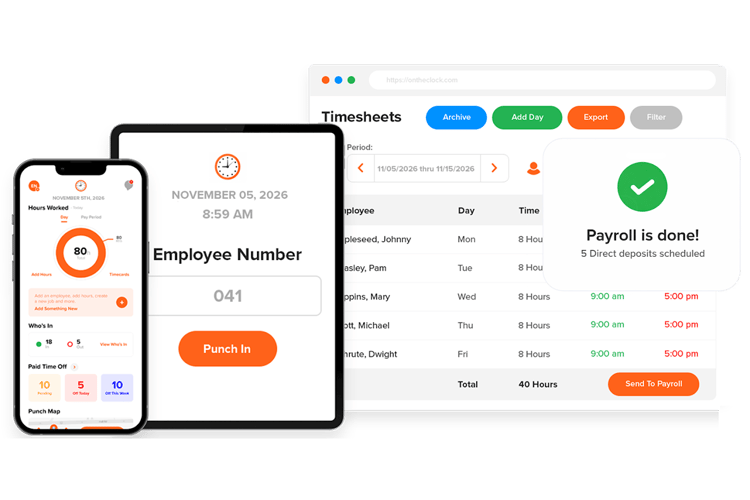
OnTheClock is built for small to mid-sized businesses that want strong time tracking without unnecessary complexity. Most small teams do not need enterprise layers of software. They need something that works every day, especially on payroll week.
In my experience, small business owners care about three things: accurate hours, clean payroll exports, and simple tools their crew will actually use. OnTheClock focuses on those fundamentals and keeps everything on one affordable plan. You do not have to unlock basic features behind multiple pricing tiers.
Where OnTheClock stands out is in how easy it is to move from “we think these hours are right” to “we know they are right.” Employees can clock in from their phones, a shared kiosk, or a desktop. Managers can set GPS rules, restrict clock-ins to job sites, and require photos to reduce buddy punching. Every punch is tied to a clear record, so there is less guesswork when reviewing timecards.
What Makes It Different from Jibble?
The biggest difference lies in payroll and support.
With Jibble, payroll typically involves exporting data and sending it to another system. That adds extra steps and increases the chance of errors. OnTheClock takes a more direct approach. It offers a built-in payroll option, so hours can be moved from timecards to paychecks in a single system. This includes handling tax documents, direct deposits, and basic compliance, which helps reduce manual work during payroll week.
Support is another clear difference. Many teams using Jibble rely on automated support, which can be slow when something urgent comes up. OnTheClock focuses on real, human support. You can reach someone by phone, chat, text, or email, regardless of your plan.
In day-to-day operations, that matters more than it seems. If a timecard needs to be fixed or payroll is on a deadline, being able to talk to a real person can save time and prevent mistakes.
Key Features
Integrations:
Pros
Cons
Pricing
-
Plans start at $5/month base fee + $4 per user/month

Clockify: Best Jibble Alternative for Free Time Tracking
Available on: Web, iOS, Android
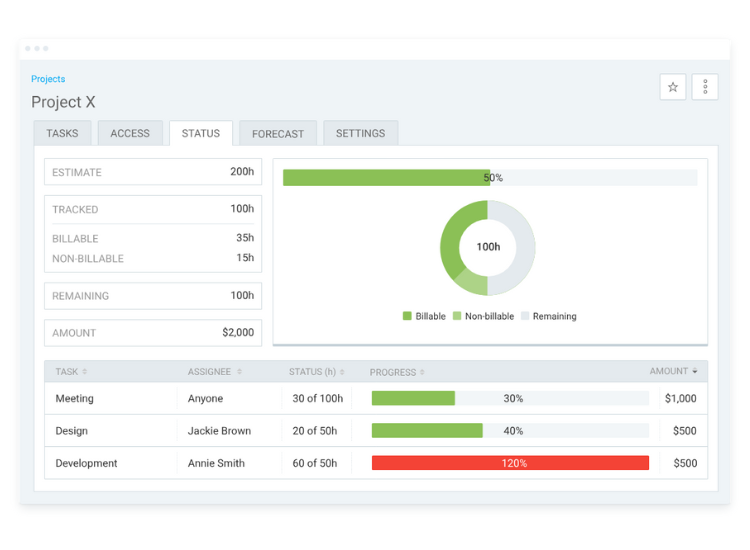
If the main reason you are sticking with Jibble is the free plan, Clockify is the closest match.
It also offers free time tracking for teams of up to five users. But where it stands out is how much more you can do inside that free tier. You are not just tracking hours — you can organize time by projects, clients, and tasks right away.
That makes a big difference depending on how your business runs.
Clockify is built for teams that care about where time is going, not just when someone clocks in. If you bill clients hourly or want to understand which projects are profitable, it gives you that structure without needing to upgrade.
But it does come with trade-offs.
Clockify is not designed for attendance tracking. You will not find features, like facial recognition, biometric clock-ins, or geofencing. So, if your priority is making sure employees are physically on-site when they clock in, this is not the tool for that.
Key Features
Pros
✓ Free for Up to Five Users
✓Simple, Clean Interface
✓Generous Free Plan
✓Project Billing Focus
✓Multiplatform Support
Cons
Pricing
-
Free plan available
-
Plans start at $3.99 per user/month when billed annually

Connecteam: Best Jibble Alternative for All-in-One Deskless Teams
Available on: Web, iOS, Android
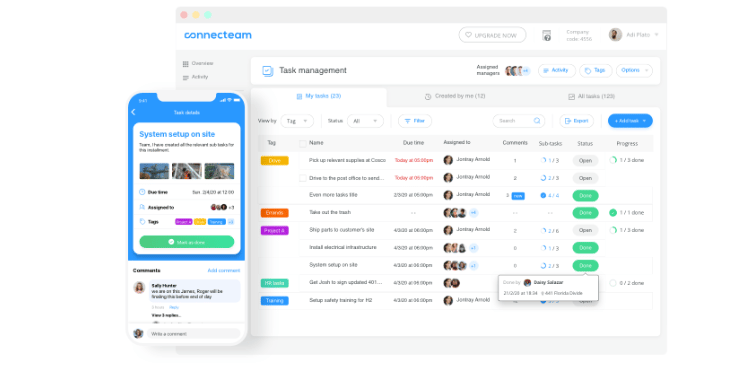
Connecteam is built as a full workforce platform for teams that do not sit behind a desk. If you manage cleaning crews, construction workers, retail staff, or field technicians, everything runs through a single mobile app.
From the employee side, it's simple. They clock in, check schedules, read updates, complete training, and submit forms all in the same place. There is no switching between apps or missing information.
From the manager's side, that changes how you run your team.
Instead of juggling separate tools for scheduling, messaging, and time tracking, you can manage everything in one system. That means fewer gaps, fewer missed updates, and less back-and-forth with your team.
But there is a trade-off.
Connecteam has many features, which can make it feel heavier than tools like Jibble or Clockify. The pricing is also split into different hubs, which can get confusing depending on what you need.
Key Features
Pros
Cons
Pricing
- Free plan available
-
Paid plans start at $29/month for the first 30 users when billed annually

Buddy Punch: Best Jibble Alternative for Preventing Time Theft
Available on: Web, iOS, Android
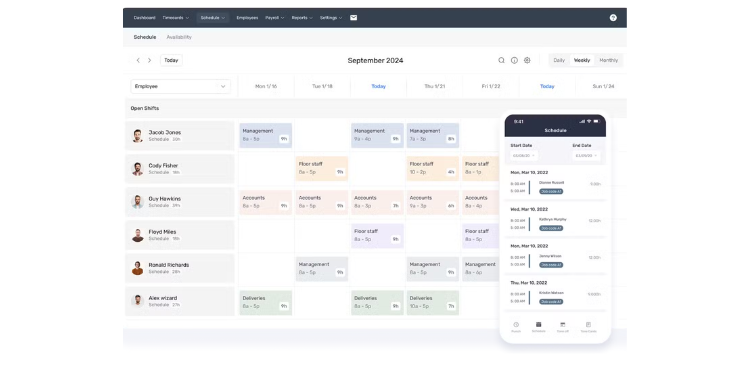
Buddy Punch gives you multiple ways to confirm who is actually clocking in. You can use facial recognition, webcam photos, QR codes, PINs, geofencing, IP restrictions, and even text-to-punch. That level of control matters if you are dealing with buddy punching or need tighter oversight on job sites.
It also improves how payroll is handled.
Buddy Punch includes an optional payroll add-on and connects with more than 20 payroll providers. This makes it easier to move from tracked hours to payroll with less manual cleanup.
The trade-off is cost.
There is no free plan, and the base fee plus per-user pricing can add up quickly for small teams. It is a larger investment than tools like Jibble or Clockify.
Key Features
Pros
Cons
Pricing
-
A 14-day trial is available
- $19 base fee + $4.99 per user/month when billed annually

Hubstaff: Best Jibble Alternative for GPS Tracking and Remote Monitoring
Available on: Web, iOS, Android
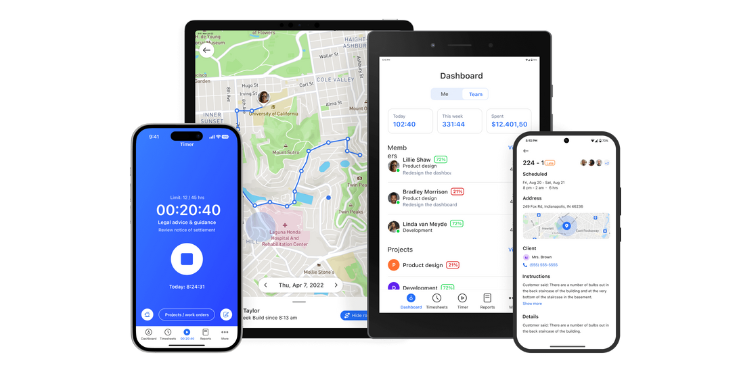
If your main issue with Jibble is GPS accuracy or limited location tracking, Hubstaff takes it much further.
It gives you real-time GPS tracking, geofencing, and a clear view of where your team is throughout the day. On top of that, it adds screenshot capture, app and URL tracking, and activity levels. You are not just tracking time; you're seeing how that time is spent.
That level of visibility is useful if you manage remote employees, field teams, or crews across multiple job sites. You can quickly spot gaps, confirm work is happening where it should, and stay on top of daily operations without constant check-ins.
Hubstaff also simplifies payroll.
It includes built-in payroll through tools like PayPal, Payoneer, and Wise, so you can move from tracked hours to payments without using a separate system.
The trade-off is how much it monitors.
Features like screenshots and activity tracking can feel invasive. Some teams push back, especially if they value trust and flexibility. This is a tool built for accountability, and it works best in environments where that level of oversight is expected.
Key Features
Pros
Cons
Pricing
-
Plans start at $4.99 per user/month when billed annually

Homebase: Best Jibble Alternative for Scheduling Hourly Teams
Available on: Web, iOS, Android
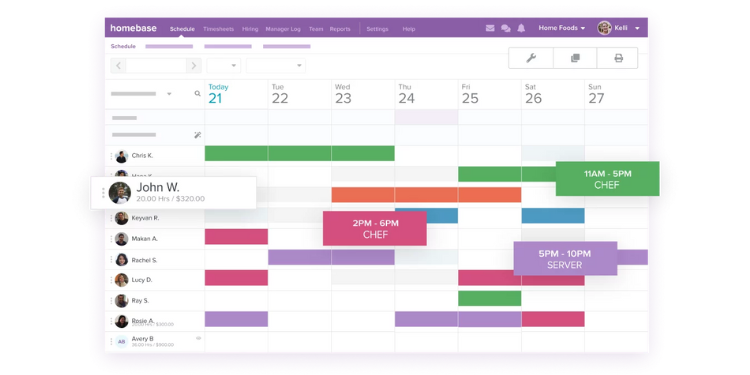
Homebase is designed for businesses that run on hourly shifts — restaurants, retail stores, cleaning teams, and service crews. You can build schedules with drag-and-drop tools, track time, message your team, and even handle hiring in one place.
That makes day-to-day operations much easier. Instead of managing schedules in one app and time tracking in another, everything stays connected. When a shift changes, your team sees it right away, and hours flow directly into timecards.
The biggest advantage is how pricing works.
Homebase charges per location, not per employee. If you have a single location with a large team, this can be very cost-effective. A restaurant with 40 employees pays the same as a smaller shop with just a few people.
But that model can work against you as you grow.
If you manage multiple locations, each one requires its own subscription. Costs can increase quickly, and what started as affordable can become expensive across several sites.
Key Features
Pros
Cons
Pricing
-
A free plan is available
-
Starts at $30 per location
A Side-by-Side Comparison of Jibble Alternatives
Why Choose OnTheClock?
See how OnTheClock stacks up against other Jibble alternatives.
| Tool | Best For | Pricing (Approx.) | Key Strengths | Top Integrations |
|---|---|---|---|---|
| OnTheClock | Small businesses | $5 base + $4/user | Simple setup, flat pricing, clean payroll exports, no feature gating | ADP, QuickBooks, Gusto, Square |
| Clockify | Free time tracking | Free; paid from $3.99/user | Free for up to five users, project tracking, invoicing, 80+ integrations | QuickBooks, Xero, Jira, Asana |
| Connecteam | All-in-one deskless | Paid plans start at $29/month for the first 30 users when billed annually | Time + scheduling + comms + HR in one app, GPS breadcrumbs | QuickBooks, Gusto, Paychex, Xero |
| Buddy Punch | Preventing time theft | $19 base fee + $4.99 per user/month when billed annually | Most verification methods, 20+ payroll integrations, top-rated support | QuickBooks, ADP, Gusto, Paychex |
| Hubstaff | GPS and monitoring | Plans start at $4.99 per user/month when billed annually | Real-time GPS, screenshots, built-in payroll, project management | Asana, QuickBooks, Trello, Jira |
| Homebase | Scheduling hourly teams | Free; paid from $30/location/month | Per-location pricing, drag-and-drop scheduling, hiring, POS integrations | QuickBooks, Gusto, ADP, Square, Toast |
Comparison data based on 2026 market research and subject to change by respective providers.
What’s the Best Option for You?
The best way to choose is not by comparing feature lists. It is by fixing the one problem that keeps showing up every week.
Start with a simple question: What is slowing you down right now?
Many managers pick tools based on what they might need later. That often leads to systems that feel heavy and teams that avoid using them. It is better to focus on the problem you are dealing with today.
Use this as a quick check:
-
Are you spending too much time fixing payroll or correcting timecards?
-
Is your team struggling to use the system consistently in the field?
-
Do you lack clear visibility into where your team is or what they are working on?
-
Are you juggling multiple tools for scheduling, time tracking, and communication?
-
Is accountability an issue, like buddy punching or missed punches?
-
Are you missing features your business now depends on, like scheduling or reporting?
Your answer should guide the decision.
When you choose a tool that solves your main problem, everything gets easier. Payroll runs cleaner, schedules stay organized, and you spend less time fixing issues and more time running your business.
Frequently Asked Questions About Jibble Alternatives
What is the best alternative to Jibble?
The best alternative depends on your main priority. For small to mid-sized businesses that want simple setup and clean payroll integration, OnTheClock is often a strong fit. For teams that need a free option with project tracking, Clockify is worth evaluating. For businesses that need scheduling, messaging, and time tracking in one app, Connecteam covers all three.
Is Jibble’s free plan enough for a growing team?
Jibble’s free plan is generous for basic time tracking. However, as teams grow, features like custom schedules, leave accruals, time sheet approvals, and advanced reporting require paid tiers. If your team is outgrowing the free plan, it is worth comparing the cost of Jibble Premium against alternatives that include those features at a similar or lower price.
Which Jibble alternative is best for preventing buddy punching?
Buddy Punch offers the most clock-in verification methods, including facial recognition, webcam photos, QR codes, and IP address locking. Jibble also offers facial recognition on its free plan, so if verification is your only need and budget is tight, Jibble may still be a fit. But for broader verification options and payroll integration, Buddy Punch is the stronger choice.
Do Jibble alternatives integrate with QuickBooks and ADP?
Yes. OnTheClock, Buddy Punch, Hubstaff, Homebase, and Connecteam all integrate with QuickBooks. For ADP specifically, OnTheClock, Buddy Punch, and Homebase offer direct integrations. Always confirm the depth of the integration before committing, as some send only basic time sheet data.
How long does it take to switch from Jibble to another platform?
Most small to mid-sized teams can switch time tracking platforms in a few days to two weeks. The timeline depends on employee count, payroll setup, and the number of integrations you need to reconnect. Many platforms on this list offer free trials, so you can test the replacement before fully committing.
Can Jibble alternatives handle both time tracking and employee scheduling?
Homebase and Connecteam are the strongest options for combined time tracking and scheduling. Clockify and Hubstaff offer scheduling on higher-tier plans. OnTheClock includes basic scheduling. Buddy Punch offers scheduling as an add-on.
Will my employees resist switching from Jibble?
Employees usually resist change only when the new system feels more complicated. If the replacement platform is simple and mobile-friendly, most teams adapt within a day or two. Tools like OnTheClock and Buddy Punch are consistently rated among the easiest to set up and use.
