


Jump to section
Put These Best Practices on Autopilot
OnTheClock handles the hard parts for you. Employees clock in from their phone or a shared kiosk, and GPS records where they punched. Managers approve and lock time sheets before payroll, and hours sync to ADP, Gusto, QuickBooks and Square.
Try OnTheClock free todayEmployee time tracking best practices make sure every hour is recorded consistently, close to when it was worked, and reviewed before it reaches payroll. Getting there takes a written policy, tools that make clocking in easy, trained managers, a clear approval process, and employees who understand why it matters.
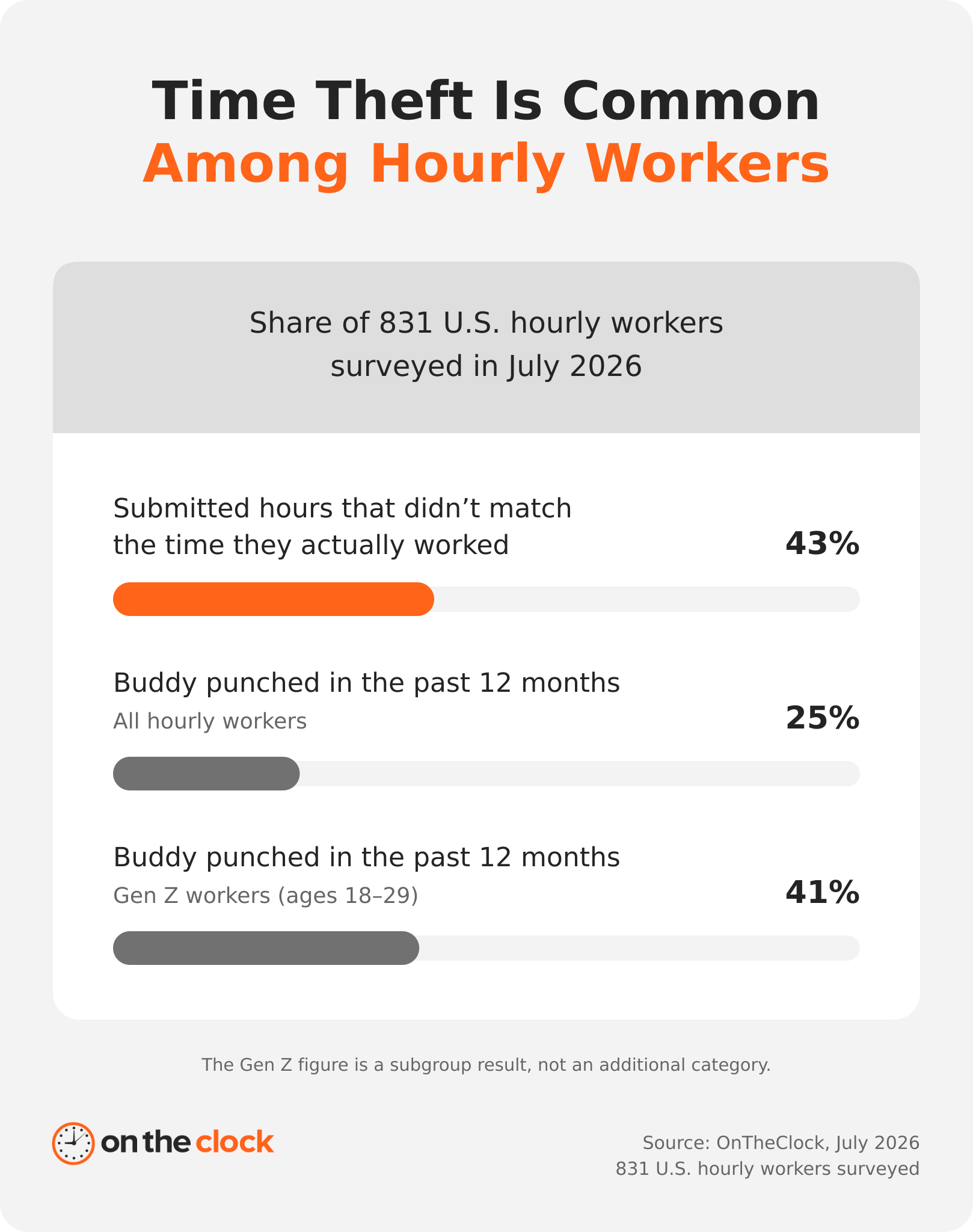
That last part is harder than it sounds. In our 2026 survey of 831 hourly workers, 43% admitted submitting hours that didn't match what they worked. One in four had clocked in or out for a coworker, or had a coworker do it for them, in the past year. Payroll can only be as accurate as the time sheets behind it, and 63% of the small business owners and payroll decision-makers we surveyed say their company has made a payroll error.
Key Takeaways
- ✔Set a written time tracking policy so employees and managers follow the same rules for recording and approving hours.
- ✔Record time as work happens to reduce missed hours and errors caused by filling out time sheets from memory.
- ✔Make clocking in easy with mobile or kiosk options, clear training, and reminders for missed punches.
- ✔Review time sheets before payroll and document every correction so you can trace who changed hours and why.
- ✔Use accurate time data to improve staffing, project estimates, and job profitability while explaining its purpose to employees.
Set your time tracking policy
Most time tracking problems start as gaps in the policy. Write these four decisions down before anyone clocks in, so every manager applies the same rules and every employee knows what's expected.
1. Be decisive on hourly vs. salaried time tracking
Decide which employees track time, and put it in writing. For non-exempt employees, this isn't optional. The Fair Labor Standards Act (FLSA) requires you to record hours worked each workday and each workweek. The FLSA doesn't require hour records for exempt employees, but many employers track their time anyway for paid time off (PTO), client billing, project costing, or state requirements.
"Salaried" and "exempt" aren't the same thing. Exempt status depends on both salary level and job duties, so a salaried employee can still be non-exempt and owed overtime.
Whatever you decide, apply it the same way to everyone in a given role, and write down the reasoning so managers can explain it.
2. Have everyone on the same tracking schedule
Kids notice when a sibling gets a later bedtime, and employees notice when another team plays by different rules. If one team records time daily, every team should. If time sheets lock at 5 p.m. Friday for one department, use the same deadline everywhere unless there's a real business reason not to. Uneven rules confuse managers and feel unfair to employees.
Put the schedule in your written policy: when time is due, when time sheets lock, and who approves them.
3. Define what counts as hours worked
Your policy should spell out what's on the clock and what isn't. Under the FLSA, hours worked generally include any time you require or allow an employee to work, including:
-
Short rest breaks, usually 5 to 20 minutes
-
Required training, meetings, and staff calls
-
Travel between job sites during the workday
-
Work an employee does before or after a shift, even if you didn't ask for it
Bona fide meal periods (usually 30 minutes or more, with the employee fully relieved of duty) and a normal commute generally don't count.
If an activity falls in a gray area, check Department of Labor (DOL) guidance or talk with employment counsel before you treat it as unpaid.
4. Apply consistent meal and break policies
Federal law doesn't require employers to offer breaks, but it does govern how you pay for them. Short rest breaks of about 5 to 20 minutes count as paid work time. Meal periods of 30 minutes or more can be unpaid, but only if the employee is fully relieved of duty. A "lunch break" spent answering phones at the front desk is paid time.
Many states go further. California requires a 30-minute meal period for shifts over five hours, and New York and Oregon set their own meal timing rules. Check the DOL's state meal period chart for your locations.
Then make it easy to follow. Have employees clock out and back in for unpaid meals so the record shows the break actually happened, and apply the same rules across all teams.
Roll out time tracking the right way
How you introduce time tracking decides whether people follow it. Start small, show the habit from the top, and explain the reasons before anyone has to ask.
5. Start with a pilot program
If you're new to time tracking or switching systems, test it with one group before you roll it out company-wide. A pilot shows you where the policy is unclear, where the tool gets in the way, and which questions come up again and again.
- Pick a team. One location or department works well. Include a few skeptics along with your early adopters.
- Set the policy. Settle practices 1–4 before day one.
- Train the group. Cover how to clock in, what to do about a missed punch, and who to ask for help.
- Run it for two to four weeks. Cover at least one full pay period. Keep your current method running alongside it so you can compare totals.
- Review and adjust. Look at missed punches, edits, and employee feedback, then fix the policy before expanding.
- Go company-wide. Use what you learned to train everyone else.
For a deeper walkthrough, see How to Introduce Time Tracking to Your Employees.
6. Lead by example
Time tracking works best from the top down, especially in client-billable businesses like law and consulting firms. If managers skip their own time entries, employees notice and stop taking it seriously.
Picture this: it's Friday at 5:30 p.m., and you really want to wrap up that project before the weekend. You finish the work, hit send, close your laptop, and rush out the door toward sweet weekend freedom without thinking twice about your timer. Whoops. Managers who track their own time know these slip-ups firsthand. That makes them better trainers, and more credible when they ask the team to stay on top of it.
7. Train employees and managers, then retrain
A single training session won't stick. An executive coach once gave this advice: once you think your team understands something, tell them three more times. Mix up the formats so everyone gets it at least one way:
-
Live demonstrations of clocking in, editing, and submitting time
-
Short video tutorials employees can rewatch
-
Written quick-start guides
-
Practice runs with sample time sheets before real hours count
Train managers just as thoroughly, because they're the ones answering questions and approving hours. If Jimmy can ask Manager Molly a question, then ask Manager Mike the same one and get two different answers, your policy is only as consistent as your least-trained supervisor. Give managers the same playbook, and check in after the first few pay periods.
The people who run payroll need the same care. In OnTheClock's survey of 525 small business owners and payroll decision-makers, 76% of those who learned payroll from a predecessor said their company had made payroll mistakes, compared with 65% of those with formal training.
Plan a refresher whenever the policy or the tool changes, and as part of onboarding for every new hire.
8. Explain why you track, and what you don't
Hint: it's not just for payroll. Tell employees what you actually use time data for. That might be accurate client billing, better project estimates, staffing decisions, or visibility into a team that works across job sites or from home.
Be just as clear about where tracking stops. If you use GPS, say when location is recorded (for example, only at clock-in and clock-out, or only while employees are on the clock) and who can see it. Employees who don't get an explanation tend to assume the worst.
Make time tracking easy for employees
The easier it is to record time, the more accurate the records will be. Cut the steps, the guesswork, and the end-of-week catch-up.
9. Automate as much as you can
Every manual step is another chance for a missed punch or a typo. Let the system do the work:
-
Mobile clock-in. Employees punch in from their phone, whether they're in the office, on a job site, or on the road.
-
GPS and geofencing. Record where employees clock in, or limit punches to approved locations.
-
A shared kiosk. Set up one tablet or computer at the entrance for teams that work on site.
-
Missed-punch alerts. Get notified when someone misses a punch, so you can fix it before it turns into a payroll correction.
-
Payroll sync. Send approved hours straight to payroll instead of re-keying them.
An online time clock like OnTheClock handles all of this and connects with payroll providers including ADP, Gusto, QuickBooks, and Square. Hours flow into payroll without a spreadsheet in between.
10. Record time daily (don't wait for Friday!)
Do you remember what you had for lunch on Monday? If today is Thursday, probably not. Employees who fill in a week's worth of hours on Friday afternoon have the same problem: they're guessing.
Set a clear deadline in your policy, such as the end of each shift or the end of each workday, and use automated reminders so nobody has to rely on memory.
For hourly employees using a time clock, the rule is simple: clock in when you start working, and clock out when you stop. If someone starts answering emails or prepping their station before they clock in, that time still counts as hours worked.
11. Make the categories simple
Skip the elaborate project codes. Plain, consistent categories like "Editing," "Meetings," and "Employee Training" are faster to pick and easier to report on. Use the same names across every project, and keep the list short. If an employee can't find a category that fits, have them ask for a new one rather than skip the entry or dump it into "Other."
12. Tie activities and tasks to projects or clients
Decide what counts as internal or company time, and set up projects to track that time too. For client work, attach the supporting tasks (emails, planning, calls) to the client they're for. At a recruiting firm, for example, time spent emailing applicants for a client's open role should go to that client, not to a generic "Email" category. That's how you see what each client really costs.
Approve, audit, and stay compliant
Accurate hours don't just happen at clock-in. They're protected by who reviews them, how corrections get made, and what rules your system enforces before payroll runs.
13. Assign a time checker and a missed-punch process
Have one person (usually someone in HR, an office manager, or an executive assistant) in charge of making sure time sheets look "normal" and accurate. They need the people skills to chase down stragglers and know when to escalate to a manager. This person can also be the go-to for training new employees and for editing a locked time sheet, which takes even more headaches off your plate.
Give that person a written procedure for missed punches, because they're going to happen:
- The employee reports it quickly, ideally the same day or by their next shift, through your time clock app or a simple correction form.
- The time checker or manager verifies the hours against the schedule, job notes, or a supervisor's confirmation.
- The correction is made in the system, not on a sticky note, with the reason recorded.
- The edit is logged so you can see who changed what, when, and why.
Even if an employee forgets to clock in, you still have to pay for the time they worked. You can address repeated missed punches through your policy, but not by withholding pay.
14. Prevent buddy punching
Buddy punching is when one employee clocks in or out for a coworker who isn't there. It's more common than most employers think. In OnTheClock's 2026 Time Theft Report, one in four hourly workers said they'd buddy punched or had a coworker punch for them in the past year, and among Gen Z workers the figure rose to 41%.
A written policy helps, but your time clock should make it hard to do in the first place:
-
Individual logins or PINs, so every punch is tied to one person
-
Photo capture at clock-in, to help verify who's punching
-
GPS and geofencing, so punches only count from approved locations
-
Device or IP restrictions, to record punch locations or restrict punches to approved locations
If you're considering fingerprint or face-scan clocks, check your state's rules first. Illinois's Biometric Information Privacy Act (BIPA) requires written consent and a published retention policy before you collect biometric data, and other states have their own biometric privacy laws. Learn more about buddy punching.
15. Follow FLSA rounding rules
Many employers round punches to the nearest 5, 6 (one-tenth of an hour), or 15 minutes to simplify payroll. The FLSA permits neutral rounding practices, but the policy must operate neutrally over time and cannot systematically undercompensate employees for compensable work.
Under the common "7-minute rule" for 15-minute rounding, a punch at 8:07 rounds down to 8:00, and a punch at 8:08 rounds up to 8:15. Rounding that only ever goes in the employer's favor, like always rounding clock-ins forward and clock-outs back, is a fast route to a wage claim.
Some states, including California, look at rounding more closely, so check local rules before you turn it on. Better yet, pay to the minute. A time clock records exact punches anyway, and many employers find it simpler to skip rounding altogether.
16. Approve and lock time sheets before payroll
To avoid confusion and uncontrolled edits, lock time sheets at the end of every pay period. You get the most reliable data, and your accountant or payroll person doesn't go crazy. Before they lock, build in three safeguards:
-
Manager approval. A manager reviews and approves every time sheet before payroll runs. In OnTheClock's survey, workers adjusted their hours even when they believed managers checked closely, so spot-check a random sample each month as well.
-
An audit trail. Every edit after submission should record who made it, when, and why. Route edits to locked time sheets through your time checker (practice 13).
-
Record retention. The FLSA requires you to keep payroll records for at least three years, and time cards and other wage computation records for two
. Some states require longer.
OnTheClock's reporting tools let managers review, approve, and export hours, and keep a record of every change.
Put your time data to work
Once your hours are accurate, they tell you a lot more than what to pay people. Use the data, share it, and make good habits a team effort, but be careful how you connect it to performance.
17. Use your time data
Time data shows where your business actually spends its hours. Use it to:
-
Spot staffing needs before overtime starts piling up
-
Price and budget projects based on what similar work really took
-
Find bottlenecks, like tasks that take far longer than they should
-
See which clients, jobs, or services are profitable
- Back up your sales and marketing with real numbers on turnaround times and capacity
Run a few reports each month and look for patterns. Look at trends across multiple weeks or months rather than drawing conclusions from a single week.
18. Share the data and its uses with employees
Data you share builds trust and pride. Data you keep to yourself can look like surveillance. Here's how one CEO puts it:
"Four Point Consulting is very proud of a lot of our time tracking data. We boast record rates for recruitment placements at very small fees, and we can do a lot of HR work in a little time. As the CEO of Four Point, I share this data with my team because they should be proud of how good they are at their jobs. I also explain to management how to properly scope work for clients and for salespeople and how to sign contracts. It also is great for my marketing manager to continue to improve our website and sales collateral. Finally, I love the data because it ensures our finances are in order, it's how we bill clients, and it can tell me if I need to be cognizant that we need to hire someone else. Data = power!"
You don't need a dashboard on the break room wall. A quick look at team totals in a monthly meeting, or a note when a project comes in under budget, goes a long way.
19. Set time tracking goals for the team
Everyone's time sheets done accurately and early one week? Coffee on Monday is on the house! Everyone compliant for a whole month? Lunch is on the boss! Think of fun incentives that get your team into the spirit and promote proper use of your time tracking system.
Here's a tip: ask key employees and managers what would really get people going, rather than assuming you know because you're the owner, CEO, or "big boss."
20. Be careful about tying time to performance
People got gold stars for perfect attendance in grade school, but time data and performance reviews don't mix as neatly in the real world. An employee may need extra breaks or a modified schedule as a disability accommodation, or take protected leave. Penalizing them for the hours they log can expose you to discrimination or retaliation claims. If you want to use time data in reviews, check with employment counsel first.
Team goals are a safer use. Pit Team A in customer service against Team B to see who turns in time sheets on time more often. A little friendly competition never hurt anyone.
Common time tracking mistakes to avoid
-
Waiting until Friday. Hours entered from memory at the end of the week are guesses. Set a daily deadline.
-
Editing time without an audit trail. Every change should show who made it, when, and why.
-
Letting each manager make their own rules. Inconsistent rules feel unfair and lead to payroll errors.
-
Using too many categories. If employees have to hunt for a code, they'll skip the entry or guess.
-
Monitoring without explaining. GPS or activity tracking with no context reads as surveillance.
-
Treating short breaks or pre-shift work as unpaid. Rest breaks of 5 to 20 minutes and work done before clocking in both count as hours worked.
This article is for general information only and isn't legal advice. Wage and hour rules vary by state, so check with employment counsel or your state labor agency before changing your policies.
Time tracking best practices FAQ
What are the best practices for employee time tracking?
Put a written time tracking policy in place and apply it the same way to every team. Make clocking in easy with mobile or kiosk options, and have employees record time daily. Train managers to enforce the rules consistently, approve and lock time sheets before payroll, and follow FLSA rules for breaks, rounding, and recordkeeping.
How do I get employees to track their time?
Make it easy, and explain why it matters. Use a time clock employees can reach from their phone or a shared kiosk, set a daily deadline with automated reminders, and train more than once. Tell employees how the data is used, lead by example, and reward teams that turn in accurate time sheets on time.
What should a time clock policy include?
A time clock policy should cover who tracks time, how and when to clock in and out, what counts as hours worked, and meal and break rules. It should also spell out how to report a missed punch, rounding rules, overtime approval, time sheet deadlines and approvals, and what happens when someone breaks the policy, including buddy punching.
What should employees do if they forget to clock in?
They should report it to their manager or time checker as soon as possible, ideally the same day, through your time clock app or a correction form. A manager verifies the hours and corrects the record with a documented reason. Employers still have to pay for all time worked, even when a punch is missed.
Do salaried employees need to track time?
Not under federal law, if they're exempt. The FLSA requires hour records only for non-exempt employees. But salaried doesn't automatically mean exempt, since exempt status depends on both salary and job duties. Many employers still track exempt employees' time for PTO, client billing, project costing, or state requirements.
How long do I need to keep time records?
Under the FLSA, keep payroll records for at least three years. Keep time cards, schedules, and other records used to calculate wages for at least two years. Some states require longer, so check your state's rules, and store records where you can produce them quickly if the Department of Labor asks.