

Jump to section
Try OnTheClock Free
Save time and make payroll effortless with our easy-to-use, affordable employee time tracking app.
Try It Free- ✔ Yes, you have to pay employees for all hours worked, even if they forget to clock in.
- ✔ Set clear consequences for missed punches by updating your employee handbook and following through on discipline.
- ✔ Only deduct time for breaks if they were actually taken, and make sure your team understands the policy.
- ✔ Expect small time differences, but fix any major errors to keep payroll accurate.
- ✔ Use a simple time clock system to make it easier for employees to punch in and for human resources (HR) to fix mistakes.
- ✔ Forgetting to clock out can lead to estimated hours, which may affect overtime calculations.
- ✔ Tell your manager as soon as possible, so payroll corrections can be done quickly.
Yes. If an employee forgets to clock in or out, you still have to pay them for every hour they actually worked. Under federal law, keeping accurate time records is the employer's job. A missed punch changes how you fix the record, not whether you pay.
One of the biggest frustrations employers face is getting employees to clock in and out.
As new time management policies and systems are introduced, many administrators tend to ask the same question: What happens if employees forget to clock in or out? If hours are not recorded properly, does the company really have to pay them? And, how can I know they are honest about when they arrived and left?
Regardless of how frustrating timecard mistakes may be or who caused the error, employees still have to be paid for all hours worked. The real issue is how those missed punches are handled and corrected.
In this article, I'll introduce you to the legalities surrounding missed punches and dig into what employees and managers can do to fix and prevent this issue.
What Does Clocking In and Out Mean?
Clocking in and out means recording the exact time an employee starts and ends their workday. This is done through a time clock system, mobile app, or computer, and it creates an official record of hours worked for payroll and compliance purposes.
A missed punch occurs when an employee forgets to clock in, forgets to clock out, or records the wrong time. This creates gaps in the time record that need to be corrected. Accurate timekeeping matters because it ensures employees are paid correctly and helps employers maintain accurate payroll, track hours, and remain compliant with labor laws.
Why Do Employees Forget to Clock In or Out? (Honest Mistakes vs. Time Fraud)
Not every missed punch is a problem or done on purpose. In many cases, employees simply forget. It can happen at the start of a busy shift, during a schedule change, or when leaving in a rush at the end of the day.
Common reasons include:
-
Getting distracted when starting or ending a shift
-
Changes in routine or schedule
-
Forgetting after breaks or switching tasks
-
Technical issues with the time system
At the same time, employers also need to consider the possibility of time fraud. This is less common, but it can happen when someone intentionally avoids clocking in or out to affect their recorded hours.
The key difference is intent. Most missed punches are honest mistakes, but repeated or unusual patterns should be reviewed. These patterns can indicate fraud, such as:
-
Buddy punching, where one employee clocks in or out for another
-
Delaying a clock-out to add extra time
-
Reporting or editing hours that were not actually worked
Learn more about timecard fraud and how to stop it.
Clear tracking and consistent policies make it easier to identify mistakes early and address behavior that needs attention.
What Happens if Someone Forgets to Clock In or Out?
How It Affects Pay and Payroll
If someone forgets to clock out, their hours may be estimated instead of captured accurately. For example, in manual systems, hours are often entered later based on memory. This increases the risk of incorrect time entries, especially if the shift included breaks or changes. These errors can lead to payroll mistakes and require additional time to correct.
In automatic time tracking systems, the issue manifests differently. The system may close the shift at a set time or based on a default rule. This can lead to the same problem, where recorded hours do not match the actual time worked, and payroll needs to be adjusted.
How It Affects Overtime Calculations
When employees forget to clock out, their time may continue running past the end of their shifts. This can cause hours to be recorded as overtime, even if no additional work was performed. In some cases, the system keeps tracking time until the next punch or until the shift is manually closed.
In the short term, this can lead to unexpected overtime and payroll discrepancies. When the time is reviewed, the recorded hours may need to be adjusted to reflect the actual hours worked. If extra overtime was paid by mistake, the company may try to recover that amount through payroll adjustments, depending on company policy and local laws. This can put the employee in a situation where their pay is reduced in a future paycheck.
How It Affects Employees
A missed punch can delay payroll corrections, especially if it is not reported right away. When hours are estimated or entered later, there is a higher chance of underpayment, and the record may need to be corrected.
Missed punches that are repeated can also lead to disciplinary action. Many companies track these issues and apply policies when patterns emerge. Reviewing time records regularly and reporting errors early helps prevent problems and keeps records accurate.
How It Affects the Employer
Missed punches create more than just small errors; they affect payroll accuracy, increase administrative work, and can create compliance risks.
When time is not recorded correctly, payroll teams need to investigate and adjust hours. This takes time and often requires input from managers and employees to confirm what was actually worked. If errors are not corrected, it can lead to inaccurate pay, which may create legal exposure under wage and hour laws.
This is why employers take missed punches seriously. Clear policies, consistent enforcement, and reliable time tracking systems help reduce errors and keep payroll accurate.
What Are the Federal Recordkeeping Requirements?
According to the Fair Labor Standards Act (FLSA), employers must keep records of the number of hours each employee worked, regardless of whether employees clock in and out. This means that if an employee forgets to clock in and still works a full day, payroll must be adjusted to reflect the actual hours worked and the employee must be paid accordingly.
Under labor laws related to clocking in and out, the responsibility to track time accurately falls on the employer, not the employee.
-
Pay employees for all hours actually worked — regardless of whether a clock record exists.
-
The employer bears legal responsibility for accurate timekeeping, not the employee.
-
Retain payroll records for at least three years and records used to calculate wages, such as timecards and work schedules, for at least two years.
-
Employers cannot withhold pay for hours actually worked as punishment for failing to clock in or out.
"The Act requires no particular form for the records but does require that the records include certain identifying information about the employee and data about the hours worked and the wages earned."
— U.S. Department of Labor, Fact Sheet #21
Oftentimes, employers ask whether they can dock employees' pay for failing to clock in or out or withhold pay entirely for that day. They cannot. Employees must be paid for the exact number of hours worked, regardless of whether they clocked in.
State laws may impose stricter requirements, so it is important to review local regulations or consult an HR professional in your state.
This article is for general information only and isn't legal advice. Labor laws vary by state, so check with an employment attorney or your state labor agency about your situation.
What to Do as an Employee
If you forget to clock in or out, the most important thing is to fix it as soon as possible. The longer you wait, the more difficult it becomes to verify hours and correct time records.
Follow these steps as soon as you notice a missed punch — the sooner you act, the easier the correction.
What Should You Do if You Forgot to Clock In or Out?
Step 1: Note the Exact Time You Actually Worked
Write down your start and end times as soon as you notice the mistake. Use a phone note, send yourself an email, or record it anywhere you can access later. The sooner you document it, the more accurate your correction will be.
Step 2: Tell Your Manager in Person
Let your manager know as soon as possible. In-person is best because you can explain the situation clearly and answer any questions right away. Keep it simple and specific. Share when you arrived or left, and why there is no punch recorded.
Step 3: Provide Evidence if Needed
If your hours need to be verified, be ready to support your correction. This can include completed work, messages, coworker confirmation, badge logs, or receipts for on-site time. Anything that helps confirm your time can speed up the process.
Step 4: Review Your Employee Handbook
Take a few minutes to review your company's time tracking policy. This helps you understand how corrections are handled and what is expected going forward. Knowing the process makes it easier to avoid repeat issues.
Can You Get Fired for Forgetting to Clock In or Out?
In most cases, forgetting to clock in or out will not get you fired. What matters is how often it happens and whether it becomes a pattern.
First Offense
A single missed punch may be treated as a correctable mistake, but disciplinary action depends on the employer's policies and the circumstances. Employers understand that mistakes happen and usually focus on fixing the issue rather than punishing the employee.
In most cases, the employee is asked to confirm their actual hours so the record can be corrected. This is also when expectations are clarified, such as when to clock in, how to report missed punches, and how quickly to notify a manager. As long as the issue is reported and corrected, it is treated as a normal mistake.
Repeated Pattern
If missed punches keep happening, it becomes a bigger concern. Many companies track these issues and follow a step-by-step discipline process. This usually starts with verbal warnings, then moves to written warnings, and may include additional steps if the pattern continues.
At this point, the focus shifts from a one-time mistake to reliability and accountability. Repeated missed punches can disrupt payroll, create extra work for managers, and raise concerns about time accuracy. If there is clear documentation of repeated issues and prior warnings, termination can become a possibility.
When Fraud Is Involved
Intentional behavior is treated differently. If someone knowingly records incorrect time, delays clocking out to add hours, or has someone else clock in for them, the risk of termination is much higher.
This is considered time fraud and is handled more seriously than an honest mistake. Even a single incident can lead to immediate action because it involves intent, not error. Companies often have strict policies in place for this, and enforcement is usually consistent.
Tips to Avoid Forgetting to Clock In or Out
Forgetting to clock in or forgetting to clock out at work usually comes down to routine and timing. Small changes can make a big difference and help prevent missed punches.
Arrive a Few Minutes Early
Rushing in at the last second is one of the most common reasons people forget to clock in. Giving yourself a few extra minutes before your shift starts makes it easier to settle in and clock in on time. A short buffer helps turn it into a consistent habit.
Set Phone Reminders
Setting a recurring reminder on your phone for the start and end of your shift removes the need to rely on memory. This is especially helpful for changing schedules or busy workdays when it is easy to forget to punch out.
Make It Part of Your Routine
Clocking in should be part of your normal workflow. Pair it with something you already do, like setting up your workstation or grabbing coffee. When it becomes part of a routine, you are less likely to forget.
Use a Time Clock App With Auto-Reminders
Time clock apps with built-in reminders can alert you to clock in or out at the right time. These tools help reduce missed punches and make it easier to stay consistent without relying on memory alone.
How Employers Should Handle Missed Punches
Steps Employers Take to Address Missed Punches
Most companies follow a progressive discipline process. Before issuing any discipline, the policy must be documented in your employee handbook — employees must be informed of consequences before they can be enforced.
| Situation | Action | Documentation required | Outcome |
|---|---|---|---|
|
1First offense
|
Verbal warning | Manager notes the conversation; no formal file entry required | Hours corrected; employee reminded of policy |
|
2Second offense
|
Written warning | Formal written notice referencing the handbook policy; employee signs and receives a copy | Warning added to employee file; behavior monitored |
|
3Repeated pattern
|
Probation | Probation agreement with defined period (e.g., 60 days) and clear expectations; signed by both parties | Any further violation triggers the next step |
|
4Pattern continues
|
Termination review | Full written record of all prior warnings and probation; HR review required before action | Termination is defensible when all prior steps are documented |
|
!Time fraud
|
Immediate action | Evidence of intent (buddy punching, editing unworked hours); a single incident may suffice | Termination possible on first offense — intent changes the severity |
Employers cannot dock pay as a disciplinary measure for missed punches. State laws may impose additional requirements — consult an HR professional for your jurisdiction.
What Disciplinary Options Do Employers Have?
If an employer cannot dock pay for failing to clock in or out, they can take other steps to reinforce accurate time tracking. In most cases, this starts with notifying the employee's manager so the issue can be addressed directly. The manager is then responsible for following up and ensuring the employee corrects the behavior.
If you plan to enforce discipline for missed punches, it should be clearly outlined in your employee handbook. Policies should explain expectations, how missed punches are handled, and what actions may follow. Any updates should be reviewed with employees so expectations are clear.
Tips for Employers to Reduce Missed Punches
Set Clear Timekeeping Policies
Define when employees should clock in, clock out, and how to report a missed punch. Include this in your employee handbook and review it regularly so expectations are clear. When employees know exactly what is expected, they are less likely to miss punches or make incorrect entries.
Require Same-Day Corrections
Ask employees to report missed punches as soon as they happen. Fixing issues the same day makes it easier to verify hours and prevents payroll errors from carrying over into the next pay period. It also reduces the time managers spend tracking down details later.
Use Manager Approvals for Edits
Require managers to review and approve timecard changes. This ensures that adjustments reflect actual hours worked and creates a clear record of who approved the correction. It also helps prevent repeated errors from going unnoticed.
Teach Employees to Account for Breaks
Make sure employees understand when and how to clock out for breaks. Break-related confusion is a common cause of missed punches, especially during busy shifts. Clear guidance helps employees stay consistent and keeps time records accurate. Learn more about how extended breaks contribute to time theft.
Can You Deduct Break Time if an Employee Doesn't Clock Out for Lunch?
While the main clock-in and -out process typically isn't confusing for employees, there may be confusion about when to clock out for breaks, and what HR can do if they don't.
Breaks and overtime
Federal law generally doesn't require employers to provide meal or rest breaks. However, when employers offer short breaks — typically lasting 5 to 20 minutes — that time generally counts as compensable work time. Bona fide meal periods, typically 30 minutes or longer, generally don't have to be paid as long as the employee is completely relieved of work duties.
Employers can also establish policies requiring employees to take scheduled breaks and obtain approval before working overtime. However, if a nonexempt employee performs compensable work, the employer generally must pay for that time — even if the work wasn't authorized in advance. Employers can address violations of break or overtime policies separately through their disciplinary process.
Your HR department needs to clearly explain the break policy to both employees and managers, and managers must enforce breaks throughout the workday. This way, employees will be fairly paid, won't be overworked, and won't commit timecard fraud that harms your company.
Minor Time Clock Discrepancies Are Unavoidable
It's natural for minor differences to occur between scheduled hours and actual punch times. However, if an employee performs work after clocking out — such as helping a coworker or completing a task — that compensable time generally must be recorded and paid.
To solve this, many companies implement policies that utilize employee time tracking to round punches up or down to the nearest quarter hour. For example, if an employee clocks in at 7:55, the punch rounds up to 8:00. There is also a middle point where punch-ins at 8:07 round down to 8:00 while punch-ins at 8:08 and beyond round up to 8:15. Depending on the time clock tool that you have, you can choose to tag the exact time or use this rounding method for easier payroll management.
It's OK for your time clock to be a few minutes off from what your employees actually work, but you need to address any major discrepancies, so your records, payroll, and employee hours all line up. Any rounding practice should be neutral and should not consistently result in employees being underpaid for time actually worked.
Invest in a Time Clock That's Easy to Use
If you're frustrated by employees who can't clock in or out correctly, and your human resources department hates fixing time sheets each month, consider switching to a time clock tool that both parties can appreciate.
How OnTheClock Helps Employees Avoid Missed Punches
OnTheClock is an online time clock, meaning employees can clock in or out wherever they have an internet connection. It also makes it easier to remember punches and fix mistakes, with features such as:
-
Multiple ways to clock in, including the mobile app, a phone's web browser, a computer, or a shared tablet with a PIN
-
Punch reminders, where text or email alerts tied to the schedule tell employees when to clock in, take a break, or clock out
-
Schedules in the mobile app, so employees know their shifts before they start
-
Punch notes, where employees can add a quick note when they clock in or out
-
Manual time entry, which lets employees add or adjust their own time when you turn it on
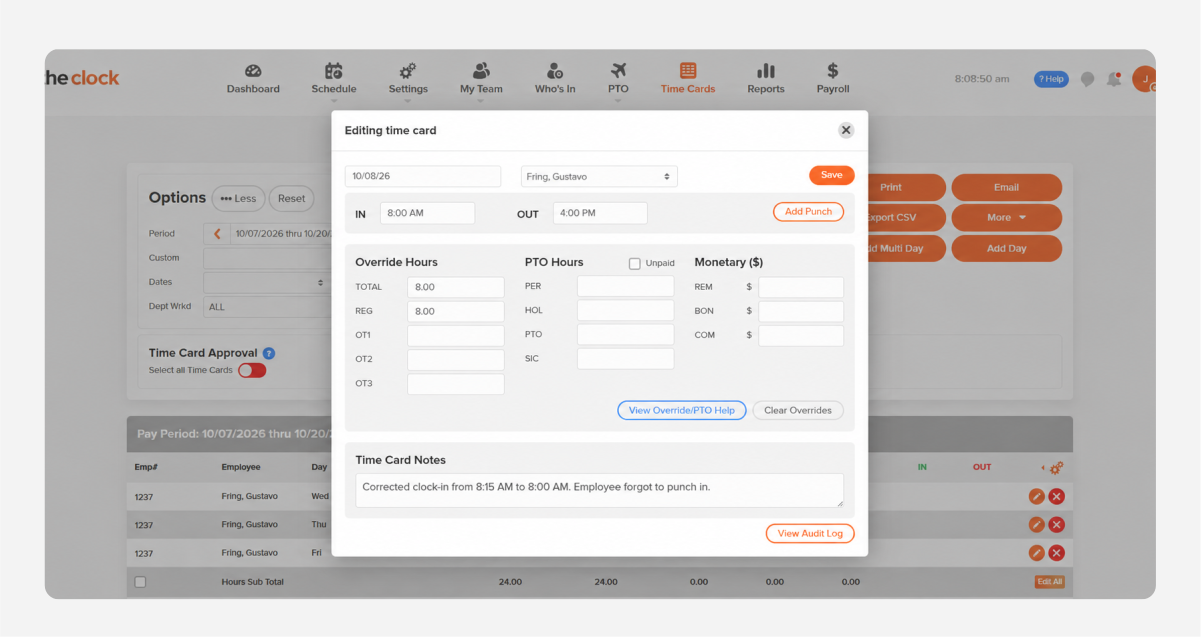
How OnTheClock Helps HR Fix Missed Punches
OnTheClock is also easy for HR teams who need to quickly make adjustments in a simple interface. Managers can use tools such as:
-
Timecard edits, where managers can change a punch time or add a missed day
-
An audit log that records every change made to a timecard
-
Timecard approvals, so corrections are checked before payroll
-
Geofencing, so team members can only clock in when they are on or near the premises
-
Early punch blocking, which stops employees from clocking in before their scheduled shift
Learn how to introduce time tracking to your employees and explore how to choose the right type of time clock for your business.
You always have to pay employees for the time they work, but you can make it easier for them to clock in and help your HR team make changes with the right tool.
Stop Chasing Missed Punches Every Pay Period
OnTheClock makes it easy for employees to clock in from anywhere, and even easier for HR to fix mistakes when they happen.
Frequently Asked Questions
Do I Have to Pay an Employee Who Forgets to Clock In?
Yes. Under the FLSA, employers must pay for all hours actually worked — regardless of whether a time record exists. You cannot dock pay because an employee failed to clock in or out.
Can I Discipline an Employee for Not Clocking In?
Yes. Verbal warnings, written warnings, and even termination are permissible for repeated violations, as long as the policy is in your employee handbook and applied consistently. You just cannot cut their pay as a punishment.
Can I Deduct Break Time if an Employee Doesn't Clock Out for Lunch?
It depends. Short breaks of about 5 to 20 minutes are generally compensable under federal law. Bona fide meal periods, typically 30 minutes or longer, generally don't have to be paid if the employee is completely relieved from work duties. If an employee works through lunch, that compensable work time generally must be counted and paid.
How Long Do I Need to Keep Employee Time Records?
The FLSA generally requires employers to retain payroll records for at least three years and records used to calculate wages, such as time cards and work schedules, for at least two years. State laws may require longer retention periods.
I Forgot to Clock Out Yesterday. Is It Too Late to Fix It?
No, it is not too late. Most time tracking systems allow corrections after the fact. The important thing is to report it as soon as possible. Let your manager or HR rep know your actual end time, so they can update your time record while the details are still fresh.
What Happens if You Don't Clock Out and No One Notices?
The employer is still required to pay for all hours worked, even if the time was not recorded correctly. However, the employee is still responsible for reporting the missed punch. If it is not reported, the recorded hours may be inaccurate and require correction later.
Can I Get Fired for Forgetting to Clock Out Once?
Almost never. A single missed punch is usually treated as a normal mistake and handled with a reminder or verbal warning. However, repeated missed punches after warnings can lead to disciplinary action.
What's the Difference Between Forgetting to Clock In vs. Clock Out?
If you forget to clock in, there is no record of when your shift started. If you forget to clock out, there is no record of when your shift ended. In both cases, the time needs to be corrected, and you should report the actual hours worked to your manager.
What if My Employer Won't Fix My Timecard After a Missed Punch?
Employers are required to pay for all hours worked. If your timecard is not corrected after you report a missed punch, you can raise the issue with HR. If the problem is not resolved, you have the option to file a complaint with the Department of Labor's Wage and Hour Division.