
Jump to section
Try OnTheClock Free
Save time and make payroll effortless with our easy-to-use, affordable employee time tracking app.
Try It FreeKey Takeaways
- ✔ The best time clock software for landscaping is the one that fits how your crews actually work: out in the field, across multiple properties, and away from a desk. It accurately tracks hours wherever the work happens and turns time records into useful payroll and pricing data.
- ✔ OnTheClock is the best overall pick for landscaping crews, pairing GPS punches, job costing, scheduling, and payroll integrations in one plan at $4 per user per month plus a $5 base fee.
- ✔ Time theft is the silent budget leak. A five-person crew rounding hours can bleed roughly $1,000 a month in phantom labor.
- ✔ GPS and geofencing settle the "where were you" question by stamping every punch with a location and blocking clock-ins outside the job site.
- ✔ Job costing turns hours into answers. Tag time to a client or route, and you finally see which properties make money.
- ✔ The right tool depends on your crew, not a feature count. Match your biggest weekly headache to the picks below.
The best time clock software for landscaping is the one that proves who was on which property, then turns those hours into clean payroll and real job costs. That's the whole job. Everything else is a bonus.
Picture a five-person crew. They clock in 15 minutes early and out 15 minutes late on paper, four days a week. At a $28 blended hourly rate, that's about $1,050 a month in hours nobody actually worked, gone before you spot it. Now, add three job sites, two rain delays, and a worker who "forgot" to punch out. Friday payroll becomes detective work.
A clock built for the field fixes most of that on its own. No single tool wins on everything, though. So, below, we break down the best pick for each situation a landscaping business runs into.
What Landscapers Actually Want
You want to trust the hours. That starts with knowing who was at which property and when without driving across town to check. When a crew works unsupervised, a GPS-stamped punch is the proof that protects your payroll and client billing.
Then you want payroll that doesn't eat your week. Owners lose 10-15 hours a week chasing paper time sheets and fixing errors, and the fix is hours that flow straight into QuickBooks or Gusto without retyping.
And you want to know if the work pays. Was that big commercial contract profitable, or did drive time and debris runs quietly sink it? When crews tag time to a job, you get the answer before the next bid.
When landscapers pick a time clock, they're really after those three things. The right solution shifts with which one hurts most. Some need location proof above all; for others, it's job costing or simple scheduling. That's why there's no single winner, only the best solution one for each circumstance.
Quick Picks: The Best Time Clock Software for Landscaping at a Glance
-
OnTheClock: Best overall for selection for GPS, job costing, and payroll in one
-
Buddy Punch: Best solution for job profitability tracking
-
LMN: Best all-in-one green industry platform
-
Timeero: Best solution for GPS and geofencing
-
Truein: Best for stopping buddy punching
-
ezClocker: Best for a low flat monthly rate
-
Connecteam: Best for scheduling and dispatch
-
Jobber: Best for quoting and invoicing
How We Evaluated the Best Time Clock Software for Landscaping
We judged each tool on what actually matters to a crew working outdoors across multiple sites, not on feature-sheet length. We compared every option against the eight needs landscapers keep raising using what we call the OnTheClock Landscaping Time Clock Checklist:
-
Mobile clock-in: Crews punch from a phone at the property, no desk or wall clock required.
-
GPS and geofencing: Every punch carries a location, and a geofence blocks clock-ins away from the site.
-
Job and task tracking: Hours tag to a client or job code so labor sorts by property.
-
Job costing: Tagged hours become a clear read on whether each job made money, and drive time is included.
-
Scheduling and dispatch: Assign crews to sites and routes, and let them see where to go.
-
Offline punching: Clock-ins work with no signal at rural sites and sync once back in range.
-
Payroll and overtime: Federal overtime math, break tracking, and clean exports to ADP, QuickBooks, Gusto, and Square.
-
Price and ease for a small crew: What a five- to 20-person operation pays, and how fast the team adopts it.
OnTheClock earns the best overall spot because it covers all eight of these in a single plan. GPS-stamped punches with a crew map, geofencing, job costing, scheduling, PTO, and overtime that exports straight to payroll, none of it held back for a higher tier. All of those features at $4 per user per month plus a $5 base fee is the basis for it earning the top spot. That said, each of the remaining solutions serves its own situation best.
The Best Time Clock Software for Landscaping
Below are the best time clock software solutions for landscaping, with the right pick for each situation. For each one, we cover who it fits best, where it stands out, and where it may not be the right move.

OnTheClock: Best Overall Solution for GPS, Job Costing, and Payroll in One
Available on: Web, iOS, Android
Why OnTheClock Is the Best Overall Solution for Landscaping Crews
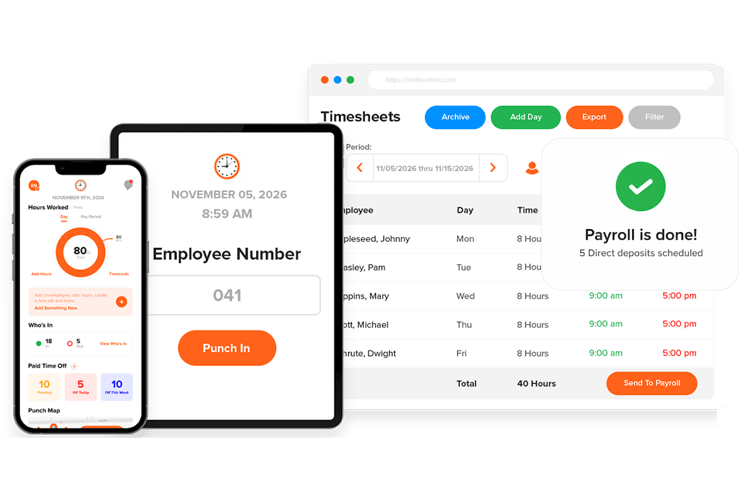
You run crews in the field and need accurate hours without buying an entire operations platform. That's the gap OnTheClock fills. Started in 2004 and built for small and mid-size teams, it puts mobile punches, GPS, job costing, scheduling, and payroll exports in one place at a price a 10-person crew can absorb.
Here's the part that matters on a job site. Every punch carries a GPS location, and you can draw a geofence around a property, so a worker can't clock-in from the gas station three miles away. Crews tag each punch to a client or job code, so by Friday you know exactly how many hours that commercial account ate. Hours then flow into QuickBooks, Gusto, ADP, or Square without retyping, which is where owners win back most of their week.
Why OnTheClock Is Different
Most field tools make you choose. You get a great GPS clock but no scheduling, or a full platform that costs $300 a month and takes a month to learn. OnTheClock keeps the field features and the simple price in the same box: one plan costs $4 per user per month plus a $5 base fee, with a 30-day trial and no credit card to start.
Think of a six-truck maintenance operation tracking 40 recurring accounts. Crews punch in at each stop, the office sees who's on-site in real time on the crew map, and labor lands against the right job for billing. There's a real caution to consdier, though: OnTheClock needs internet or Wi-Fi to punch, so a crew deep in a dead zone won't get the offline buffer that LMN or Truein offer. It's also lighter on landscape-specific budgeting than a green industry platform.
Key Features
Pros
Cons
Pricing
- 30-day free trial, no credit card is required at sign-up
- $5/month base plus $4 per user/month (see how OnTheClock pricing works)

Buddy Punch: Best Solution for Job Profitability Tracking
Available on: Web, iOS, Android
Why Buddy Punch Is the Best Solution for Job Profitability Tracking
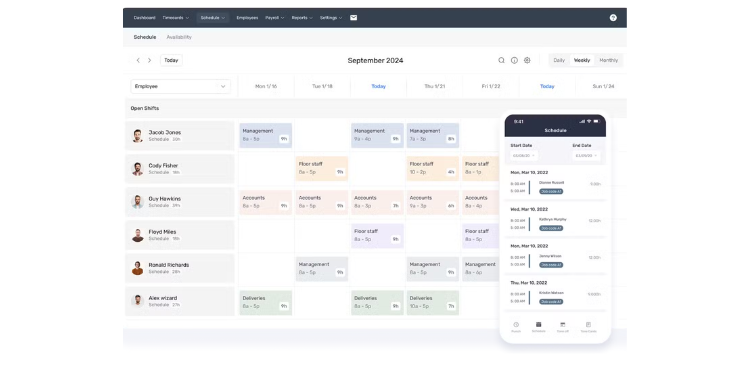
Buddy Punch fits the owner whose real question is, "Did that job make money?" Crews pick up equipment, choose a job code when they reach a client's property, switch codes when they hop to the next yard, and clock out at the shop. Every minute lands against a specific client, so labor cost per job stops being a guess.
The structure helps a growing crew. The base fee is a flat $19 a month and covers all your admin users with no per-admin charge, then you pay per worker on top. That makes it cheaper to run than tools that charge per manager seat. Reviewers on G2 and Capterra rate it highly for ease of use, with an average rating of 4.8 stars, and call clocking is quick and clean.
It does give something up. Buddy Punch has no real-time team messaging, so crew and office coordination happens in another app. Think of it as a sharp clock with job costing, not a full dispatch or invoicing platform.
Key Features
Pros
Cons
Pricing
- Free trial available
- Starter from $4.99 per user/month, $19 base

LMN: Best All-in-One Green-Industry Platform
Available on: Web, iOS, Android
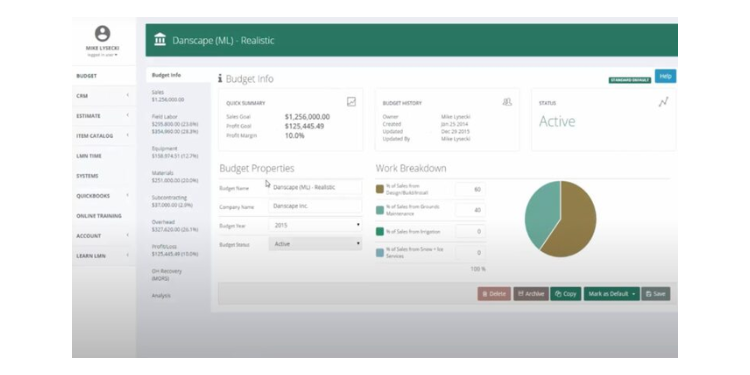
LMN is built only for the green industry, and it shows. It covers the full landscape workflow, estimating, budgeting, job costing, crew scheduling, time tracking, and invoicing in one platform. More than 3,000 landscape companies and 50,000 crew members use it, including operators like The Grounds Guys and U.S. Lawns.
The LMN Crew app is widely called the cleanest landscape-specific time clock in the category. Crews handle schedule updates and one-tap punch-ins from the field, equipment costs allocate automatically to each job, and the app even uploads receipt photos for materials. It also works without cell service, then syncs, which matters on remote properties.
This depth is for bigger shops. LMN runs $297 a month for Starter and up to $598 for Professional, aimed at companies with $1M to $20M in revenue. A solo operator or a brand-new crew will find it heavier and pricier than they need.
Key Features
Pros
Cons
Pricing
- Demo and paid trial available
- Starter $297/month, Professional $598/month

Timeero: Best Solution for GPS and Geofencing
Available on: Web, iOS, Android
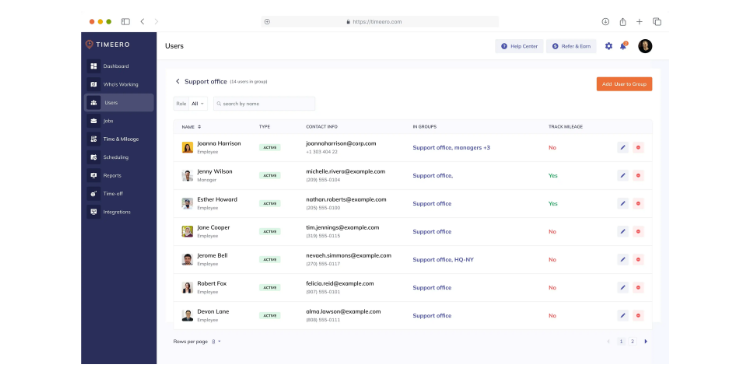
Pinpointing locations is the whole point here. Timeero is built for teams that drive, with real-time GPS, geofencing, and mileage tracking in one app. Its segmented tracking feature uses your geofences to automatically assign time to the right job. A crew bouncing between five properties never has to clock in and out at each stop.
That auto-tracking is a standout feature. Drive time, visit time, and distance get captured on their own, which is gold for a maintenance route where mileage reimbursement and accurate job time both matter.
Just know what it isn't. Timeero tracks time and mileage well, but it's no scheduling or invoicing suite, and the richer auto-tracking features sit on the Pro and Premium plans. If you want quoting or dispatch in the same tool, look further down this list.
Key Features
Pros
Cons
Pricing
- Free trial available
- Paid plans start around $4 per user/month

Truein: Best for Stopping Buddy Punching
Available on: Web, iOS, Android
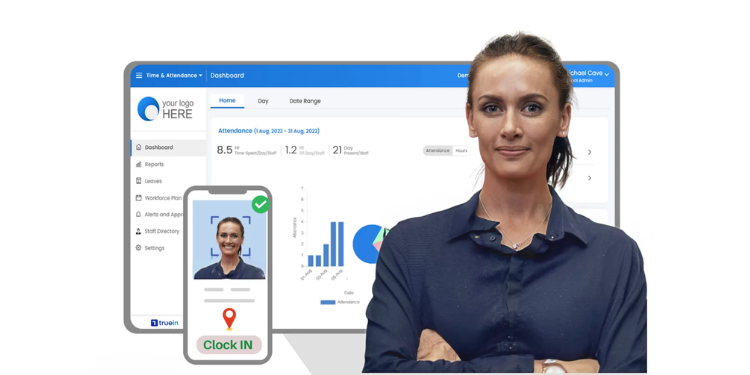
Why Truein Is Best for Stopping Buddy Punching
When one worker punches in for five, Truein shuts it down. It verifies identity at every clock-in with face recognition, so a crew member can't cover for a no-show. And, for seasonal or hourly crews spread across job sites, that single feature plugs a real payroll leak.
It's built for exactly this workforce. Truein adds geofencing so punches count only from approved sites. It supports offline attendance and resyncs when a signal returns and can be run on a smartphone or a shared kiosk at the site. Bulk onboarding makes it quick to add summer hires, and a multisite dashboard shows who's arrived and who's late across every location. Pricing starts at $3 per user per month for the Time Capture plan, keeping it affordable for a large seasonal roster.
The catch is breadth. Truein does attendance and identity but not much else, so you'll pair it with another tool for estimating, invoicing, or job scheduling. Its job costing is thin too. If you want one platform to run the whole business, this isn't it.
Key Features
Pros
Cons
Pricing
- Free demo available
- Time Capture from $3 per user/month

ezClocker: Best for a Low Flat Monthly Rate
Available on: Web, iOS, Android
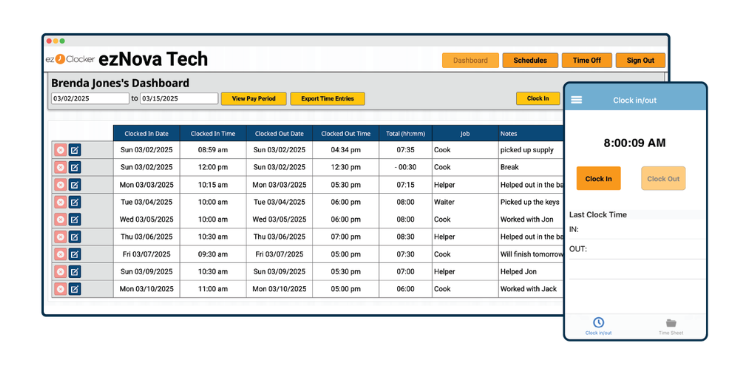
ezClocker is for the solo operator or small crew watching every dollar. Its appeal is a low, flat monthly rate: One predictable price covers your whole team instead of charging per worker. The Basic plan runs $15 a month for up to 15 employees, and it does the basics well: GPS-verified clock-ins, simple scheduling, and time sheet exports for payroll.
The name says it all. It keeps things simple on purpose with a clean web dashboard where you review time, approve time off, and pull payroll reports in minutes, and you can tag punches to a job to see labor cost per property, which is plenty for a small maintenance route.
It has a ceiling, though. One longtime user noted they eventually moved to a paid tool for more features and a friendlier interface as they grew. There's no offline mode, and the reporting is light. For all of those reasons, this is a great place to start but not a forever platform for a scaling shop.
Key Features
Pros
Cons
Pricing
- 30-day free trial available
- Basic $15/month flat for up to 15 employees

Connecteam: Best Solution for Scheduling and Dispatch
Available on: Web, iOS, Android
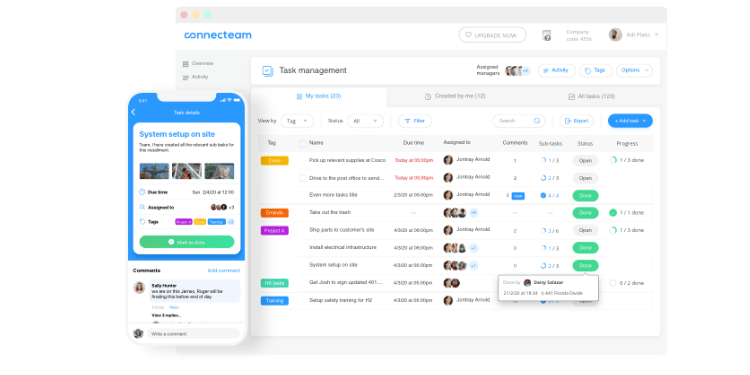
Scheduling and crew communication are the daily grind Connecteam was built for. It's a deskless workforce app that pairs a time clock with drag-and-drop scheduling, dispatch, and built-in team chat, so a last-minute rain delay or route change reaches the crew in one place. For an owner juggling several crews and shifting weather, that coordination is the draw.
The free plan is the hook. Connecteam is free for up to 10 users and includes features across its scheduling, communication, and HR tools, which is generous for a small operation, and crews clock in from a phone or a job-site kiosk while hours automatically feed digital time sheets.
Pricing is where it gets fiddly. Connecteam splits features across three paid hubs, and reviewers find the plans harder to untangle than simpler tools, like Buddy Punch. Costs climb once you pass 10 users or need geofencing and advanced GPS, which sit on higher tiers. Read the tiers closely before you commit.
Key Features
Pros
Cons
Pricing
- Free for up to 10 users
-
Paid plans from $29/month for the first 30 users when billed annually

Jobber: Best Solution for Quoting and Invoicing
Available on: Web, iOS, Android
Why Jobber Is Best for Quoting and Invoicing
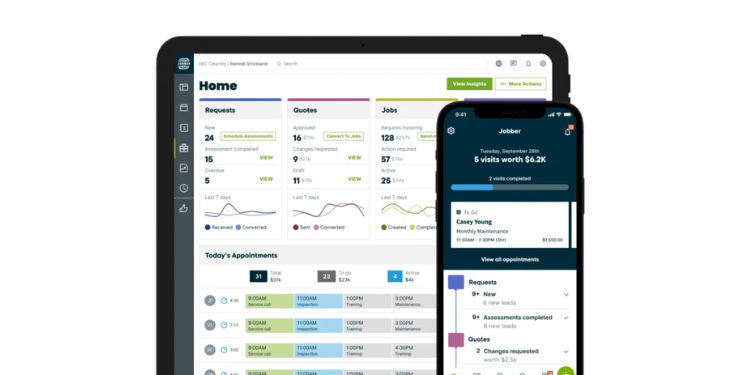
Run a residential service shop that quotes, schedules, and bills all day? Jobber is the fit. It's a mature field service platform used by more than 250,000 home service pros, with scheduling, quoting, invoicing, client communication, and payments all in one system. Time tracking rides along, so hours connect to the jobs you're already billing.
For a landscaping business that lives on estimates and fast invoicing, that end-to-end flow is the value. A crew finishes a property, the office turns the visit into an invoice, and the client pays online. Jobber's mobile app and clean interface get steady praise.
Watch the bill, though. Jobber prices per user, and add-ons, like the AI Receptionist or marketing tools, can push a real-world setup past $300-$600 a month for a small team. Crew time tracking sits on higher tiers, so the cheapest plans won't cover it. If your core need is just a field clock, this is more platform than you need.
Key Features
Pros
Cons
Pricing
- 14-day free trial
- Core starts at $29/month billed annually, but time tracking starts on the Connect plan, which begins at $99/month billed annually for one user.
Side-by-Side Comparison
| Tool | Best For | Pricing | Key Strengths | Top Integrations |
|---|---|---|---|---|
| OnTheClock | Best overall | $5 base + $4/user/month | GPS, job costing, payroll in one | QuickBooks, Gusto, ADP, Square |
| Buddy Punch | Job profitability | $19 base + from $4.99/user/month | Job codes, flat admin base fee | QuickBooks, Gusto, Paychex |
| LMN | Green-industry all-in-one | $297–$598/month | Landscape budgeting, offline crew app | QuickBooks |
| Timeero | GPS and geofencing | From $5/user/month | Mileage, segmented auto-tracking | QuickBooks, Gusto, Rippling |
| Truein | Stopping buddy punching | From $3/user/month | Face recognition, offline punch | Payroll and HRMS exports |
| ezClocker | Low flat monthly rate | $15/month flat to 15 users | Simple GPS clock, flat pricing | QuickBooks |
| Connecteam | Scheduling and dispatch | Free to 10; from $29/month | Scheduling, crew chat | QuickBooks, Gusto, Paychex |
| Jobber | Quoting and invoicing | From $29/month | Quote-to-invoice flow | QuickBooks, Stripe |
Comparison data verified October 2026 against each vendor's own site; subject to change by respective providers.
What's the Best Time Clock Software for Landscaping?
The best option isn't the one with the longest feature list; it's the one that solves the problem you ran into most this week.
Start with one question: What's actually slowing you down? Many owners buy for features they might need someday and end up with software that's heavier than the crew will use. Focus on today's bottleneck instead.
Ask yourself a few honest questions. Are you fixing time sheets by hand every Friday before payroll runs? Do you trust that the hours on paper match where your crews actually were? Can you say, today, which of your accounts made money last month? And when a worker hops three properties in a day, do those hours land on the right job or pile into one bucket?
Whichever question stings the most is your answer. The right tool removes the friction from that one problem, and once it's gone, the rest of the week gets lighter on its own.
What Is Time Clock Software for Landscaping?
Time clock software for landscaping is a mobile app that records when crews start and stop, usually with a GPS stamp on each punch. Workers clock in from a phone at the property instead of a wall clock or a paper card.
For a landscaping business, it adds the field details that matter: Which job site a worker punched from, how many hours went to each client, and whether the crew was where they said. The simple point is accuracy you can trust without standing on the job site yourself.
Who Needs Time Clock Software for Landscaping?
Any landscaping business with hourly crews working away from a fixed office needs it. The math changes the moment you have workers you can't see all day, which is most crews by the second or third hire.
A solo operator with one helper can scrape by on a free app. A maintenance company running several trucks across dozens of properties cannot. If you're chasing texts for hours, guessing at job costs, or eating overtime you didn't catch, you're the audience.
Why Landscapers Rely on Time Clock Software
Landscaping work happens everywhere except a desk. Crews move between properties all day, often outdoors with no supervisor watching, and every hour either lands on the right job or quietly distorts your costs and payroll.
The old way fails because paper and texts can't prove location or catch a buddy punch. Software replaces that with GPS-verified punches and hours tagged to each job, which protects both billing and payroll. Accurate time also keeps you on the right side of overtime rules, where mistakes get expensive quickly. For a deeper look at field crew tracking, see our guide to time tracking for field crews.
Key Features Landscaping Time Clock Software Should Have
Before you compare prices, make sure any tool covers the basics a field crew actually needs.
-
Mobile clock-ins: Crews punch from their phones at the property, no shared hardware required.
-
GPS and geofencing: Location on every punch, with clock-ins blocked outside the job site.
-
Job and task tracking: Hours tag to a client or code so labor sorts by property.
-
Offline mode: Punches work with no signal and sync later on remote sites.
-
Payroll exports: Hours flow to ADP, QuickBooks, Gusto, or Square without retyping.
-
Overtime and break tracking: Built-in rules catch the 40-hour line before payday.
How to Choose the Proper Time Clock Software for Landscaping
Step 1: Name your biggest weekly headache. Before you look at any tool, write down the one time problem that costs you the most right now. Maybe it's re-entering hours into payroll, maybe it's crews clocking in from home, maybe it's never knowing if a job was profitable. The clearest path to the right software is matching it to that single pain, not to the longest feature list. A tool that fixes your worst problem and ignores features you'll never use beats a heavier platform every time.
Step 2: List your must-haves and your nice-to-haves. Once you know the core pain, split your wish list into two columns. Must-haves are the features you can't run a crew without, usually mobile punching, GPS, and a clean payroll export. Nice-to-haves are the extras like scheduling, chat, or estimating that help but won't make or break the week. This list becomes your scorecard, and it keeps a slick sales demo from talking you into a plan built around features you'll never open.
Step 3: Confirm it works in the field. Landscaping crews work outdoors, on the move, with no desk in sight. Test the mobile app yourself before you commit, and check that punches carry a GPS location and that a geofence can block clock-ins away from the property. If a worker can't clock in from a back-lot job, or a manager can't see who's on-site from the truck, the tool fails the only test that matters for your business.
Step 4: Check how it handles dead zones. Plenty of properties sit where cell signal drops to nothing, and a clock that needs a live connection will lose those punches. Ask whether the app stores punches offline and syncs them once the crew is back in range. Tools like LMN and Truein do this; lighter clocks may not. If your routes run rural, treat offline mode as a must-have, not a bonus, because a missed punch is a payroll correction waiting to happen.
Step 5: Tie time to jobs, then to dollars. A punch is only half the value; the other half is knowing which property the hours belong to. Make sure crews can tag time to a client or job code with a tap and that the reports show labor cost per job. This is how you learn whether the big commercial contract pays or whether drive time and debris runs are eating the margin, which sharpens every bid you make next.
Step 6: Check payroll and integration fit. The point of tracking time is paying people correctly without losing your week to it. Look at how the software exports to your payroll provider, whether that's ADP, QuickBooks, Gusto, or Square, and confirm overtime and breaks calculate automatically against the 40-hour rule. A clean export that lands hours in payroll with no retyping is where you win back the most time. Confirm the integration covers the exact payroll tool you already run, not just a similar one.
Step 7: Run a trial and test crew adoption. The best software on paper is useless if your crew won't use it. Start a free trial and put it in the hands of real workers on a real job site, not just the office. Watch how fast they pick up punching in, switching job codes, and reading their schedule, and listen for the grumbling that signals a tool that's too fussy. A clock your crew adopts in a day beats a powerful one they quietly work around.
Step 8: Price it at your real crew size, and read the terms. Pricing pages look cheap until you add the base fee, per-user cost, and features hiding on higher tiers. Run the numbers for the crew you have plus the one or two hires coming this season, and watch for tools that gate GPS or geofencing behind a premium plan. Then check the fine print: month-to-month versus annual contract, what support hours you get, and how easy it is to cancel. Honest, predictable pricing and responsive support matter as much as the feature list when a busy spring hits.
Tips for Implementing Time Clock Software Successfully
-
Roll it out to one crew first. Pick your most reliable crew and run the new clock with them for a week before going company-wide. They'll surface the quirks, and their buy-in makes the wider rollout easier. A small pilot beats flipping a switch on everyone at once.
-
Train at the truck, not in a meeting. Show crews how to punch and tag a job where they actually work, on their phones, at the site. Two minutes of hands-on beats a long email nobody reads, and field training sticks.
-
Set overtime alerts from day one. Overtime adds up fast when crews work long days across several properties, and federal law requires catching it before the paycheck goes out, not after. Turn on alerts so you approve hours before Thursday and fix problems with time to spare. The U.S. Department of Labor's overtime pay rules spell out the 40-hour standard.
Frequently Asked Questions
What's the best time clock software for landscaping?
For most landscaping crews, OnTheClock is the best overall pick because it combines GPS punches, job costing, and payroll exports in one plan at $4 per user plus a $5 base fee. The best choice still depends on your top need: Buddy Punch or LMN for job costing, Timeero or Truein for location and identity proof, and Connecteam for scheduling.
Do I need GPS tracking for my landscaping crew?
Yes, if your crews work without a supervisor on-site. GPS stamps each punch with a location, and geofencing blocks clock-ins away from the job, which stops the most common form of time theft. For a single helper you watch all day, it matters less.
How much does time clock software for landscaping cost?
Most field-friendly tools run from free to about $10 per user a month, plus a base fee on some plans. Simple flat-rate clocks, like ezClocker, start around $15 a month for a small crew, while green industry platforms, like LMN, run $297 a month or more for their deeper estimating and job costing tools.
Can time clock software help with job costing?
Yes. When crews tag each punch to a client or job code, the software totals labor cost per property, so you can see which jobs make money. Buddy Punch, LMN, and OnTheClock all do this, which sharpens your bids and your invoices.
What happens if a crew loses cell signal on a job site?
It depends on the tool. Apps with offline mode, like LMN and Truein, let crews punch without signal and sync the data once they're back in range. Tools that need a live connection, including OnTheClock, require internet or Wi-Fi to record a punch.
How does time tracking help with overtime compliance?
Time clock software calculates hours automatically and can alert you before a worker crosses 40 hours in a week. Under the federal Fair Labor Standards Act, overtime is owed at 1.5 times the regular rate past 40 hours, and you have to catch it before payday. Weekly approvals make that routine.
Start Tracking Time for Free
Stop losing payroll dollars to phantom hours and off-site punches. See where every labor hour goes, tie it to the job, and run payroll in minutes.
No credit card required, and you'll be set up in minutes.
