

Jump to section
Try OnTheClock Free
Save time and make payroll effortless with our easy-to-use, affordable employee time tracking app.
Try It FreeKey Takeaways
- ✔The best time clock for a staffing agency tracks hours accurately across client sites and exports them clean for payroll, so a single wrong number doesn't hit both a paycheck and a client invoice.
- ✔OnTheClock is the best overall option for staffing agencies because it pairs GPS-enabled time tracking, scheduling, PTO management, and payroll integrations for $5/month base plus $4 per employee/month, with optional full-service payroll priced separately.
- ✔Buddy Punch offers multiple punch controls to help deter time theft; Connecteam is best for a free start; When I Work wins on shift scheduling; QuickBooks Time fits agencies already on QuickBooks.
- ✔These time clocks organize hours for payroll and client billing workflows; full-service payroll or invoicing may require separate services.
- ✔Pick the solution that solves your biggest bottleneck (verification, setup speed, scheduling, or payroll), not the option with the longest feature list.
The best time clock for a staffing agency is the one that captures hours accurately at every client site and organizes approved hours for payroll and client billing without unnecessary manual work. While that sounds simple, it isn't.
Picture 40 placements spread across a dozen client sites. Each worker is paid one rate and billed to the client at another. Hours can inform both payroll and client invoices, while the difference between pay and bill rates contributes to your margin. Now run that through a clock that rounds wrong, misses a punch, or lacks location records to review a disputed punch. The cleanup eats your week, and every error chips at the markup you live on.
So the proper pick depends on what trips you up most. Some agencies bleed hours to buddy punching, others are tiny and need to start free, and some live inside QuickBooks already.
Below, we break down the best time clock software for staffing agencies and help you identify the right one for each situation.
What Staffing Agencies Actually Want from a Time Clock
You place workers at other companies' sites. That one fact changes everything about what you need from a clock.
You need information to review whether a worker punched from an approved location, because the client is paying for those hours and will dispute them if they look off. You need hours you can trust, captured once, accurately, the first time. When a new placement starts Monday at an unfamiliar site, they need a straightforward clock-in process with minimal training. And when payroll runs, the hours have to leave the system clean, with less manual reentry, because inaccurate hours can affect both payroll and client billing.
Most roundups skip all of this and rank apps on generic features. The picks below are judged on the things that actually decide it for an agency: tracking across sites, trustworthy hours, fast worker setup, and clean exports.
Quick Picks: The Best Time Clock Software for Staffing Agencies
-
OnTheClock: Best overall for staffing agencies
-
Buddy Punch: Best for stopping time theft
-
Connecteam: Best for a free start
-
When I Work: Best for shift scheduling
-
QuickBooks Time: Best for QuickBooks users
How We Picked
We compared each option against seven staffing-agency needs: site tracking, mobile clock-in, verification, payroll exports, setup speed, rate flexibility, and compliance support. Then, we gave each tool the one job it does best. We focused on practical requirements for a workforce scattered across client sites and preparing payroll each week.
Here's what we measured and why each one matters:
-
Tracking workers across job sites: Your placements are at the client's location, not yours, so you need reliable site-related punch records.
-
Easy mobile clock-in: Mobile clock-in allows workers to record their hours at client locations without returning to the agency office.
-
Stopping time theft: Buddy punching inflates the hours you pay and the hours you bill, so verification controls can help protect your margin.
-
Clean payroll exports: Hours feed both pay and invoices, so they should transfer with minimal manual correction.
-
Fast setup for new workers: Your roster turns over constantly, so adding a placement should be straightforward with manageable training.
-
Different pay rates and shifts: Agencies run varied rates and shift structures, so the clock has to handle them without workarounds.
-
Compliance: Overtime and labor laws differ by jurisdiction, so look for configurable rules and reliable records to support employer compliance reviews.
OnTheClock is our overall recommendation for agencies prioritizing affordable time tracking, GPS-related punch records, scheduling, and payroll compatibility. Its core time tracking features are available without a higher time tracking tier. The rest each win a specific situation, and we'll show you which.
The Best Time Clock Software for Staffing Agencies

OnTheClock: Best Overall for Staffing Agencies
Available on: Web, iOS, Android
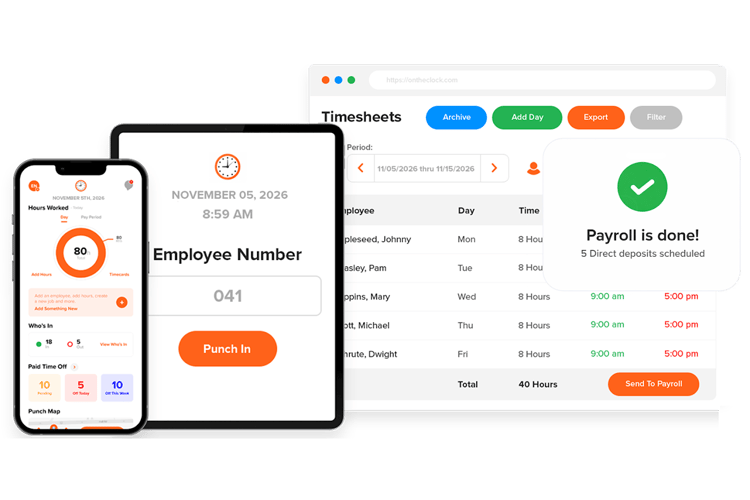
For most staffing agencies, OnTheClock is the one to beat. It supports GPS-enabled punches and geofencing, helping managers review device locations associated with clock-ins and restrict punches to approved client sites. Workers clock in from a phone, computer, or shared kiosk, and you can lock punches to approved locations with IP and geofence rules. Photo verification and fingerprint punching with compatible hardware can help deter buddy punching; these controls do not guarantee employee identity.
What sets OnTheClock apart is how little it hides. Core time tracking tools such as GPS, geofencing, scheduling, PTO, overtime settings, and payroll integrations are included without a higher time tracking tier; full-service payroll costs extra. Approved hours can move through supported payroll exports and integrations, including QuickBooks, Gusto, and ADP. Configured overtime and break tracking can support accurate timecards, subject to employer review. For an agency, reviewed timecards provide a consistent starting point for payroll and client billing, which may require separate invoicing software. Managers can add workers and configure clock-in options as placements change.
OnTheClock is developed and supported by a U.S.-based team, giving agencies access to help as their workforce and client-site needs change.
Key Features
Integrations:
Pros
Cons
Pricing
- 30-day free trial, no credit card is required upon sign-up
- $5/month base plus $4 per employee/month
- Optional full-service payroll: $40/month base plus $6 per employee/month, with a one-time $250 implementation fee
Built to Keep Agency Hours Accurate
Try it free, and see how easy time tracking can be across every client site.
Try Free
Buddy Punch: Best for Stopping Time Theft
Available on: Web, iOS, Android
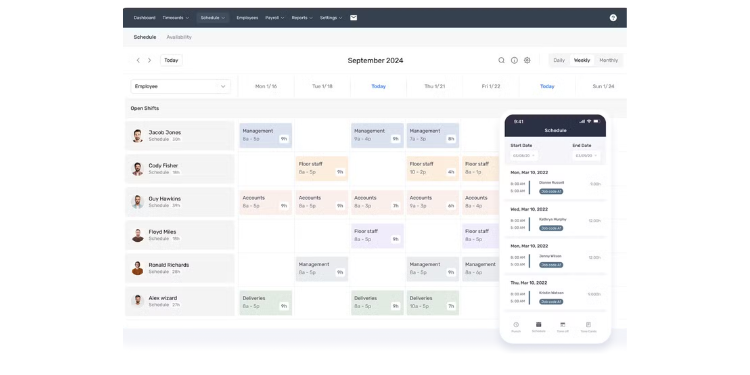
If buddy punching is bleeding your margin, Buddy Punch may be your best defense. It offers multiple clock-in methods and controls, including GPS punch records and, on eligible plans, geofencing, PIN and kiosk punching, QR codes, and webcam photos. These tools can help deter unauthorized punches and provide information for timecard review. GPS records describe device location rather than proving who performed the work.
It fits agencies that need multiple punch controls. Managers can review employee punch status and location information; live GPS features may require Advanced. Agencies with frequently changing rosters should confirm how active-user billing works before subscribing.
Key Features
Integrations:
Pros
Cons
Pricing
- Starter: $5.99/user/month; Pro: $7.99/user/month; Advanced: $13.99/user/month, plus a $19 monthly base fee; optional payroll costs extra

Connecteam: Best for a Free Start
Available on: Web, iOS, Android
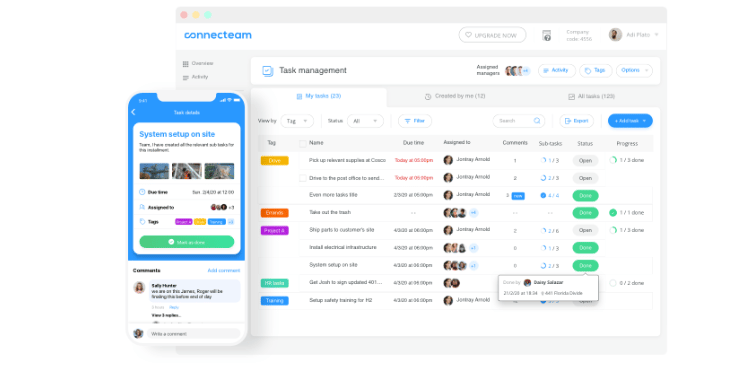
New or small agencies should look at Connecteam first. Connecteam offers a free Small Business plan for up to 10 users, making it an accessible starting point for boutique staffing agencies. Some features have limits. The app is built phone-first, so new placements can use supported mobile clock-in methods after setup, and location-enabled punches may provide device GPS records for review.
It shines for small, mobile teams that want one simple app. Geofencing can restrict punches to configured sites; Operations Advanced provides up to 10 geofence locations, while Expert advertises unlimited sites. Time tracking and scheduling sit in Operations, while Communications has separate hub pricing. Agencies should calculate the combined monthly cost of the hubs and additional users they need.
Key Features
Integrations:
Pros
Cons
Pricing
- Free for up to 10 users; Operations Basic $35/month, Advanced $59/month, Expert $119/month for the first 30 users; other hubs and users may cost extra

When I Work: Best for Shift Scheduling
Available on: Web, iOS, Android
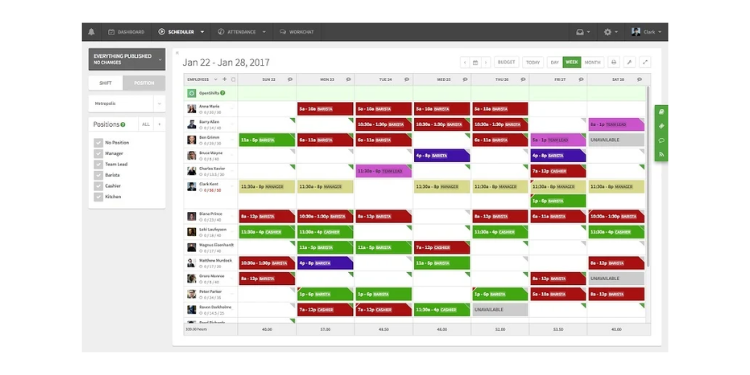
When placements run on rotating shifts, When I Work earns its spot. Scheduling is its strength, building, publishing, and filling assignments across a shift-based workforce with a time clock that ties hours to the schedule. Supported geofencing can help review whether a punch occurred within configured boundaries, while approved hours can transfer through compatible payroll integrations.
It fits agencies whose headache is coverage, keeping every client shift filled, more than verification. Advanced scheduling and administrative features vary by plan. Compare the total subscription cost with attendance enabled and your required integrations.
Key Features
Integrations:
Pros
Cons
Pricing
- Essentials: $2.50/user/month; Pro: $5/user/month; Premium: $8/user/month; free trial available. Attendance checkout total may vary

QuickBooks Time: Best for QuickBooks Users
Available on: Web, iOS, Android
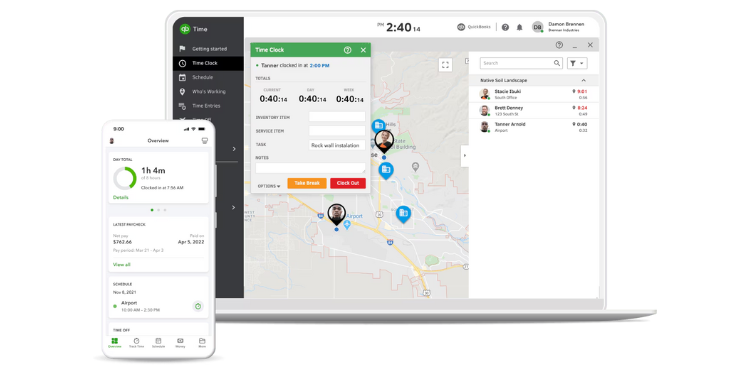
Already running QuickBooks? Then QuickBooks Time is the natural pick. Approved hours can transfer through supported QuickBooks Online and payroll workflows, reducing manual data entry. Supported GPS-related punch records, location features, and geofencing depend on the selected plan and configuration.
The trade-off is cost. There is no permanent free plan, and a separate QuickBooks Online subscription is required. Time Premium and Elite are time tracking plans; full-service payroll requires a separate eligible payroll subscription or bundle.
Key Features
Integrations:
Pros
Cons
Pricing
- Time Premium: $20/month base plus $10/user/month; Time Elite: $40/month base plus $12/user/month. QuickBooks Online and payroll subscriptions cost extra
Side-by-Side Comparison
Why Choose OnTheClock?See how OnTheClock stacks up against other time clock software for staffing agencies.
| Tool | Best For | Pricing | Key Strengths | Payroll Integrations |
|---|---|---|---|---|
| OnTheClock | Best overall | $5 base + $4/employee/month; payroll extra | Core time tracking, GPS controls, exports | QuickBooks, Gusto, ADP, exports |
| Buddy Punch | Stopping time theft | Starter $5.99/user/month + $19 base | Plan-specific punch controls | QuickBooks, ADP, Gusto, Paychex |
| Connecteam | A free start | Free up to 10; Operations Basic $35/month for first 30 | Mobile-first, free tier | Supported payroll exports and integrations |
| When I Work | Shift scheduling | Essentials $2.50/user/month; attendance total varies | Scheduling depth | Gusto, QuickBooks, ADP |
| QuickBooks Time | QuickBooks users | Premium $20 + $10/user/month; Elite $40 + $12/user/month | Native QB sync | QuickBooks |
Pricing and features reviewed October 2026 using available vendor documentation. Standard monthly rates are shown where verified; add-ons and subscription requirements may affect the total.
What's the Best Time Clock for Your Staffing Agency?
The best pick isn't the one with the most features; it's the one that clears the problem you hit most.
Ask yourself what actually costs you time and money right now. Losing hours to punches you can't verify? Buddy Punch offers several verification controls. Just getting started, or running lean with a handful of placements? Connecteam offers a free tier for up to 10 users, subject to limits. Drowning in shift coverage across clients? When I Work was built for that. Already living in QuickBooks? QuickBooks Time supports closely integrated workflows.
And if you want one tool that handles the whole picture: GPS-related punch records, payroll compatibility, straightforward setup, and predictable per-employee pricing, OnTheClock covers the most ground. Match the tool to your bottleneck, and payroll week stops being a fight.
What Is Time Clock Software for Staffing Agencies?
Time clock software records when and where workers start and stop, and how many hours they log at each client site. For a staffing agency, reviewed time records can support payroll and client billing, sometimes through separate systems.
Unlike a basic punch clock, agency-focused tools add location verification, multiple punch methods, and clean payroll exports, so the hours you collect are easier to review and transfer with less manual reentry.
Who Needs Time Clock Software for Staffing Agencies?
Any agency placing hourly or temporary workers at client sites needs it. Light-industrial and warehouse agencies use it to track crews across shifting locations. Health care staffing firms rely on it for accurate, compliant hours across facilities. Any agency billing clients by the hour needs reliable time records supported by appropriate review and approval processes.
Why Staffing Agencies Rely on Time Clock Software
Your margin is the gap between what you pay a worker and what you bill the client, and both figures are based on the same hours. If those hours are wrong, you either underpay your people or overbill your client, and neither survives long. Accurate, reviewed time can support payroll and billing, but employers remain responsible for applying the correct rates and rules. The FLSA generally requires covered employers to keep hours-worked and wage records for nonexempt employees. GPS punch records may help with timecard disputes alongside schedules, approvals, and other evidence.
Key Features a Staffing Agency Time Clock Should Have
Look for the features that match how an agency actually works:
-
GPS and geofencing to review device locations at punches
-
Multiple punch controls to help deter buddy punching
-
Straightforward setup for new placements
-
Clean payroll exports to your existing system
-
Overtime and break rules that match each jurisdiction
-
Visibility into punch status and supported location data
How to Choose the Proper Time Clock for Your Agency
Step 1: Start with your bottleneck
Name the one problem costing you the most right now, and prioritize the solution above everything else. If workers clock in from off-site, verification comes first. If your roster turns over weekly, setup speed matters most. If payroll week is a mess, focus on clean exports. Don't shop for a long feature list. Shop for the fix to your biggest leak.
Step 2: Check the export path
Before anything else, confirm the tool sends hours cleanly into the payroll or billing system you already run. Ask whether it's a direct integration or a manual export, and what format it produces. This is where staffing errors hide, so a supported integration may reduce manual reconciliation before payroll.
Step 3: Test on-site accuracy
Run a real punch from an actual client location during the trial. Check that the GPS stamp lands right and the geofence behaves the way you expect. A clock that's accurate in the office but flaky at a job site won't hold up when a client disputes hours.
Step 4: Model the true cost
Add the base fee, per-user charge, and any feature you'd have to upgrade a tier to get. Then run that against your actual headcount and churn frequency. A tool that looks cheap can climb quickly once you add the GPS or scheduling you actually need, so price the plan you'll really use, not the entry tier.
Step 5: Pilot with one client
Before rollout, test whether approved hours export correctly, whether client approvals can be recorded, and how separate pay and bill rates move through your billing workflow.
Tips for Rolling Out a New Time Clock
-
Explain the why. Tell workers the clock protects accurate pay, not that you're watching them. Placed workers are often wary of GPS, so explain when location data is collected, who can access it, and how it is used. Accurate records can support employee pay and client billing reviews.
-
Keep the setup simple. Pick a tool that new placements can learn quickly with minimal training, because frequent roster changes make a simple onboarding process important. Have the punch method ready before their first shift, and send a one-screen instruction they can follow on their phone.
-
Start with one site. Prove the tool at a single client before going wide. Run it with a cooperative, on-site contact; work out the geofence and punch quirks there; and then expand once it's clean. A staged rollout prevents a single glitch from affecting every placement at once.
-
Check the first payroll early. Review the first export closely, before it becomes a paycheck and an invoice. Catch rule mistakes (overtime thresholds, break deductions, rounding) on the first run, because in staffing, a single wrong number lands in both the worker's pay and the client's bill.
-
Fix friction fast. If workers struggle to punch, address it the same week. A clock people quietly stop using leaves you with gaps you won't notice until payroll, so watch the first few days for missed punches and step in before the habit sticks.
Frequently Asked Questions
What's the best time clock software for a staffing agency?
For most agencies, OnTheClock is the best overall option because it pairs GPS-related punch records, payroll compatibility, and predictable per-employee time tracking pricing. The right pick still depends on your biggest problem: Buddy Punch excels at verification, Connecteam offers a free start, When I Work offers robust scheduling, and QuickBooks Time may suit agencies already using QuickBooks.
Can a time clock track workers across multiple client sites?
Yes. Tools with GPS and geofencing, like OnTheClock, Buddy Punch, and QuickBooks Time, can capture device location information on supported punches and restrict clock-ins to approved sites, though GPS alone cannot prove who performed the work.
Do these time clocks handle client billing?
Time clocks primarily organize employee time. Some offer billing-related features or integrations, but agencies should confirm whether they can invoice clients directly or transfer approved hours to separate billing software.
How do time clocks help with the pay rate versus bill rate gap?
Reviewed time records can help reconcile hours used in payroll and client invoices. Agencies still need to apply distinct pay rates, bill rates, overtime rules, and contract terms.
Which time clock is cheapest for a small agency?
Connecteam offers a free Small Business plan for up to 10 users, subject to feature limits. OnTheClock time tracking costs $5/month base plus $4 per employee/month, with optional payroll priced separately.
Can new workers start clocking in quickly?
Yes. OnTheClock and Connecteam are both built for fast setup. Managers can add placements and configure supported clock-in options as staffing needs change; setup time varies.
Start Tracking Time the Easy Way
Track employee hours across client sites with OnTheClock. Start your free, 30-day trial today. No credit card is required at sign-up.
Start Tracking Time for Free!