

Jump to section
Try OnTheClock Free
Save time and make payroll effortless with our easy-to-use, affordable employee time tracking app.
Try It FreeKey Takeaways
- ✔The best time clock for a transportation company lets drivers quickly clock in from a phone, confirms where they were with GPS, and turns those hours into clean payroll. For most fleets, OnTheClock is the best overall option because it covers their core needs in one place.
- ✔OnTheClock leads because drivers clock in with one tap, GPS comes in the base plan instead of as a paid add-on, and every driver's hours land in one place, ready for payroll.
- ✔Free options, like Jibble, fit a small fleet on a tight budget. ExakTime fits routes that lose signal, because it keeps working offline.
- ✔Look for three things first: a clock-in drivers will actually use, real GPS to confirm location, and pricing with no surprise fees.
- ✔A time clock and an electronic logging device (ELD) do different jobs. A time clock tracks paid hours for payroll; it doesn't replace the hours-of-service logs that interstate truckers keep.
The best time clock software for transportation lets your drivers clock in from a phone in seconds, uses GPS to confirm they were where they should be, and sends clean hours straight to payroll. For most small and mid-size fleets, OnTheClock is a strong overall option because it puts mobile clock-in, GPS verification, scheduling, and payroll-ready reports in one simple place.
Now, here's the part you dread: It's Monday morning. You have a stack of paper logs from three drivers, a few texts that say "I forgot to clock out," and a dispatch sheet that doesn't match any of it. You're trying to rebuild last week's hours from memory and guesswork. One driver swears he started at six, but the log says seven.
Then, it gets worse. One punch never came through at all because the driver attempted to clock in while navigating a rural stretch with no signal.
If that sounds like your week, you're not alone. We read through public customer reviews on G2, Capterra, Software Advice, and the app stores, and the same frustrations came up again and again. The good news: The right time clock software fixes all of it. Under the Fair Labor Standards Act, overtime starts after 40 hours in a workweek, and short breaks of five to 20 minutes are paid, so getting driver hours right isn't optional.
Below, we rank the nine best options for 2026 and explain who each one is really for.
We graded every tool against the OnTheClock Transportation Time Clock Scorecard, a weighted system we built around what fleets actually need before we looked at a single product. Here is what we found.
What Most Transportation Teams Actually Want from a Time Clock
Most fleet owners aren't dreaming about more features. They want the clock to just work, out on the road, where the work happens.
When we read the reviews, three frustrations showed up over and over.
First, the punch dies in a dead zone. A driver taps the button on a remote route and nothing happens, because the app needs a signal to work. Then the hour is gone, and you fix it by hand later. Drivers and dispatchers mention this more than anything else.
Second, the price is never the price. A low sticker number turns into a base fee. Then, you're charged for GPS. Next, you have to pay for a higher tier of service to unlock the one feature you wanted. Owners on thin margins suddenly feel nickel-and-dimed.
Third, chasing hours eats the week. Forgotten punches, hour disputes, and overtime you only spot after it occurred blow the budget. Payroll Monday turns into a time-consuming spreadsheet you have to rebuild by hand.
Underneath all three, the same thing remains true: Transportation teams are chasing calm Mondays and clean payroll, not software that requires significant time and effort.
Quick Picks: Which Time Clock Best Fits Your Fleet
-
OnTheClock: Best overall solution for transportation
-
Timeero: Best for tracking drive time and miles
-
QuickBooks Time: Best for geofencing stops and depots
-
Workyard: Best for pinpoint GPS accuracy
-
Jibble: Best free option
-
Buddy Punch: Best for stopping buddy punching
-
ExakTime: Best for working without a signal
-
When I Work: Best for driver scheduling
-
Deputy: Best for managing shift swaps
How We Evaluated These Transportation Time Clocks
A "best" list only means something if you know what we measured. Accordingly, we built the OnTheClock Transportation Time Clock Scorecard before we looked at a single product. The criteria came from what fleets deal with every day, not from what any one tool happens to do well.
Here is what we graded on:
-
Mobile, driver-friendly clock-ins: Can a driver punch in from a phone in one tap with no training?
-
GPS and geofencing: Does the clock confirm where a driver was, and can you draw a boundary around a depot or stop?
-
Offline mode: Does a punch still save when the route loses signal?
-
Ease of use: Can you set it up and roll it out without an IT person?
-
Overtime and break tracking: Does it do the labor law math for your hourly drivers and shop staff?
-
Multiterminal and route visibility: Can you see hours by driver, terminal, or route in one dashboard?
-
Pricing transparency and clean payroll export: Do you know the full bill before you sign, and do the hours export without cleanup?
Mobile clock-in, GPS, and offline mode carried the most weight, as those three are the on-the-road realities that matter most to transportation companies. A driver is rarely at a desk, often out of sight, and sometimes out of signal. If you run long-haul trucks that already use ELDs, lean harder on overtime, clean hours, and a kiosk for your yard and shop staff instead.
The Nine Best Time Clock Software Solutions for Transportation in 2026
Below, we break down nine tools that actually serve fleets and delivery teams. For each one, we cover who it fits, what it does well, and where it may fall short.

OnTheClock: Best Overall Solution for Transportation
Available on: Web, iOS, Android
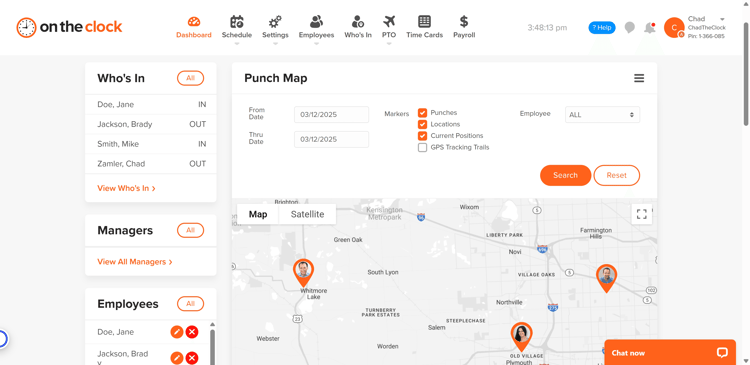
OnTheClock is a strong fit for most transportation companies because it's built for people who work away from a desk. Drivers clock in from a phone with one tap, and GPS confirms the punch. Every hour from every driver lands in one dashboard, ready for payroll. You can set it up the same day with no training or IT help.
What Makes it Different for Transportation?
The difference is OnTheClock's built-in features. GPS tracking and geofencing are included in the base plan, not locked behind a pricier tier, so you can confirm a driver reached the depot without paying extra for the privilege. A driver taps once, and a location stamp and photo confirm it was really them, not a buddy covering for a late start.
That fits independent fleets, courier and last-mile teams, and small carriers running drivers across town or across the state. It also covers the mixed shop, where drivers are mobile, but your mechanics and dispatchers clock in at a fixed terminal.
Picture a three-terminal regional carrier that outgrew paper logs. Before, payday meant rebuilding hours by hand from three sets of paper. With OnTheClock, every terminal's hours are already totaled on one screen. Scheduling, paid time off, and overtime tracking live in the same place, so dispatch and the shop floor stay organized together.
Key Features
Integrations:
Pros
Cons
Pricing
- A free, 30-day trial is available (no credit card)
- $5 monthly base fee plus $4 per user per month
Built to Simplify Your Fleet's Payroll
Try it free, and see how easy driver time tracking can be.
Try Free
Timeero: Best for Tracking Drive Time and Miles
Available on: Web, iOS, Android
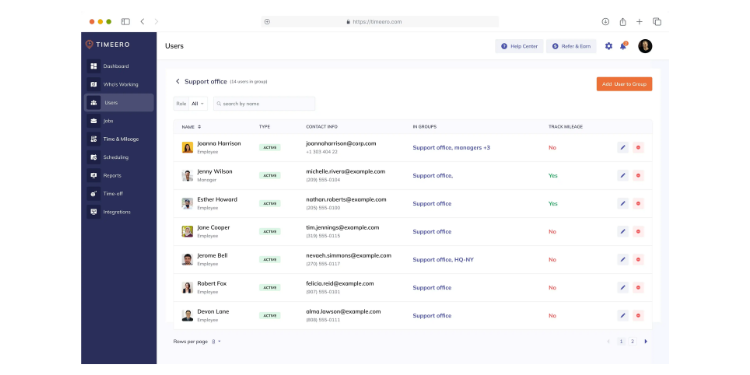
If your drivers cover routes and you need to know the miles, Timeero was built for you. It's a GPS time-and-mileage app designed for delivery fleets and field teams. Reviewers in logistics point to it for one reason: it tracks where drivers go and how far they travel without making them fuss with the app.
Its standout is segmented tracking. A driver clocks in once at the start of the day, and Timeero figures out the time spent at each stop on its own. No clocking in and out at every customer. For a delivery fleet that bills by the stop or reimburses by the mile, that saves real work and cuts the human error that comes with it.
This works less well if scheduling is your main need. Drivers can see their routes, but shift swaps and team-wide scheduling are less robust than what a scheduling-first tool provides. Some Android users also report GPS drift and battery drain, so pilot it on a few phones before you commit the whole fleet.
Key Features
Integrations:
Pros
Cons
Pricing
- Plans from $4 per user per month; mileage features in higher tiers

QuickBooks Time: Best for Geofencing Stops and Depots
Available on: Web, iOS, Android
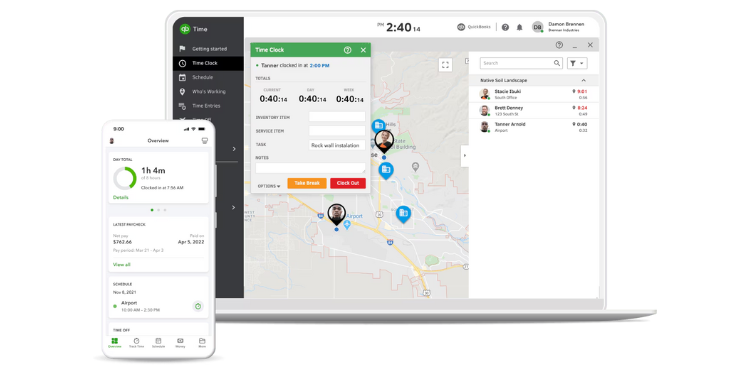
QuickBooks Time is strongest for fleets that already use QuickBooks and want geofencing around depots and delivery stops. You draw a virtual boundary around a location, and the app can remind a driver to clock in when they arrive and out when they leave. For dispatch, that means fewer missed punches and a clearer picture of who is where.
It also works as a real time clock with a kiosk option for your terminal and GPS that follows drivers through the day. If you already use QuickBooks for your books, the hours flow in automatically with no exporting.
Where it may fall short is the tier and the tie-in. The stronger geofencing and mileage features sit in the Elite plan, and you need QuickBooks to get the full value. It also costs more than most tools on this list.
Key Features
Integrations:
Pros
Cons
Pricing
- Premium from $20 base plus $10 per user; Elite from $40 base plus $12 per user; 30-day trial

Workyard: Best for Pinpoint GPS Accuracy
Available on: Web, iOS, Android
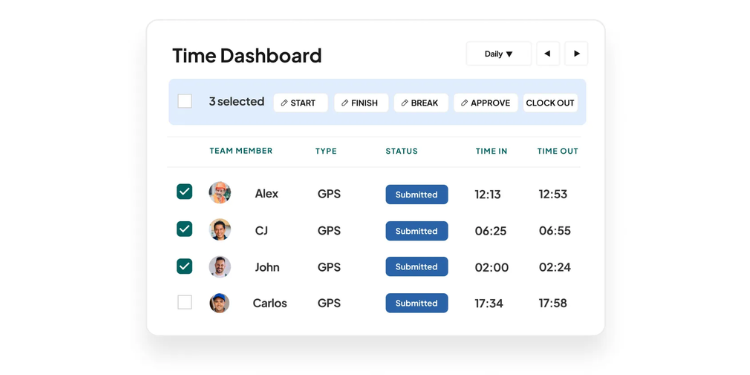
Workyard is built for fleets that need to know exactly where a vehicle is. It tracks a mobile workforce on the move with high-accuracy GPS, and that carries straight over to a fleet. A dispatcher can see each driver on a live map and give a customer a real arrival time, not a guess.
It also logs mileage automatically and tracks hours by job, so a carrier can bill different routes or contracts while keeping the labor tied to the right one. The location data holds up even when drivers are moving fast between stops.
Workyard leans toward construction and field service, so some of its job costing extras may be more than a simple fleet requires. You can ignore those -- just know the base fee runs higher than the flat tools on this list.
Key Features
Integrations:
Pros
Cons
Pricing
- From $6 per user per month plus a $50 base fee

Jibble: Best Free Option
Available on: Web, iOS, Android
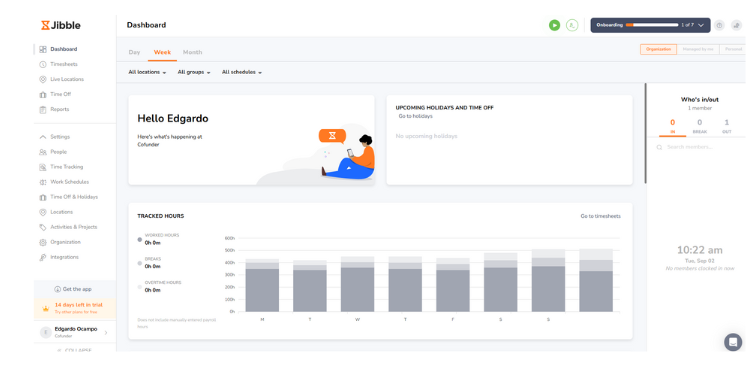
Running a small fleet on a tight budget? Start here. Jibble's core time clock is free for unlimited users, and that includes GPS and face recognition that most tools charge for. A small courier or a two-truck outfit can run a real time clock without paying a cent.
It works on a phone, tablet, or the web, so a driver on a route and a dispatcher at the office can both use it. It even handles offline clock-ins, which is rare at a free price and genuinely useful when a driver hits a dead zone.
The main limitation is depth. Deeper reports and live tracking are available only with paid plans, and the scheduling tools are lighter than rivals'. For a small fleet that mostly needs honest, location-stamped punches, that is a fair trade.
Key Features
Integrations:
Pros
Cons
Pricing
- Premium $4.99/user/month; Ultimate $7.99/user/month.

Buddy Punch: Best for Stopping Buddy Punching
Available on: Web, iOS, Android
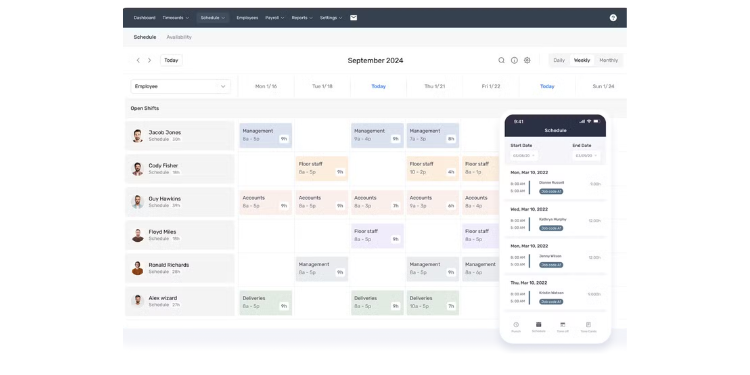
Worried a driver is clocking in for a buddy who is running late? Buddy Punch is built to stop exactly that. It confirms the right person with a photo, PIN, webcam shot, QR code, or face recognition. You pick the method that fits how your drivers and shop staff clock in.
For a fleet spread across stops and terminals, that layered check brings real peace of mind. GPS shows where the punch happened, and the photo confirms who made it. Reviewers like how flexible the verification is, so you can keep it light for trusted drivers and strict where needed.
It does need a steady connection, with no offline mode, so it suits routes with a reliable signal better than remote ones. The monthly base fee, in addition to the per-user rate, can also sting a very small team.
Key Features
Integrations:
Pros
Cons
Pricing
- From $4.99 per user per month plus a $19 monthly base fee; 14-day trial

ExakTime: Best for Working Without a Signal
Available on: Web, iOS, Android, physical clocks
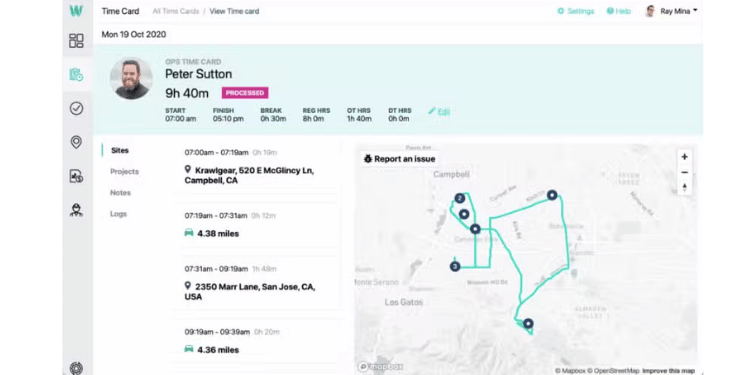
ExakTime is built for fleets whose routes run through dead zones. The name says it all: It's made for rugged, remote work, with offline clock-ins at its core. A driver clocks in where there is no signal, the punch saves on the phone, and it syncs the moment the connection comes back. No lost hours or manual fixes.
It pairs that with photo verification and GPS coverage on each punch, so you still know who clocked in and where. For a carrier hauling long, rural routes, that reliability is the whole point.
Watch the pricing and setup. ExakTime quotes you a price instead of posting one, so you can't compare it at a glance, and getting started takes a little more effort than an app-only tool.
Key Features
Integrations:
Pros
Cons
Pricing
- Quote-based; contact the vendor for a quote

When I Work: Best for Driver Scheduling
Available on: Web, iOS, Android
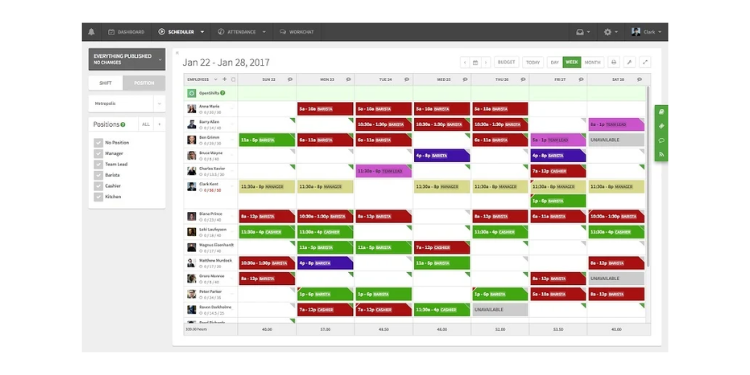
If building the schedule is what breaks your week, look here. When I Work builds driver shifts quickly, sends them to phones, and lets drivers see exactly when and where they're working. The time clock rides along, with a photo clock-in that ties hours to the schedule.
For a fleet juggling part-time drivers and rotating routes, the scheduling side does the heavy lifting. Open shifts and route changes get pushed out from the same app where you publish the schedule, so dispatch spends less time on the phone. One caution from reviewers: some teams report that clock-ins can freeze when many people punch in at once, so test it during a busy shift change. Pricing starts at $2.50 per user per month for single-location teams and $5 per user per month for multi-location businesses, with scheduling, time and attendance, and team messaging included.
Key Features
Integrations:
Pros
Cons
Pricing
- Scheduling from $2.50 per user per month; time clock add-on costs extra

Deputy: Best for Managing Shift Swaps
Available on: Web, iOS, Android
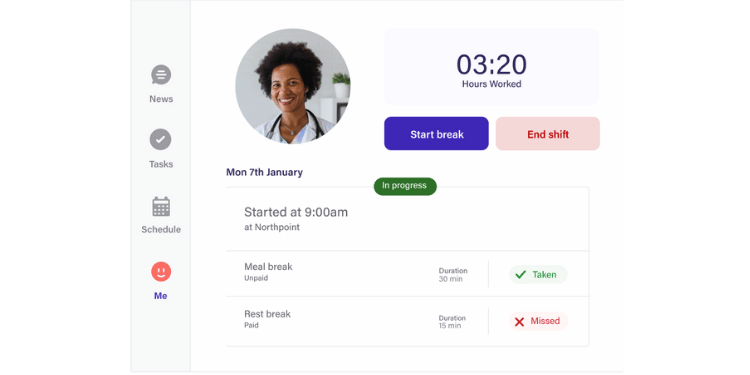
Drivers calling out and swapping shifts at the last minute? Deputy keeps that from turning into chaos. It's a scheduling and time tool that makes it easy for drivers to swap and pick up shifts with manager approval, so your routes stay covered without a flurry of texts.
It pairs that with a clean time clock, including a tablet kiosk for the terminal and a GPS-stamped photo punch-out in the field. Reviewers praise the modern app, which matters when you're asking part-time drivers to adopt something new.
Where it may fall short is focus. Deputy leans toward scheduling first, so the time clock can feel like the second job. Its GPS is a snapshot at the punch, not a live trail, and the app needs a connection, so it fits routes with a reliable signal.
Key Features
Integrations:
Pros
Cons
Pricing
- From $5 per user per month; no base fee
Side-by-Side Comparison Table
Why Choose OnTheClock for Transportation?
See how OnTheClock stacks up against other time clock software for fleets and delivery teams.
| Tool | Best For | Pricing | Key Strengths | Top Integrations |
|---|---|---|---|---|
| OnTheClock | Transportation overall | $5 base + $4/user | GPS in base plan, multiterminal view | ADP, QuickBooks, Gusto, Square |
| Timeero | Drive time and miles | From $4/user | Segmented mileage, route replay | QuickBooks, Gusto, Xero, ADP |
| QuickBooks Time | Geofencing stops | $20 base + $10/user | Strong geofencing, QB tie-in | QuickBooks, Gusto |
| Workyard | Pinpoint GPS | $6/user + $50 base | Most accurate GPS, live map | QuickBooks, ADP, Gusto, Paychex |
| Jibble | Free option | Free; paid from ~$4/user | Free GPS and offline clock-in | QuickBooks, Gusto, Xero |
| Buddy Punch | Stopping buddy punching | $4.99/user + $19 base | Six verification methods | QuickBooks, Gusto, ADP, Paychex |
| ExakTime | Working without signal | Quote-based | Strongest offline mode | QuickBooks, ADP, Paychex |
| When I Work | Driver scheduling | From $2.50/user; multilocation from $5/user | Fast scheduling, photo punch | Gusto, QuickBooks, ADP, Square |
| Deputy | Shift swaps | From $5/user | Easy swaps, modern app | Gusto, ADP, QuickBooks, Xero |
Comparison data based on October 2026 market research and subject to change by respective providers.
What's the Best Time Clock for Your Transportation Business?
The best tool isn't the one with the longest feature list; it's the one that fixes the friction you feel every day. Start with one question: What part of your week do you dread?
If you dread spending hours rebuilding hours every payday, consider tools with strong photo or GPS verification, like OnTheClock or Buddy Punch.
If you dread punches dying on remote routes, your answer is whatever works offline, like ExakTime or Jibble.
If you dread merging hours from multiple terminals, your answer is whatever shows all locations in a single dashboard, which is where OnTheClock shines.
If you dread covering last-minute route changes, your answer is whatever scheduling app moves quickly, like When I Work or Deputy.
When the friction you actually feel disappears, the time clock stops being a Monday headache and becomes a calm dispatch and a clean payroll, week after week.
What Is Time Clock Software for Transportation?
Time clock software for transportation is a tool that records when your drivers and staff start and stop work. It replaces paper logs, punch cards, and texts. People clock in and out on a phone, tablet, computer, or small wall device at the terminal. The software adds up hours, tracks breaks and overtime, and prepares payroll totals.
One thing it isn't: an ELD. A time clock records paid hours for payroll; it doesn't replace the federal hours-of-service logs that interstate truckers keep to limit driving time. Many local and intrastate fleets fall outside those rules, so a time clock is all they need.
Which Transportation Businesses Need Time Clock Software?
-
Trucking and freight carriers tracking driver and yard-staff hours
-
Local delivery and courier services paying drivers by the hour
-
Moving companies with crews on the road all day
-
Bus and transit operators with rotating shifts
-
Mixed fleets with mobile drivers plus mechanics and dispatchers at a terminal
-
Intrastate haulers that fall outside federal hours-of-service rules
The common thread: Anyone who pays staff by the hour and doesn't want timekeeping to deplete their week.
How Time Clock Software Works for Transportation
Time clock software works by recording each punch, confirming the person, doing the hour math, and preparing clean totals for payroll. Each driver gets a way to clock in, and the software handles the rest.
When a driver starts the day, he or she punches in. In transportation, that usually happens on a phone out in the field, though shop and dispatch staff might use a tablet at the terminal. The moment they tap, the software automatically enters the exact time. Most tools also capture a GPS stamp or a photo right then, so you have proof the right person clocked in and where. When the driver breaks for lunch or finishes the route, they punch out the same way.
Behind the scenes, the software does the math you used to do by hand. It adds up hours, separates regular time from overtime once a driver reaches 40 hours in a week, and tracks paid breaks as the law requires. If a driver forgets to clock out, the system flags it instead of leaving you to guess.
For a fleet, the payoff lands on payday. Every hour from every driver and terminal is already totaled on one screen. You scan it, fix anything that looks off, approve it, and send it to payroll. The task that used to take a Monday takes a few minutes.
Why Transportation Companies Rely on Time Clock Software
Once a fleet switches software providers, most never go back. The reasons stack up fast.
Accuracy comes first: Real, location-stamped punches replace guesswork, so paychecks are right. Compliance follows: Breaks and overtime are tracked as the law requires. Then there is cost control, because you stop paying for time nobody worked, and transparency, because drivers and managers see the same record, so disputes drop. The biggest win is time. Payroll that used to take hours now takes minutes. For a small fleet, that saved time is the difference between leaving on time and staying late.
Key Features a Transportation Time Clock Should Have
Not every time clock is built for a fleet. A desk-bound office tool doesn't understand a driver on a route with a spotty signal. Look for these:
-
Mobile clock-in: Drivers punch in on their phones because they are rarely near a desk.
-
GPS and geofencing: A location stamp confirms a driver was where they should be, and a boundary around a depot can prompt the punch.
-
Offline mode: The punch must save when a route loses signal, then sync later.
-
Kiosk mode: A shared tablet at the terminal covers your shop and dispatch staff.
-
Automatic overtime and break tracking: The software does the labor law math for your hourly drivers.
-
Multiterminal reporting: One dashboard for every location, so you're not logging in three times.
-
Clean payroll export: Hours should flow to ADP, QuickBooks, Gusto, or Square with no cleanup.
If a tool nails mobile, GPS, and offline, it'll serve a fleet well. The rest are helpful extras.
How to Choose the Proper Time Clock for Your Transportation Business
Step 1: Set your goal
Before you compare a single tool, identify what you most need to fix. Maybe drivers are clocking in for each other. Maybe payroll takes too long because you're merging hours from two terminals. Maybe punches keep dying on remote routes. Write that cornerstone problem out in one sentence, because it'll guide every choice after this.
Step 2: Map your drivers and staff
Count your hourly people and notice how they actually work. A two-van courier is a very different setup from a three-terminal carrier with drivers, mechanics, and dispatchers. Write down how many people clock in, where they clock in, and whether anyone works through dead zones.
Step 3: Separate must-haves from nice-to-haves
Be honest about what you truly need. For most fleets, mobile clock-in and GPS are must-haves. Detailed analytics or team chat might be nice, but you can live without them. This list keeps a flashy feature from pulling you toward the wrong tool.
Step 4: Build a short list
Pick three or four tools from this guide that match your fleet, not nine. Comparing too many leads to paralysis. Lean on the "best for" labels above to narrow fast.
Step 5: Test the clock-in yourself
Sign up for the free trials and pretend you're a new driver on your first run. Tap through clocking in and out. If it feels slow or confusing to you, it'll frustrate your drivers every day.
Step 6: Check accuracy and compliance
Make sure overtime kicks in after 40 hours in a week and that paid breaks are tracked correctly. A clock that gets the labor law math wrong creates bigger problems than the one it solved.
Step 7: Confirm it works without a signal
This is the transportation step most buyers skip. Test a clock-in with the phone in airplane mode, or ask the vendor exactly what happens on a dead-zone route. If the punch is lost, so is the hour.
Step 8: Confirm payroll fits
Check that the tool connects to the payroll provider you already use. The whole point is to move hours into payroll without extra work, so this step isn't optional.
Step 9: Run a small pilot
Before you commit, try the tool with two or three drivers for a week. A short pilot exposes setup issues while they are still small and easy to fix.
Step 10: Add up the true costs
Look past the headline price. Add the base fee, the per-user charge, and any GPS add-on together to get your real monthly number. A tool that looks cheap can get expensive when you add up all the fees.
Step 11: Choose and roll it out
Make the decision, set it up, and tell your team what's coming and why. A clear heads-up turns a surprise into a smooth start.
Tips for Rolling it Out at Your Transportation Company
-
Explain the why. Tell drivers this is about correct paychecks, not spying, and the resistance usually fades.
-
Keep training short. If the tool is simple, a one-minute walkthrough is enough.
-
Start with a pilot. Test the clock with two or three drivers before you roll it out fleet-wide.
-
Review the reports early. Look at the first week of hours to catch any incorrect overtime rules or missing terminals.
-
Handle pushback fast. A worry answered on day one stays small instead of spreading to the whole team.
Conclusion: Why the Right Transportation Time Clock Pays Off
The right time clock gives everyone something back. Drivers get paychecks they can trust, with no fights over missed minutes. Dispatchers and managers get their Mondays back, instead of rebuilding time sheets by hand. Owners get a clear, honest record of every hour across every terminal.
The tool you pick doesn't have to be perfect. It has to fix the one thing you dread most. When that is gone, dispatch gets calmer, and payroll gets cleaner, week after week.
Frequently Asked Questions
What is the best time clock software for a small trucking company?
For most small fleets, OnTheClock is a strong fit. It's simple: Drivers clock in from a phone, and GPS is included in the base plan. Jibble is a strong free option if budget is your top concern.
How do I stop drivers from buddy punching?
Use a tool with photo, PIN, or GPS verification. OnTheClock, Buddy Punch, and Deputy all confirm who is really clocking in, so one driver can't punch in for another.
Can I track hours across multiple terminals?
Yes. Tools like OnTheClock display each terminal's hours on a single dashboard. This is a must-have for carriers with multiple locations.
Do these tools run payroll, or just send the hours?
Most don't run payroll themselves. They are time clocks that send clean hours to payroll providers such as ADP, QuickBooks, Gusto, or Square. That keeps the clock simple and lets you keep the payroll you already use.
Is a time clock the same as an ELD?
No. A time clock records paid hours for payroll under the Fair Labor Standards Act. An ELD records driving hours to meet federal hours-of-service rules from the FMCSA. Long-haul interstate truckers need an ELD for those logs. A time clock doesn't replace it, and an ELD doesn't produce payroll-ready hours. Many local and intrastate fleets fall outside hours-of-service rules and need only a time clock.
Are driver breaks paid?
Under federal law, short breaks of 5 to 20 minutes are paid and count as work time. Longer meal breaks of 30 minutes or more are usually unpaid. Some states have their own break rules, so check your state too. Good time clock software tracks this for you.
How long does it take to switch time clock systems?
Most small fleets switch in a few days. Simple tools like OnTheClock can be set up the same day, since there's no hardware to install.
Ready to Simplify Your Fleet's Payroll?
Try OnTheClock free for 30 days. No credit card, contract, or setup fees. Get time tracking, GPS, scheduling, and reports in one place, and set up your fleet in about five minutes.
Start Tracking Time for Free