

Jump to section
Pay Contractors and Employees in One Place
Track 1099 contractor hours alongside your W-2 timecards and run payroll for both in one system.
Try It FreeKey Takeaways: Time Tracking for Independent Contractors
- ✔Classify 1099 contractors separately from W-2 employees while managing both worker types in the same system.
- ✔Accurate contractor time records support payment and help preserve contractors' independence.
- ✔Time records can become relevant in a worker misclassification audit.
- ✔Choose a flexible time tracking system that lets contractors record hours without requiring a fixed schedule or location.
- ✔Connect contractor time to payroll so you can manage payments without re-entering hours manually.
You've got a 1099 contractor working alongside your W-2 team. When payday comes around, you need their hours to calculate what you owe, but you also need to keep the working relationship clearly defined. The challenge is finding a way to keep records reliable without treating your contractor like a full-time employee.
An efficient approach to time tracking for independent contractors makes it easier to record hours accurately and receive payment without adding unnecessary oversight. With the right time tracking tools, you can keep your records organized while giving contractors the flexibility they need in how they work.
Read on to learn:
- What time tracking for independent contractors should and shouldn't look like
- How to track contractor hours without crossing into employee-style control
- How worker misclassification risk can show up in your time records
- What to look for in a system that handles both W-2 and 1099 workers
- How OnTheClock can help you manage contractor and full-time employee hours and payroll in one place
Tracking Hours for Independent Contractors vs. Full-Time Employees
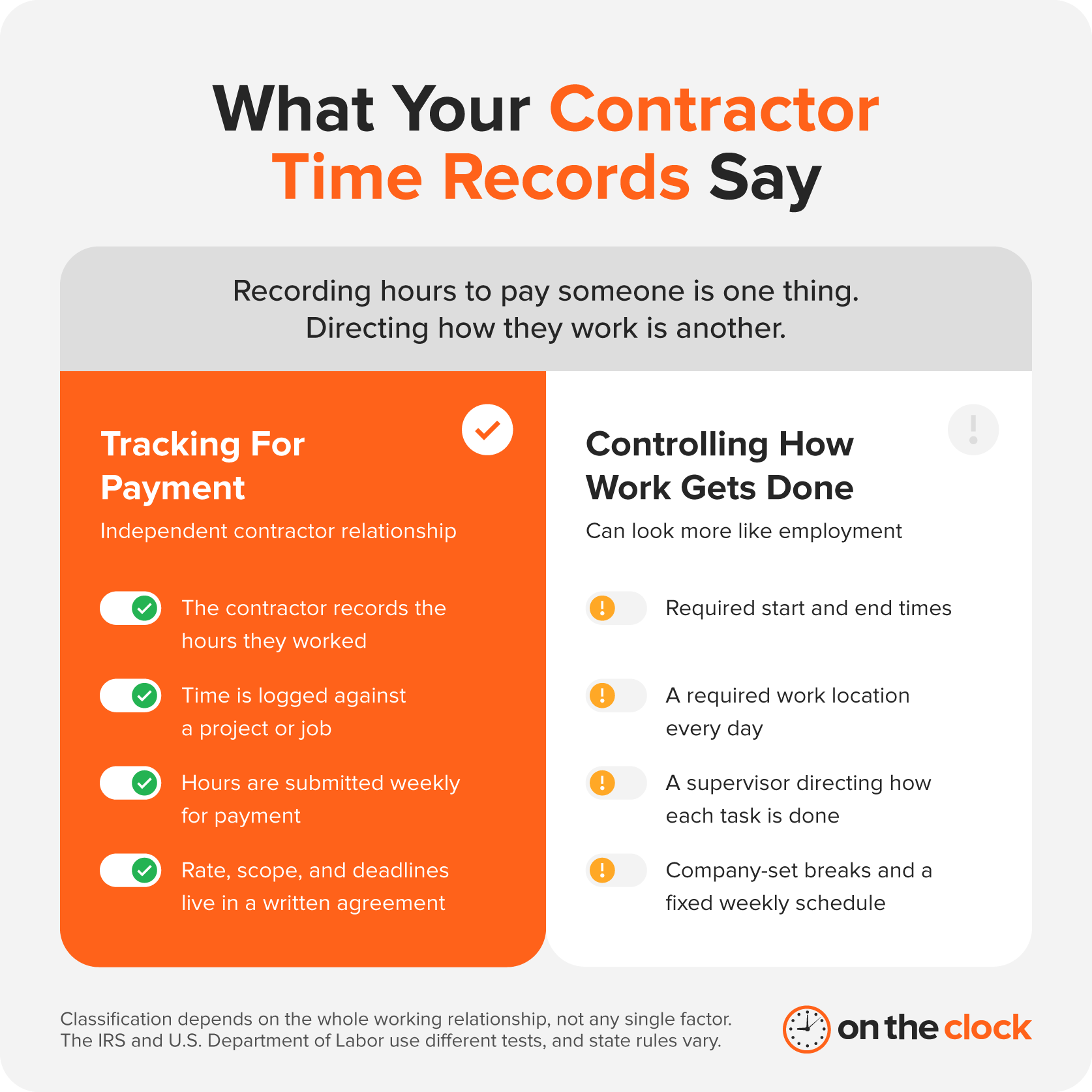
When you track a full-time employee's hours, you're usually managing a set schedule and making sure your employees get paid for the time worked. With an independent contractor, you're generally tracking hours for payment while giving the contractor more control over how and when they complete the work. Depending on your agreement, a contractor might clock in and out as they work, submit hours weekly, or record time against a specific project.
That difference matters when you set up independent contractor time tracking. Recording the hours a contractor submits can help you pay accurately. Requiring a fixed schedule, a specific work location, or constant supervision can make the relationship look more like employment under IRS or Department of Labor (DOL) guidelines.
You may even see the term 1099 employee, but the worker is generally an independent contractor for tax purposes. The label matters less than the actual working relationship, so your time tracking process should reflect that.
The Worker Misclassification Risk Hiding in Your System
Employee misclassification happens when you treat someone as an independent contractor when they should legally be classified as an employee — or vice versa. Full-time employees and contractors have different tax and employment rules, which means you shouldn't treat them the same way.
Your time tracking system tells a story about how you work with a contractor. If your time records show set hours, direct supervision, or regular use of company equipment, they could become evidence in a misclassification audit — a review of whether workers have been correctly classified as employees or independent contractors.
How to Avoid Worker Misclassification
To avoid worker misclassification, you can use digital time clocks or a contractor time tracking app that helps you record contractor time for accurate payment without controlling how they work.
A written agreement gives you another layer of clarity. Spell out the contractor's scope, rate, and deadlines separately from your time tracking process. The exact rules vary by situation, so review your approach before you rely on it for compliance.
What to Look For in a Contractor Time Tracking System
Your independent contractor time tracking system should simplify recording hours without adding unnecessary control over how 1099 contractors work.
Make sure the system includes:
- Flexible clock-ins and clock-outs: Let contractors record their time without requiring a fixed schedule or work location
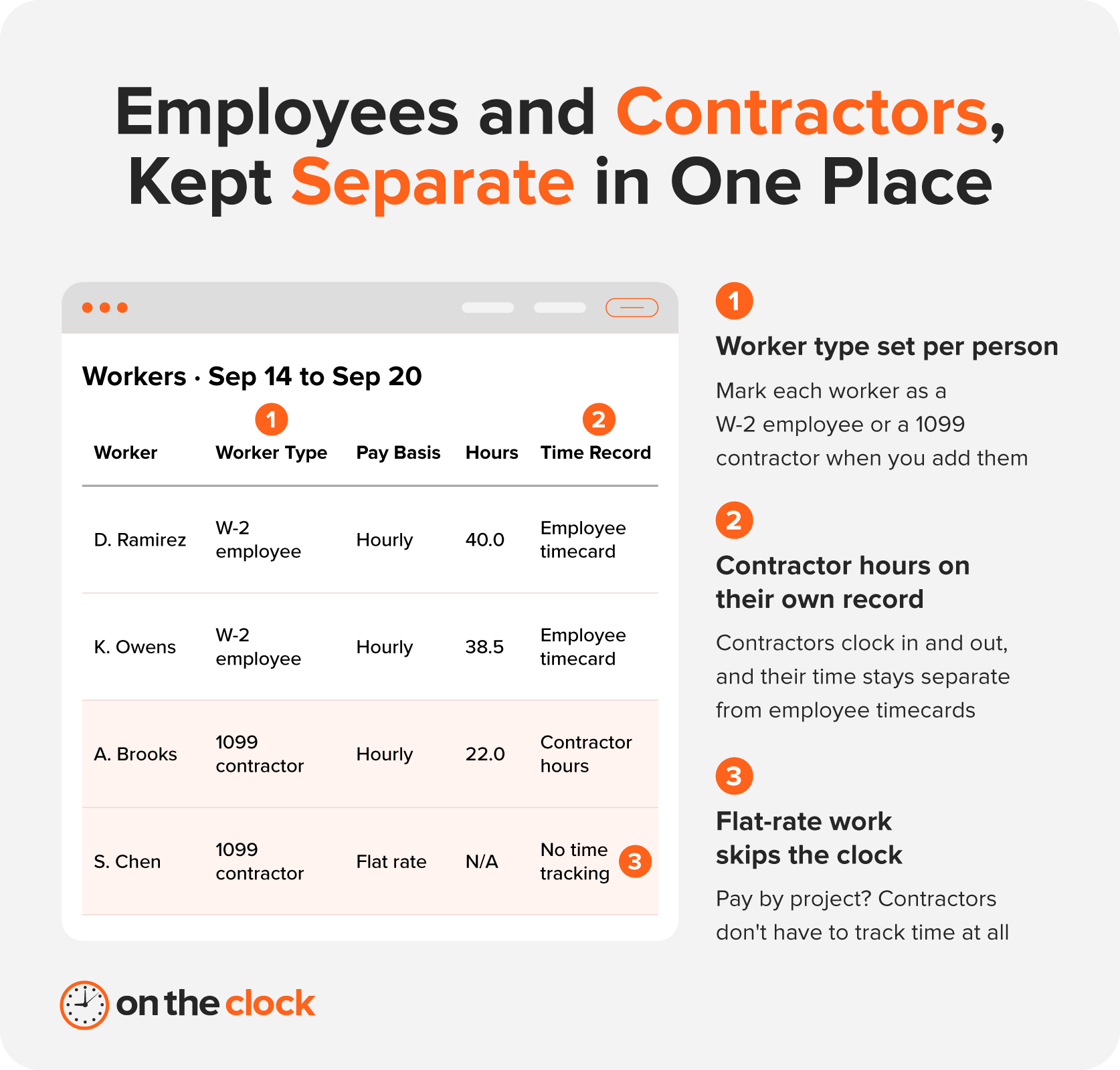
- Worker classification: Classify 1099 contractors separately from W-2 employees so paid time off (PTO) settings, payroll taxes, and year-end forms apply correctly, while you manage both worker types in one system
- Simple time records: A clear record of hours worked helps you calculate payments accurately without tracking hours by hand
- Payroll integration: Send contractor hours to payroll alongside employee hours, so you can manage payments in one system
- Appropriate oversight: Choose features, such as geofencing and IP restrictions, that fit your working relationship and avoid tools that encourage unnecessary monitoring of contractor activity
The right setup should make managing contractor hours feel like a routine part of payroll rather than another task on your plate.
How OnTheClock Handles Time Tracking for 1099 Contractors
OnTheClock lets you add 1099 contractors to your account so they can clock in and out just like other workers. You can then keep contractor time records alongside your employees' timecards.
With OnTheClock Payroll, approved timecards flow directly into payroll, letting you pay W-2 employees and 1099 contractors in one system. Contractors can also skip time tracking if you pay them a flat rate or on a per-project basis. That gives you one place to manage contractor and employee time tracking and payroll without re-entering hours into a separate system.
Pricing
Try OnTheClock at no cost for 30 days, and no, you don't need a credit card to sign up. If you decide to keep using it, the pricing depends on which features you need:
| Plan | Pricing/employee/month | Key features you get |
|---|---|---|
| Employee time tracking, scheduling & PTO management | $4 + $5 monthly base fee |
|
| Add payroll to your OnTheClock plan* | $6 + $40 monthly base fee |
|
| Enterprise (100+ employees) | Contact us |
|
*A one-time $250 professional payroll migration/onboarding fee is required for the payroll plan.
When comparing plans, consider how many workers you have and whether you need payroll now or plan to add it later. OnTheClock gives you the flexibility to start with time tracking and expand your setup as your payroll needs change. That can make it easier to build your system around your business rather than taking on features you don't need yet.
A Few Contractor Time Tracking Tools Worth Knowing About
A quick search for independent contractor time tracking software will bring up plenty of familiar names, but most are designed for freelancers who track their own hours across multiple clients to create invoices. If you're a business paying contractors, you need to collect contractor hours and use those records to manage payments and payroll.
Here are a few options that fit into those categories:
| Tool | Primary use | Free trial/plan? | Starting price/user/month* | Payroll integration |
|---|---|---|---|---|
| OnTheClock | Employer time tracking and payroll | ✅ | $4 + $5 monthly base fee | Native |
| QuickBooks Contractor Payments | Contractor payments | ✅ | $25 for up to 20 contractors + $2 per additional contractor (billed monthly) | Native with QuickBooks Online |
| Clockify | Freelancer billing and project tracking | ✅ | $3.99 (billed annually) | Third-party |
| TimeCamp | Time tracking and billing | ✅ | $3.99 (billed annually) | Third-party |
| Toggl Track | Freelancer billing and project tracking | ✅ | $9 | Third-party |
*Pricing is per month, billed annually, as of Oct. 6, 2026.
The difference comes down to what happens after the clock stops. Tools built around freelancer billing typically turn tracked hours into billable time or invoices, while employer-focused tools can connect those hours to your payroll process. If you're paying contractors through payroll, that distinction saves you an extra step.
For the tax side of contractor payments, check out our guide to 1099 workers and Form 1099-NEC.
Pay Your Contractors Without the Guesswork
Tracking contractor hours helps you pay 1099 workers accurately, but the way you track those hours matters. Your system should give you reliable time records while leaving contractors in control of how they complete their work.
OnTheClock lets you add 1099 contractors separately from W-2 employees and track their hours alongside your employee timecards when needed. And with OnTheClock Payroll, you can bring those hours into the same payroll process you use for your employees. When your time records and payroll live in the same workflow, payday becomes one less thing to untangle.
Start your free, 30-day trial today and simplify contractor time tracking and payroll.
Time Tracking for Independent Contractors FAQ
Do I Have to Track Hours for a 1099 Independent Contractor?
You only need to track hours if your payment arrangement or business process requires them. If you pay a contractor by the hour, tracking hours can help you calculate their payment accurately. If you pay a flat rate or on a per-project basis, you may not need to track their hours.
Can Tracking a Contractor's Hours Too Closely Lead to Misclassification?
Yes. Records showing fixed hours, direct supervision, or other signs of employee-style control could become relevant in a misclassification audit.
Can I Pay W-2 Employees and 1099 Contractors Through the Same System?
Absolutely. OnTheClock Payroll lets you pay W-2 employees and 1099 contractors through the same platform while keeping their records separate.
What's the Difference Between a Subcontractor and an Independent Contractor?
"Independent contractor" is the broader term for a worker who operates independently under a contract. A subcontractor is an independent contractor hired by another contractor or business to handle part of a larger project.
Can a 1099 Contractor Live Outside the U.S.?
Yes. A U.S. business can hire an independent contractor who lives outside the U.S., but different tax rules apply. Instead of a Form W-9, you'll typically collect a Form W-8BEN, and you generally won't issue a Form 1099-NEC for work performed entirely outside the U.S. If a foreign contractor performs work in the U.S., you may need to report those payments on Form 1042-S.
International contractors can still use OnTheClock to clock in and out alongside the rest of your team. However, OnTheClock Payroll only processes payroll for workers in the U.S., so you'll need to pay contractors based outside the U.S. through a separate payment method.